
1. Important Safety Information
Please read all instructions carefully before assembly and use. Keep this manual for future reference.
- Always assemble the desk on a stable and flat surface to ensure proper alignment and stability.
- Consider using appropriate anchoring methods to secure the desk to a wall or floor. This is especially important to prevent tipping when heavy equipment is placed on the desk or in areas prone to seismic activity.
- Do not place heavy objects on the edges of the desk. Uneven weight distribution can lead to instability and potential tipping.
- Ensure all screws and fasteners are tightened securely during assembly and checked periodically.
- Keep small parts away from children during assembly to prevent choking hazards.
2. Product Overview
The Devoko L-Shaped Gaming Desk (Model 0457) is designed to provide a spacious and ergonomic workspace for various activities, including gaming, studying, and home office tasks. Its L-shaped configuration maximizes corner space, offering ample room for multiple monitors and accessories.

Image: The Devoko L-Shaped Gaming Desk integrated into a modern gaming room environment, showcasing its design and potential use.
Key Features:
- L-Shaped Design: Optimizes corner space for a larger work area.
- Spacious Desktop: Accommodates multiple monitors, peripherals, and other essentials.
- Ergonomic Legroom: Designed to provide comfortable space for stretching legs.
- Reinforced Z-Shaped Legs: Sturdy steel structure for enhanced stability and durability.
- Durable Surface: High-quality, scratch-resistant tabletop.
- Integrated Monitor Stand: Provides an elevated platform for monitors, promoting better posture.
3. Assembly Instructions
Assembly typically takes one person approximately 30 minutes. Ensure all parts are present before beginning.
3.1 Package Contents
Verify that all components and hardware listed in your product's packing list are included. If any parts are missing or damaged, contact customer support.
3.2 Step-by-Step Assembly
- Unpack Components: Carefully remove all parts from the packaging and lay them out on a clean, soft surface to prevent scratches.
- Assemble Frame: Attach the Z-shaped leg frames to the main support beams using the provided screws and tools. Ensure all connections are firm.
- Attach Desktop Panels: Secure the L-shaped desktop panels to the assembled frame. Pay attention to the orientation of each panel to form the correct L-shape.
- Install Foot Pads: Screw the adjustable foot pads into the bottom of each leg. These help stabilize the desk on uneven floors.
- Mount Monitor Stand: If included, attach the integrated monitor stand to the designated area on the desktop.
- Final Tightening: Once fully assembled, re-check and tighten all screws to ensure maximum stability.

Image: Dimensional diagram of the desk, illustrating its length (150cm), width (130cm), and height (75cm).
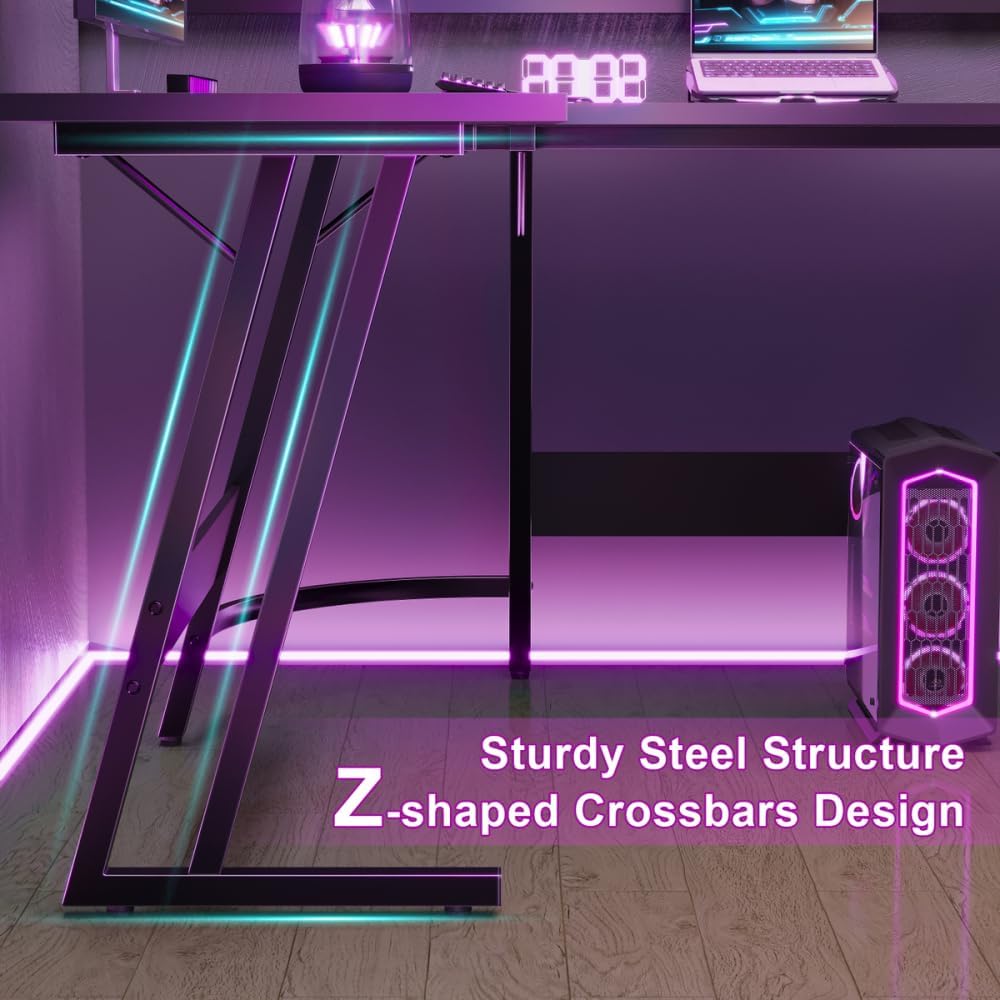
Image: Detail of the Z-shaped steel crossbars, highlighting the robust construction of the desk's frame.
4. Operating and Usage
The L-shaped design offers versatility for various setups. Utilize the spacious surface for optimal organization and ergonomic positioning.
- Multi-Monitor Setup: The expansive desktop is ideal for accommodating multiple monitors, enhancing productivity or gaming immersion.
- Ergonomic Positioning: Position your chair and equipment to maintain good posture. The integrated monitor stand helps elevate screens to eye level.
- Cable Management: Consider using cable ties or management solutions to keep your workspace tidy and prevent tripping hazards.
- Weight Distribution: Distribute weight evenly across the desk surface. Avoid concentrating heavy items on one side or edge.

Image: A view illustrating the generous legroom and open space beneath the desk, allowing for comfortable seating and potential storage.
5. Maintenance and Care
Proper maintenance will ensure the longevity and appearance of your Devoko L-Shaped Gaming Desk.
- Cleaning: Wipe the desk surface with a soft, damp cloth. For stubborn marks, use a mild soap solution and dry immediately. Avoid abrasive cleaners or harsh chemicals, which can damage the finish.
- Stability Check: Periodically check all screws and fasteners to ensure they remain tight. Re-tighten if necessary to maintain desk stability.
- Protect Surface: Use coasters for drinks and mouse pads to protect the desk surface from scratches and spills.
- Foot Pads: The adjustable foot pads help protect your floor and level the desk. Ensure they are properly adjusted.

Image: Detailed view of the desk's matt textured surface and the adjustable foot pads designed for stability and floor protection.
6. Troubleshooting
If you encounter any issues with your desk, refer to the following common problems and solutions:
- Desk is Wobbly:
- Ensure all screws are securely tightened.
- Check if the desk is on an even surface. Adjust the foot pads to level the desk if the floor is uneven.
- Verify that all frame components are correctly assembled according to the instructions.
- Parts Do Not Align:
- Double-check the assembly steps and diagrams. Some parts may have a specific orientation.
- Loosen screws slightly, adjust the parts into alignment, then re-tighten.
- Scratches on Surface:
- For minor scratches, furniture repair kits or markers may help.
- Prevent future scratches by using protective mats for keyboards, mice, and other items.
7. Specifications
| Brand | Devoko |
| Model Number | 0457 |
| Color | Black |
| Dimensions (L x W x H) | 150 cm x 130 cm x 75 cm |
| Weight | 19 Kilograms |
| Material (Top) | Wood |
| Material (Base) | Iron |
| Special Features | Integrated Monitor Stand, Ergonomic Design, Spacious Workspace, Z-shaped Legs |
8. Warranty and Support
Devoko products are manufactured to high-quality standards. For specific warranty details, please refer to the documentation included with your purchase or visit the official Devoko website.
If you require assistance with assembly, missing parts, or have any questions regarding your Devoko L-Shaped Gaming Desk, please contact Devoko customer support through their official channels or the retailer from whom you purchased the product.
You can visit the Devoko brand store for more information: Devoko Brand Store

