
1. Introduction
This instruction manual provides essential information for the safe and efficient operation of your ComMarker B4 100W Max Fiber Engraver with Rotary Axis. Please read this manual thoroughly before operating the machine to ensure proper usage and to prevent damage or injury. Keep this manual for future reference.
2. Safety Information
WARNING: This is a Class 1 Laser Product with a power output of 1.95mW. Always follow safety guidelines to prevent exposure to laser radiation.
- Always wear the provided 1064nm laser safety goggles when operating the machine.
- Never look directly into the laser beam or at reflections.
- Ensure the work area is well-ventilated.
- Keep flammable materials away from the laser engraving area.
- Do not leave the machine unattended during operation.
- Familiarize yourself with the emergency stop switch location and function.
- Ensure proper grounding of the machine.
Refer to IEC 60825-1 Report Number: 2501Q25848E-SFA1 and FDA Accession No. : 2521455-000 for detailed laser safety standards.
3. Package Contents
Verify that all items listed below are included in your package:
- 1 x B4 Machine (Magical Black)
- 1 x 110mm x 110mm Lens
- 1 x 200mm x 200mm Lens
- 1 x Adapter
- 1 x Foot Switch
- 1 x Positioner
- 1 x USB Drive (containing software and drivers)
- 1 x Ruler
- 1 x Data Cable
- 1 x Allen Wrench Set
- 1 x 1064nm Laser Safety Goggles
- 1 x Rotary Drive
- 2 x Paperboard (for testing)
- 1 x Auxiliary Holder
- 1 x Material Package (sample materials)

Image: The ComMarker B4 100W Max Fiber Engraver, including the main unit, rotary axis, and two different sized lenses.
4. Setup
4.1. Unpacking and Placement
Carefully remove all components from the packaging. Place the main machine unit on a stable, level surface in a well-ventilated area. Ensure there is enough space around the machine for safe operation and access.
4.2. Connecting Components
- Connect the power adapter to the machine and a suitable 110V power outlet.
- Connect the data cable from the machine to your computer.
- If using the rotary axis, connect it to the designated port on the machine.
- Attach the desired lens (110x110mm or 200x200mm) to the laser head.
4.3. Software Installation
Insert the provided USB drive into your computer. Install the Ezcad2 software (provided) or LightBurn software (compatible) by following the on-screen instructions. Ensure all necessary drivers are installed for proper communication between the computer and the engraver.
4.4. Focus Adjustment
Accurate focusing is critical for optimal engraving results. The machine features three red light focusing points. Adjust the laser head height until these three red light points overlap perfectly on the surface of your material. The measuring focal length for the 110x110mm lens is approximately 20mm, and for the 200x200mm lens, it is approximately 342mm. These distances are measured from the bottom line of the laser head to the material surface. Each device may have slightly different focal lengths due to variations in laser sources and field lenses.

Image: The ComMarker B4's 90-degree rotating vertical arm and the integrated galvanometer with three red light focusing points for precise height adjustment.
5. Operation
5.1. Powering On and Software Interface
After connecting all components and installing the software, power on the machine. Launch Ezcad2 or LightBurn. The software interface allows you to import designs, set engraving parameters (speed, frequency, power), and control the engraving process.
5.2. Material Compatibility
The ComMarker B4 fiber laser engraver is designed for marking and engraving a wide range of materials, including:
- Metals: Stainless Steel, Aluminum, Gold, Silver, Alloy, Brass, etc.
- Other Materials: Some painted products and non-transparent plastics.
It is suitable for engraving jewelry, rings, bracelets, necklaces, pens, tags, and tumblers.
5.3. Electric Lifting Function
The machine features an electric lifting mechanism for convenient and precise adjustment of the laser head height. Use the up and down buttons on the machine to fine-tune the focus for different material thicknesses.

Image: Illustration of the electric lifting feature, highlighting the manual lifting option and the control buttons for electric lifting.
5.4. Desktop and Handheld Modes
The B4 is a versatile 2-in-1 machine, functioning as both a desktop and a handheld fiber laser marking machine. This allows for flexibility when working on various project sizes and shapes. The 90-degree rotating vertical arm further expands engraving space.
5.5. Engraving Process
- Place your material on the work platform.
- Adjust the focus using the electric lifting mechanism until the red light points overlap.
- Load your design into the software and set the desired engraving parameters (speed, power, frequency).
- Perform a preview of the engraving path to ensure correct placement.
- Initiate the engraving process. Monitor the machine during operation.
5.6. Engraving Performance
The fiber laser technology offers high marking speeds compared to other laser types, increasing efficiency for various projects.
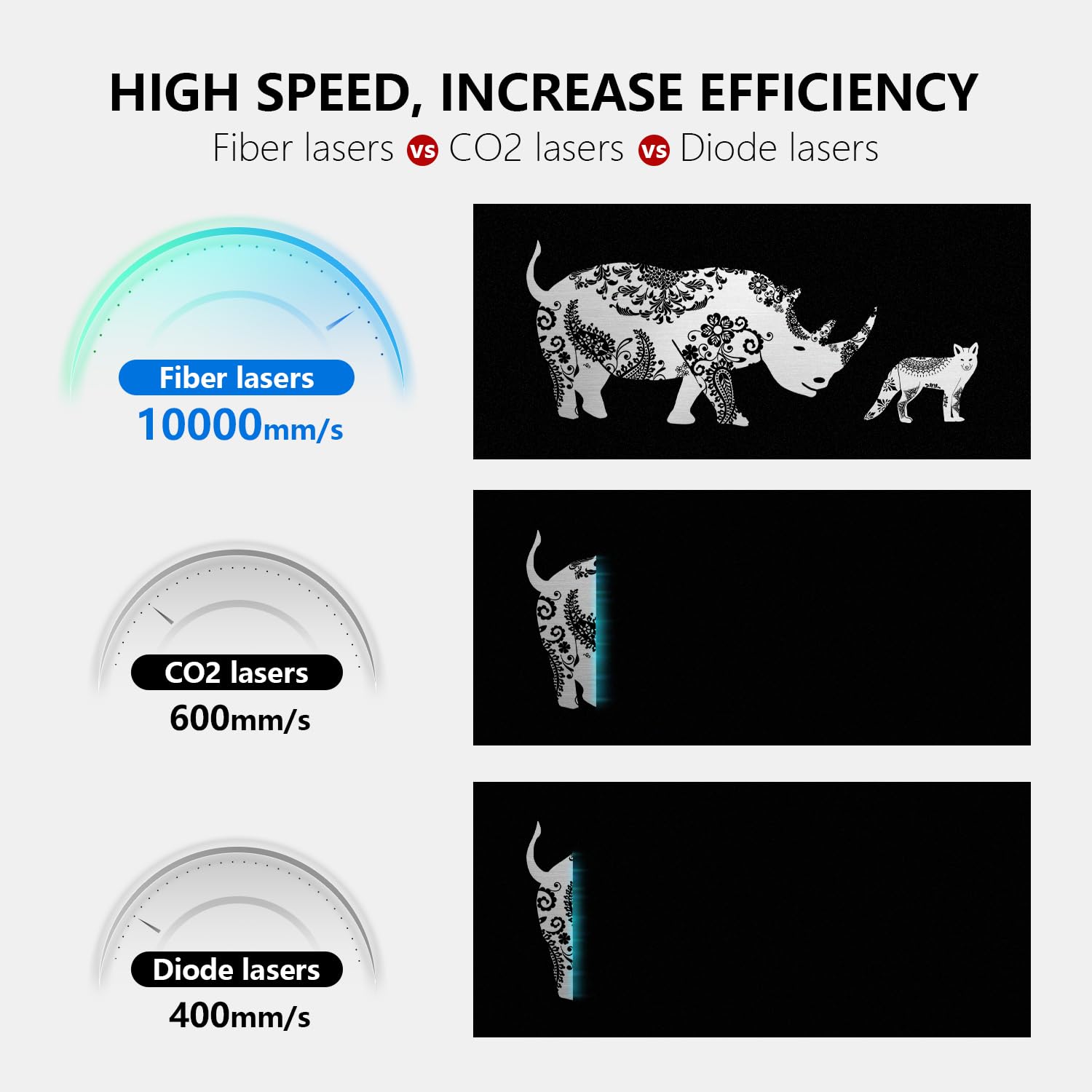
Image: A graphic comparing the engraving speeds of Fiber lasers (10000mm/s), CO2 lasers (600mm/s), and Diode lasers (400mm/s), illustrating the high speed of fiber lasers.
5.7. Software Compatibility
The ComMarker B4 supports LightBurn and Ezcad2 software. It is compatible with Windows 7/8/10/11 and Mac (LightBurn only). Supported graphics formats include BMP, GIF, JPG, JPEG, DXF, DST, AI, etc.

Image: The ComMarker B4 connected to a laptop running engraving software, with icons indicating compatibility with Mac, Windows, Ezcad2, LightBurn, and various file formats like DXF, JPG, PLT, PNG, and AI.
5.8. Demonstration Video: Engraving Knives
Video: A demonstration of the ComMarker B4 fiber laser engraver marking patterns on throwing knives and a folding knife. This video showcases the precision and detail achievable with the machine.
6. Maintenance
Regular maintenance ensures the longevity and optimal performance of your ComMarker B4 engraver.
- Cleaning: Regularly clean the work platform and the laser head. Dust shields are added to the back of the work area for a longer service life. Use a soft, dry cloth.
- Lens Care: Handle lenses with care. Clean them only with specialized lens cleaning solutions and cloths to avoid scratches.
- Cable Inspection: Periodically check all cables for wear or damage. Replace any damaged cables immediately.
- Software Updates: Keep your engraving software updated to the latest version for improved features and stability.

Image: Detailed view of the ComMarker B4's internal structure, highlighting dust shields for extended service life and chamfered/filleted sharp parts for safety.
7. Troubleshooting
If you encounter issues with your ComMarker B4 engraver, refer to the following common problems and solutions:
- No Laser Output: Check power connections, ensure the emergency stop button is not engaged, and verify software settings.
- Poor Engraving Quality: Re-adjust the focus, check material settings (speed, power, frequency), ensure the material surface is clean, and inspect the lens for dirt or damage.
- Software Connection Issues: Ensure the data cable is securely connected, restart the software and machine, and check for updated drivers.
- Machine Not Responding: Press the emergency stop button, then release it and restart the machine. Check for any obstructions.
For persistent issues, contact ComMarker customer support.
8. Specifications
| Feature | Description |
|---|---|
| Model Number | B4 |
| Laser Source | Max Fiber Laser |
| Laser Wavelength | 1064 nm |
| Power | 100W |
| Voltage | 110V |
| Working Area (Lenses) | 110x110mm, 200x200mm |
| Marking Speed | 0-15000mm/s |
| Frequency | 20-60kHz |
| System Compatibility | Windows 7/8/10/11, Mac (LightBurn) |
| Supported Graphics Formats | BMP, GIF, JPG, JPEG, DXF, DST, AI, etc. |
| Minimum Line Width | 0.01mm |
| Engraving Depth | 0.3-0.5mm |
| Material | Metal |
| Mounting Type | Table Mount, Handheld |
| Safety Certification | FDA, CE, FCC (IEC 60825-1 Class 1 Laser Product) |
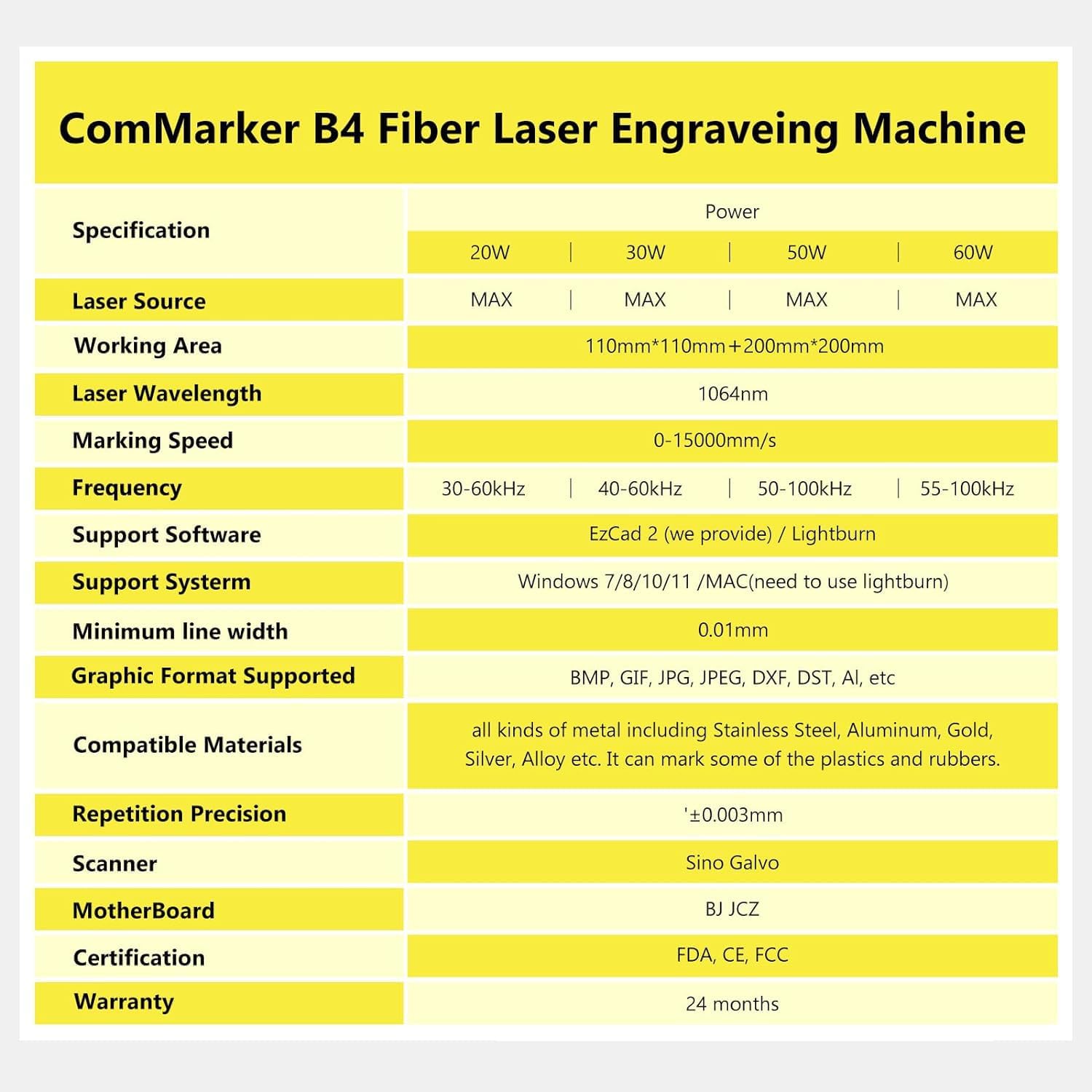
Image: A detailed specification table for the ComMarker B4 Fiber Laser Engraving Machine, outlining power options, laser source, working area, wavelength, marking speed, frequency, software/system support, graphic formats, minimum line width, compatible materials, repetition precision, scanner, motherboard, certification, and warranty.
9. Warranty and Support
9.1. Warranty Information
The ComMarker B4 Fiber Engraver comes with a 2-year manufacturer's warranty. This warranty covers defects in materials and workmanship under normal use. Please retain your proof of purchase for warranty claims.
9.2. Customer Support
For technical assistance, troubleshooting, or warranty inquiries, please contact ComMarker customer support through the official website or your purchase platform. Provide your model number and a detailed description of the issue for prompt service.