
1. Introduction
The Xiegu X6200 is a high-performance HF transceiver designed for amateur radio enthusiasts. It features an advanced DRFS architecture, providing superior receiver sensitivity and low noise. This compact and portable device supports HF/50MHz full mode operation, including WFM broadcast and aviation band reception. Equipped with an automatic antenna tuner, remote control capabilities, and an integrated multi-mode modem, the X6200 offers versatile communication options. This manual provides essential information for setting up, operating, maintaining, and troubleshooting your Xiegu X6200 transceiver.

Figure 1.1: The Xiegu X6200 HF Transceiver with its included microphone, showcasing its compact design and front panel controls.
2. Package Contents
Before proceeding with setup, please verify that all items listed below are present in your package:
- 1 x X6200 HF Transceiver
- 1 x Type-C Data Cable
- 1 x Multi-function Speaker Microphone
- 1 x Power Adapter (for charging the removable battery)
- 1 x Power Cable
3. Key Features
The Xiegu X6200 incorporates several advanced features for enhanced performance and user experience:
- High-Performance DRFS Architecture: Delivers superior receiver sensitivity and a lower noise coefficient for clear signal reception.
- Versatile Communication Capabilities: Supports HF/50MHz full mode (SSB, CW, AM, NFM, DIGI, WFM) and includes WFM broadcast and aviation band reception.
- Compact and Portable Design: Engineered for convenience, allowing easy transport for outdoor or travel use.
- Integrated Automatic Antenna Tuner (ATU): Built-in tuner for efficient antenna matching.
- 4-Inch High-Resolution Display: Provides clear visual feedback and supports remote control.
- Multi-mode Modem: Enables efficient communication through preset messaging and audio automatic calls.
- USB Interface: Supports one-line data transmission, control, and automatic reporting to a computer.
- Convenient Removable Battery: Integrated Lithium Polymer battery for portable operation.

Figure 3.1: The X6200's display showing DRFS architecture and 8W power output, highlighting its full mode capabilities.

Figure 3.2: Close-up of the X6200's 4-inch screen, demonstrating its clear interface and support for remote control.
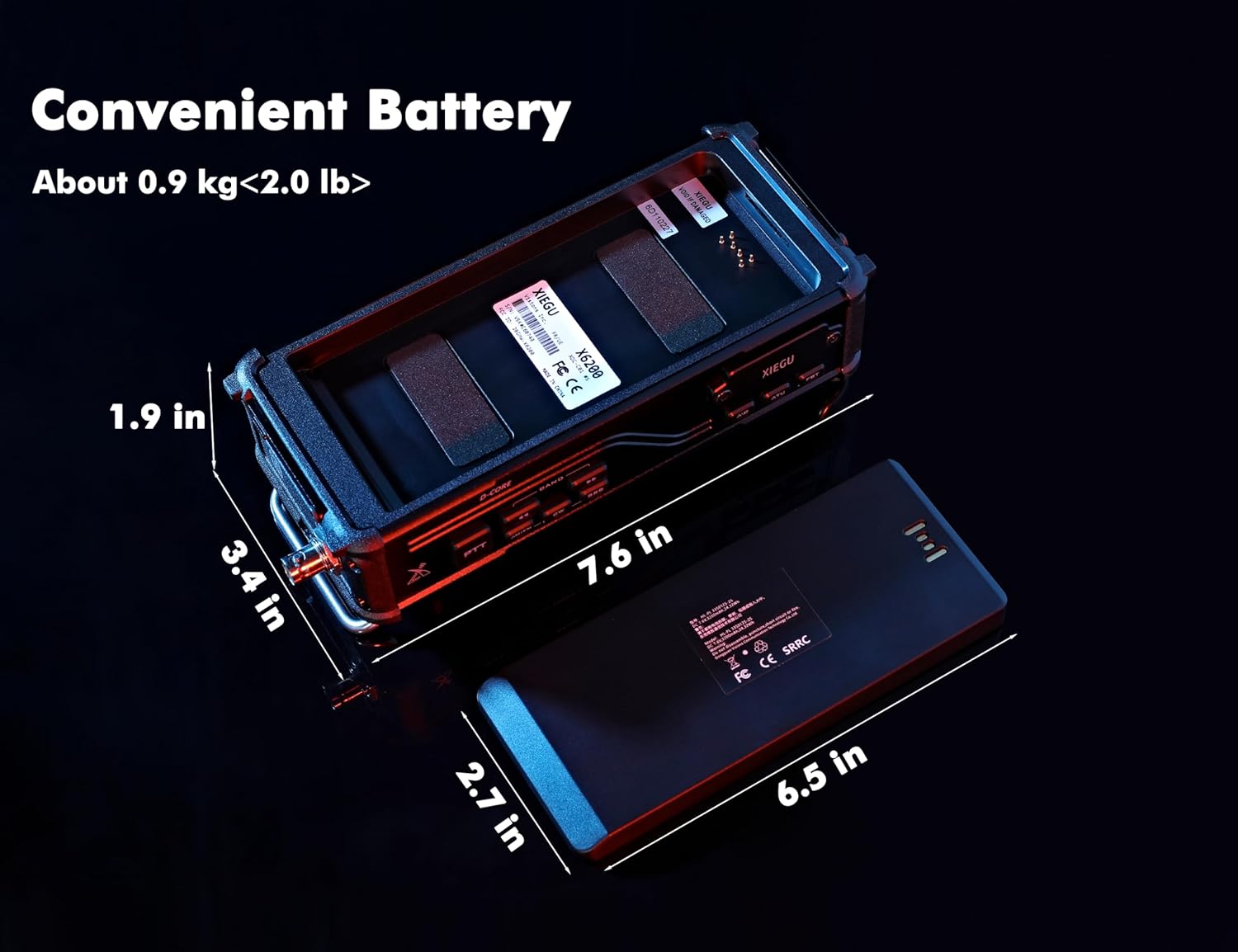
Figure 3.3: The X6200 with its removable battery, illustrating the compact dimensions and portable design.
4. Getting Started (Setup)
4.1 Initial Inspection
Upon unboxing, inspect the transceiver and all accessories for any signs of damage. If any components are missing or damaged, contact your vendor immediately.
4.2 Battery Installation and Charging
The X6200 comes with a pre-installed Lithium Polymer battery. For initial use, it is recommended to fully charge the battery using the provided power adapter. Connect the power adapter to the transceiver's charging port and plug it into a suitable power outlet. The charging indicator on the device will show the charging status.
4.3 Antenna Connection
Connect your HF antenna to the antenna connector on the rear panel of the X6200. Ensure the connection is secure. For optimal performance, use an antenna suitable for the frequency bands you intend to operate on.
4.4 Power On/Off
To power on the transceiver, press and hold the POWER button located on the front panel until the display illuminates. To power off, press and hold the POWER button again until the unit shuts down.
5. Operation
5.1 Basic Controls
Familiarize yourself with the main controls:
- VOLUME Knob: Adjusts the audio output level.
- VFO/TUNE Knob: Primary control for frequency tuning and menu navigation.
- MODE Button: Cycles through available operating modes (SSB, CW, AM, NFM, DIGI, WFM).
- BAND Buttons: Selects different frequency bands.
- PTT (Push-To-Talk) Button: Located on the microphone, used to transmit.
5.2 Frequency Tuning
Rotate the VFO/TUNE knob to adjust the operating frequency. The step size can typically be adjusted via menu settings or dedicated buttons for fine-tuning.
5.3 Mode Selection
Press the MODE button to cycle through the available modulation modes. Select the appropriate mode for the signal you wish to receive or transmit (e.g., SSB for voice, CW for Morse code, WFM for broadcast radio).
5.4 Automatic Antenna Tuner (ATU)
The X6200 features a built-in automatic antenna tuner. To activate the ATU, press the dedicated ATU button. The transceiver will automatically adjust to achieve the best possible SWR (Standing Wave Ratio) for your connected antenna on the current frequency. This process typically takes a few seconds.

Figure 5.1: The X6200 highlighting its Automatic Antenna Tuner capability, essential for efficient antenna matching.
5.5 Multi-mode Modem
The integrated multi-mode modem allows for advanced digital communication. Refer to the on-screen menu or a detailed user guide for specific instructions on utilizing preset messaging and audio autocall functions.

Figure 5.2: The X6200's multi-mode modem interface, enabling features like preset messages and audio autocall.
5.6 USB Interface
The Type-C USB port on the X6200 supports one-line data transmission, allowing for computer control (CAT), digital mode operation, and automatic reporting. Connect the provided Type-C data cable to your computer and install any necessary drivers or software as per Xiegu's official website.

Figure 5.3: Close-up of the X6200's USB interface, facilitating data transmission and computer control.
6. Care and Maintenance
Proper care ensures the longevity and optimal performance of your Xiegu X6200.
- Cleaning: Use a soft, dry cloth to clean the exterior of the transceiver. Avoid using abrasive cleaners or solvents, which can damage the finish.
- Battery Care: To maximize battery life, avoid fully discharging the battery frequently. If storing the transceiver for an extended period, charge the battery to approximately 50% and store it in a cool, dry place.
- Environmental Conditions: Protect the transceiver from extreme temperatures, direct sunlight, dust, and moisture. The X6200 is not water resistant.
- Firmware Updates: Periodically check the official Xiegu website for firmware updates. Keeping your transceiver's firmware up-to-date can improve performance and add new features.
7. Troubleshooting
This section addresses common issues you might encounter with your Xiegu X6200. If the problem persists, contact customer support.
| Problem | Possible Cause | Solution |
|---|---|---|
| Transceiver does not power on. | Low or depleted battery; power cable not connected properly. | Charge the battery or connect to external power. Ensure all power connections are secure. |
| No audio output. | Volume too low; speaker/microphone not connected; squelch too high; incorrect mode. | Increase volume. Check speaker/microphone connection. Adjust squelch level. Verify correct operating mode. |
| Poor signal reception. | Antenna not connected or improperly tuned; incorrect frequency/mode; high noise level. | Check antenna connection. Run ATU. Verify frequency and mode. Consider noise reduction features. |
| Cannot connect to Wi-Fi (if applicable). | Incorrect password; network not found; firmware issue. | Double-check Wi-Fi password. Ensure network is visible. Update firmware if a known fix exists. Reset network settings if possible. |
| Screen appears shaky or unstable. | Software glitch; internal issue. | Reboot the transceiver. Check for and apply the latest firmware update. If persistent, contact support. |
8. Technical Specifications
Detailed specifications for the Xiegu X6200 HF Transceiver:
| Feature | Specification |
|---|---|
| Item Weight | 4 pounds (approx. 1.8 kg) |
| Product Dimensions | 1.9 x 7.6 x 3.4 inches (approx. 4.8 x 19.3 x 8.6 cm) |
| Model Number | Xiegu X6200 |
| Batteries | 1 Lithium Polymer battery (included) |
| Manufacturer | Xiegu |
| Color | Black |
| Number of Channels | 200 |
| Special Feature | Noise Reduction |
| Frequency Range (Emission) | 1.8~29.7MHz (Amateur Band) / 50.00~54.00MHz |
| Frequency Range (Reception) | 0.5~30MHz / 50.00~54.00MHz / 88.0~136.0MHz |
| Talking Range Maximum | 5000 Kilometer (dependent on conditions and antenna) |
| Voltage | 13.8 Volts (DC) |
| Water Resistance Level | Not Water Resistant |
9. Warranty and Customer Support
9.1 Warranty Information
The Xiegu X6200 HF Transceiver comes with an 18-month manufacturer's warranty. This warranty covers defects in materials and workmanship under normal use. Please retain your proof of purchase for warranty claims.
9.2 Customer Support
For technical assistance, troubleshooting, or warranty inquiries, please contact Ham Club, the authorized provider of Xiegu products. They offer professional technical support and assistance with firmware upgrades.
Additional protection plans may be available for purchase:
- 2-Year Protection Plan
- 3-Year Protection Plan
- Complete Protect (monthly billing option)
For details on these plans, please refer to your purchase documentation or the product listing page.


