1. Introduction
This manual provides essential information for the installation, operation, maintenance, and troubleshooting of the SOBOUR Air Conditioner Computer Board, specifically for models KFR-35W, KFR-35W/BP3N1, and KFR-35W/BP3N1-(RX62T+41560).D.13.WP2-1. Please read this manual thoroughly before attempting any procedures to ensure proper function and safety.
2. Safety Information
- Always disconnect power to the air conditioner unit before attempting any installation, maintenance, or repair.
- Installation and repair should only be performed by qualified and certified technicians.
- Wear appropriate personal protective equipment (PPE), such as insulated gloves and safety glasses.
- Ensure all connections are secure and correctly wired according to the air conditioner unit's wiring diagram.
- Do not operate the air conditioner with damaged or improperly installed components.
- Keep the computer board dry and free from moisture or corrosive substances.
3. Product Overview
The SOBOUR Air Conditioner Computer Board serves as a replacement control unit for compatible KFR-35W series air conditioning systems. It manages various functions of the AC unit, including temperature control, fan speed, mode selection, and error detection. This board is designed to integrate seamlessly with the specified models.

Figure 3.1: Full view of the SOBOUR Air Conditioner Computer Board, showing the main circuit, heat sinks, and various connectors.

Figure 3.2: Close-up view of the central processing unit (CPU) and surrounding components on the SOBOUR Air Conditioner Computer Board, highlighting integrated circuits and capacitors.
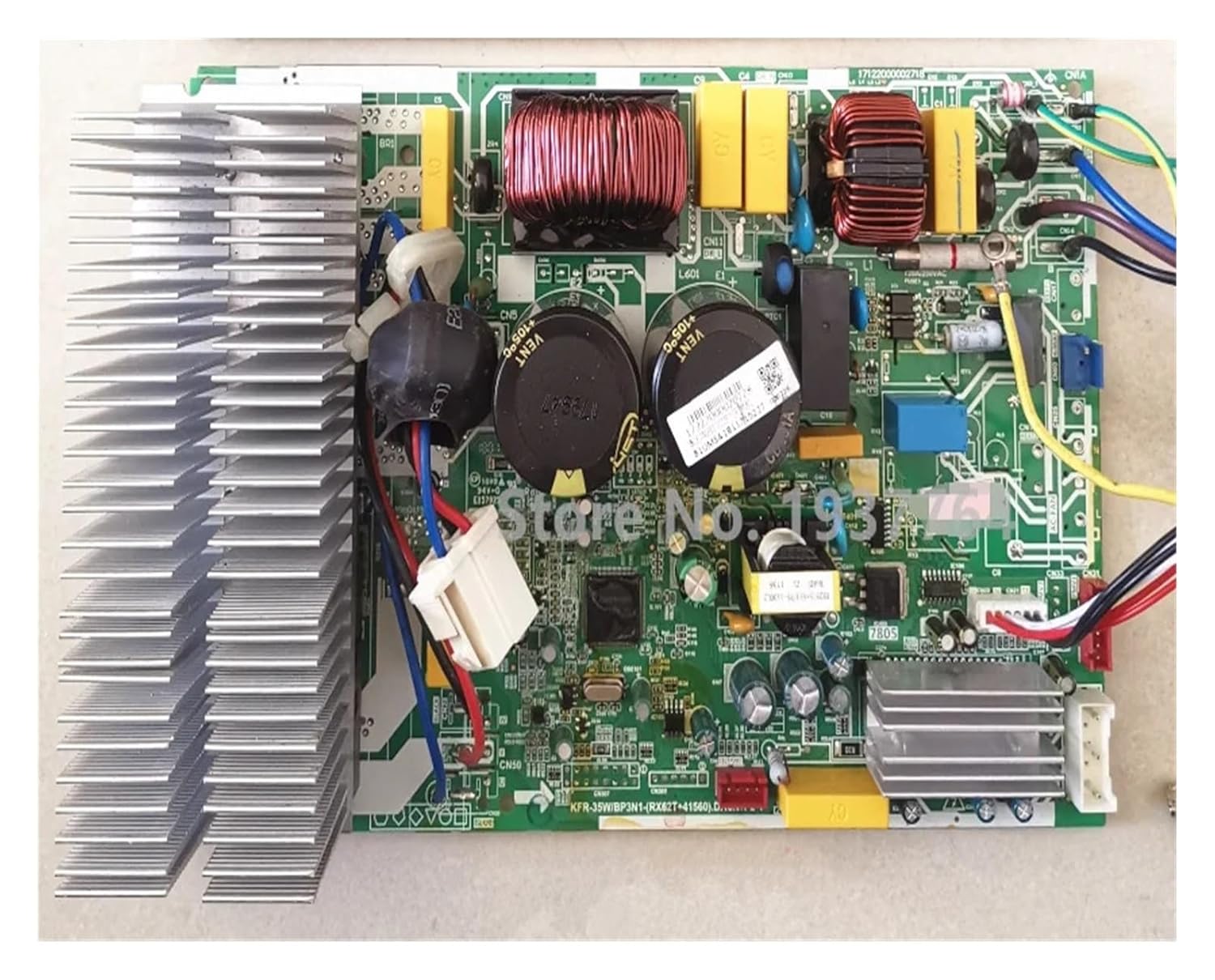
Figure 3.3: Another perspective of the SOBOUR Air Conditioner Computer Board, displaying the arrangement of power components, relays, and wiring harnesses.
4. Setup (Installation)
The installation of this computer board requires technical expertise. It is strongly recommended that installation be performed by a certified HVAC technician.
- Power Disconnection: Ensure the main power supply to the air conditioner unit is completely disconnected at the circuit breaker. Verify with a voltage tester.
- Access Panel Removal: Carefully remove the outer casing or access panel of the indoor or outdoor unit to expose the existing computer board.
- Component Identification: Take clear photographs of the existing board and all connected wires before disconnection. Note the position and color of each wire.
- Disconnection: Disconnect all wiring harnesses and connectors from the old computer board.
- Old Board Removal: Unscrew or unclip the old computer board from its mounting points.
- New Board Installation: Mount the new SOBOUR computer board in the exact same position as the old one.
- Wiring Connection: Reconnect all wiring harnesses and connectors to the new board, ensuring they match the photographs taken earlier. Double-check all connections for security and correct polarity.
- Panel Reinstallation: Replace the access panel and outer casing.
- Power Restoration: Restore power to the air conditioner unit.
- Initial Test: Perform a functional test of the air conditioner to ensure all modes and settings operate correctly.
5. Operating
Once correctly installed, the SOBOUR Air Conditioner Computer Board operates automatically as the central control unit for your air conditioner. User interaction occurs through the standard air conditioner remote control or wall-mounted thermostat. The board processes commands for:
- Temperature regulation
- Fan speed adjustment
- Operating mode selection (e.g., Cool, Heat, Fan, Dry)
- Timer functions
- Self-diagnosis and error code display (if supported by the AC unit)
Refer to your specific air conditioner unit's user manual for detailed instructions on operating its functions.
6. Maintenance
The computer board itself requires minimal maintenance. However, to ensure its longevity and optimal performance, consider the following:
- Environmental Control: Ensure the air conditioner unit's environment is kept clean, dry, and free from excessive dust or humidity.
- Dust Removal: Periodically, and only after disconnecting power, gently clean any accumulated dust from the board's surface using a soft brush or compressed air. Avoid using liquids.
- Professional Inspection: During routine air conditioner servicing, have a qualified technician inspect the board for any signs of wear, corrosion, or loose connections.
7. Troubleshooting
If the air conditioner unit experiences issues after board replacement, consider these troubleshooting steps. Always disconnect power before inspecting internal components.
| Problem | Possible Cause | Solution |
|---|---|---|
| Unit does not power on. | No power supply, loose connection, faulty board. | Check circuit breaker. Verify all power connections to the board. Ensure the board is correctly installed. |
| Specific functions (e.g., fan, compressor) not working. | Incorrect wiring, faulty component on board, external component failure. | Recheck wiring against diagrams. Consult a technician for diagnosis of board components or external parts. |
| Error codes displayed. | System malfunction, sensor issue, communication error. | Refer to your air conditioner unit's specific error code manual. Verify sensor connections to the board. |
For complex issues, always consult a professional HVAC technician.
8. Specifications
- Brand: SOBOUR
- Model Numbers: KFR-35W, KFR-35W/BP3N1, KFR-35W/BP3N1-(RX62T+41560).D.13.WP2-1
- Type: Air Conditioner Computer Board / Control Board
- Package Dimensions: 1.18 x 0.79 x 0.39 inches
- Item Weight: Approximately 2.2 Pounds (as per package weight)
- Manufacturer: SOBOUR
- Date First Available: August 15, 2024
9. Warranty and Support
For warranty information, technical support, or service inquiries regarding your SOBOUR Air Conditioner Computer Board, please contact the seller or manufacturer directly. Keep your purchase receipt as proof of purchase.
Manufacturer: SOBOUR
For further assistance, refer to the contact information provided at the point of purchase or on the official SOBOUR website.


