1. Introduction
Thank you for choosing the WantJoin 28.8QT Electric Hot Dog Steamer with Bun Warmer. This manual provides essential information for the safe and efficient operation, maintenance, and troubleshooting of your appliance. Please read these instructions thoroughly before initial use and retain them for future reference.
This appliance is designed for commercial and home use to steam hot dogs and warm buns, ensuring they are kept at an optimal serving temperature.
2. Safety Instructions
To prevent injury or damage, always observe basic safety precautions when using electrical appliances.
- Electrical Safety: Ensure the power supply matches the voltage specified on the appliance (110-120V). Do not operate with a damaged cord or plug. Keep the power cord away from hot surfaces.
- Water Level: Always ensure the water tank is filled to the appropriate level before operation. The unit features an automatic power cut-off and a light indicator for low water levels to prevent overheating.
- Hot Surfaces: The steamer generates steam and heat. Surfaces will be hot during and after operation. Use caution and wear protective gloves when handling.
- Placement: Place the steamer on a stable, level, heat-resistant surface, away from walls or other appliances to allow for proper ventilation.
- Cleaning: Disconnect from power and allow the unit to cool completely before cleaning. Do not immerse the electrical components in water.
- Children and Pets: Keep children and pets away from the appliance during operation and when it is cooling down.
3. Product Overview
The WantJoin Hot Dog Steamer is designed for efficient steaming and warming of hot dogs and buns. It features a two-layer design, adjustable temperature control, and a visible glass sliding door.
Key Features:
- Large Capacity: Accommodates approximately 175 hot dogs and 40 buns.
- Adjustable Temperature: Temperature control knob with a range of 86-230 ℉ (30-110 ℃).
- Uniform Heating: U-shaped heating tube and large water tank ensure even steam distribution.
- Visible Sliding Glass Door: Allows for easy access and product visibility.
- Convenient Drainage: Side drainage port for easy water removal.
- Safety Features: Automatic power cut-off and low water level indicator.
Components:
- Sliding Glass Door
- Stainless Steel Shelves (2 layers)
- U-shaped Heating Tube
- Temperature Control Knob Switch
- Power Switch
- Water Tank
- Drain Valve
- Steam Vent

Image 3.1: Front view of the WantJoin Hot Dog Steamer, showcasing its two-tier design for hot dogs and buns, with a visible glass door and control panel.

Image 3.2: Diagram illustrating the key components of the WantJoin Hot Dog Steamer, including the sliding door, stainless steel shelves, U-shaped heating tube, and temperature control knob.
4. Setup
Follow these steps for initial setup of your hot dog steamer:
- Unpacking: Carefully remove all packaging materials. Inspect the unit for any damage during transit.
- Placement: Position the steamer on a flat, stable, and heat-resistant surface. Ensure there is adequate space around the unit for ventilation.
- Initial Cleaning: Before first use, clean all removable parts (shelves, water tank) with warm, soapy water. Wipe the exterior with a damp cloth. Rinse thoroughly and dry.
- Add Water: Locate the water tank at the bottom of the unit. Fill the water tank with clean water up to the indicated maximum fill line. Do not overfill.
- Assemble: Place the stainless steel shelves into their designated positions inside the steaming chamber.
- Connect Power: Plug the power cord into a grounded electrical outlet (110-120V).
5. Operating Instructions
Operating your hot dog steamer is straightforward:
- Pre-heating: Ensure the water tank is filled. Turn the power switch ON. Set the temperature control knob to your desired steaming temperature (e.g., 180-200 ℉ for hot dogs). Allow the unit to pre-heat for approximately 15-20 minutes until steam is consistently produced.
- Load Hot Dogs and Buns: Open the sliding glass door. Place hot dogs on the lower shelf and buns on the upper shelf. Close the door securely. The unit can hold up to 175 hot dogs and 40 buns.
- Monitor Water Level: Periodically check the water level in the tank. If the low water indicator light illuminates, or if steam production decreases, turn off the unit, allow it to cool slightly, and refill the water tank.
- Serving: Once hot dogs and buns are heated to your preference, use the provided tongs to retrieve them.
- Adjust Temperature: Adjust the temperature knob as needed to maintain the desired serving temperature.
- Power Off: When finished, turn the temperature knob to the 'OFF' position and then turn the power switch OFF. Unplug the unit from the electrical outlet.
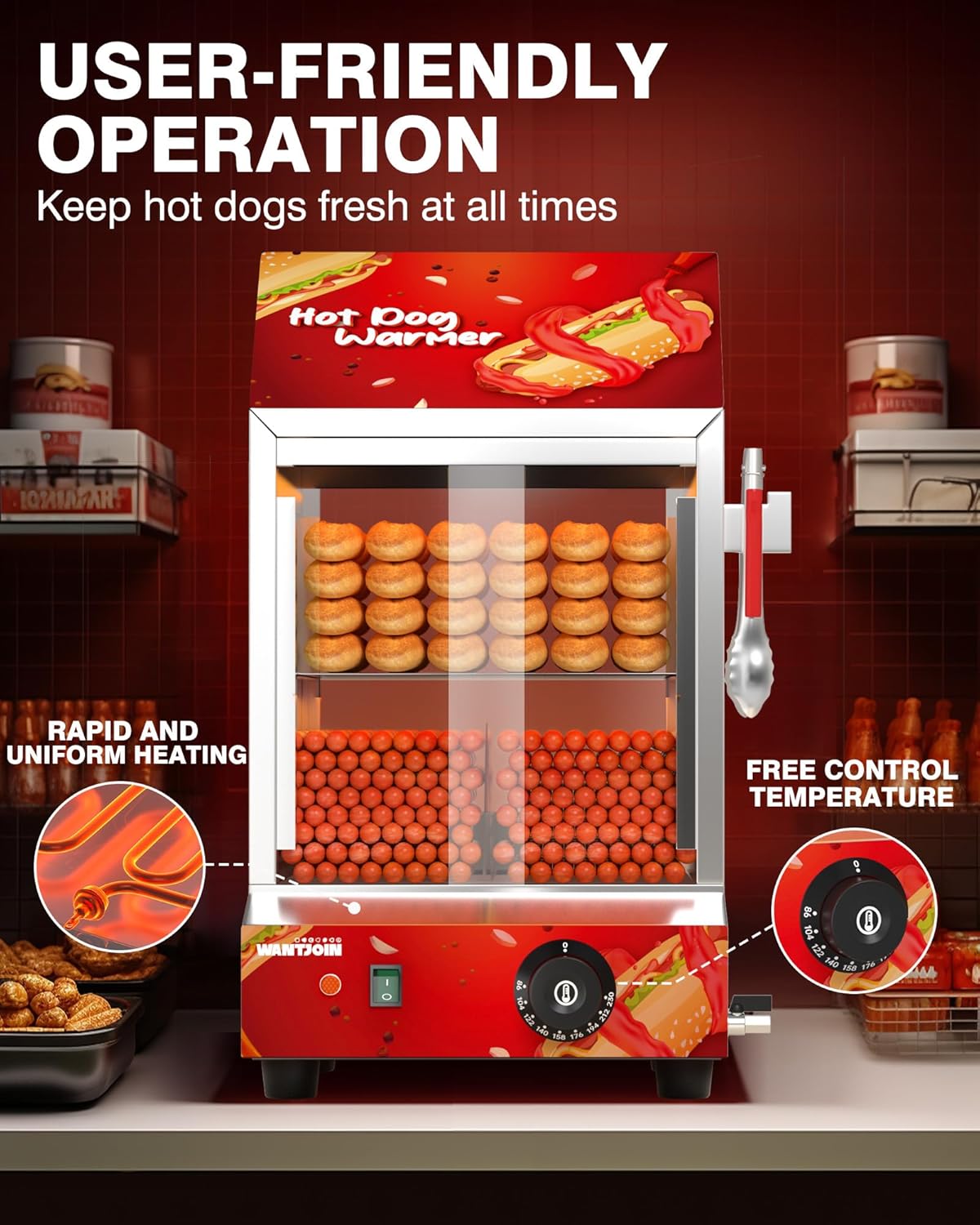
Image 5.1: Illustration of the steamer's user-friendly operation, highlighting the rapid and uniform heating system and the free control temperature knob.

Image 5.2: Visual representation of the safety features, showing the red light indicator for water refill and overheat protection in case of water shortage.
6. Maintenance and Cleaning
Regular cleaning and maintenance will extend the life of your steamer and ensure optimal performance.
- Daily Cleaning: After each use, turn off and unplug the unit. Allow it to cool completely.
- Drain Water: Use the side drainage port to empty the water tank. This prevents stagnant water and makes cleaning easier.
- Clean Interior: Remove the shelves and wash them with warm, soapy water. Wipe the interior surfaces of the steaming chamber with a damp cloth. For stubborn residue, use a mild, non-abrasive cleaner.
- Clean Exterior: Wipe the exterior surfaces with a damp cloth. Do not use abrasive cleaners or scouring pads, as they can damage the stainless steel finish.
- Descaling: Over time, mineral deposits may accumulate in the water tank. To descale, fill the tank with a solution of equal parts white vinegar and water. Heat the solution for 15-20 minutes (without food). Turn off, unplug, and let it cool. Drain the solution and rinse the tank thoroughly with clean water. Repeat if necessary.
- Storage: Ensure the unit is clean and dry before storing. Store in a cool, dry place.

Image 6.1: Diagram showing the removable shelves and the drain valve, illustrating the ease of cleaning and draining the unit.
7. Troubleshooting
If you encounter issues with your steamer, refer to the following common problems and solutions:
| Problem | Possible Cause | Solution |
|---|---|---|
| Unit does not power on. | Not plugged in; power switch off; circuit breaker tripped. | Ensure unit is securely plugged in. Turn power switch ON. Check circuit breaker. |
| No steam or insufficient steam. | Low water level; temperature set too low; unit not pre-heated long enough. | Check and refill water tank. Increase temperature setting. Allow sufficient pre-heating time (15-20 minutes). |
| Water leakage or excessive steam escape. | Door not properly closed; seals damaged; unit not assembled correctly. | Ensure the sliding glass door is fully closed. Inspect door seals for damage. Verify all components are correctly assembled. |
| Hot dogs/buns not heating evenly. | Overloaded chamber; uneven distribution of items. | Do not overload the steamer. Arrange hot dogs and buns in a single layer for best results. |
| Red light indicator is on. | Low water level. | Turn off the unit, allow to cool slightly, and refill the water tank. |
If the problem persists after attempting these solutions, please contact customer support.
8. Specifications
| Feature | Specification |
|---|---|
| Brand | WantJoin |
| Model Number | Hot Dog Steamer 4 |
| Capacity | 27 Liters / 28.8 Quarts (approx. 175 hot dogs & 40 buns) |
| Temperature Range | 86-230 ℉ (30-110 ℃) |
| Material | Stainless Steel |
| Product Dimensions (L x W x H) | 15" x 13.9" x 21" |
| Item Weight | 29 Pounds |
| Voltage | 110-120V |
| Power | 1200W |
| UPC | 785034987755 |

Image 8.1: Diagram showing the detailed dimensions of the WantJoin Hot Dog Steamer.
9. Warranty and Support
WantJoin products are manufactured to high-quality standards. For information regarding warranty coverage, please refer to the warranty card included with your purchase or visit the official WantJoin website.
For technical assistance, troubleshooting not covered in this manual, or to inquire about replacement parts, please contact WantJoin customer support. The brand offers 24/7 customer support to assist you.
Contact Information: Please refer to the contact details provided on the product packaging or the official WantJoin website for the most current support information.

Image 9.1: Graphic indicating 24/7 customer support availability for WantJoin products.


