
1. Introduction
This manual provides essential instructions for the installation, operation, and maintenance of your LiftMaster 87504-267 Secure View Garage Door Opener. This model features an integrated camera, Wi-Fi connectivity, and a battery backup system. Please read this manual thoroughly before beginning installation or operation to ensure proper function and safety.
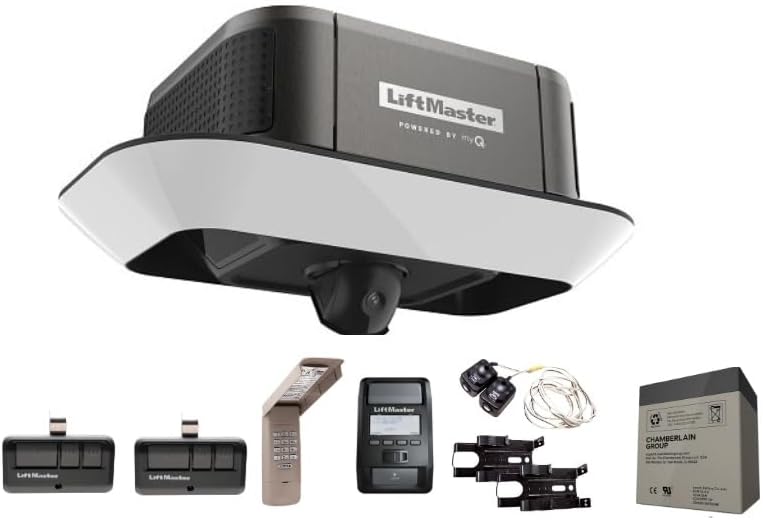
Image 1.1: LiftMaster 87504-267 Secure View Garage Door Opener unit with remote controls, keypad, and battery backup.
2. Safety Information
Your safety and the safety of others are very important. This manual outlines important safety messages. Always read and follow all safety messages.
General Safety Precautions:
- Do not operate the garage door opener unless the garage door is in full view and free of obstructions.
- Keep children and pets away from the garage door area.
- Never permit children to operate or play with the garage door controls.
- Regularly inspect the garage door system, including springs, cables, rollers, and other hardware, for signs of wear or damage. Do not attempt repairs on these components yourself.
Integrated Safety Features:
- Security+ 2.0: Safeguards garage access by sending a new code with every click of the remote, preventing unauthorized entry.
- PosiLock: Electronically monitors against forced openings, locking down the door.
- Timer-to-Close: Automatically closes the door after a pre-programmed number of minutes.
- Alert-2-Close Warning System: Provides audible and visual warnings when the garage door is about to close using myQ Technology or Timer-to-Close.
- Motion Detector: Integrated into the Smart Control Panel for rapid detection and illumination of the garage.
- The Protector System: Safety sensors emit an invisible light beam across the garage door opening, automatically reversing the door if an object interrupts the beam.
3. Package Contents
Verify that all components are present before beginning installation. This package includes the garage door opener head unit and accessories. Please note: A rail assembly is NOT included with this operator. This unit is designed to be used with an existing compatible LiftMaster belt rail.
- LiftMaster 87504-267 Garage Door Opener Head Unit with Integrated Camera
- Two 3-Button Elite Remote Controls (893MAX)
- Smart Control Panel (880LMW)
- Wireless Keypad (878MAX)
- Integrated Battery Backup (485LM)
- Mounting Hardware (specific to head unit installation)
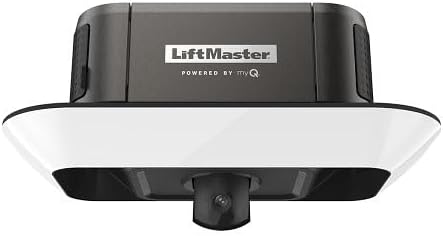
Image 3.1: Front view of the LiftMaster 87504-267 opener unit, showing the integrated camera.
4. Setup and Installation
Installation should be performed by a qualified technician or an experienced individual following all local electrical and building codes. Ensure the garage door is balanced and in good working order before installation.
Pre-Installation Checks:
- Verify that your existing garage door rail is a compatible LiftMaster belt rail. This unit does not include a rail.
- Ensure the garage door is properly balanced. If not, contact a garage door service professional.
- Disconnect power to the garage door opener outlet.
Installation Steps (Overview):
- Mount the Opener Head Unit: Securely attach the opener head unit to your existing belt rail system according to the rail's instructions.
- Connect Wiring: Connect the safety sensors, wall control panel, and power cord.
- Install Battery Backup: Insert the integrated battery backup (485LM) into the designated compartment on the opener unit.
- Program Remote Controls and Keypad: Follow the instructions provided with the 893MAX remote controls and 878MAX wireless keypad to program them to your opener.
- Connect to Wi-Fi and myQ App: Download the myQ mobile app. Follow the in-app instructions to connect your opener to your home Wi-Fi network and set up the integrated camera.
For detailed step-by-step instructions, refer to the comprehensive installation guide provided with your specific rail system or consult the LiftMaster support website.

Image 4.1: Angled view of the LiftMaster 87504-267 opener unit, highlighting its compact design.
5. Operating Instructions
Using Remote Controls (893MAX):
Press the desired button on your 3-Button Elite Remote Control to open or close the garage door. Ensure you are within range and have a clear line of sight to the door.
Using Wireless Keypad (878MAX):
Enter your 4-digit PIN on the wireless keypad and press the ENTER button to operate the garage door. This provides convenient access from outside the garage.
Using Smart Control Panel (880LMW):
The Smart Control Panel allows you to open/close the door, adjust settings, and view system diagnostics. It also displays time and temperature and provides maintenance alerts. The Timer-to-Close feature can be activated and configured via this panel.
myQ App Operation:
The myQ mobile app (free download) enables secure monitoring and control of your garage door opener from your smartphone, tablet, or laptop. You can open/close the door remotely, receive alerts, and access camera features.
- Live Streaming: View a live stream of your garage for free through the myQ app.
- 2-Way Audio: Communicate in real-time between your garage and smartphone via the app.
- Video Storage: A myQ Video Storage Subscription allows you to record and save videos for up to 7 or 30 days.
- Alerts: Receive email or push notifications on your mobile device regarding the status of your garage door.
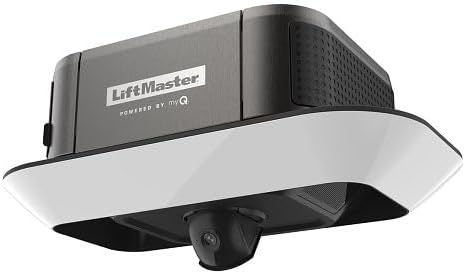
Image 5.1: Side view of the LiftMaster 87504-267 opener unit, showing ventilation details.
6. Maintenance
Regular maintenance ensures the longevity and safe operation of your garage door opener.
- Monthly: Test the safety reversal system and the Protector System sensors. Ensure the door reverses upon contact with an obstruction or when the beam is broken.
- Annually: Lubricate the garage door's moving parts (rollers, hinges, bearings) as recommended by the garage door manufacturer. Do not lubricate the rail.
- Battery Backup: The integrated battery backup (485LM) provides power during outages. Test its functionality periodically by disconnecting main power and operating the door. Replace the battery as needed, typically every 1-2 years.
- Camera Lens: Gently clean the camera lens with a soft, dry cloth if video quality degrades.
7. Troubleshooting
This section addresses common issues you might encounter. For more complex problems, contact customer support.
| Problem | Possible Cause | Solution |
|---|---|---|
| Opener does not operate from remote or keypad. | Dead batteries in remote/keypad; remote/keypad not programmed; power outage. | Replace batteries; reprogram remote/keypad; check power supply and battery backup. |
| Door reverses unexpectedly or does not close. | Safety sensors obstructed or misaligned; force settings too low; door unbalanced. | Clear obstruction; realign sensors; adjust force settings (refer to full manual); check door balance. |
| myQ app not connecting or camera not streaming. | Wi-Fi signal issue; incorrect myQ setup; internet outage. | Check Wi-Fi router; re-establish myQ connection in app; verify internet access. |
| Opener is noisy. | Lack of lubrication on door parts; loose hardware. | Lubricate door parts (not rail); tighten hardware. |
8. Specifications
| Model Number | 87504-267 |
| Brand | LiftMaster |
| Mounting Type | Wall Mount |
| Wireless Communication | Wi-Fi |
| Included Components | Garage Opener with Accessories (No Rail) |
| Item Dimensions (L x W x H) | 20 x 12 x 10 inches |
| Item Weight | 24.2 pounds |
| Video Capture Format | MPEG-4 |
| Alert Type | Motion Only |
| Compatible Devices | Laptop, Smartphone, Tablet |
| Control Method | Remote, Push Button, myQ App |
| UPC | 012381202836 |
9. Warranty Information
LiftMaster provides the following warranty for the 87504-267 Secure View Garage Door Opener:
- Motor and Belt: Lifetime coverage
- Parts: Five (5) years
- Battery: One (1) year
This warranty covers defects in materials and workmanship under normal use. For full warranty terms and conditions, please refer to the documentation included with your product or visit the official LiftMaster website.
10. Support
For technical assistance, troubleshooting beyond this manual, or warranty claims, please contact LiftMaster Customer Support. Have your model number (87504-267) and date of purchase ready when contacting support.
You can typically find support contact information on the LiftMaster official website or in the product packaging.


