
SGPWATT SG48100P
SUNGOLDPOWER 10KW 48V Solar Inverter & Battery Kit User Manual
Model: SG48100P
Brand: SGPWATT
1. Product Introduction
This manual provides detailed instructions for the installation, operation, and maintenance of your SUNGOLDPOWER 10KW 48V Pure Sine Wave Solar Inverter and 10.24KWH LiFePO4 Battery Kit. This integrated system is designed to provide reliable and efficient power for various applications, combining a high-capacity inverter with advanced LiFePO4 battery technology for optimal energy storage and delivery.

Figure 1.1: SUNGOLDPOWER 10KW 48V Solar Inverter and 10.24KWH LiFePO4 Battery Kit.
2. Important Safety Instructions
Please read and understand all safety instructions before installing or operating the system. Failure to follow these instructions may result in electric shock, fire, or serious injury.
- Installation must be performed by qualified personnel in accordance with all local and national electrical codes.
- Do not attempt to disassemble or repair the inverter or batteries. Refer all servicing to qualified service personnel.
- Ensure proper grounding of all components.
- Keep the system away from flammable materials, moisture, and direct sunlight.
- Use appropriate personal protective equipment (PPE) during installation and maintenance.
- Verify correct polarity when connecting batteries and solar panels.
- Ensure adequate ventilation around the inverter and batteries to prevent overheating.
3. Product Overview
3.1 SUNGOLDPOWER 10KW Pure Sine Wave Solar Inverter
The SUNGOLDPOWER 10KW DC 48 volt Pure Sine Wave Solar Inverter is an all-in-one unit combining a solar charge controller, inverter, and battery charger. It features a maximum 200A battery charging capability and two built-in MPPT solar controllers with a maximum open circuit voltage of 500VDC. It supports both split-phase (120V/240V) and single-phase (120V) output. A WiFi module is included for remote monitoring via a mobile application.
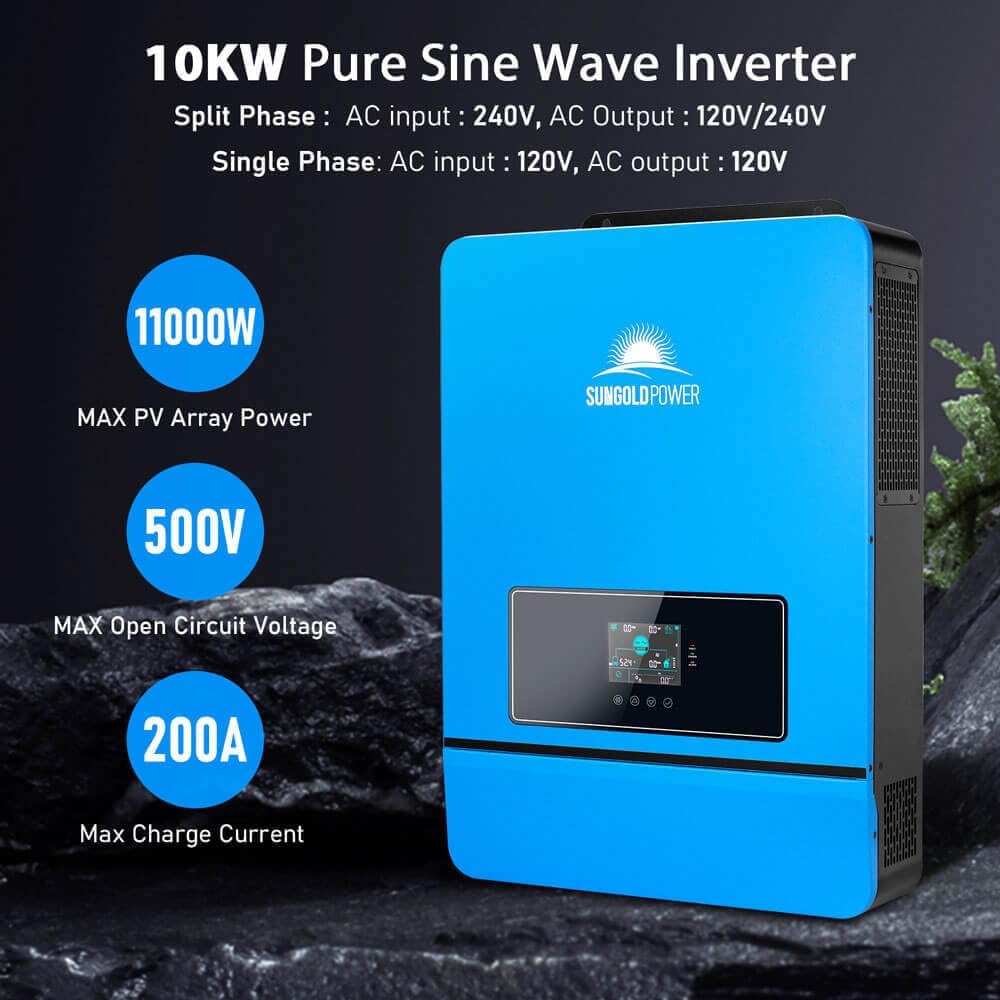
Figure 3.1: Key features of the 10KW Pure Sine Wave Inverter.

Figure 3.2: Inverter LCD HD Display for real-time data and parameter configuration.
3.2 SUNGOLDPOWER 51.2V 100Ah LiFePO4 Battery
The SUNGOLDPOWER 51.2V 100Ah LiFePO4 Battery is manufactured with automotive-grade battery cells, ensuring high quality and longevity. It provides over 7000 deep cycles and an estimated lifespan of up to 15 years. This battery supports CAN/RS485/RS232 communication protocols for seamless integration with the inverter and other compatible systems. It also features a 100A BMS with equalization function and can be connected in parallel with up to 32 units.

Figure 3.3: SUNGOLDPOWER 48V 100AH Server Rack LiFePO4 Lithium Battery.

Figure 3.4: Detailed view of the SG48100P Battery features and connections.
4. Setup and Installation
4.1 Unpacking and Inspection
Carefully unpack all components and inspect them for any shipping damage. Ensure all accessories listed in the packing list are present. If any damage or missing parts are found, contact your supplier immediately.

Figure 4.1: Inverter dimensions and included accessories.

Figure 4.2: Battery dimensions and included accessories.
4.2 Inverter Installation
- Mounting: Choose a suitable location for the inverter, ensuring adequate ventilation and protection from environmental elements. Mount the inverter securely to a wall or sturdy surface using appropriate hardware.
- AC Wiring: Connect the AC input (grid or generator) and AC output (to loads) to the designated terminals on the inverter. Ensure all connections are secure and follow local electrical codes. The inverter supports both 120V/240V split-phase and 120V single-phase configurations.
- PV Wiring: Connect your solar PV array to the PV input terminals. The inverter features dual MPPT controllers. Ensure the PV input voltage and current are within the inverter's specifications.
- Battery Wiring: Connect the 48V LiFePO4 batteries to the battery terminals. Pay close attention to polarity.
- Communication Wiring: Connect the WiFi module and any other communication cables (e.g., RS485, RS232) as required for monitoring and battery communication.

Figure 4.3: System Connection Diagram.
4.3 Parallel Function
The SUNGOLDPOWER inverter supports parallel connection of up to 6 units for increased power output and system redundancy. This allows for single-phase, split-phase, or three-phase configurations.

Figure 4.4: Parallel connection wiring diagrams.
5. Operating Instructions
5.1 LCD Display and Controls
The inverter features an LCD HD display that provides real-time operating data and allows for parameter settings. Navigate through menus using the function buttons (MENU, ENTER, DOWN, ESC) to view status, adjust settings, and monitor system performance.
5.2 Charging Modes
The system offers multiple charging modes, including Solar priority, Utility priority, Solar and Utility, and Solar only. These modes can be configured via the LCD display to optimize energy usage based on your preferences and available power sources.
5.3 Time-Slot Charging/Discharging Function
The SPH series inverter is equipped with a time-slot charging and discharging function. This feature allows users to set specific periods for charging and discharging the battery, optimizing energy costs by utilizing off-peak electricity tariffs or prioritizing solar energy during peak hours.
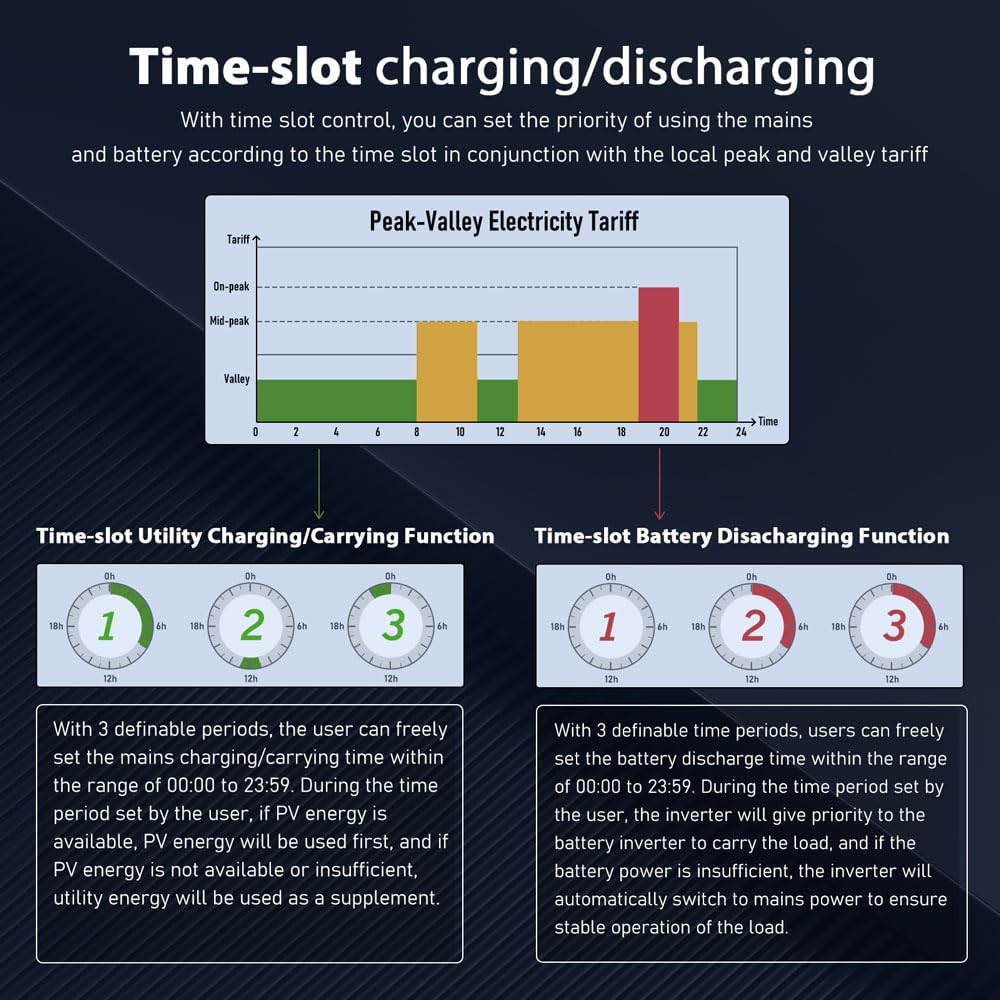
Figure 5.1: Time-slot charging/discharging function overview.
5.4 WiFi Monitoring
The included WiFi module enables remote monitoring of the inverter's operating status and parameters through a dedicated mobile application. This allows users to conveniently check system performance from anywhere.
6. Maintenance
Regular maintenance ensures the longevity and optimal performance of your solar power system. Perform the following checks periodically:
- Visual Inspection: Check all cables and connections for signs of wear, corrosion, or damage. Ensure all terminals are tight.
- Cleaning: Keep the inverter and battery surfaces clean and free from dust and debris. Ensure ventilation openings are not blocked. Use a dry, soft cloth for cleaning.
- Environmental Check: Ensure the installation environment remains within specified temperature and humidity ranges.
- Performance Monitoring: Regularly check the system's performance via the LCD display or mobile app to ensure it is operating efficiently.
- Firmware Updates: Check the manufacturer's website for any available firmware updates for the inverter to ensure optimal performance and access to new features.
7. Troubleshooting
This section provides solutions to common issues you might encounter. For problems not listed here, please contact customer support.
| Problem | Possible Cause | Solution |
|---|---|---|
| Inverter not turning on | No DC input from battery; Battery voltage too low; DC breaker off; Loose battery connection. | Check battery connections and voltage; Ensure DC breaker is ON; Charge battery if voltage is low. |
| No AC output | AC output breaker tripped; Overload; Inverter fault. | Check AC output breaker; Reduce load; Restart inverter; Consult manual for fault codes. |
| Battery not charging | PV input too low/none; AC input not present (if charging from grid); Charging settings incorrect; Battery communication error. | Check PV array and connections; Verify grid connection; Adjust charging parameters; Check battery communication cable. |
| Inverter displaying error code | Internal fault; Over-temperature; Over-voltage/current. | Refer to the specific error code in the detailed user manual (PDF) for diagnosis and resolution. Ensure proper ventilation. |
8. Technical Specifications
8.1 SUNGOLDPOWER 10KW Inverter Specifications
| Parameter | Value |
|---|---|
| Rated Output Power | 10000W |
| Max. Peak Power | 20000W |
| Output Waveform | Pure Sine Wave |
| AC Output | 120V/240V (split phase/single phase) |
| Efficiency | 92% |
| Max Charging Current | 200A |
| Maximum PV Array Power | 11,000W |
| PV Voltage Range | 40-60Vdc |
| MPPT Voltage Range | 125-425Vdc |
| Bypass Overload Current | 63A |
| Dimensions (L x W x H) | 26.0 x 17.9 x 4.9 inches |
| Net Weight | 54 lbs |

Figure 8.1: 10KW Inverter Technical Specifications.
8.2 SUNGOLDPOWER LiFePO4 Battery Specifications
| Parameter | Value |
|---|---|
| Nominal Voltage | 51.2V |
| Nominal Capacity | 100Ah |
| Energy | 5.12KWH |
| Charge Cut-off Current | 5A |
| MAX Continuous Charge Current | 100A |
| Discharge Cut-off Voltage | 43.2V |
| Cycle Life | ≥7000 cycles |
| Communication Protocol | RS232/RS485/CAN (Support multiple protocols) |
| Storage Temperature | 14 to 113°F (-10 to +45°C) |
| Dimensions (L x W x H) | 19.3 x 18.9 x 5.5 inches |
| Weight | 93 lbs |

Figure 8.2: LiFePO4 Battery Technical Specifications.
9. Warranty and Customer Support
SGPWATT products are designed for reliability and performance. This product comes with a manufacturer's warranty covering defects in materials and workmanship under normal use. The specific terms and duration of your warranty are detailed in the warranty card included with your product.
For technical assistance, troubleshooting, or warranty claims, please refer to the contact information provided in your purchase documentation or visit the official SGPWATT website. You can also find a detailed User Guide in PDF format here for further reference.
When contacting support, please have your product model number (SG48100P) and purchase date readily available.