
COOLGEEK B0DD41WKCH
COOLGEEK Portable Stereo CD Player Boombox User Manual
Model: B0DD41WKCH
1. Introduction
Thank you for purchasing the COOLGEEK Portable Stereo CD Player Boombox. This versatile device combines a vertical CD player, Bluetooth speaker, and FM radio into a single, stylish unit. Designed for both home and outdoor use, it offers high-fidelity audio and extended battery life. Please read this manual carefully to ensure proper operation and to maximize your enjoyment of the product.

Image: The COOLGEEK Portable Stereo CD Player Boombox, showcasing its compact design and integrated handle.
2. What's in the Box
- Vintage CD Player (Main Unit)
- Power Adapter
- Instruction Manual
3. Product Overview
Familiarize yourself with the various components and controls of your COOLGEEK Boombox.
3.1 Front Panel and Controls
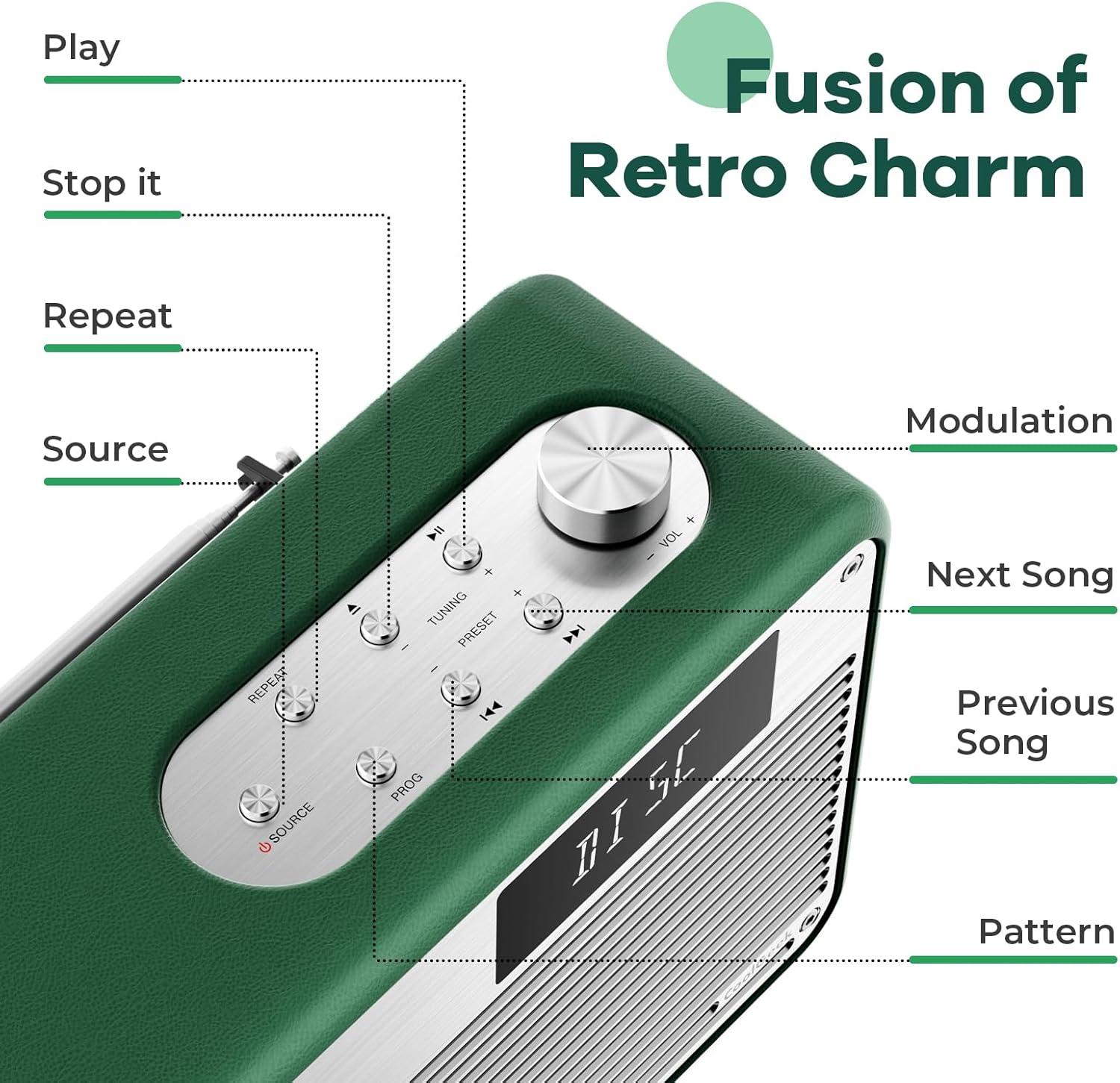
Image: Detailed view of the control panel, highlighting buttons for Play, Stop, Repeat, Source, Modulation, Next Song, Previous Song, and Pattern.
- CD Slot: Vertical slot for inserting CDs.
- Display Screen: Shows current mode, track number, time, FM frequency, and Bluetooth status.
- Volume Knob: Rotate to adjust volume.
- Source Button: Press to switch between CD, FM, and Bluetooth modes.
- Play/Pause Button: Starts or pauses playback.
- Stop Button: Stops playback.
- Repeat Button: Toggles repeat modes for CD playback.
- Tuning Buttons (+/-): For FM radio tuning.
- Preset Buttons (+/-): For navigating saved FM radio presets.
- Previous/Next Track Buttons: Skips to the previous or next track on CD, or changes FM frequency/preset.
- PROG Button: For programming CD playback order.
3.2 Rear Panel and Features

Image: Close-up of the boombox's leather handle and aluminum shell, highlighting the premium materials.
- FM Antenna: Extendable antenna for improved FM radio reception.
- Power Input: DC 12V/3A input for the power adapter.
- Rear Phase Inverter Hole: Enhances bass performance for a richer sound experience.
4. Setup
4.1 Charging the Device
Before first use, fully charge the boombox. Connect the provided power adapter to the DC 12V/3A input on the rear of the unit and plug it into a wall outlet. A full charge takes approximately 2.5 hours and provides over 18 hours of wireless playback.

Image: The boombox highlighting its long battery life for extended use.
4.2 Initial Placement
Place the boombox on a stable, flat surface. For optimal sound, especially bass, consider placing it near a wall or in a corner. Ensure adequate ventilation around the unit.
5. Operating Instructions
5.1 Power On/Off
Press and hold the Source button to power the unit on or off.
5.2 Mode Selection
Press the Source button repeatedly to cycle through the available modes: CD, FM Radio, and Bluetooth (BT).
5.3 CD Playback
To play a CD:
- Ensure the unit is in CD mode (display shows "DISC" or "READING").
- Carefully insert a CD into the vertical CD slot. The disc will automatically begin to spin and read.
- Use the Play/Pause, Stop, Previous/Next Track, and Repeat buttons to control playback.
The boombox supports various types of CDs. For optimal performance, handle CDs by their edges to avoid scratches.
Video: Demonstrates the operation of the COOLGEEK CD Player, including inserting a CD, switching modes, and adjusting volume.
5.4 FM Radio Operation
To listen to FM radio:
- Switch to FM mode using the Source button (display shows "FM" and frequency).
- Extend the FM antenna on the rear of the unit for better reception.
- Use the Tuning (+/-) buttons to manually tune to a desired frequency.
- To save a preset, press and hold the PROG button, then use the Preset (+/-) buttons to select a preset number, and press PROG again to confirm.
- Use the Preset (+/-) buttons to navigate through saved stations.
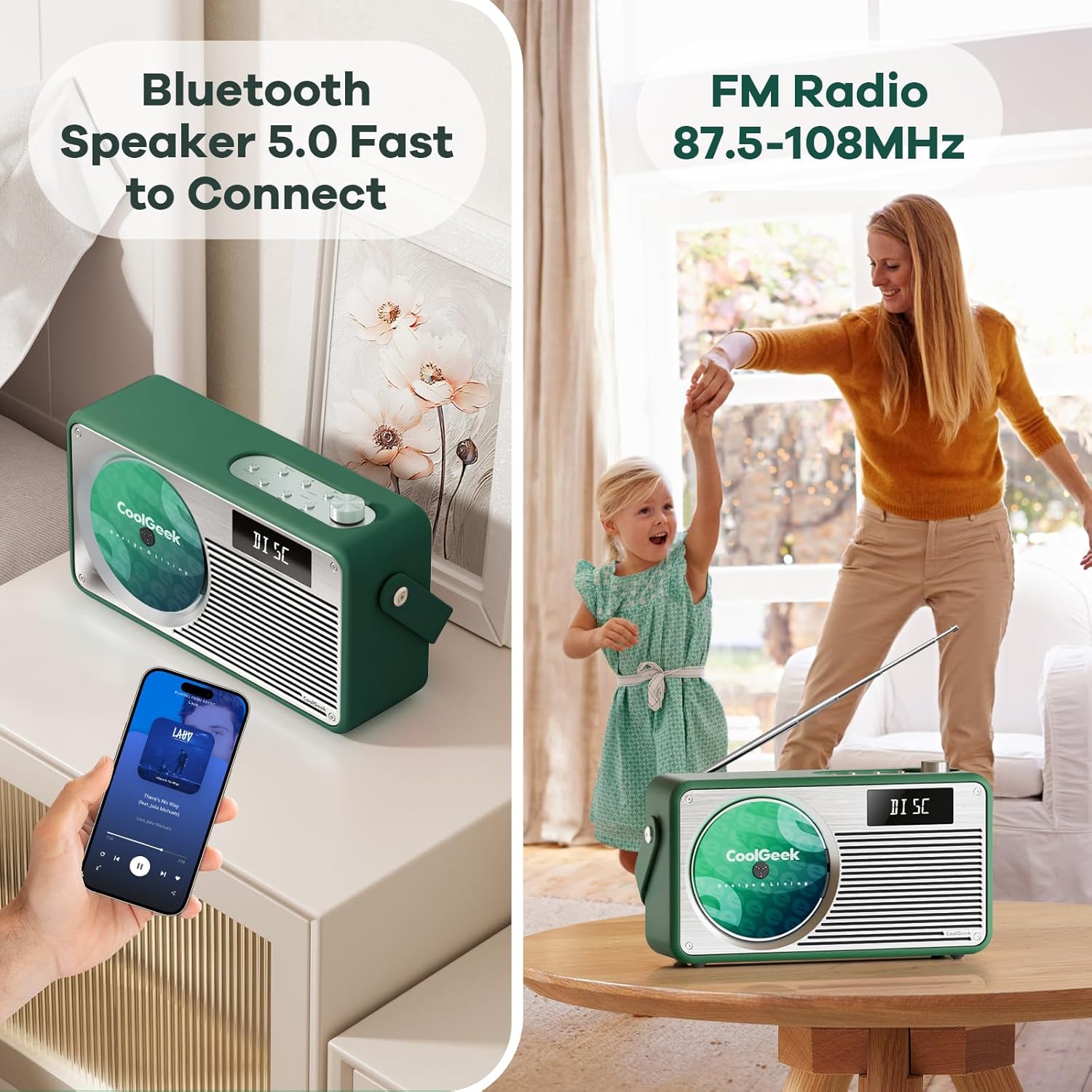
Image: The boombox displaying its Bluetooth and FM radio capabilities, showing a phone connected via Bluetooth and the FM antenna extended.
5.5 Bluetooth Mode
To connect via Bluetooth:
- Switch to Bluetooth mode using the Source button (display shows "BT"). The unit will automatically enter pairing mode.
- On your mobile device, enable Bluetooth and search for "CoolGeek VS-02" (or similar).
- Select the device to pair. Once connected, the display will indicate a successful connection.
- You can now play audio from your device through the boombox. Use your device or the boombox's Play/Pause and Previous/Next Track buttons to control playback.
5.6 Volume Control
Rotate the Volume Knob clockwise to increase volume and counter-clockwise to decrease volume.
6. Maintenance
- Cleaning: Use a soft, dry cloth to clean the exterior of the unit. Do not use liquid cleaners or abrasive materials.
- CD Care: Always handle CDs by their edges. Store them in their cases to prevent scratches and dust accumulation.
- Storage: When not in use for extended periods, store the boombox in a cool, dry place away from direct sunlight and extreme temperatures.
- Battery: To prolong battery life, avoid fully discharging the battery frequently. Charge it regularly, even if not in constant use.
7. Troubleshooting
| Problem | Possible Cause | Solution |
|---|---|---|
| Unit does not power on. | Battery is depleted; Power adapter not connected or faulty. | Charge the unit fully. Ensure power adapter is securely connected and working. |
| CD skipping or not playing. | CD is dirty, scratched, or inserted incorrectly; Unit is on an unstable surface. | Clean the CD with a soft cloth. Re-insert the CD correctly. Place the unit on a stable surface. |
| Poor FM radio reception. | Antenna not extended; Weak signal in the area. | Fully extend the FM antenna. Try repositioning the unit for better signal. |
| Bluetooth not connecting. | Unit not in Bluetooth mode; Device not discoverable; Already connected to another device. | Ensure unit is in BT mode. Make sure your device's Bluetooth is on and discoverable. Disconnect from other devices. |
| No sound. | Volume too low; Mute activated; Incorrect mode selected. | Increase volume. Check if unit is muted. Ensure correct mode (CD, FM, BT) is selected. |
8. Specifications
| Feature | Detail |
|---|---|
| Product Dimensions | 17 x 9.5 x 6.7 inches |
| Item Weight | 8.5 pounds |
| Batteries | 1 Lithium Ion battery (included) |
| Connectivity Technology | Bluetooth 5.0 |
| Color | Green |
| Speaker Type | Stereo |
| FM Radio Frequency | 87.5 to 108 MHz |
| Battery Life | Over 18 hours (wireless playback) |
| Charging Time | Approximately 2.5 hours |
9. Warranty and Support
COOLGEEK is committed to customer satisfaction. If you encounter any issues with your product or have questions, please contact our customer support team directly. We will do our best to resolve any problems you may have.
For support, please refer to the contact information provided on the product packaging or the official COOLGEEK website.
Related documentsB0DD41WKCH


Ask a question about this manual
Ask about setup, troubleshooting, compatibility, parts, safety, or missing instructions. Manuals+ will review the question and use this page’s manual context to help answer it.