
1. Introduction
This manual provides essential instructions for the installation, operation, maintenance, and troubleshooting of your DownyPaws Replacement Water Pump, model DPWP006. This pump is specifically designed for use with DownyPaws DPWFP6SS series stainless steel cat water fountains. Please read these instructions carefully before use to ensure proper function and longevity of your product.
2. Product Overview
The DownyPaws DPWP006 is a compact and efficient replacement water pump designed to maintain optimal water circulation in your compatible cat fountain. It features a durable construction and is engineered for quiet operation.
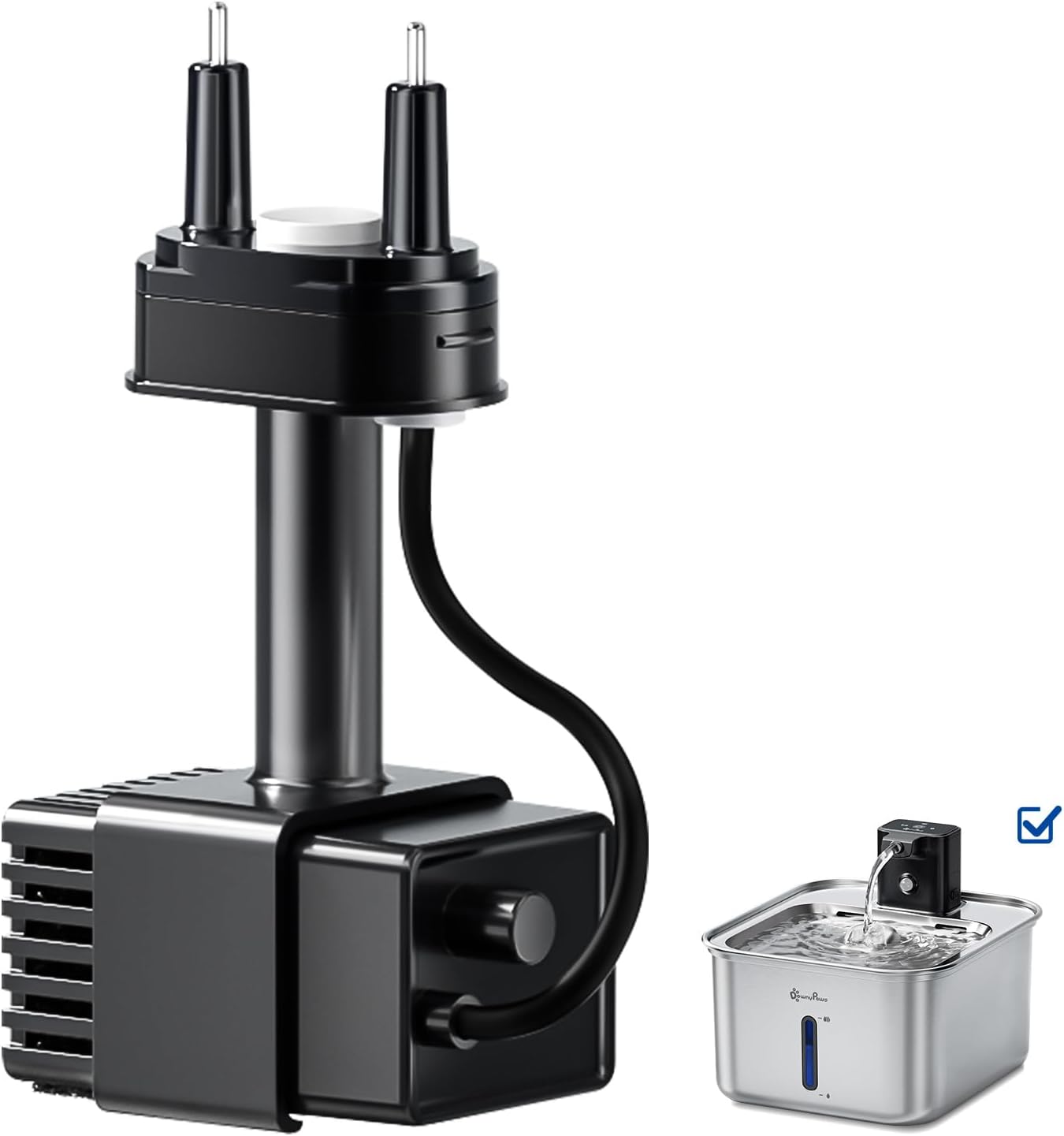
Image 2.1: The DownyPaws DPWP006 replacement water pump shown alongside a compatible stainless steel cat water fountain. The pump is black with a power cord and a water outlet nozzle, designed to fit within the fountain's structure.
Compatibility
This replacement pump is compatible with DownyPaws Fursink 3.0 and DPWFP6SS series stainless steel cat water fountains. It is not compatible with Fursink 1.0 or 2.0 models.

Image 2.2: An illustration demonstrating the compatibility of the DPWP006 pump with DownyPaws Fursink 3.0 cat fountains. Various color options of the Fursink 3.0 are displayed, indicating that the pump fits these models. A note explicitly states incompatibility with Fursink 1.0 and 2.0.
3. Setup and Installation
Follow these steps to replace your existing water pump with the new DPWP006 pump:
- Disconnect Power: Always unplug the cat fountain from the power outlet before handling any components.
- Disassemble Fountain: Carefully disassemble your cat fountain according to its specific instructions to access the old pump.
- Remove Old Pump: Disconnect the old pump from the water outlet tube and remove it from the fountain base.
- Install New Pump: Place the new DPWP006 pump into the designated area within the fountain base. Ensure it is securely seated.
- Connect Water Tube: Attach the water outlet tube from the fountain to the nozzle of the new pump. Ensure a snug fit to prevent leaks.
- Reassemble Fountain: Reassemble the remaining components of your cat fountain.
- Fill with Water: Fill the fountain with clean water to the recommended level.
- Connect Power: Plug the fountain back into a power outlet. The pump should begin operating.
4. Operating Instructions
Once installed and powered, the DPWP006 pump will continuously circulate water in your fountain. Ensure the water level is always maintained above the minimum mark to prevent the pump from running dry, which can cause damage.
LED Light Reminder
Some DownyPaws fountains feature an LED light reminder system that indicates the water level. This system helps you monitor the fountain's water status easily.
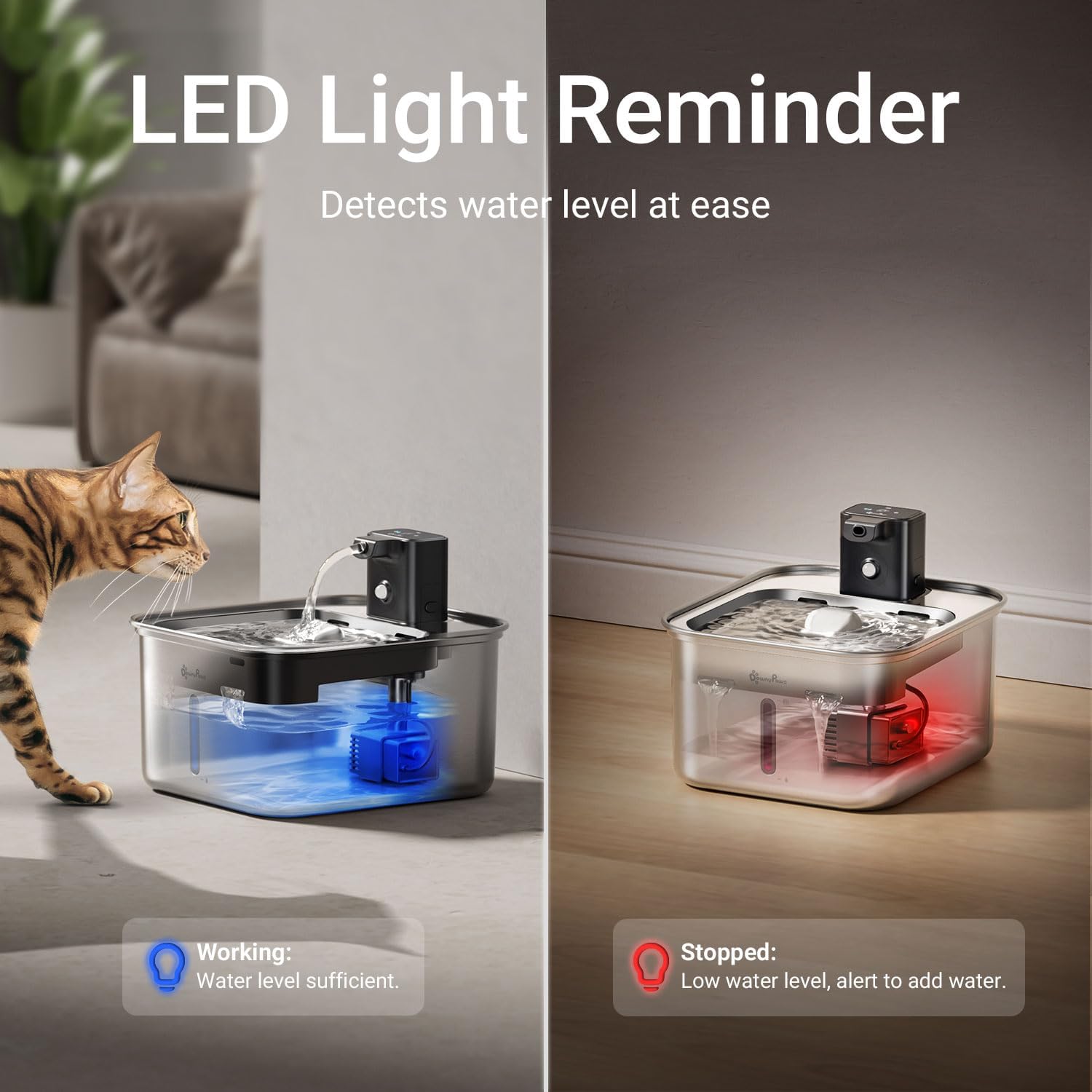
Image 4.1: A visual representation of the LED light reminder system. On the left, a blue light indicates sufficient water level and normal operation. On the right, a red light indicates a low water level, prompting the user to add more water to prevent the pump from running dry.
- Blue Light: Indicates the water level is sufficient, and the pump is working correctly.
- Red Light: Indicates a low water level. The pump may stop operating to prevent damage. Add water immediately.
5. Maintenance and Cleaning
Regular cleaning of the water pump is crucial for maintaining water quality and extending the pump's lifespan. It is recommended to clean the pump at least once every two weeks, or more frequently if the water appears dirty or the flow rate decreases.
Detachable Design for Easy Cleaning
The DPWP006 pump features a detachable design, making thorough cleaning easier and more effective.

Image 5.1: An exploded view showing the detachable components of the water pump, including the main pump body, the impeller cover, and the impeller itself. This illustrates how the pump can be taken apart for comprehensive cleaning.
Simple Steps to Disassemble and Clean
Follow these steps for detailed cleaning of your pump:

Image 5.2: A four-panel image illustrating the disassembly and cleaning process. Panel 1: Gently pull apart the pump casing. Panel 2: Remove the impeller cover and then the impeller. Panel 3: Use a small brush or tool to clean inside the pump housing and around the impeller. Panel 4: Rinse all components thoroughly under running water.
- Disconnect Power: Unplug the fountain from the power outlet.
- Remove Pump: Disassemble the fountain and remove the pump as described in the Setup section.
- Disassemble Pump: Gently pull apart the pump casing to separate its components. Remove the impeller cover and then the impeller (the small rotating part).
- Clean Components: Use a small brush (a toothbrush or a specialized cleaning brush) to remove any hair, debris, or mineral deposits from the impeller, impeller housing, and other pump parts. Rinse all components thoroughly under clean running water.
- Reassemble Pump: Carefully reassemble the pump, ensuring the impeller is correctly seated and the cover is securely attached.
- Reinstall Pump: Place the cleaned pump back into the fountain and reassemble the fountain.
- Refill and Restart: Fill the fountain with fresh water and plug it back in.
6. Troubleshooting
If you encounter issues with your DownyPaws water pump, refer to the following common problems and solutions:
| Problem | Possible Cause | Solution |
|---|---|---|
| Pump not working | No power; Impeller blocked; Low water level | Check power connection; Clean pump impeller; Add water to the fountain. |
| Weak water flow | Pump or filter clogged; Water level too low | Clean pump and filter thoroughly; Ensure water is at optimal level. |
| Pump making unusual noise | Impeller blocked; Pump running dry; Air in pump | Clean impeller; Add water; Gently shake fountain to release trapped air. |
| LED light is red | Low water level | Add water to the fountain immediately. |
7. Specifications
- Model: DPWP006
- Manufacturer: DownyPaws
- Item Weight: 3.84 ounces (0.11 Kilograms)
- Item Package Dimensions (L x W x H): 4.88 x 2.6 x 1.85 inches
- Color: Black
- Compatibility: DownyPaws Fursink 3.0 / DPWFP6SS series cat water fountains
8. Warranty and Support
For warranty information or technical support, please refer to the documentation provided with your original DownyPaws cat water fountain or contact DownyPaws customer service directly. Keep your purchase receipt as proof of purchase.
For further assistance, please visit the official DownyPaws store or contact their customer support channels.