
COOLGEEK B0DD41WKCH
User Manual
COOLGEEK Portable Stereo CD Player Boombox
Model: B0DD41WKCH
1. Introduction
Thank you for purchasing the COOLGEEK Portable Stereo CD Player Boombox. This manual provides essential information for the safe and efficient operation of your device. Please read it thoroughly before use and retain it for future reference.
2. Product Overview
2.1 Key Features
- 3-in-1 Functionality: Combines a vertical CD player, Bluetooth speaker, and FM radio.
- Vintage & Fashion Design: Blends leather hues with brushed aluminum for a unique aesthetic.
- Portable Design: Features a leather handle for easy carrying.
- Extended Battery Life: Up to 18 hours of wireless playback on a single charge (approx. 2.5 hours charging time).
- Stereo Speakers: Built-in stereo speakers with an aluminum grille for enhanced audio.
- Versatile CD Compatibility: Supports various types of CDs with simple operation and 360° surround sound.
- Bluetooth 5.0: Fast and stable wireless connection.
- FM Radio: Tunable from 87.5 to 108 MHz.
- Inverted Phase Hole: Designed for powerful and booming bass experience.

Figure 2.1: The COOLGEEK Portable Stereo CD Player Boombox in green, showcasing its vintage design and portable handle.

Figure 2.2: Visual representation of the boombox's key features, including its 3-in-1 functionality, Bluetooth 5.0, FM radio, vertical CD playback, and long battery life.
2.2 What's in the Box
- Vintage CD Player (1 unit)
- Power Adapter (1 unit)
- Instruction Manual (This document)
3. Setup
- Unpacking: Carefully remove all components from the packaging. Retain packaging for future transport or storage.
- Power Connection: Connect the provided power adapter to the DC IN port on the back of the boombox and plug it into a standard wall outlet.
- Initial Charge: For optimal battery performance, fully charge the device before first use. A full charge takes approximately 2.5 hours. The device can operate wirelessly for over 18 hours on a full charge.
- Placement: Place the boombox on a stable, flat surface. Its portable leather handle allows for easy relocation.

Figure 3.1: The portable design of the boombox, highlighting its leather handle for easy transport and versatile placement.
4. Operating Instructions
4.1 Controls Overview
Familiarize yourself with the control buttons and knob located on the top panel of the boombox. Refer to Figure 4.1 for a visual guide.
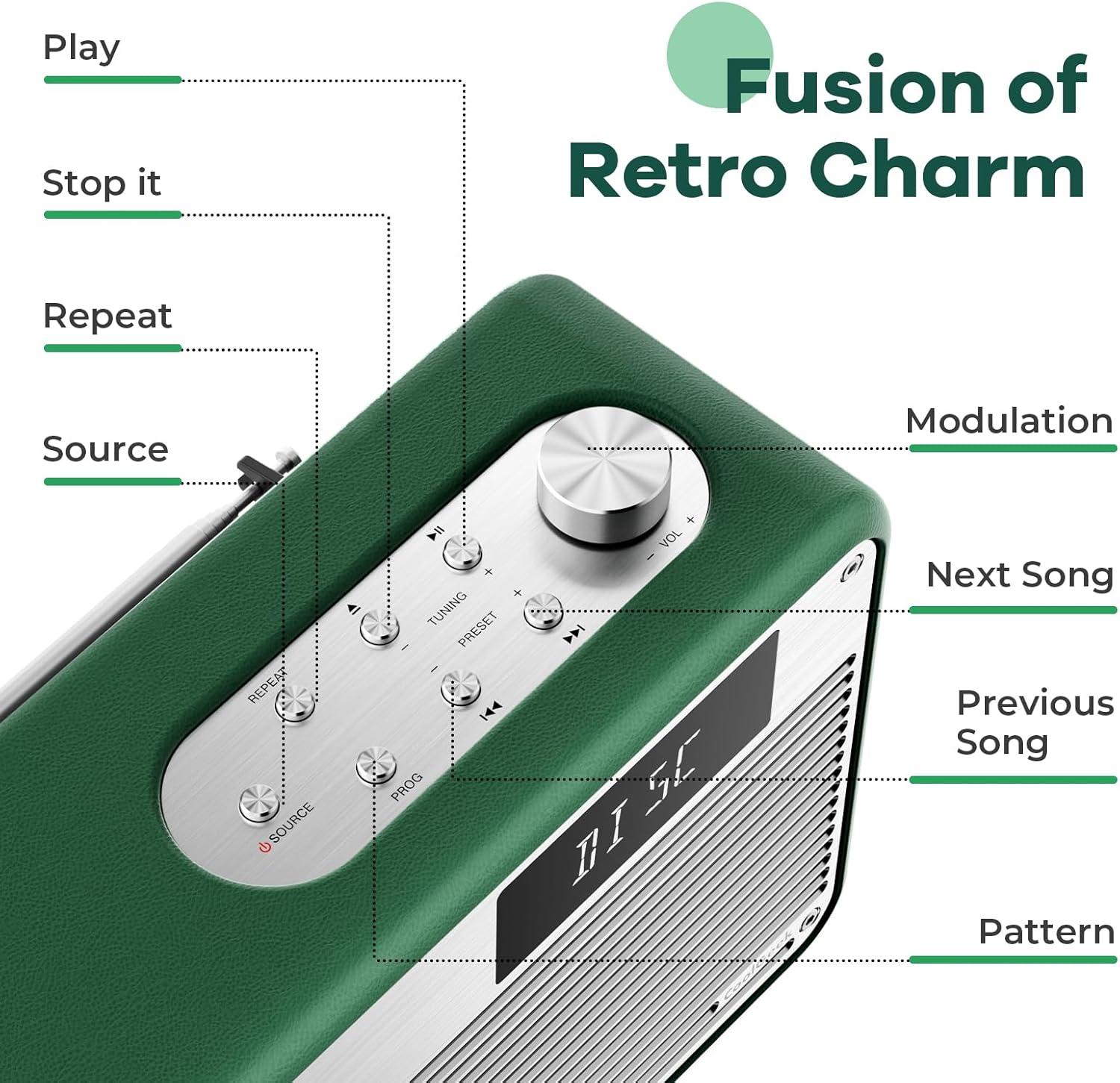
Figure 4.1: Detailed view of the control panel, indicating the function of each button and the modulation knob.
4.2 CD Playback
- Insert CD: Gently slide your CD into the vertical CD slot on the front of the boombox. The player is designed for simple disc insertion.
- Select Source: Press the 'SOURCE' button until 'CD' mode is displayed.
- Play/Pause: Press the 'PLAY/PAUSE' button to start or pause playback.
- Skip Tracks: Use the 'NEXT SONG' or 'PREVIOUS SONG' buttons to navigate between tracks.
- Volume Control: Rotate the 'MODULATION' knob to adjust the volume.
- Stop Playback: Press the 'STOP' button to end CD playback.
4.3 Bluetooth Mode
- Select Source: Press the 'SOURCE' button until 'BT' (Bluetooth) mode is displayed. The device will enter pairing mode, indicated by a flashing Bluetooth icon or specific audio prompt.
- Pairing: On your mobile device (smartphone, tablet, etc.), enable Bluetooth and search for available devices. Select 'COOLGEEK Boombox' (or similar name) from the list.
- Connection: Once paired, the boombox will indicate a successful connection. You can now play audio from your mobile device through the boombox.
- Control Playback: Use the boombox's 'PLAY/PAUSE', 'NEXT SONG', and 'PREVIOUS SONG' buttons, or control playback directly from your paired device.
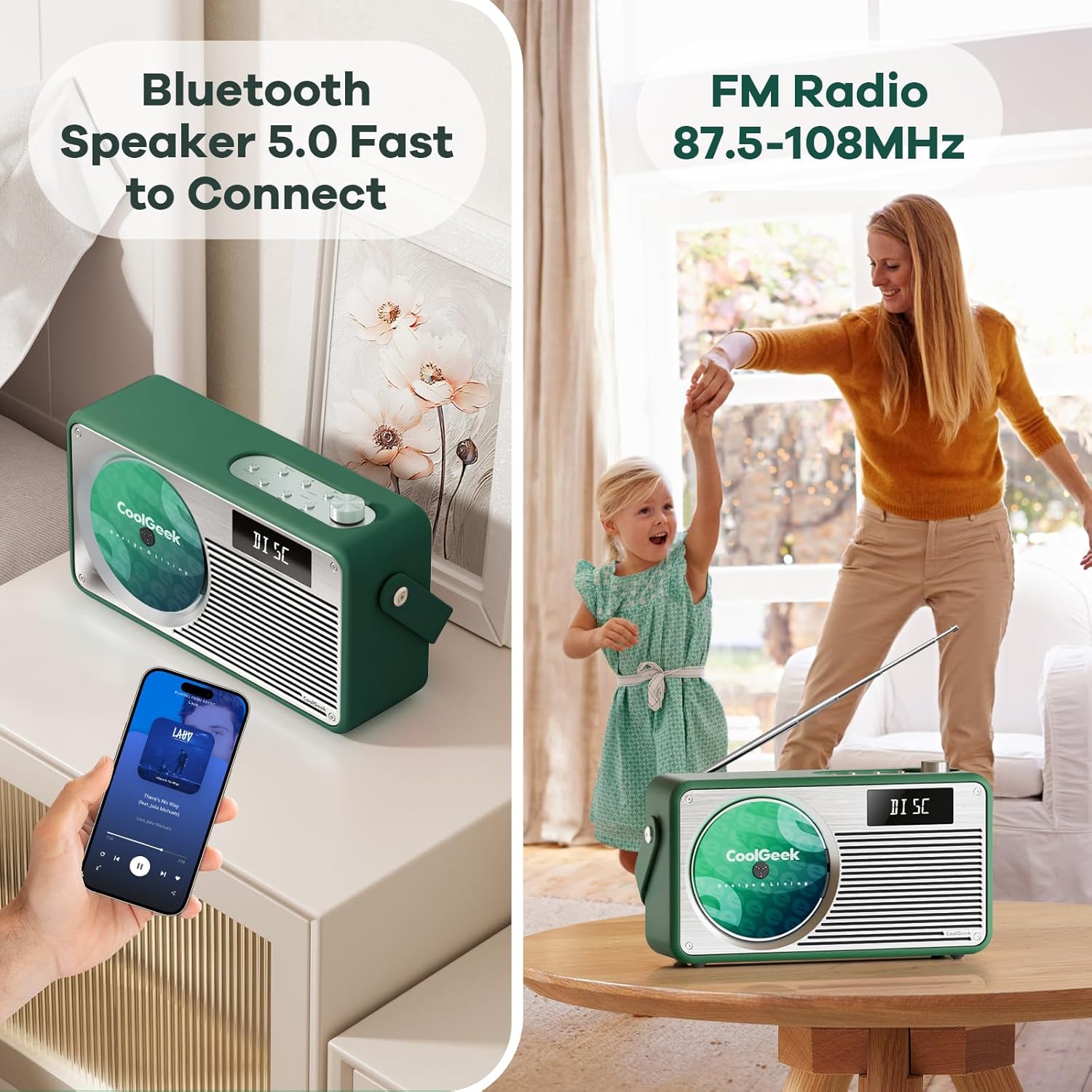
Figure 4.2: The boombox demonstrating its Bluetooth connectivity with a smartphone and its FM radio antenna extended.
4.4 FM Radio
- Select Source: Press the 'SOURCE' button until 'FM' mode is displayed.
- Tune Stations: Use the 'TUNING' buttons (often combined with 'NEXT SONG'/'PREVIOUS SONG' or a dedicated tuning knob) to scan for radio stations. The frequency range is 87.5 to 108 MHz.
- Antenna: Extend the telescopic antenna on the back of the unit for better reception. Adjust its position for clearer sound.
- Preset Stations: Some models allow saving favorite stations. Refer to the specific button (e.g., 'PRESET' or 'PROG') for instructions.
5. Maintenance
- Cleaning: Use a soft, dry cloth to clean the exterior of the boombox. Do not use liquid cleaners or abrasive materials.
- CD Care: Handle CDs by their edges. Clean dirty CDs with a soft, lint-free cloth, wiping from the center outwards.
- Battery Care: To prolong battery life, avoid fully discharging the battery frequently. If storing the device for an extended period, charge it to about 50% every few months.
- Storage: Store the device in a cool, dry place away from direct sunlight and extreme temperatures.
6. Troubleshooting
| Problem | Possible Cause | Solution |
|---|---|---|
| No power | Battery drained; Power adapter not connected properly. | Charge the battery; Ensure power adapter is securely connected to both the boombox and the outlet. |
| No sound | Volume too low; Incorrect source selected; Device muted. | Increase volume; Press 'SOURCE' to select correct mode (CD, BT, FM); Check if device is muted. |
| CD skipping or not playing | CD is dirty or scratched; CD inserted incorrectly. | Clean the CD; Ensure CD is inserted correctly into the vertical slot. |
| Bluetooth not connecting | Boombox not in pairing mode; Device too far; Bluetooth disabled on mobile device. | Ensure boombox is in BT mode and flashing; Move devices closer; Enable Bluetooth on your mobile device. |
| Poor FM reception | Antenna not extended or positioned correctly; Weak signal area. | Fully extend and adjust the telescopic antenna; Try moving the boombox to a different location. |
7. Specifications
| Feature | Detail |
|---|---|
| Product Dimensions (L x W x H) | 17 x 9.5 x 6.7 inches |
| Item Weight | 8.5 pounds |
| Model Number (ASIN) | B0DD41WKCH |
| Batteries | 1 Lithium Ion battery (included) |
| Brand | COOLGEEK |
| Connectivity Technology | Bluetooth |
| Color | Green |
| Speaker Type | Stereo |
| Manufacturer | COOLGEEK |
| Date First Available | August 14, 2024 |
8. Warranty and Support
COOLGEEK is committed to providing excellent customer service. If you encounter any issues with your product or have questions, please contact us directly. We will do our best to resolve any problems you may experience.
For support, please refer to the contact information provided with your purchase or visit the official COOLGEEK website.
Ask a question about this manual
Ask about setup, troubleshooting, compatibility, parts, safety, or missing instructions. Manuals+ will review the question and use this page’s manual context to help answer it.