
Introduction
The TOZO E2 Wireless Earbuds are designed to provide an immersive audio experience with advanced features. These earbuds feature 10mm dynamic drivers for powerful bass and clear sound, AI Call Noise Cancellation for clear communication, and Bluetooth 5.3 for stable connectivity. The TOZO App allows for extensive sound customization with 32 EQ settings. Enjoy extended listening with up to 30 hours of total playtime using the charging case.

Image: TOZO E2 Wireless Earbuds showcasing their elegant space capsule design.
What's in the Box
- TOZO E2 Wireless Earbuds
- Charging Case
- 3 pairs of Eartips (S/M/L)
- USB-C (A to C) cable (20cm)
- User Manual

Image: The TOZO E2 Wireless Earbuds, charging case, and included accessories.
Setup
Wearing the Earbuds
- Ensure the earbud tip is facing downwards.
- Place the earbuds into your ear.
- Rotate the earbuds back to your auricle side to fit snugly.

Image: Demonstrates the comfortable and secure fit of the TOZO E2 earbuds for prolonged listening.
Bluetooth Pairing
- Pick up both earbuds from the charging case. The white indicator light will blink slowly, indicating pairing mode.
- Search for the pairing name "TOZO E2" and select it in your mobile device's Bluetooth settings.

Image: Illustrates the Bluetooth 5.3 technology for faster and more stable connections.
Operating
Smart Touch Controls
The TOZO E2 earbuds feature intuitive touch controls for easy management of audio playback and calls.
- Play/Pause: Tap the earbud once (L/R).
- Previous Song: Tap the left earbud twice.
- Next Song: Tap the right earbud twice.
- Volume Down: Hold the left earbud.
- Volume Up: Hold the right earbud.
- Answer/Hang Up Call: Tap the earbud once (L/R).
- Reject Call: Hold the earbud for 2 seconds (L/R).
- Activate Voice Assistant: Tap the earbud three times (L/R).

Image: The TOZO E2 earbuds in their charging case, illustrating the touch control panel on each earbud.
TOZO App Customization
Enhance your listening experience by utilizing the TOZO App. The app provides:
- 32 preset EQ modes to tailor sound preferences.
- Access to over 2,000 user-shared EQs in the 'EQ Zone'.
- Additional settings and features for personalized audio.

Image: A visual representation of the TOZO App, demonstrating its features for customizing sound settings and accessing EQ modes.
AI Call Noise Cancellation
The TOZO E2 earbuds are equipped with 2 built-in microphones and advanced Environmental Noise Cancellation (ENC) technology. This system works to effectively block out background noise during calls, ensuring clearer communication even in busy environments.

Image: A person engaged in a clear conversation using the TOZO E2 earbuds, highlighting the call noise cancellation feature.
Charging
The TOZO E2 Wireless Earbuds offer extended playtime, with up to 8.5 hours on a single charge. The portable charging case provides an additional 30 hours of power, totaling 30 hours of use.
Charging the Case and Earbuds
- To charge the earbuds, place them back into the charging case. The earbuds will automatically begin charging.
- To charge the case, connect the provided USB-C (A to C) cable to the charging port on the case and a compatible power source. The indicator light on the case will show charging status.
- Charging time for the case is approximately 1.5 hours.
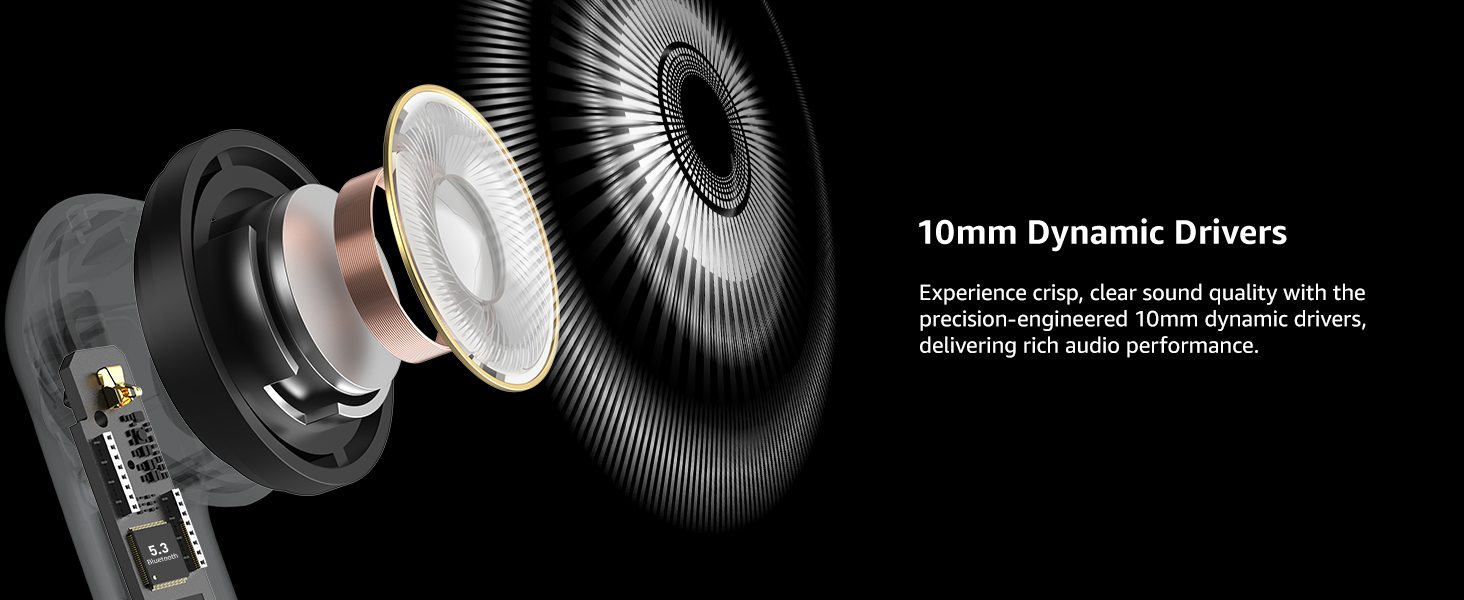
Image: The TOZO E2 earbuds and charging case, illustrating the extended battery life of 8.5 hours on a single charge and 30 hours with the case.
Sound Quality
The TOZO E2 earbuds are engineered with 10mm dynamic drivers, delivering a balanced audio profile with powerful bass, clear midrange, and crisp treble. This design ensures an enhanced and immersive listening experience across various music genres.

Image: An internal view highlighting the 10mm dynamic drivers responsible for the earbuds' sound performance.
Specifications
| Feature | Detail |
|---|---|
| Model Name | E2 |
| Connectivity Technology | Wireless (Bluetooth 5.3) |
| Noise Control | Environmental Noise Cancellation |
| Audio Driver Size | 10 Millimeters |
| Playtime (Single Charge) | Up to 8.5 hours |
| Total Playtime (with Case) | Up to 30 hours |
| Charging Time | 1.5 Hours |
| Water Resistance Level | Waterproof |
| Control Type | Touch Control, App Control |
| Bluetooth Range | 20 Meters |
| Audio Latency | 60 Milliseconds (Low-latency mode) |
| Item Weight | 32.9 Grams |
| Dimensions | 2.4 x 1.93 x 1.02 inches |
Troubleshooting
If you encounter issues with your TOZO E2 Wireless Earbuds, consider the following general troubleshooting steps:
- No Sound: Ensure earbuds are charged and properly paired with your device. Check device volume and earbud fit.
- Pairing Issues: Place earbuds back in the case, close it, then reopen to re-enter pairing mode. Ensure Bluetooth is enabled on your device and try reconnecting.
- Intermittent Connection: Ensure no obstructions between earbuds and device. Try resetting the earbuds (refer to the included Quick Guide for specific reset instructions).
- Unresponsive Touch Controls: Ensure your fingers are clean and dry. Try restarting the earbuds by placing them in the case and taking them out again.
For detailed troubleshooting or specific error messages, please refer to the comprehensive User Manual included in the product packaging.
Maintenance
To ensure the longevity and optimal performance of your TOZO E2 Wireless Earbuds, follow these maintenance guidelines:
- Cleaning: Regularly clean the earbuds and charging case with a soft, dry cloth. Avoid using harsh chemicals or abrasive materials. Gently clean earbud tips and charging contacts to prevent debris buildup.
- Storage: Store the earbuds in their charging case when not in use to protect them from dust, moisture, and physical damage. Keep the case in a cool, dry place.
- Water Exposure: While the earbuds are waterproof, avoid prolonged submersion in water. Ensure they are dry before placing them back in the charging case to prevent damage to the charging contacts.
- Battery Care: Avoid fully draining the battery frequently. Charge the earbuds and case regularly to maintain battery health.
Warranty and Support
The TOZO E2 Wireless Earbuds come with an 18-month warranty. For any product-related inquiries, technical support, or warranty claims, please contact TOZO customer support.
- Live Chat Support: Visit www.tozostore.com for 7x24 Live Chat Support.
- Customer Support Email: Contact via email at info@tozostore.com.
Please retain your proof of purchase for warranty validation.


