
1. Introduction and Overview
The GEYA Overvoltage Undervoltage Protective Device is designed to provide comprehensive protection for household equipment against voltage fluctuations. It monitors voltage and current in real-time, ensuring the safety and longevity of connected appliances.
Key Features:
- Voltage (True RMS) monitoring and protection. Over/under voltage values can be precisely set.
- Double bus wiring design for enhanced durability and stronger current handling ability.
- Automatic self-reset function after a fault condition is cleared.
- Digital display shows real-time voltage values, and fault statuses are indicated by LED lights.
- Compact 1-MODULE design, suitable for DIN rail mounting.

This image shows the front view of the GEYA GPS8-01 device, highlighting its digital display, control buttons, and terminal connections for neutral (N) and input (IN).
2. Setup and Installation
Proper installation is crucial for the safe and effective operation of the device. This device is designed for DIN rail mounting. Ensure all power is disconnected before proceeding with installation.
Wiring Diagram:

This diagram illustrates the difference between upper wiring and down wiring configurations. For the GPS8-01 (Down Wiring) model, the incoming line connects to the bottom terminals (N and 1), and the outgoing load connects to the top terminals (N and 2).
Installation Steps:
- Mount the device securely onto a standard DIN rail.
- Connect the neutral (N) and live (L) wires from the power supply to the designated input terminals (N and IN) on the device. For the GPS8-01 (Down Wiring) model, these are the bottom terminals.
- Connect the load wires (neutral and live) from your household equipment to the output terminals on the device. For the GPS8-01 (Down Wiring) model, these are the top terminals.
- Ensure all connections are tight and secure to prevent loose contacts and potential hazards.
- Once wiring is complete, restore power to the circuit. The device will power on and display the current voltage.
Installation Demonstration Video:
This video provides a visual guide to the installation and basic operation of the GEYA Overvoltage & Undervoltage Protector (GPS8-01/02/03). It demonstrates how to connect the device to a power supply and a load, and shows the device's display in action. The video also highlights key features such as RMS measurement, settable voltage/current values, self-reset, and LED fault indicators.
3. Operating Instructions
Panel Overview:
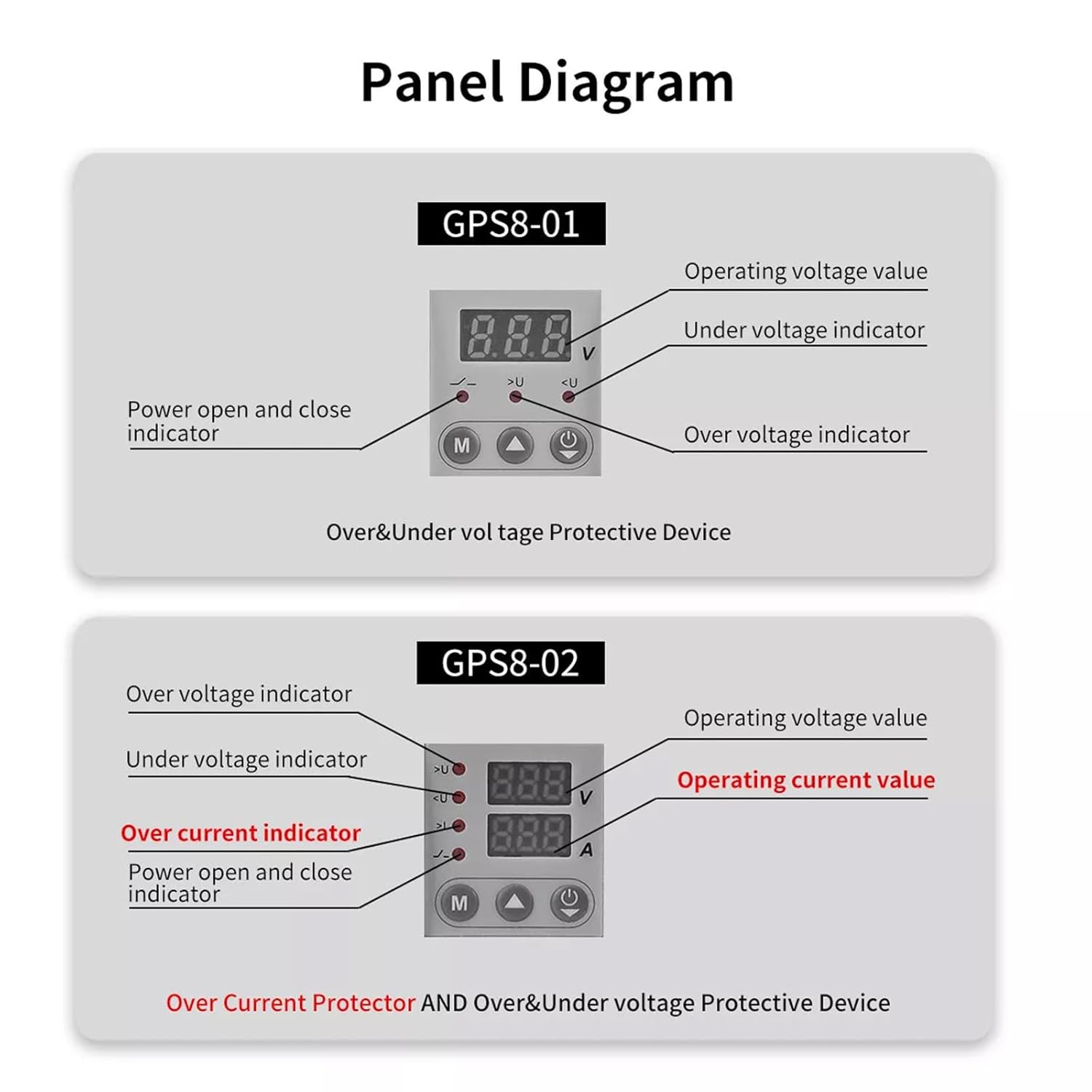
The GPS8-01 panel features a digital display for operating voltage, an under-voltage indicator, an over-voltage indicator, and a power open/close indicator. It includes 'M' (Menu/Mode), 'Up', and 'Power' buttons for control.
Parameter Setting:

To enter the parameter setting interface, press the 'M' button for 3 seconds. Use the 'Up' and 'Down' (implied by context, though only 'Up' is shown as a button) buttons to adjust values. Short press 'M' to cycle through settings: Overvoltage setting (230V-300V, factory default 275V), Undervoltage setting (145V-210V, factory default 175V), and Reset time setting (2s-900s, factory default 30s). Long press 'M' for 3 seconds to exit the setup mode and return to running mode. If no key is operated for 60 seconds, the device will automatically exit the setting interface.
4. Maintenance
The GEYA Overvoltage Undervoltage Protective Device is designed for minimal maintenance. However, regular checks can ensure its continued optimal performance.
- Cleaning: Periodically wipe the device with a dry, soft cloth to remove dust and debris. Do not use abrasive cleaners or solvents.
- Connection Check: Annually, or if you suspect an issue, verify that all wiring connections are secure and free from corrosion. Ensure power is off before checking connections.
- Environmental Conditions: Ensure the device operates within its specified temperature and humidity ranges to prevent damage.
- Firmware: This device does not typically require user-updatable firmware.
5. Troubleshooting
If you encounter issues with your GEYA Overvoltage Undervoltage Protective Device, refer to the following common troubleshooting steps:
| Problem | Possible Cause | Solution |
|---|---|---|
| Device not powering on/display is blank. | No power supply; loose wiring; internal fault. | Check power source. Ensure wiring is correct and secure. If problem persists, contact support. |
| Device trips frequently. | Voltage outside set parameters; faulty appliance; incorrect settings. | Verify actual voltage with a multimeter. Check connected appliances for faults. Review and adjust over/under voltage settings. |
| Display shows error code or abnormal reading. | Internal malfunction; extreme voltage condition. | Note the error code. Disconnect and reconnect power. If error persists, contact support. |
| Device does not self-reset. | Fault condition still present; reset time setting too long; internal fault. | Ensure the voltage has returned to normal range. Check the reset time setting. If necessary, manually reset by cycling power. |
For issues not covered here, or if troubleshooting steps do not resolve the problem, please contact GEYA customer support.
6. Specifications
Detailed technical specifications for the GEYA GPS8-01 Overvoltage Undervoltage Protective Device:
| Parameter | Value (GPS8-01) |
|---|---|
| Function | Over and under voltage protection |
| Rated Supply Voltage | AC220V (L-N) |
| Rated Supply Frequency | 50/60Hz |
| Rated Operational Current | 32A, 40A, 50A, 63A, 80A (AC1) - *Note: This specific model is 40A.* |
| Burden | AC max. 3VA |
| Voltage Display | Yes |
| Current Display | No |
| Over Voltage Operation Value | 230V ~ 300V (factory default: 275V) |
| Over Voltage Action Delay | 0.5s |
| Under Voltage Operation Value | 145V ~ 210V (factory default: 175V) |
| Under Voltage Action Delay | 0.5s |
| Power-up Delay | 2s |
| Reset Time | 2 ~ 900s (factory default: 30s) |
| Measurement Error | ≤1% |
| Operating Temperature | -20°C to +55°C (-4°F to 131°F) |
| Storage Temperature | -35°C to +75°C (-22°F to 158°F) |
| Mounting/DIN Rail | DIN rail EN/IEC 60715 |
| Protection Degree | IP40 for front panel/IP20 terminals |
| Operating Position | Any |
| Overvoltage Category | III. |
| Pollution Degree | 2 |
| Dimensions | 82 × 36 × 68 mm |
| Weight | 130g |
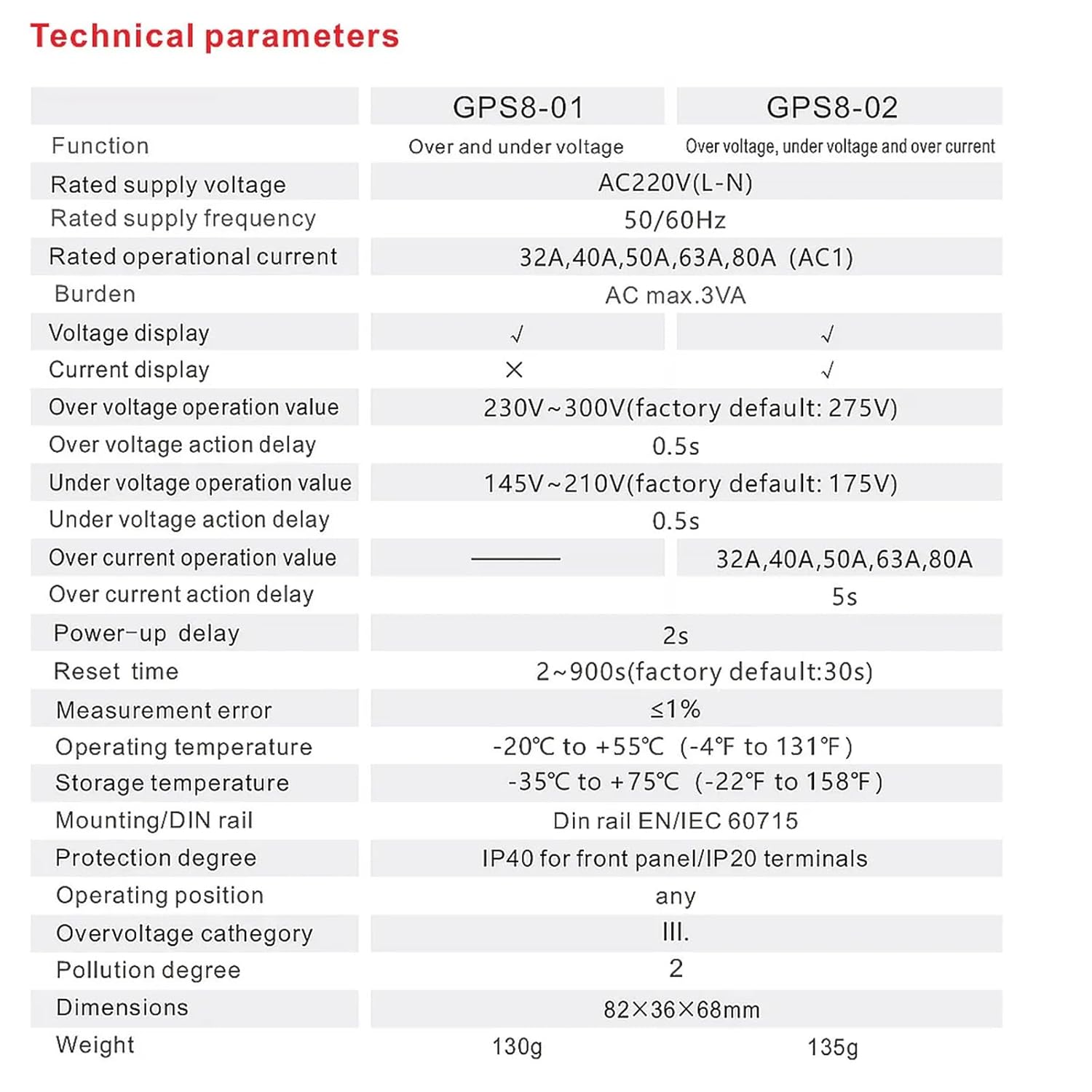
This image provides a visual representation of the technical specifications, including functions, rated supply voltage, frequency, operational current, and environmental conditions.
Dimensions:
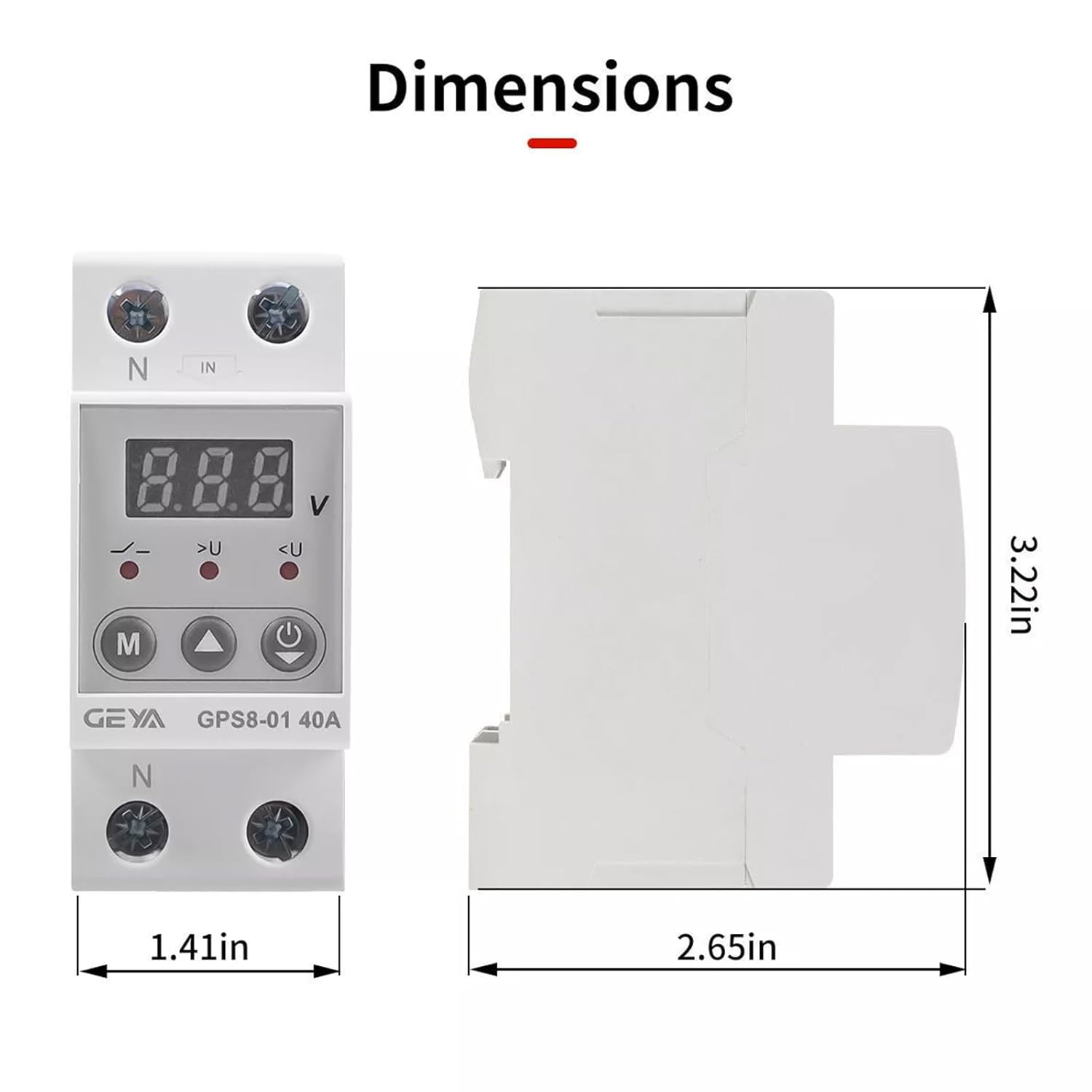
This image illustrates the physical dimensions of the device, showing its height (3.22in), width (1.41in), and depth (2.65in).
7. Warranty and Support
GEYA products are manufactured to high quality standards. For warranty information and technical support, please refer to the official GEYA website or contact your local distributor.
- Warranty: Please retain your proof of purchase for warranty claims. Specific warranty terms and conditions may vary by region.
- Technical Support: For technical assistance, installation queries, or troubleshooting beyond this manual, please reach out to GEYA customer service.


