
TIMNUT T-16
TIMNUT 4K60fps Action Camera User Manual
Model: T-16
1. Introduction
This user manual provides detailed instructions for the setup, operation, maintenance, and troubleshooting of your TIMNUT 4K60fps Action Camera. Please read this manual thoroughly before using the camera to ensure proper functionality and to maximize your experience.
The TIMNUT 4K60fps Action Camera is designed to capture high-quality video and photos in various environments, including underwater. It features 4K video recording at 60 frames per second, 48MP photo resolution, Electronic Image Stabilization (EIS), Wi-Fi connectivity, and comes with a waterproof case and essential accessories.
2. What's in the Box
Verify that all items listed below are included in your package:
- TIMNUT 4K60fps Action Camera
- 1 x 64GB SD Card
- 2 x 1350mAh Batteries
- 1 x Battery Charger
- 1 x Waterproof Case
- Various Attachments and Tethers
- 1 x Remote Control
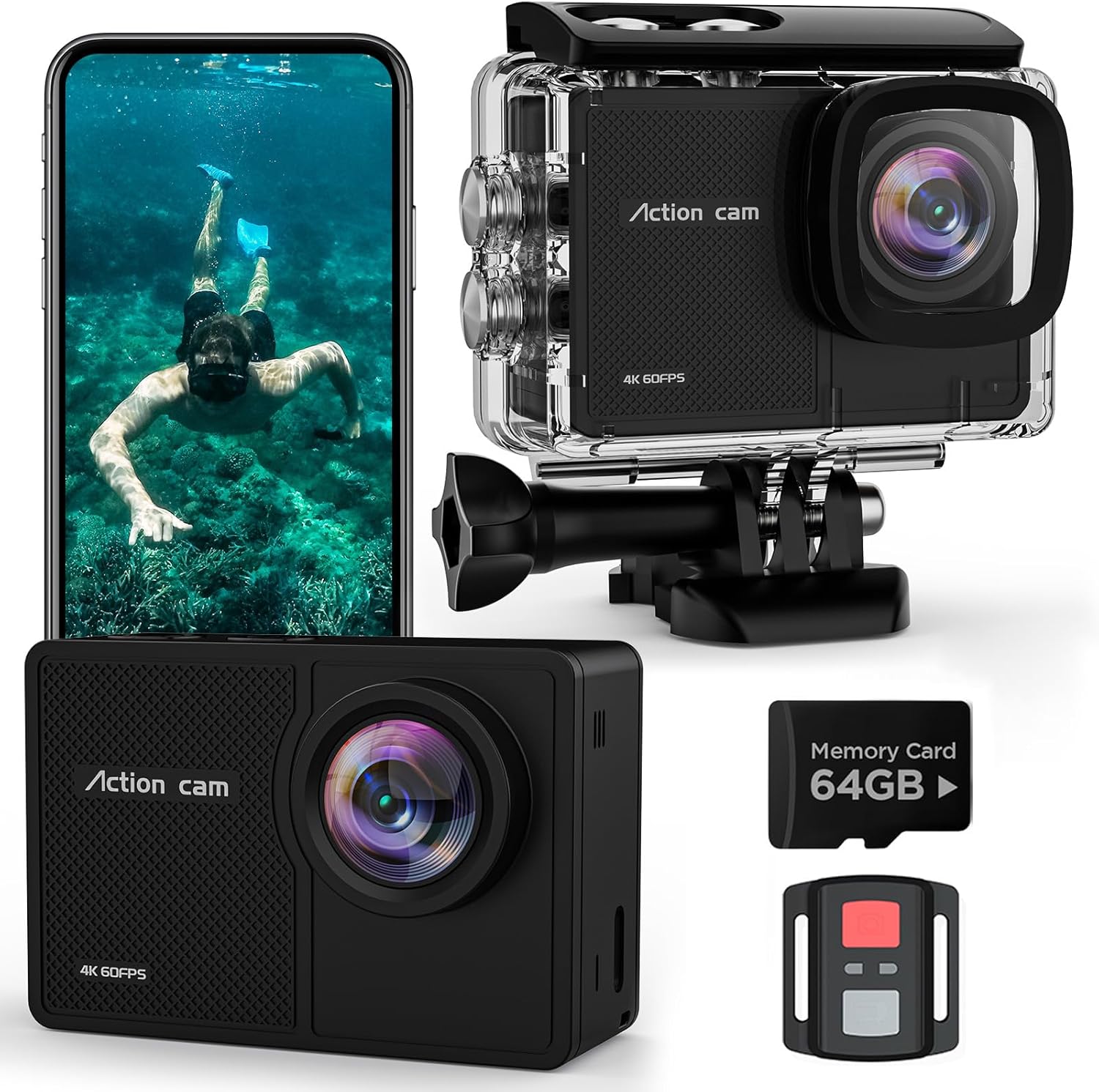
Figure 2.1: Contents of the TIMNUT Action Camera package.
3. Setup
3.1 Charging the Batteries
Before first use, fully charge both 1350mAh batteries using the provided battery charger. The charging indicator light will change once charging is complete.

Figure 3.1: Charging the camera batteries.
3.2 Inserting the SD Card and Battery
Open the battery compartment cover. Insert the 64GB SD card into the designated slot until it clicks. Then, insert a charged 1350mAh battery, ensuring correct orientation. Close the cover securely.

Figure 3.2: Inserting the SD card and battery.
3.3 Attaching the Waterproof Case
For underwater use or protection against water and dust, place the camera inside the waterproof case. Ensure the case is properly sealed before submersion. The case allows for depths up to 131 feet (40 meters).

Figure 3.3: Camera in waterproof case.
4. Operating the Camera
4.1 Power On/Off
Press and hold the Power/Mode button (usually on the front or top) for 3 seconds to turn the camera on or off. A blue indicator light will illuminate when the camera is on.
Video 4.1: Demonstrating the 4K 60FPS Action Camera in use, showcasing its video capabilities.
4.2 Switching Modes
Press the Power/Mode button repeatedly to cycle through different modes: Video, Photo, Playback, and Settings. The current mode will be displayed on the screen.
4.3 Recording Video
In Video mode, press the Shutter/OK button (usually on top) to start recording. Press it again to stop recording. The camera supports 4K resolution at 60 frames per second.
Video 4.2: A brief demonstration of the camera's video recording function.
4.4 Taking Photos
In Photo mode, press the Shutter/OK button to take a picture. The camera captures 48MP still images.

Figure 4.1: Capturing high-resolution photos with the action camera.
4.5 Wi-Fi Connectivity
To connect your camera to a smartphone or tablet via Wi-Fi:
- Ensure the camera is in Video mode.
- Long press the Up button (usually on the side) for 3 seconds to activate Wi-Fi mode. The screen will display the SSID (e.g., ActionCam_095750) and Password (e.g., 12345678).
- On your smartphone/tablet, go to Wi-Fi settings and connect to the camera's SSID.
- Open the "Fun DV" app (download from yolansin.com/download/fundv) to control the camera, view live footage, and transfer files.
- To turn off Wi-Fi, long press the Up button again.

Figure 4.2: Wi-Fi connection process for remote control and file transfer.
Video 4.3: Step-by-step guide on how to connect the camera to Wi-Fi using the mobile application.
4.6 Remote Control Operation
The included remote control allows for convenient operation from a distance. It typically has buttons for starting/stopping video recording and taking photos. Ensure the remote control feature is enabled in the camera's settings.

Figure 4.3: Using the 2.4G remote control for hands-free operation.
4.7 Advanced Features
- Electronic Image Stabilization (EIS): Improves video stability, reducing blur from camera shake.
- Wide Angle Lens: Offers a broad field of view. Adjustable settings may be available for narrower angles.
- Loop Recording: Records video continuously, overwriting the oldest files when the memory card is full.
- Slow Motion: Captures high-frame-rate video for slow-motion playback.
- Time-Lapse: Records a series of photos at set intervals to create a time-lapse video.
- Driving Mode: Automatically starts recording when the vehicle starts and stops when it turns off.
- Image Flipping: Flips the image vertically, useful when mounting the camera upside down.
- Exposure Adjustment: Manually adjust the exposure for different lighting conditions.
- White Balance Adjustment: Adjusts color temperature for accurate colors in various environments.
5. Maintenance
- Cleaning: Use a soft, lint-free cloth to clean the camera lens and screen. For the waterproof case, rinse with fresh water after saltwater use and allow to air dry.
- Storage: Store the camera in a cool, dry place away from direct sunlight and extreme temperatures. Remove batteries if storing for extended periods.
- Battery Care: Do not expose batteries to fire or extreme heat. Use only the provided charger.
- SD Card: Periodically format the SD card in the camera's settings to maintain optimal performance and prevent data corruption. Back up important files before formatting.
6. Troubleshooting
| Problem | Possible Cause / Solution |
|---|---|
| Camera does not turn on. | Battery is depleted or not inserted correctly. Ensure battery is charged and properly seated. |
| Cannot record video/take photos. | SD card is full, corrupted, or not inserted. Format the SD card (after backing up data) or replace it. |
| Wi-Fi connection issues. | Ensure Wi-Fi is enabled on the camera (long press Up button). Check Wi-Fi settings on your phone/tablet. Make sure the "Fun DV" app has necessary permissions (location, local network). |
| Poor video/photo quality. | Check resolution settings (ensure 4K60fps for video, 48MP for photos). Clean the lens. Ensure adequate lighting. EIS may be off if video is shaky. |
| Water leakage in waterproof case. | Ensure the waterproof case is properly sealed and free of debris around the seal. Check for any cracks or damage to the case. |
7. Specifications
| Feature | Detail |
|---|---|
| Model | T-16 |
| Video Resolution | 4K at 60fps |
| Photo Resolution | 48MP |
| Waterproof Depth | Up to 131ft (40m) with included case |
| Image Stabilization | Electronic Image Stabilization (EIS) |
| Connectivity | Wi-Fi |
| Screen Size | 2 inches |
| Battery Capacity | 2 x 1350mAh |
| Storage | Supports Micro SD (64GB card included) |
| Special Features | Loop Recording, Slow Motion, Driving Mode, Image Flipping, Time-Lapse, Exposure Adjustment, White Balance Adjustment, Remote Control |
| Weight | 2.26 ounces |
| Dimensions | 9.17 x 4.88 x 2.52 inches (Package) |
8. Warranty and Support
TIMNUT is committed to providing high-quality products and excellent customer service. Your TIMNUT Action Camera comes with the following support:
- 30-Day Refund: If you are not satisfied with your purchase.
- 365-Day Replacement: For product defects or accessory damage.
- 24-Hour Troubleshooting: Dedicated support for technical issues.
- Lifetime Support: Ongoing assistance for the product's lifespan.
For further assistance, please contact TIMNUT customer service. Refer to the product packaging or official website for contact details.

Figure 8.1: TIMNUT customer support and warranty details.
Related documentsT-16


Ask a question about this manual
Ask about setup, troubleshooting, compatibility, parts, safety, or missing instructions. Manuals+ will review the question and use this page’s manual context to help answer it.