Introduction
This manual provides comprehensive instructions for the safe and effective operation of your INFURTURE K2pro Karaoke Machine. The K2pro is a high-power portable Bluetooth speaker designed for various entertainment needs, featuring 350W audio output, long battery life, multiple connectivity options, and colorful lighting effects. Please read this manual thoroughly before use and retain it for future reference.
What's in the Box
- INFURTURE K2pro Karaoke Machine (Main Speaker Unit)
- 2 x Wireless Microphones
- Remote Control
- Charging Cable (Type-C)
- User Manual

Image: The INFURTURE K2pro Karaoke Machine, including the main speaker unit, two wireless microphones, and the remote control.
Product Overview
Key Features:
- 350W High Power Audio: Equipped with 5 speakers (2x 30mm treble, 2x 103mm midrange, 1x 190x114mm bass) for powerful sound.
- Extended Playtime: 30000mAh battery provides up to 15 hours of playback at 50% volume.
- Fast Charging: PD60W fast charging allows full charge in 2-3 hours.
- Multiple Interface Modes: Supports wired microphone (6.35mm), USB disk (up to 128GB), TF card, 3.5mm AUX, 3.5mm monitor mode, and OTG interface.
- Bluetooth 5.3: Ensures stable wireless connection.
- TWS System: Allows connection of two K2pro units for stereo sound.
- 360° Non-Directional Remote Control: Control various settings remotely.
- Colorful Lights & EQ Sound: Adjustable RGB lights and 3 EQ sound effects (Normal, 3D, Low Frequency).
- Emergency Power Bank: Built-in USB output (5V/1A) to charge external devices.

Image: Detailed view of the K2pro's control panel, highlighting buttons for power, mode switching, microphone connection, EQ, light control, playback, and volume adjustments.

Image: Illustration of the K2pro's diverse connectivity ports, including inputs for microphones, USB, TF card, AUX, and monitoring.
Setup
Initial Charging:
- Before first use, fully charge the K2pro speaker using the provided Type-C charging cable and a PD60W compatible power adapter (not included).
- The charging indicator will show progress and turn off when fully charged.
Microphone Setup:
- Ensure the wireless microphones have sufficient battery.
- The microphones are pre-paired with the speaker. If re-pairing is needed, refer to the "Operating Instructions" section.

Image: The K2pro speaker connected to a charger, illustrating its powerful battery and ability to act as a mobile power supply for other devices.
Operating Instructions
Power On/Off:
- Press and hold the Power button on the speaker's control panel to turn the unit on or off.
Bluetooth Connection:
- Turn on the K2pro speaker. It will automatically enter Bluetooth pairing mode.
- On your device (smartphone, tablet, etc.), enable Bluetooth and search for "K2pro" in the list of available devices.
- Select "K2pro" to connect. A voice prompt will confirm successful pairing.

Image: The K2pro in an outdoor setting, showcasing its portability and use in social gatherings.
Using Microphones:
- Turn on the wireless microphones. They should automatically connect to the speaker.
- Adjust microphone volume using the dedicated controls on the speaker or remote.
- For wired microphones, connect them to the 6.35mm interface.
TWS (True Wireless Stereo) Function:
To connect two K2pro speakers for a stereo experience:
- Ensure both K2pro speakers are powered on and not connected to any Bluetooth device.
- On one speaker, press the TWS button (often indicated by a chain link icon or "TWS" label). It will enter TWS pairing mode.
- The two speakers will automatically connect to each other. A voice prompt will confirm successful TWS pairing.
- Connect your device to one of the K2pro speakers via Bluetooth. Audio will now play through both speakers in stereo.
EQ Sound Effects:
- Press the EQ button on the speaker or remote to cycle through available sound modes: Normal Mode, 3D Mode, and Low Frequency Mode.
Controlling Lights:
- Press the Light button on the speaker or remote to change light modes or turn them off.
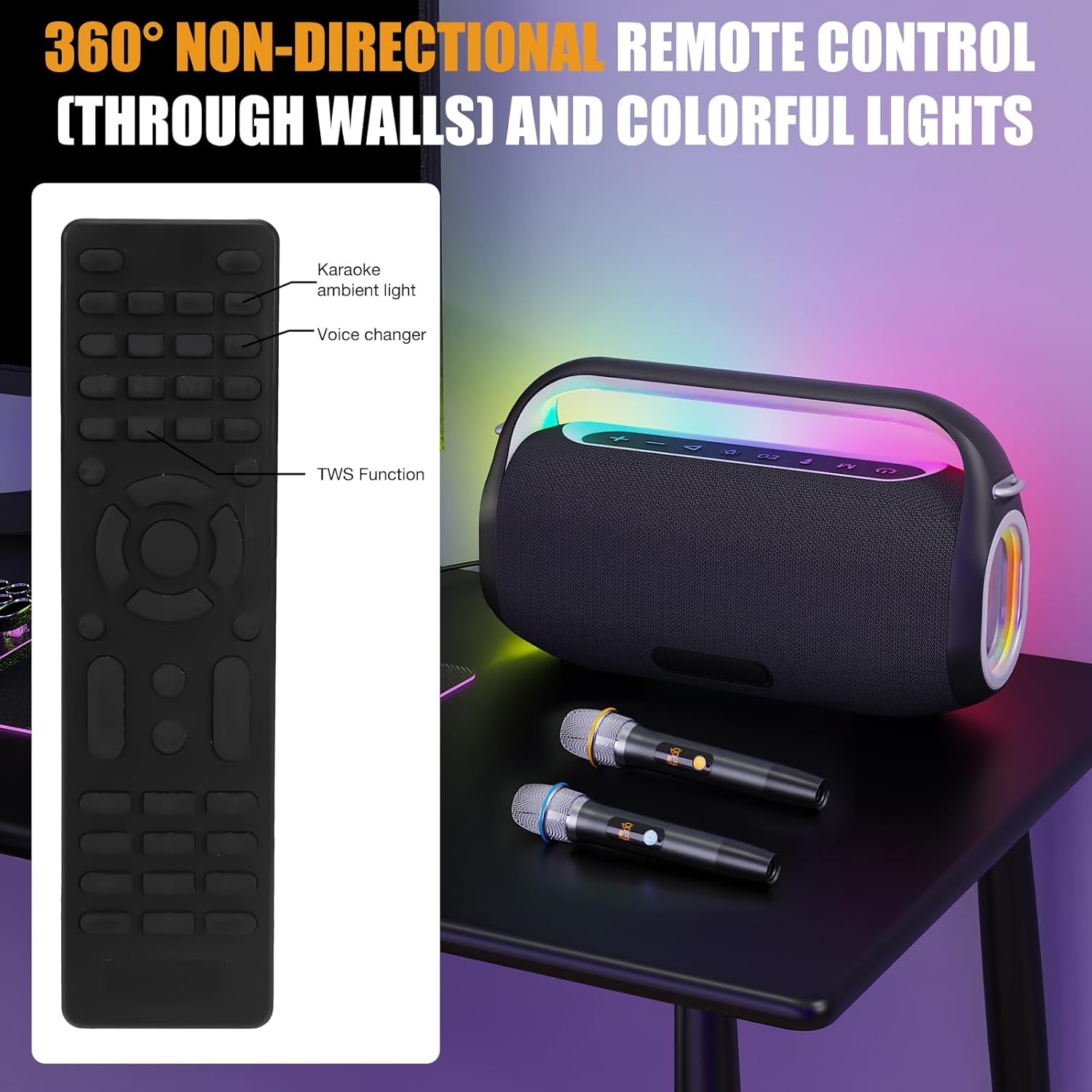
Image: The K2pro's vibrant RGB lighting in action, alongside its remote control, emphasizing the ease of remote operation.
Video Demonstration:
Video: A demonstration of the K2 Pro Professional Portable Bluetooth Speaker's sound and lighting features. This video highlights the speaker's internal components and dynamic RGB lights while playing music.
Maintenance
- Cleaning: Use a soft, dry cloth to clean the speaker and microphones. Do not use abrasive cleaners or solvents.
- Storage: Store the device in a cool, dry place away from direct sunlight and extreme temperatures.
- Battery Care: To prolong battery life, avoid fully discharging the battery frequently. Charge the device regularly, even if not in use for extended periods.
- Water Resistance: This product is not waterproof. Avoid exposure to water or excessive moisture.
Troubleshooting
| Problem | Possible Cause | Solution |
|---|---|---|
| No Power | Battery is depleted. | Charge the speaker fully. |
| Cannot connect via Bluetooth | Speaker is not in pairing mode or too far from device. | Ensure speaker is in pairing mode. Move device closer. Disconnect from other devices. |
| Microphones not working | Microphones are off or out of range. | Turn on microphones. Ensure they are charged. Move closer to speaker. |
| Sound distortion or static | Volume too high, interference, or low battery. | Reduce volume. Move away from other electronic devices. Charge the speaker. |
| TWS connection failed | Speakers already connected to other devices. | Ensure both speakers are disconnected from other devices before initiating TWS pairing. |
Specifications
| Feature | Detail |
|---|---|
| Brand | INFURTURE |
| Model Number | K2pro |
| Output Wattage | 350 Watts |
| Speaker Configuration | 5 speakers (2x 30mm treble, 2x 103mm midrange, 1x 190x114mm bass) |
| Battery Capacity | 30000mAh |
| Playtime | Up to 15 hours (at 50% volume) |
| Charging Time | 2-3 hours (with PD60W fast charging) |
| Bluetooth Version | 5.3 |
| Connectivity Technology | Bluetooth, USB, TF Card, AUX |
| Audio Input | Wired Microphone (6.35mm), Auxiliary (3.5mm), USB, TF Card |
| Emergency Power Output | 5V/1A (USB) |
| Product Dimensions | 6.5 x 19 x 11 inches |
| Item Weight | 19.86 pounds (9.03 Kilograms) |
Warranty and Support
INFURTURE products are designed and manufactured to the highest quality standards. For warranty information and customer support, please refer to the warranty card included with your product or visit the official INFURTURE website. Keep your purchase receipt as proof of purchase.
For further assistance, you may contact INFURTURE customer service through their official channels.