
Karinear NEW 23510
Karinear 12 Inch Induction Cooktop User Manual
Model: NEW 23510
Brand: Karinear
1. Introduction
This user manual provides essential information for the safe and efficient operation of your Karinear 12 Inch Induction Cooktop. Please read this manual thoroughly before installation and use, and keep it for future reference.
Important Safety Information
- Ensure the cooktop is installed by a qualified electrician due to its hard-wire connection requirement.
- Do not operate the cooktop if the ceramic glass surface is cracked or broken.
- Keep children away from the cooktop during operation and utilize the child lock function.
- Only use cookware compatible with induction cooktops (magnetic base).
- Be aware of residual heat after use; the residual heat indicator will show when the surface is hot.

Figure 1.1: Karinear 12 Inch Induction Cooktop, showcasing its sleek black ceramic glass surface and touch controls.
2. Installation and Setup
2.1 Product Dimensions and Cutout
The Karinear 12 Inch Induction Cooktop is designed for drop-in installation. Ensure your countertop cutout meets the specified dimensions for proper fit and ventilation.
- Product Dimensions: 19.7 inches (D) x 11 inches (W) x 2.4 inches (H)
- Cutout Dimensions: Refer to the diagram for precise measurements.

Figure 2.1: Detailed dimensions for installation and a wiring diagram for the 220-240V hard-wire connection.
2.2 Electrical Connection
This induction cooktop requires a 220-240V power supply and must be hard-wired. It does not come with a plug. Installation should only be performed by a qualified electrician to ensure safety and compliance with local electrical codes.
- Power Requirement: 220-240V, 3500W.
- Connection Type: Hard-wire (no plug).
- Refer to the wiring diagram in Figure 2.1 for correct connections.
3. Operating Instructions
The Karinear Induction Cooktop features digital sensor touch controls for easy operation.
3.1 Power Levels
The cooktop offers 9 power levels (1-9) to accommodate various cooking needs, from simmering to rapid boiling. The two burners have individual power settings: 1500W and 1800W.
3.2 Boost Function
The boost function temporarily increases the power of a burner to 2000W, ideal for quickly boiling water or stir-frying. This function helps save time during cooking.
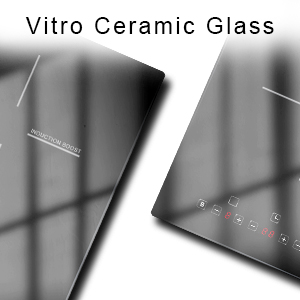
Figure 3.1: The boost function increases power for faster cooking.
3.3 Timer Function
Set the timer for 1 to 99 minutes. The cooktop will automatically shut down the selected burner(s) once the countdown is complete, providing convenience and preventing overcooking.

Figure 3.2: The timer function allows for precise cooking times, and the child lock ensures safety.
3.4 Child Lock
Activate the child lock to disable all control buttons, preventing accidental operation. This feature is particularly useful in households with children, enhancing safety.
3.5 Pause Function
The pause function allows you to temporarily halt cooking without losing your current settings. Simply press the pause button, and resume cooking by pressing it again.
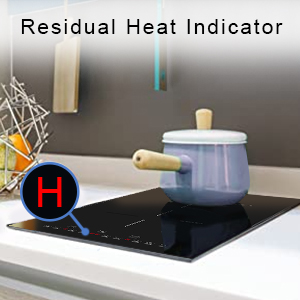
Figure 3.3: The pause function provides convenience during cooking.
3.6 Cookware Compatibility
Induction cooktops require cookware with a magnetic base. Compatible materials include cast iron, stainless steel, and enameled iron. Non-compatible materials include aluminum, ceramic, copper, glass, and cookware with a concave base.

Figure 3.4: Guide to compatible and incompatible cookware for induction cooktops.
4. Care and Maintenance
The Karinear Induction Cooktop features a high-quality vitroceramic glass surface that is easy to clean and resistant to scratches.
4.1 Cleaning the Cooktop Surface
- Allow the cooktop to cool completely before cleaning.
- Use a soft cloth or sponge with a mild detergent and warm water.
- For stubborn stains, use a ceramic cooktop cleaner and the provided scraper.
- Wipe dry with a clean cloth to prevent water spots.
- Avoid abrasive cleaners, scouring pads, or harsh chemicals that can damage the surface.

Figure 4.1: Cleaning the vitroceramic glass surface is simple and effective.
5. Troubleshooting
If you encounter issues with your Karinear Induction Cooktop, refer to the following common problems and solutions. For more complex issues, please contact customer support.
| Problem | Possible Cause | Solution |
|---|---|---|
| Cooktop does not turn on. | No power supply; child lock activated. | Check circuit breaker; deactivate child lock. |
| "E" error code displayed. | Internal error; power fluctuation. | Turn off the cooktop, wait a few minutes, then restart. If persistent, contact support. |
| Cooktop not heating. | Incompatible cookware; no cookware detected. | Ensure cookware is induction-compatible and properly centered on the burner. |
| Overheating protection activated. | Cooktop temperature too high. | Remove cookware, turn off the cooktop, and allow it to cool down. |
6. Product Specifications
| Feature | Detail |
|---|---|
| Brand | Karinear |
| Model Number | NEW 23510 |
| Product Dimensions | 19.7 x 11 x 2.4 inches |
| Item Weight | 10.93 pounds |
| Heating Elements | 2 (Induction Burners) |
| Power Source | Electric (Hard-wired) |
| Voltage | 220-240V |
| Total Power | 3500W (1500W + 1800W, with 2000W boost) |
| Control Type | Digital Sensor Touch |
| Surface Material | Vitroceramic Glass |
| Special Features | 9 Power Levels, 99-Minute Timer, Child Lock, Boost Function, Pause Function, Overheat Protection, Residual Heat Indicator, Automatic Shut-Off |
| Country of Origin | China |
7. Warranty and Support
For warranty information, technical assistance, or any questions regarding your Karinear Induction Cooktop, please contact Karinear customer support. Details for contacting support are typically found on the product packaging or the official Karinear website.
Please have your model number (NEW 23510) and purchase date available when contacting support.

Figure 7.1: Karinear customer support is available to assist with product inquiries.
Related documentsNEW 23510

Ask a question about this manual
Ask about setup, troubleshooting, compatibility, parts, safety, or missing instructions. Manuals+ will review the question and use this page’s manual context to help answer it.