
1. Introduction and Overview
The INIU 45W Power Bank (Model P55L) is a compact and powerful portable charger designed for fast and efficient charging of your electronic devices. Featuring a 10000mAh capacity and a built-in USB-C cable, it offers convenience and high-speed charging for a wide range of smartphones, tablets, and other gadgets. Its slim and lightweight design makes it an ideal companion for travel and daily use.

2. What's in the Box
Please check the package contents to ensure all items are present:
- INIU 10000mAh Portable Power Bank with Built-in Cable x 1
- USB-C Cable x 1
- User Manual x 1
3. Product Features
- 45W Full-Speed Charging: Delivers up to 45W output, supporting PD, QC, and other fast-charging protocols for rapid device charging.
- Built-in USB-C Cable: Integrated USB-C cable for convenient charging of devices and recharging the power bank itself, also serving as a lanyard.
- Compact and Lightweight: 25% smaller and 15% lighter than similar capacity power banks, making it highly portable.
- 10000mAh Capacity: Provides ample power for multiple charges of smartphones and other small devices.
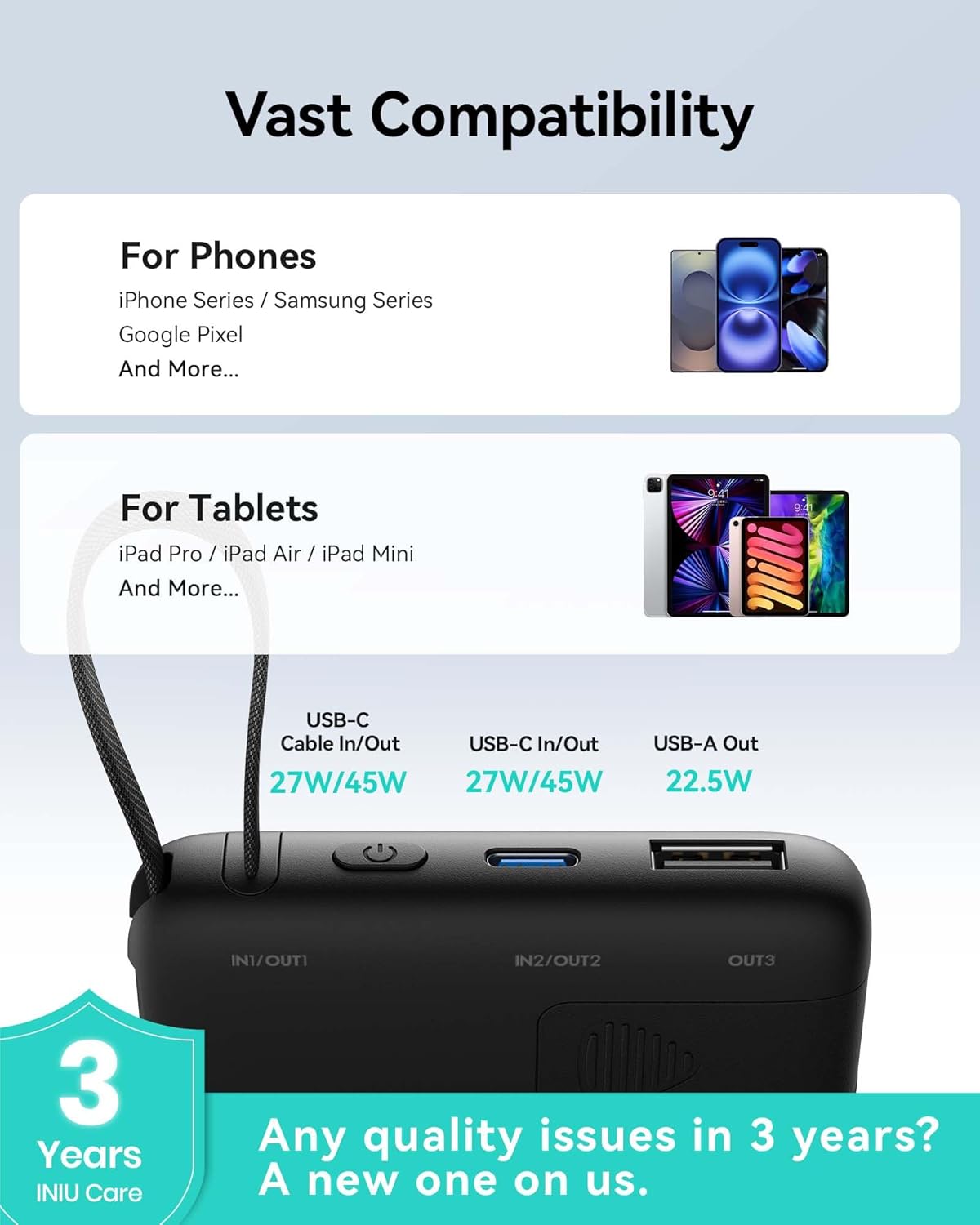
- Vast Compatibility: Compatible with a wide range of devices from smartphones to tablets and small gadgets like AirPods.
- Digital Display: Real-time percentage display for precise battery level monitoring.
- Multi-Device Charging: Equipped with USB-C (in/out) and USB-A (out) ports to charge up to three devices simultaneously.


4. Setup
Before first use, it is recommended to fully charge your INIU 45W Power Bank. This ensures optimal performance and battery longevity. Refer to the "Charging the Power Bank" section for detailed instructions.
5. Operating Instructions
Power On/Off
The power bank automatically turns on when a device is connected for charging. To manually check the battery level or activate charging, briefly press the power button located on the side of the device.
Checking Battery Level
The digital display on the front of the power bank shows the remaining battery percentage in real-time. Simply press the power button once to activate the display.
Using the Built-in USB-C Cable
The integrated USB-C cable can be pulled out from its slot and used directly to charge compatible USB-C devices. It also serves as a convenient lanyard for carrying the power bank.
Using Additional Ports
In addition to the built-in cable, the power bank features a dedicated USB-C input/output port and a USB-A output port. These ports allow you to charge multiple devices simultaneously or use your own cables.
6. Charging the Power Bank
To recharge your INIU 45W Power Bank:
- Connect the built-in USB-C cable or an external USB-C cable to the power bank's USB-C input port.
- Plug the other end of the cable into a compatible USB wall charger (not included). For fastest recharging, use a 27W or higher USB-C PD charger.
- The digital display will show the charging percentage increasing as the power bank recharges.
- Once the display shows 100%, the power bank is fully charged and ready for use.

7. Charging Other Devices
The INIU 45W Power Bank can charge a variety of devices:
- Using the Built-in USB-C Cable: Pull out the integrated USB-C cable and connect it directly to your USB-C compatible smartphone, tablet, or other device.
- Using the USB-C Port: Connect your device to the power bank's USB-C port using a compatible USB-C to USB-C cable. This port supports both input and output.
- Using the USB-A Port: Connect your device to the power bank's USB-A port using a compatible USB-A to USB-C/Lightning/Micro USB cable.
- Trickle-Charging Mode: For small devices like wireless earbuds or smartwatches, the power bank automatically adapts to a trickle-charging mode to optimize power delivery without affecting battery health.

8. Compatibility
The INIU 45W Power Bank offers broad compatibility with a wide range of electronic devices, including but not limited to:
| Device Type | Examples |
|---|---|
| Smartphones | iPhone Series (16, 15, etc.), Samsung Galaxy Series (S24, S23, etc.), Google Pixel, Huawei, Xiaomi, etc. |
| Tablets | iPad Pro, iPad Air, iPad Mini, Samsung Galaxy Tab, etc. |
| Small Devices | AirPods, Bluetooth headphones, smartwatches, fitness trackers, etc. |
9. Specifications
| Feature | Detail |
|---|---|
| Model Number | P55L |
| Battery Capacity | 10000 Milliamp Hours (mAh) |
| Battery Type | Lithium Polymer |
| Product Dimensions | 4.4 x 2.7 x 0.7 inches |
| Item Weight | 7.8 ounces |
| Input (USB-C) | 5V/3A, 9V/3A, 12V/2.25A, 15V/1.8A (27W max) |
| Output (USB-C) | 5V/3A, 9V/3A, 10V/2.25A, 12V/3A, 15V/3A (45W max) |
| Output (USB-A) | 5V/3A, 9V/2A, 10V/2.25A, 12V/1.5A (22.5W max) |
| Color | Black |
| Special Features | Lightweight, Built-in Cable, Fast Charging, Pocket Size |
10. Maintenance
To ensure the longevity and optimal performance of your INIU 45W Power Bank, follow these maintenance guidelines:
- Cleaning: Use a soft, dry cloth to clean the surface of the power bank. Avoid using harsh chemicals or abrasive materials.
- Storage: Store the power bank in a cool, dry place away from direct sunlight and extreme temperatures.
- Battery Care: For long-term storage, it is recommended to charge the power bank to about 50-70% every three months to maintain battery health.
- Avoid Physical Damage: Do not drop, hit, or expose the power bank to strong impacts.
11. Troubleshooting
If you encounter any issues with your INIU 45W Power Bank, please refer to the following common problems and solutions:
- Power Bank Not Charging:
- Ensure the charging cable is securely connected to both the power bank and the wall charger.
- Try a different wall charger and cable to rule out faulty accessories.
- Verify the wall charger provides sufficient power (e.g., 27W USB-C PD for optimal speed).
- Device Not Charging from Power Bank:
- Ensure the power bank has sufficient charge (check the digital display).
- Verify the charging cable is securely connected to both the power bank and your device.
- Try a different cable or port on the power bank.
- Ensure your device is compatible with the power bank's output specifications.
- Slow Charging:
- Ensure both the power bank and your device support fast charging protocols (PD, QC).
- Use a high-quality, fast-charging compatible cable.
- Charging multiple devices simultaneously may reduce individual charging speeds.
- Digital Display Not Working:
- Press the power button to activate the display.
- If the display remains off, the power bank might be completely depleted or require a reset (try connecting it to a charger for a few minutes).
If the issue persists after trying these steps, please contact INIU customer support for further assistance.
12. Safety Information
Please read and follow these safety precautions to prevent damage to the product or injury to yourself:
- Do not expose the power bank to extreme temperatures (above 60°C/140°F or below 0°C/32°F).
- Do not expose the power bank to water, moisture, or high humidity.
- Do not disassemble, modify, or attempt to repair the power bank yourself.
- Keep the power bank away from flammable materials and direct sunlight.
- Do not use the power bank if it is damaged, swollen, or leaking.
- Keep out of reach of children.
- Dispose of the power bank responsibly according to local regulations.
13. Warranty and Support
INIU stands behind the quality of its products. The INIU 45W Power Bank comes with an industry-leading 3-Year INIU Care warranty. If you experience any quality issues with your product within this period, INIU will provide a new replacement.
For warranty claims, technical support, or any other inquiries, please visit the official INIU store or contact their customer service directly. You can find more information and contact details on the INIU Amazon Store.


