
1. Introduction
The 1Mii E35 Open Ear Headphones are designed for comfort and awareness, featuring a unique open-ear design that allows you to stay connected to your surroundings while enjoying audio. These wireless sports earbuds offer a secure and comfortable fit with rotatable ear hooks, extended playtime, clear call quality with ENC noise reduction, and IPX4 waterproofing, making them suitable for various activities.
2. What's in the Box
Verify that all items are present in the package:
- Wireless Stereo Headset (Earbuds) x1
- Charging Case x1
- USB Type-C Charging Cable x1
- User Manual x1

3. Product Features
- Snug Fit & All-Day Comfort: Features 120-degree rotatable ear hooks made of soft, skin-friendly material for a secure and comfortable fit without ear canal pain. Ideal for various sports and activities.
- Open Listening, Maximum Awareness: Utilizes air conduction technology to keep you aware of your surroundings, enhancing safety during outdoor activities and allowing interaction with others.
- Extended Playtime: Offers up to 15 hours of listening on a single charge, with a total of 60 hours of usage when combined with the charging case.
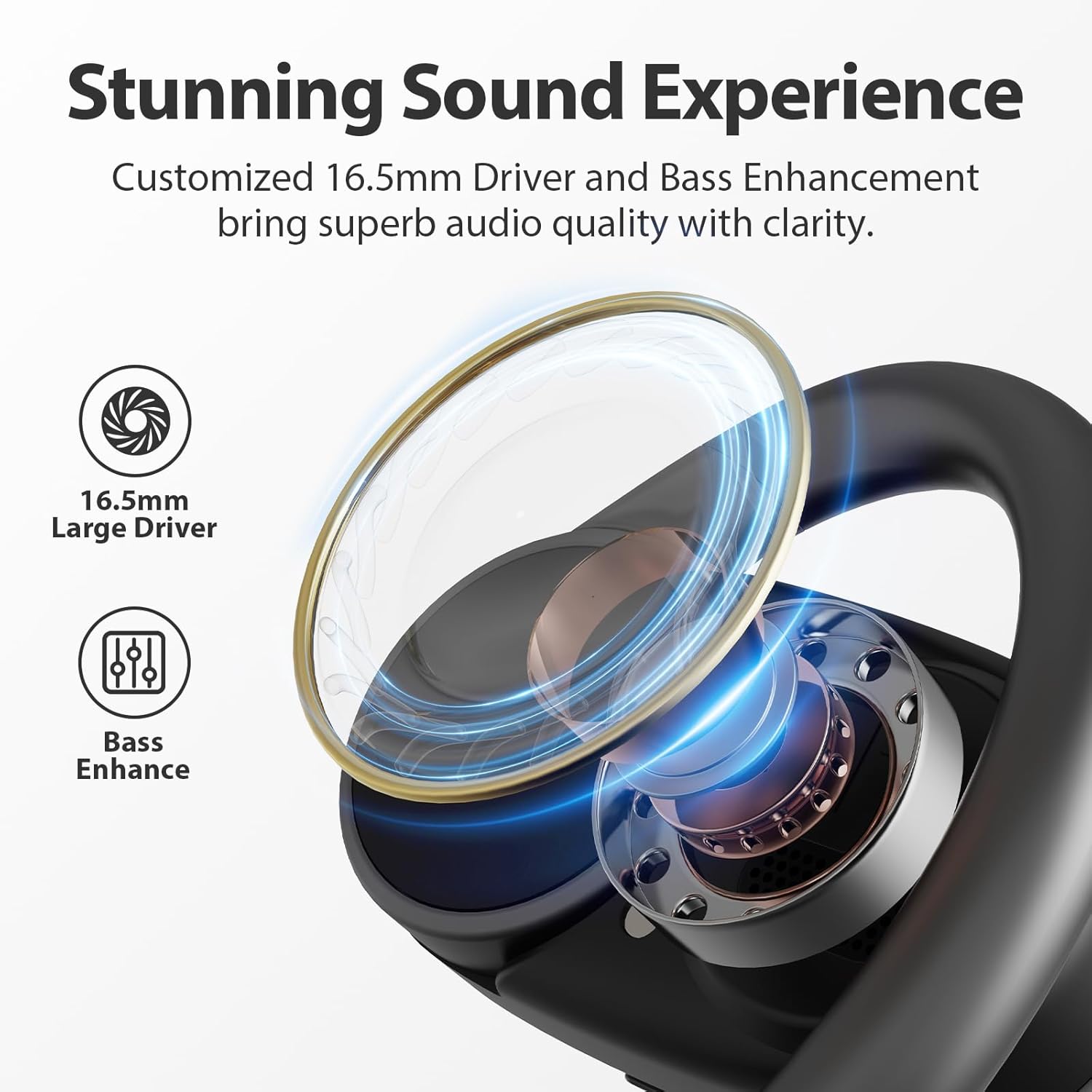
- Clear Calls & Premium Sound: Each earbud includes dual ENC (Environmental Noise Cancellation) microphones for clear voice pickup in noisy environments. Dual large 16.5mm bio-diaphragm dynamic drivers deliver robust bass and balanced stereo audio.
- IPX4 Waterproof: Designed with critically sealed areas for water resistance, making them perfect for sweaty, high-intensity sports without worrying about water or sweat damage.


4. Setup
4.1 Initial Charging
Before first use, fully charge the earbuds and the charging case. Connect the USB Type-C cable to the charging case and a power source. The indicator light on the case will show charging status. A full charge provides up to 60 hours of total playtime.
4.2 Wearing the Earbuds
Follow these steps for a secure and comfortable fit:
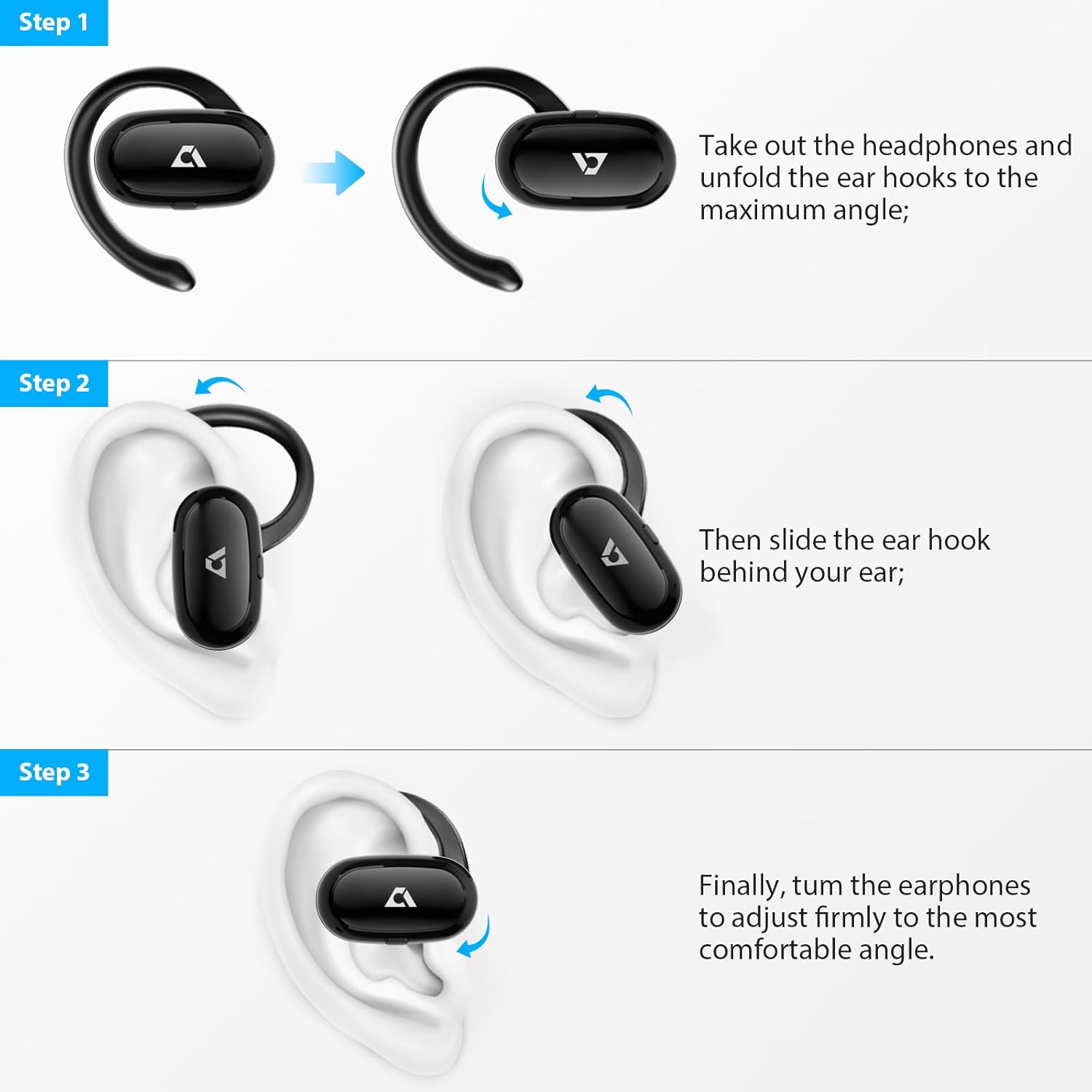
- Take out the headphones from the charging case and unfold the ear hooks to their maximum angle.
- Slide the ear hook behind your ear.
- Finally, rotate the earphones to adjust them firmly to the most comfortable angle for your ear.

5. Operating Instructions
5.1 Power On/Off
- Power On: Open the charging case, and the earbuds will automatically power on and connect to the last paired device.
- Power Off: Place the earbuds back into the charging case and close the lid. They will automatically power off and begin charging. Alternatively, press and hold the control button on either earbud for 5 seconds to manually power off.
5.2 Bluetooth Pairing
- Open the charging case. The earbuds will enter pairing mode, indicated by a flashing LED light.
- On your device (smartphone, tablet, etc.), enable Bluetooth and search for available devices.
- Select "1Mii E35" from the list of devices. Once connected, the LED indicator on the earbuds will turn off, and you will hear a confirmation tone.
- To clear pairing records, press and hold the control button on either earbud for 10 seconds.
5.3 Touch Controls
The 1Mii E35 earbuds feature intuitive touch controls. Refer to the diagram below for specific functions:

| Action | Left Earbud | Right Earbud |
|---|---|---|
| Play/Pause | 1x Tap | 1x Tap |
| Previous Track | 2x Tap | N/A |
| Next Track | N/A | 2x Tap |
| Voice Assistant | 2s Hold | N/A |
| Game Mode / Music Mode | N/A | 2s Hold |
| Pick up / Hang up a call | 1x Tap | 1x Tap |
| Reject Incoming Call | 1s Hold | 1s Hold |
| Power Off | 5s Hold | 5s Hold |
| Clear Pairing | 10s Hold | 10s Hold |
6. Maintenance
6.1 Cleaning
- Regularly clean the earbuds and charging case with a soft, dry, lint-free cloth.
- Do not use harsh chemicals, cleaning solvents, or strong detergents.
- Ensure charging contacts on both earbuds and case are clean and dry to prevent charging issues.
6.2 Storage
- Store the earbuds in their charging case when not in use to protect them and keep them charged.
- Avoid storing the device in extreme temperatures (hot or cold) or in dusty/humid environments.
7. Troubleshooting
7.1 No Sound or Intermittent Connection
- Ensure both earbuds are charged.
- Check if the earbuds are properly paired with your device. If not, try re-pairing.
- Move closer to your device to avoid interference or range issues.
- Try resetting the earbuds by clearing the pairing records (10s hold on control button) and re-pairing.
7.2 Earbuds Not Charging
- Ensure the charging cable is securely connected to both the case and the power source.
- Verify that the charging contacts on the earbuds and inside the case are clean and free of debris.
- Try using a different USB-C cable or power adapter.
7.3 Poor Call Quality
- Ensure the microphones are not obstructed.
- Move to a quieter environment if possible, as extreme background noise can affect call clarity despite ENC.
- Check your device's network connection.
8. Specifications
| Feature | Detail |
|---|---|
| Model Name | E35 |
| Brand | 1Mii |
| Connectivity Technology | Bluetooth, Wireless |
| Wireless Communication Technology | Bluetooth 5.0 |
| Ear Placement | Open Ear |
| Form Factor | Open Ear |
| Audio Driver Size | 16.5 Millimeters |
| Audio Driver Type | Dynamic Driver |
| Battery Life (Single Charge) | Up to 15 Hours |
| Total Playtime (with Charging Case) | Up to 60 Hours |
| Water Resistance Level | IPX4 Water Resistant |
| Noise Control | None (Open Ear Design) |
| Control Method | Remote (Touch Controls) |
| Material (Earhooks) | Silicone |
| Item Weight | 7 ounces |
| Package Dimensions | 5.31 x 3.98 x 1.65 inches |
9. Warranty and Support
For warranty information, technical support, or customer service inquiries, please refer to the contact details provided in your product packaging or visit the official 1Mii website. Keep your purchase receipt for warranty claims.
