
AMOROM Hidden Camera Detectors
Contents
AMOROM 5-in-1 Hidden Camera Detector User Manual
Brand: AMOROM
Model: Hidden Camera Detectors
1. Introduction
The AMOROM 5-in-1 Hidden Camera Detector is a multi-functional device engineered to protect your privacy and security. This compact and portable detector integrates five essential modes: wireless signal detection, infrared detection, magnetic detection, a powerful flashlight, and an anti-theft alarm. It is designed to help users quickly and accurately locate hidden cameras, GPS trackers, and audio bugs in various environments, ensuring personal safety and confidentiality.

Figure 1: AMOROM 5-in-1 Hidden Camera Detector
2. Key Features
- Multi-functional Design: Combines wireless signal detection, infrared detection, magnetic detection, flashlight, and anti-theft alarm.
- Adjustable Sensitivity: Five sensitivity levels for precise detection range customization.
- High-performance Detection: Advanced technology ensures reliable detection of hidden surveillance devices.
- Anti-Theft Mode: Triggers alarm or vibration upon movement, ideal for securing personal belongings or entry points.
- Wide Application: Suitable for hotels, accommodations, public restrooms, changing rooms, offices, and personal spaces.
- Simple Operation & Portability: User-friendly interface with a lightweight and compact design for convenient carrying.
- Long-lasting Battery Life: Equipped with a rechargeable battery for extended use.

Figure 2: Overview of Detector Functions
3. Package Contents
Please check the package contents upon unboxing to ensure all items are present:
- AMOROM 5-in-1 Hidden Camera Detector (White)
- Type-C Charging Cable
- Lanyard
- User Manual

Figure 3: Items included in the package
4. Setup Guide
4.1 Initial Charging
Before first use, fully charge the detector using the provided Type-C charging cable. Connect the cable to the detector's charging port and a compatible USB power adapter (not included). The device features a built-in 3.7V non-detachable polymer battery. Avoid exposing the product or battery to direct sunlight, fire, or high-temperature environments.
4.2 Power On/Off
To power on the device, press and hold the power button for 3-5 seconds until the indicator lights illuminate. To power off, press and hold the power button again until the lights turn off.
5. Operating Modes
5.1 Wireless Signal Detection
This mode detects wireless signals emitted by hidden cameras, audio bugs, and other transmitting devices. It operates within a frequency range of 1MHz-6.5GHz and offers 5 sensitivity levels to adjust the detection range.
- Turn on the device.
- Adjust sensitivity: Start with high sensitivity to confirm the general direction of a signal.
- Reduce sensitivity: Gradually decrease sensitivity to narrow down the detection area and pinpoint the exact location of the hidden equipment.

Figure 4: Wireless Signal Detection Process
5.2 Infrared (RF) Detection
This mode is specifically designed to detect hidden camera lenses by emitting an infrared beam. When the beam hits a camera lens, it reflects a red dot, making the hidden camera visible.
- Activate infrared mode (refer to user manual for specific button).
- Turn off other light sources in the room for optimal visibility.
- Scan the area slowly, looking through the detector's viewing window for any reflective red dots.
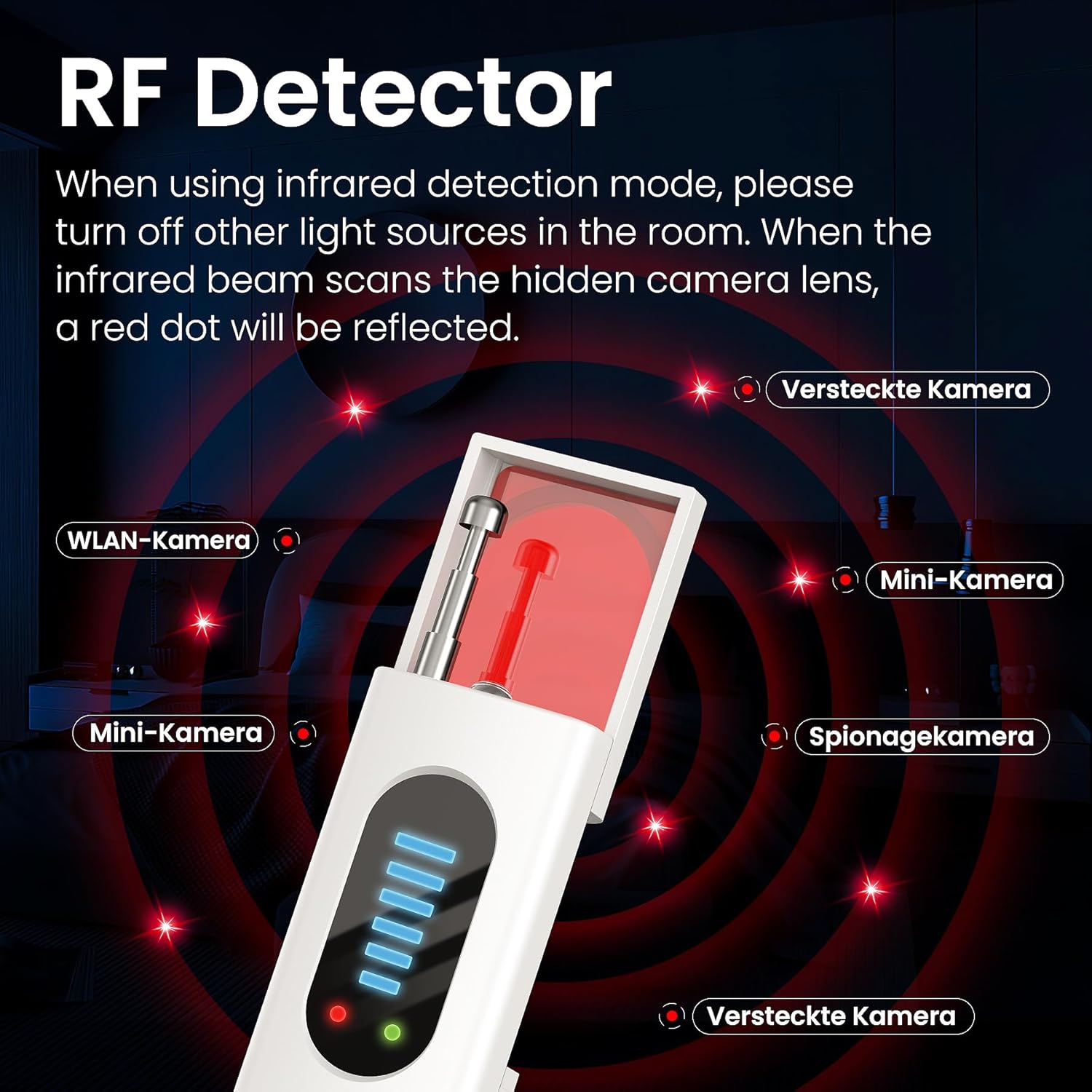
Figure 5: Infrared Detection for Camera Lenses
5.3 Magnetic Detection (GPS Tracker Finder)
The magnetic detection mode helps locate GPS trackers and other magnetic surveillance devices. When the detector is brought close to a magnetic device, it will trigger an alarm.
- Activate magnetic detection mode.
- Move the detector slowly over surfaces where a GPS tracker might be hidden, such as under a car, or within furniture.
- Listen for the alarm sound, indicating the presence of a magnetic device.

Figure 6: Using Magnetic Detection to Find GPS Trackers
5.4 Flashlight
The built-in flashlight provides illumination in dark environments, serving as a convenient backup light source or to aid in visual inspections during detection.
5.5 Anti-Theft Mode
This innovative mode acts as a personal alarm. When activated, the detector will alarm or vibrate if it detects movement, alerting you to potential theft or unauthorized access.
- Activate anti-theft mode.
- Hang the detector on a door handle, bag, or place it near valuables.
- The device will trigger an alarm or vibrate if moved.

Figure 7: Anti-Theft Alarm and Flashlight Features
6. Maintenance and Care
To ensure the longevity and optimal performance of your AMOROM detector, please follow these maintenance guidelines:
- Cleaning: Wipe the device with a soft, dry cloth. Do not use abrasive cleaners or solvents.
- Storage: Store the detector in a cool, dry place away from direct sunlight and extreme temperatures.
- Battery Care: Recharge the battery regularly, even if not in frequent use, to maintain battery health. Avoid fully discharging the battery for extended periods.
- Water Resistance: The product has no waterproof function and cannot be soaked in water. Avoid exposure to liquids.
7. Troubleshooting
| Problem | Possible Cause | Solution |
|---|---|---|
| Device does not power on. | Low battery; Power button not held long enough. | Charge the device fully; Press and hold the power button for 3-5 seconds. |
| Inaccurate signal detection. | Sensitivity too high/low; Interference from other devices. | Adjust sensitivity levels; Move away from strong signal sources like Wi-Fi routers. |
| Infrared detection not showing red dots. | Too much ambient light; Camera lens not reflective. | Dim room lights; Ensure direct line of sight to potential camera lenses. |
| Anti-theft alarm not triggering. | Insufficient movement; Mode not activated correctly. | Ensure the device is placed where movement is significant; Re-activate the mode. |
8. Technical Specifications
| Specification | Value |
|---|---|
| Product Dimensions | 5 x 3 x 3 inches |
| Item Weight | 1.76 ounces |
| Item Model Number | Hidden Camera Detectors |
| Brand | AMOROM |
| Compatible Devices | Hidden Camera Detectors |
| Frequency Bands Supported | 1 MHz - 6.5 GHz, 34.7 GHz, 24.125 GHz, 35.5 GHz |
| Power Source | Corded Electric (Rechargeable Battery) |
| Display Type | LED |
| Country of Origin | China |
9. Warranty Information
AMOROM products are manufactured to the highest quality standards. This product comes with a standard manufacturer's warranty against defects in materials and workmanship. Please retain your proof of purchase for warranty claims. For specific warranty terms and conditions, refer to the documentation provided with your purchase or contact customer support.
10. Customer Support
For any questions, technical assistance, or support regarding your AMOROM 5-in-1 Hidden Camera Detector, please contact our customer support team:
- Email: feimingu@outlook.com (from product data)
- Phone: +48223001962 (from product data)
- Online: Visit the official AMOROM store on Amazon for FAQs and additional resources.
Our team is dedicated to providing prompt and helpful assistance to ensure your satisfaction.
Documents and downloads
Ask a question about this manual
Ask about setup, troubleshooting, compatibility, parts, safety, or missing instructions. Manuals+ will review the question and use this page’s manual context to help answer it.