
1. Safety Information
Please read all instructions carefully before assembly and use. Keep this manual for future reference.
- Weight Limits: Do not exceed the maximum weight recommendation of 180 lbs (81.6 kg) on the tabletop.
- Pinch Points: Exercise caution when operating the lift-top mechanism to avoid pinching fingers or objects.
- Assembly: Ensure all components are securely fastened according to the assembly guide. Loose parts can cause instability.
- Electrical Safety: Only use the integrated power outlets and USB ports for compatible devices. Do not overload the outlets.
- Indoor Use Only: This product is designed for indoor use. Do not expose to outdoor elements.
2. Setup and Assembly
2.1 Unpacking and Inspection
Carefully remove all components from the packaging. Verify that all parts listed in the included assembly guide are present and undamaged. If any parts are missing or damaged, contact customer support before proceeding.
2.2 Assembly Instructions
Refer to the dedicated Assembly Guide included with your product for detailed, step-by-step instructions. It is recommended that two people perform the assembly to ensure stability and ease of construction.
- Recommended Tools: A hammer and screwdriver are recommended for assembly. An electric screwdriver can save time.
- Lay all accessories flat on the floor before beginning assembly to easily identify each part.
- Follow the diagrams and instructions precisely to ensure correct and safe assembly.
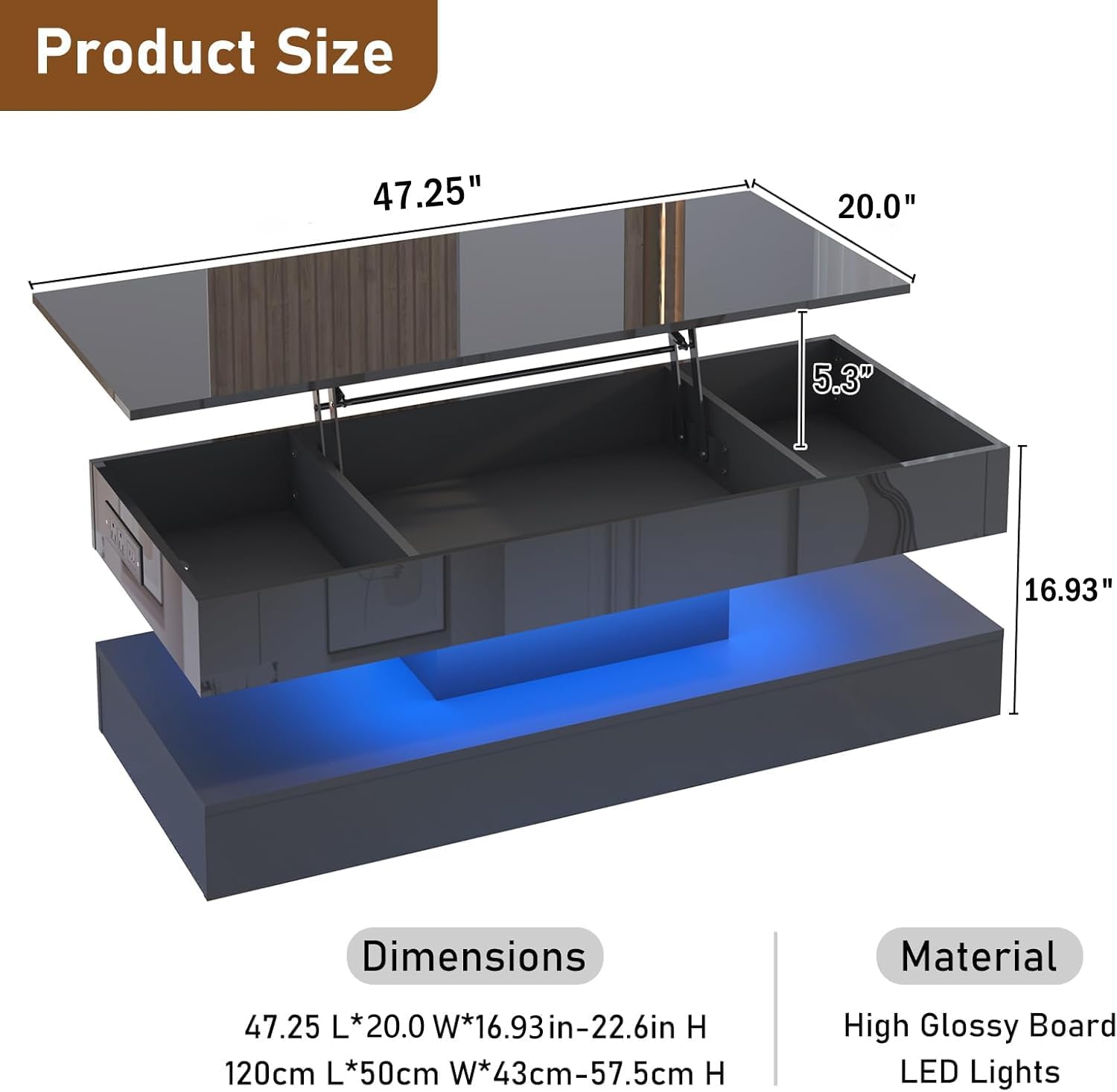
Image: Product dimensions. The table measures 47.25 inches (L) x 20.0 inches (W) x 16.93 inches (H), with the lift-top extending up to 5.3 inches.
3. Operating Instructions
3.1 Lift-Top Mechanism
The coffee table features an advanced metal gas support lifting mechanism, allowing the tabletop to be smoothly raised and lowered. The lifting range is approximately 0 to 5.3 inches (0 to 13.5 cm).
- To raise the tabletop, gently pull it upwards. The gas supports will assist in the lifting motion.
- To lower the tabletop, gently push it downwards until it rests in the closed position.
- When the lift-top is raised, it provides a convenient surface for dining, working, or gaming. When closed, it conceals a storage compartment.

Image: The coffee table with its lift-top mechanism extended, showing the elevated surface and internal storage compartments.
3.2 Smart APP RGB LED System
The integrated LED lighting system can be controlled via a mobile application, offering extensive customization options.
- APP Control: Download the designated mobile application (refer to the LED system's specific instructions for app name and download details).
- Connectivity: Connect your mobile device directly to the RGB LED lighting system via Bluetooth.
- Features: The app provides access to over 70,000 colors, 30 flashing modes, and a timing function. The LED lights can also change rhythmically with sound and music.

Image: Control options for the LED lighting system, illustrating both remote and mobile application interfaces for color and mode selection.
3.3 Integrated Power Outlet
The coffee table includes a desktop power strip for convenient charging of electronic devices.
- Outlets: Features 2 AC power outlets (125V/15A), 1 Type-C port (5V/3A), and 2 USB ports (5V/2A).
- Power Cord: A 6.5-foot (approximately 2-meter) power cord is provided for connection to a wall outlet.
- Usage: Ideal for charging laptops, mobile phones, game consoles, and other small electronic devices.

Image: Detail of the integrated power outlet, highlighting the AC, Type-C, and USB charging ports.
4. Maintenance
4.1 Cleaning
- The high-gloss surface is waterproof and scratch-resistant.
- Wipe the surface with a soft, damp cloth. Avoid abrasive cleaners or harsh chemicals that could damage the finish.
- For stubborn marks, use a mild, non-abrasive cleaner specifically designed for high-gloss furniture.
4.2 General Care
- Avoid placing hot items directly on the surface; use coasters or protective mats.
- Do not drag heavy objects across the tabletop to prevent scratches.
- Periodically check all screws and fasteners to ensure they remain tight. Retighten if necessary.
5. Troubleshooting
- Lift-Top Mechanism Issues: If the lift-top mechanism feels stiff or does not operate smoothly, ensure no obstructions are present in the lifting path. Check that all assembly screws related to the mechanism are securely tightened.
- LED Lights Not Working: Verify that the power cord is securely plugged into both the table and a functional wall outlet. Check the mobile app connection and settings.
- Power Outlets Not Functioning: Ensure the table's power cord is properly connected to a live electrical outlet. Test the outlet with another device.
- Instability: If the table feels wobbly, re-check all assembly connections and tighten any loose screws. Ensure the table is placed on a flat, even surface.
For persistent issues not resolved by these steps, please contact customer support.
6. Specifications
| Feature | Detail |
|---|---|
| Brand | chartustriable |
| Model Name | DJ0621 |
| Product Dimensions (D x W x H) | 20"D x 47.3"W x 16.93"H (50.8cm D x 120.1cm W x 43cm H) |
| Extended Length | 47.25 Inches (120 cm) |
| Maximum Lifting Height | 5.3 Inches (13.5 cm) |
| Maximum Weight Recommendation | 180 Pounds (81.6 kg) |
| Item Weight | 102 Pounds (46.3 kg) |
| Material Type | Engineered Wood, Metal |
| Finish Type | High Gloss |
| Color | Black |
| Power Outlets | 2 AC (125V/15A), 1 Type-C (5V/3A), 2 USB (5V/2A) |
| Power Cord Length | 6.5 Feet (approx. 2 meters) |
| LED System | RGB, APP Controlled (70,000+ colors, 30+ modes, music sync) |
| Recommended People for Assembly | 2 |
7. Warranty and Support
For warranty information and customer support, please refer to the documentation provided with your purchase or contact the manufacturer directly. Keep your proof of purchase for any warranty claims.
Manufacturer: FUzanni
Brand: chartustriable
For assistance, visit the chartustriable Store on Amazon or contact their customer service.