
1. Introduction
This manual provides comprehensive instructions for the installation, operation, and maintenance of your G.SKILL Flare X5 Series DDR5 RAM kit. Please read this manual carefully before installation to ensure proper functionality and to avoid potential issues. This memory kit is designed for desktop computers utilizing AMD platforms with DDR5 support.
2. Product Overview
The G.SKILL Flare X5 Series DDR5 RAM kit (Model: F5-6400J3239G16GX2-FX5) consists of two 16GB modules, totaling 32GB, engineered for high-performance computing. These modules are rated for DDR5-6400 with timings of CL32-39-39-102 at 1.40V, optimized for AMD EXPO (Extended Profiles for Overclocking) technology. The Flare X5 series features a compact, low-profile design, making it suitable for various PC builds, including those with limited clearance.
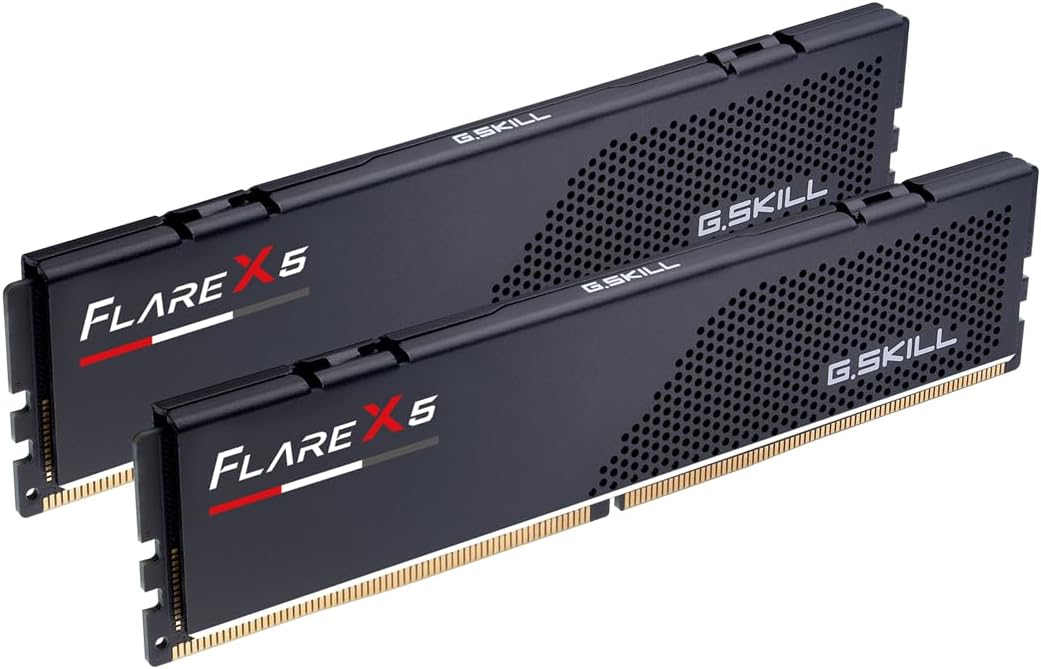
Figure 2.1: Two G.SKILL Flare X5 Series DDR5 RAM modules, matte black with "FLARE X5" branding.
Each memory kit undergoes rigorous hand-testing to ensure optimal performance and reliability. The modules include both a JEDEC default profile and an AMD EXPO memory overclock profile, allowing users to easily achieve the advertised speeds on compatible AMD platforms.

Figure 2.2: G.SKILL Flare X5 RAM modules installed on a motherboard, emphasizing their engineering for DDR5 experience and AMD EXPO compatibility.

Figure 2.3: A close-up view of the G.SKILL Flare X5 module, illustrating its compact low-profile design with a height of 33mm, ideal for space-constrained PC builds.
3. Specifications
| Feature | Detail |
|---|---|
| Model Number | F5-6400J3239G16GX2-FX5 |
| Memory Type | DDR5 U-DIMM |
| Capacity | 32GB (2 x 16GB) |
| Speed | 6400MT/s |
| Latency | CL32-39-39-102 |
| Voltage | 1.40V |
| Pin Count | 288-pin |
| Error Correction | Non-ECC |
| Compatibility | Desktop PC, AMD X870, X670, B850, B840, B650 platforms |
| Profile Support | JEDEC Default, AMD EXPO |
| Color | Matte Black |
| Module Height | 33mm (approx. 1.3 inches) |
4. Setup & Installation
Before beginning the installation process, ensure your computer is powered off and disconnected from the power source. It is recommended to wear an anti-static wrist strap or frequently touch a grounded metal object to discharge static electricity, which can damage sensitive components.
4.1 Preparing for Installation
- Power Off: Shut down your computer completely and unplug the power cable from the wall outlet.
- Open Case: Remove the side panel of your computer case to access the motherboard.
- Locate DIMM Slots: Identify the DDR5 DIMM slots on your motherboard. Consult your motherboard manual for the correct slot configuration for dual-channel memory (typically slots 2 and 4, or A2 and B2).
4.2 Installing the Memory Modules
- Open Retention Clips: Gently push open the retention clips at both ends of the DIMM slots.
- Align Module: Hold the memory module by its edges, avoiding touching the gold contacts. Align the notch on the module with the key in the DIMM slot. The module will only fit one way.
- Insert Module: Place the module into the slot and apply even pressure to both ends until the retention clips snap into place, securing the module. You should hear a click.
- Verify Seating: Visually inspect the module to ensure it is fully seated and level in the slot, with no gold contacts visible.
- Repeat: Repeat the process for the second memory module in the designated dual-channel slot.

Figure 4.1: Proper installation of G.SKILL Flare X5 RAM modules into the motherboard DIMM slots.
4.3 Post-Installation
- Close Case: Reattach the side panel of your computer case.
- Reconnect Power: Plug the power cable back into the wall outlet.
- Power On: Turn on your computer.
5. Operating Instructions: Enabling AMD EXPO
Your G.SKILL Flare X5 memory kit is designed to operate at its rated speed of 6400MT/s using the AMD EXPO profile. By default, memory modules will boot at JEDEC standard speeds (typically 4800MT/s for DDR5). To achieve the advertised performance, you must enable the AMD EXPO profile in your motherboard's BIOS/UEFI settings.
5.1 Accessing BIOS/UEFI
Upon powering on your computer, repeatedly press the designated key to enter the BIOS/UEFI setup. Common keys include Del, F2, F10, or F12. Consult your motherboard manual for the exact key.
5.2 Enabling AMD EXPO Profile
- Navigate to Memory Settings: Once in the BIOS/UEFI, locate the memory or overclocking settings. This section is often found under "AI Tweaker," "Extreme Tweaker," "OC," or similar advanced settings.
- Select EXPO Profile: Look for an option related to "Memory Profile," "EXPO," "DOCP," or "A-XMP." Select the AMD EXPO profile. This will automatically configure the memory speed, timings, and voltage to the rated specifications of your G.SKILL kit.
- Save and Exit: Save the changes and exit the BIOS/UEFI. Your system will restart.
Important Note: Enabling AMD EXPO is a form of overclocking. System stability and the ability to reach the rated speed depend on the compatibility and capability of your motherboard and CPU. Refer to the G.SKILL website for the latest QVL (Qualified Vendor List) to ensure your motherboard and CPU are validated for this memory kit.

Figure 5.1: G.SKILL Flare X5 memory modules installed, indicating their compatibility with AMD EXPO for optimized performance.
6. Maintenance
G.SKILL Flare X5 memory modules are designed for long-term reliability and require minimal maintenance. However, following these general guidelines can help ensure optimal performance and longevity of your system components:
- Dust Removal: Periodically clean the interior of your computer case to prevent dust buildup on components, including RAM modules. Use compressed air to gently blow away dust from the modules and DIMM slots. Ensure the system is powered off and unplugged before cleaning.
- Proper Airflow: Ensure your computer case has adequate airflow to dissipate heat effectively. Overheating can negatively impact memory performance and lifespan.
- Handle with Care: When handling memory modules, always hold them by the edges. Avoid touching the gold contacts or the integrated circuits (chips) on the module.
- Environmental Conditions: Operate your computer in a stable environment, avoiding extreme temperatures or humidity.
7. Troubleshooting
If you encounter issues after installing your G.SKILL Flare X5 memory kit, consider the following troubleshooting steps:
7.1 System Does Not Boot or Displays No Video
- Reseat Modules: Power off and unplug the system. Carefully remove and re-install the memory modules, ensuring they are fully seated in their respective DIMM slots.
- Check Motherboard Manual: Verify that the modules are installed in the correct DIMM slots for dual-channel operation as specified by your motherboard manual. Incorrect slot usage can prevent booting.
- Clear CMOS: If the system previously had different memory or overclocking settings, clear the CMOS (Complementary Metal-Oxide-Semiconductor) to reset BIOS settings to default. Refer to your motherboard manual for instructions on how to clear CMOS.
- Test Modules Individually: If you have multiple modules, try booting with only one module installed at a time to identify if a specific module is faulty.
7.2 Memory Not Running at Advertised Speed (6400MT/s)
- Enable AMD EXPO: As detailed in Section 5, you must enable the AMD EXPO profile in your motherboard's BIOS/UEFI settings to achieve the rated speed. Memory will default to JEDEC speeds (e.g., 4800MT/s) if EXPO is not enabled.
- Check Motherboard QVL: Verify that your motherboard model is listed on G.SKILL's Qualified Vendor List (QVL) for this specific memory kit. Compatibility can vary between motherboards and CPU combinations. Visit the G.SKILL website for the latest QVL.
- Update BIOS: Ensure your motherboard's BIOS/UEFI firmware is updated to the latest version. BIOS updates often include improved memory compatibility and stability.
- Do Not Mix Memory Kits: Memory kits are sold as matched sets designed to run together. Mixing memory kits (even if they are the same model) can lead to stability issues or prevent the system from reaching rated speeds.
7.3 System Instability or Crashes
- Verify EXPO Settings: Double-check that the AMD EXPO profile is correctly applied in BIOS. Incorrect settings can cause instability.
- Run Memory Diagnostic: Use a memory diagnostic tool (e.g., Windows Memory Diagnostic, MemTest86) to check for errors in the memory modules.
- Check CPU/Motherboard Compatibility: Ensure your CPU and motherboard are fully compatible with DDR5-6400 speeds. Some CPUs or motherboards may have limitations on maximum stable memory frequency.
8. Safety Information
Adhere to the following safety precautions when handling and installing memory modules:
- Static Electricity: Always discharge static electricity before handling memory modules. Use an anti-static wrist strap or touch a grounded metal object. Static discharge can permanently damage electronic components.
- Power Disconnection: Ensure the computer is completely powered off and unplugged from the wall outlet before opening the case or installing/removing components.
- Handle with Care: Handle memory modules by their edges only. Avoid touching the gold contacts or the surface of the chips.
- Proper Seating: Ensure modules are correctly and fully seated in their DIMM slots. Improper seating can lead to system instability or damage.
- Ventilation: Ensure adequate ventilation within your computer case to prevent overheating of components.
- Children and Pets: Keep memory modules and packaging materials out of reach of children and pets.
9. Warranty & Support
G.SKILL memory products are backed by a limited lifetime warranty, ensuring peace of mind regarding product quality and reliability. For detailed warranty terms and conditions, please refer to the official G.SKILL website.
9.1 Technical Support
If you require technical assistance or have questions regarding your G.SKILL Flare X5 memory kit, please visit the official G.SKILL support website. The website provides access to:
- FAQs and Knowledge Base: Solutions to common issues and detailed product information.
- QVL (Qualified Vendor List): Up-to-date compatibility lists for motherboards and CPUs.
- RAM Configurator Tool: A tool to help you find compatible memory for your system.
- Contact Information: Ways to reach G.SKILL technical support for personalized assistance.
G.SKILL Official Website: www.gskill.com

