
Introduction
This manual provides detailed instructions for the proper use and maintenance of your Deli 1700 240F Scientific Calculator. Please read this manual thoroughly before using the calculator to ensure correct operation and to maximize its lifespan. This calculator is designed for a wide range of mathematical and scientific computations, featuring a two-line display and 10+2 digits for enhanced functionality.
Setup
1. Battery Installation
The Deli 1700 240F Scientific Calculator operates on both solar power and two nonstandard batteries. For optimal performance, ensure batteries are installed correctly.
- Locate the battery compartment cover on the back of the calculator.
- Using a small screwdriver, carefully remove the screw and slide off the battery compartment cover.
- Insert two nonstandard batteries, ensuring the positive (+) and negative (-) terminals are aligned correctly as indicated inside the compartment.
- Replace the battery compartment cover and secure it with the screw.
Note: The calculator also utilizes solar power. Ensure adequate light exposure for solar operation, especially when batteries are low or not installed.
2. Initial Power On
Press the [ON] button to turn on the calculator. The display should show '0' or a similar initial state. If the display does not appear, check battery installation or ensure sufficient light for solar power.
Operating Instructions
The Deli 1700 240F features a two-line display, showing the input expression on the upper line and the result on the lower line. It supports 240 types of functions.

Image: The Deli 1700 Scientific Calculator's two-line display, illustrating its ability to show both input and results simultaneously. This image highlights the clear numerical output and function indicators.
1. Basic Arithmetic Operations
Enter numbers using the numeric keypad. Use the [+], [-], [×], and [÷] keys for addition, subtraction, multiplication, and division, respectively. Press [=] to get the result.
2. Scientific Functions
The calculator includes various scientific functions accessible via the [SHIFT] key. Press [SHIFT] followed by the desired function key to activate its secondary function (indicated above the key).
- Trigonometric Functions: [SIN], [COS], [TAN] and their inverse functions ([SHIFT] + [SIN⁻¹], etc.).
- Logarithmic Functions: [LOG] (base 10) and [LN] (natural logarithm).
- Power and Root Functions: [x²], [√], [xʸ], [ʸ√x].
- Factorial: [x!].
3. Memory Functions
Store and recall values using the memory keys:
- [M+]: Adds the displayed value to memory.
- [M-]: Subtracts the displayed value from memory.
- [MR]: Recalls the value from memory.
- [MC]: Clears the memory.
4. Angle Units
The calculator supports Degree (DEG), Radian (RAD), and Grad (GRA) angle units. Press [MODE] repeatedly to cycle through the angle units. The current unit is indicated on the display.
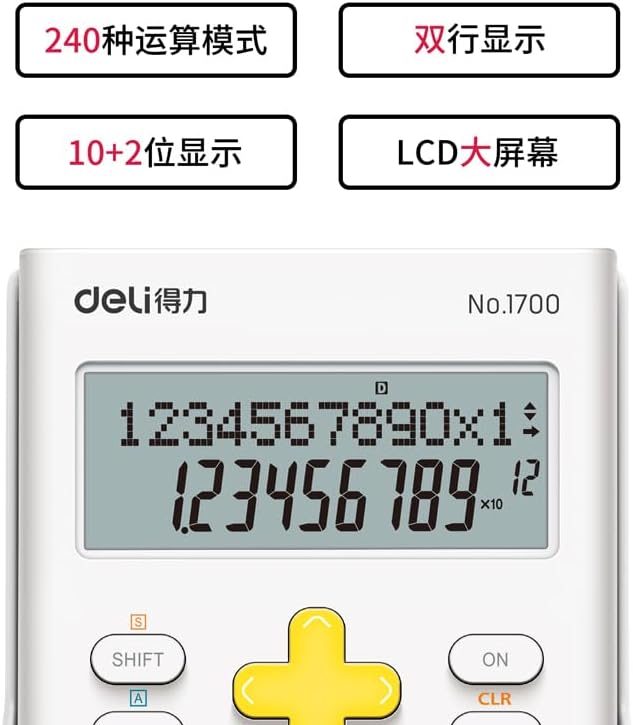
Image: A detailed view of the Deli 1700 Scientific Calculator's display and key layout. This image emphasizes the model number and the clarity of the 10+2 digit display, along with key labels like SHIFT and ALPHA.
Maintenance
1. Cleaning
To clean the calculator, use a soft, dry cloth. Do not use abrasive cleaners, solvents, or spray directly onto the calculator. Avoid excessive moisture.
2. Battery Replacement
When the display becomes dim or calculations are incorrect, it may be time to replace the batteries. Follow the battery installation steps outlined in the Setup section. Always replace both batteries at the same time with new ones of the same type.
3. Storage
Store the calculator in a cool, dry place away from direct sunlight and extreme temperatures. Avoid dropping the calculator or subjecting it to strong impacts.
Troubleshooting
| Problem | Possible Cause | Solution |
|---|---|---|
| Display is blank or dim. | Low batteries or insufficient light for solar power. | Replace batteries or move to a brighter area. |
| Incorrect calculation results. | Incorrect mode setting (e.g., angle unit) or input error. | Check angle unit (DEG/RAD/GRA). Clear all memory and re-enter calculation. Press [CLR] to clear current calculation. |
| Calculator does not respond to key presses. | Temporary system error or very low power. | Press [ON]/[OFF] to restart. If issue persists, remove and reinsert batteries. |
Specifications
- Brand: Deli
- Model: 1700
- Model Name: 240F
- Calculator Type: Engineering/Scientific
- Display Type: LCD, Two-line display
- Digits: 10+2 Digits
- Power Source: Solar Powered & Battery
- Number of Batteries: 2 Nonstandard Battery (required)
- Screen Size: 1 Centimeter (approximate viewable area)
- Color: White
- Enclosure Material: Plastic
- Manufacturer: Deli
Warranty Information
This Deli 1700 240F Scientific Calculator is covered by a standard manufacturer's warranty. Please refer to the packaging or contact your retailer for specific warranty terms and conditions. Keep your proof of purchase for warranty claims.
Customer Support
For further assistance, technical support, or inquiries regarding your Deli 1700 240F Scientific Calculator, please contact Deli customer service through their official website or the contact information provided with your purchase. Ensure you have your model number (1700 240F) ready when contacting support.


