
1. Introduction
Thank you for choosing the Faber FBIO 83L 18F TFT BK N Built-In Microwave Oven. This manual provides essential information for the safe and efficient operation, installation, and maintenance of your appliance. Please read these instructions carefully before using the oven and retain them for future reference.
This appliance is designed for domestic use and offers a variety of cooking functions including baking, roasting, grilling, defrosting, and combination cooking, supported by 18 distinct functions and an 83-liter capacity.
2. Safety Instructions
WARNING: To reduce the risk of fire, electric shock, injury to persons, or exposure to excessive microwave energy, read all instructions before using the appliance.
- Ensure the appliance is properly installed and grounded by a qualified technician.
- Do not operate the oven if the door or door seals are damaged. Contact authorized service personnel.
- Do not heat liquids or other foods in sealed containers as they are liable to explode.
- Always use oven mitts when handling hot dishes or accessories.
- Keep children away from the appliance during operation due to hot surfaces. The oven features a child lock for added safety.
- Do not attempt to repair or modify the appliance yourself. Refer all servicing to qualified service personnel.
- Ensure proper ventilation around the appliance as specified in the installation instructions.
3. Product Overview
The Faber FBIO 83L 18F TFT BK N is an 83-liter built-in oven featuring a sleek black glass appearance and a TFT touch control panel for intuitive operation. It includes 18 cooking functions and a 3D hot air circulation system for even cooking.
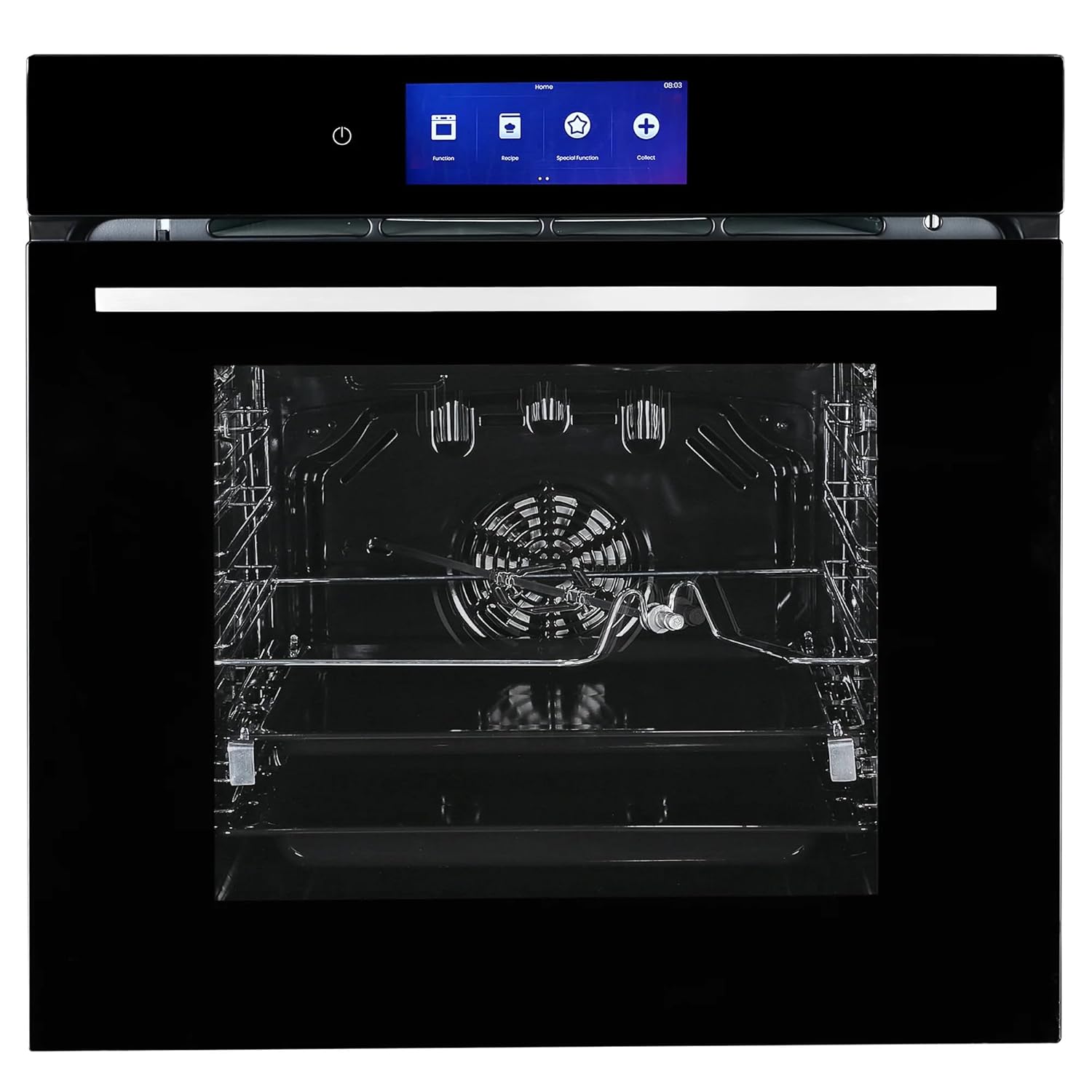
Figure 3.1: Front view of the Faber Built-In Microwave Oven, showcasing its black glass finish and control panel.
3.1 Components and Accessories
- Oven Cavity: The main cooking chamber with 83 liters capacity.
- TFT Touch Control Panel: Digital interface for selecting functions, setting time, and temperature.
- Oven Door: Features triple-glazed high borosilicate anti-scald glass and cold door technology for safety.
- Racks and Shelves: Multiple levels for flexible cooking.
- Rotisserie: For roasting meats evenly.
- Universal Baking Tray: For general baking and roasting.
- Deep Baking Tray: For dishes requiring more depth.
- SS Telescopic Runners: For easy access to trays.

Figure 3.2: The oven with its door open, revealing the spacious 83-liter interior, racks, and rotisserie.
3.2 Control Panel
The oven is equipped with a TFT touch control panel, providing a modern and user-friendly interface for all operations. This panel allows for precise control over cooking functions, temperature, and time settings.

Figure 3.3: A detailed view of the TFT touch control panel, showing various function icons and digital display.
4. Installation
This Faber oven is designed for built-in installation. Proper installation is crucial for the appliance's performance and safety. It is strongly recommended that installation be carried out by a qualified professional.
4.1 Dimensions and Placement
The product dimensions are 594mm (Width) x 594mm (Height) x 569mm (Depth). Ensure the cabinet opening meets these specifications, allowing for adequate ventilation as per the installation guide provided with the product packaging.

Figure 4.1: Diagram illustrating the precise dimensions (Width, Height, Depth) required for built-in installation of the oven.
4.2 Electrical Connection
The oven operates on 230 Volts and has a wattage of 2800 Watts. Ensure the electrical supply is compatible and properly grounded. Do not use extension cords or adapters.
5. Operating Instructions
Your Faber oven offers a wide range of cooking possibilities through its 18 functions and intuitive TFT touch control. Familiarize yourself with the control panel before first use.
5.1 Initial Setup
- Upon first power-on, the oven may prompt you to set the language and time. Follow the on-screen instructions.
- Before cooking, remove all accessories and clean the interior with a damp cloth.
- Perform an initial 'burn-in' cycle by heating the empty oven at maximum temperature for approximately 30 minutes to eliminate any manufacturing odors. Ensure adequate ventilation during this process.
5.2 Basic Operation
- Power On: Press the power symbol on the TFT touch control panel.
- Select Function: Navigate through the menu to choose one of the 18 available cooking functions (e.g., Bake, Grill, Convection, Combination).
- Set Temperature: Use the touch controls to adjust the desired cooking temperature.
- Set Time: Specify the cooking duration.
- Start: Press the start button to begin the cooking process.
5.3 Special Functions
- Auto Cook Menus: The oven includes pre-programmed recipes. Select the 'Auto Cook' option from the menu, choose your desired dish, and the oven will automatically set the optimal cooking parameters.
- Defrost: Utilize the 'Auto Defrost' system for efficient thawing of frozen foods. Select the defrost function and input the weight of the food.
- Combination Cooking: This feature allows you to combine different heating methods (e.g., convection with grill) for versatile cooking results. Refer to the on-screen prompts for specific combinations.
- Child Lock: To activate the child lock, press and hold the designated icon on the control panel. This prevents accidental operation. Repeat the action to deactivate.
- Automatic Power-Off Protection: For safety, the oven is equipped with an automatic power-off feature that activates after a period of inactivity or if certain error conditions are detected.
6. Maintenance and Cleaning
Regular cleaning and maintenance will ensure the longevity and optimal performance of your Faber oven.
6.1 Exterior Cleaning
Wipe the exterior surfaces, including the black glass finish and control panel, with a soft, damp cloth and mild detergent. Avoid abrasive cleaners or harsh chemicals that could damage the finish.
6.2 Interior Cleaning
After each use, allow the oven to cool down. Remove any food spills or residue promptly. For stubborn stains, use a non-abrasive oven cleaner suitable for microwave ovens. Ensure the oven is completely dry before next use.
6.3 Accessory Care
Clean the rotisserie, baking trays, and racks with warm soapy water. They are generally dishwasher safe, but refer to specific accessory instructions if provided.
6.4 Cold Door Technology
The anti-scalding cold door technology ensures the outer surface of the oven door remains cooler during operation, making cleaning safer and reducing the risk of burns.
7. Troubleshooting
Before contacting service, please check the following common issues:
| Problem | Possible Cause | Solution |
|---|---|---|
| Oven does not turn on | No power supply; Door not closed properly; Child lock activated. | Check power connection; Ensure door is fully closed; Deactivate child lock. |
| Oven not heating | Incorrect function/temperature set; Faulty heating element. | Verify settings on TFT panel; Contact service if problem persists. |
| Display shows error code | Internal malfunction. | Note the error code and contact Faber customer support. |
| Uneven cooking | Improper food placement; Incorrect temperature/time; Overloading. | Ensure food is centered; Adjust settings; Avoid overloading the oven. |
If the problem persists after attempting these solutions, please contact authorized Faber service personnel.
8. Specifications
| Feature | Specification |
|---|---|
| Brand | Faber |
| Model | FBIO 83L 18F TFT BK N |
| Capacity | 83 Litres |
| Installation Type | Built-In |
| Part Number | 7612986338201 |
| Special Features | Auto Cook, Child Lock, Defrost |
| Oven Cooking Mode | Convection |
| Colour | Black |
| Voltage | 230 Volts |
| Wattage | 2800 Watts |
| Fuel Type | Electric |
| Defrost System | Auto Defrost |
| Door Orientation | Front |
| Material | Stainless Steel |
| Item Weight | 35 kg |
| Item Dimensions (LxWxH) | 56.9 x 59.4 x 59.4 Centimeters |
| Finish Type | Black Glass |
9. Warranty and Support
Your Faber FBIO 83L 18F TFT BK N Built-In Microwave Oven comes with a 1-year warranty from the date of purchase. This warranty covers manufacturing defects under normal use conditions.
9.1 What's Included
The product package includes the Microwave Oven, this Instruction Manual, necessary accessories (rotisserie, universal baking tray, deep baking tray with SS telescopic runner), and a Warranty Card.
9.2 Customer Support
For warranty claims, technical assistance, or service requests, please contact Faber customer support. Keep your purchase receipt and warranty card handy when contacting support.
Manufacturer: Franke Faber India Pvt Ltd
