
1. Introduction
Thank you for choosing the Gosky 15x52 HD Monocular. This high-powered monocular is designed to provide clear and bright views for various outdoor activities, including bird watching, hunting, hiking, and traveling. Featuring 15x magnification and a 52mm objective lens, it offers a wide field of view and excellent light transmission thanks to its BAK4 prism and FMC (Fully Multi-Coated) lenses. This manual will guide you through the setup, operation, and maintenance of your new monocular to ensure optimal performance.
2. What's in the Box
- Gosky 15x52 HD Monocular
- Mini Tripod
- Smartphone Adapter
- Bluetooth Camera Remote
- Protective Carry Case
- Lens Cleaning Cloth
- Lens Brush
- Eyepiece and Objective Lens Covers
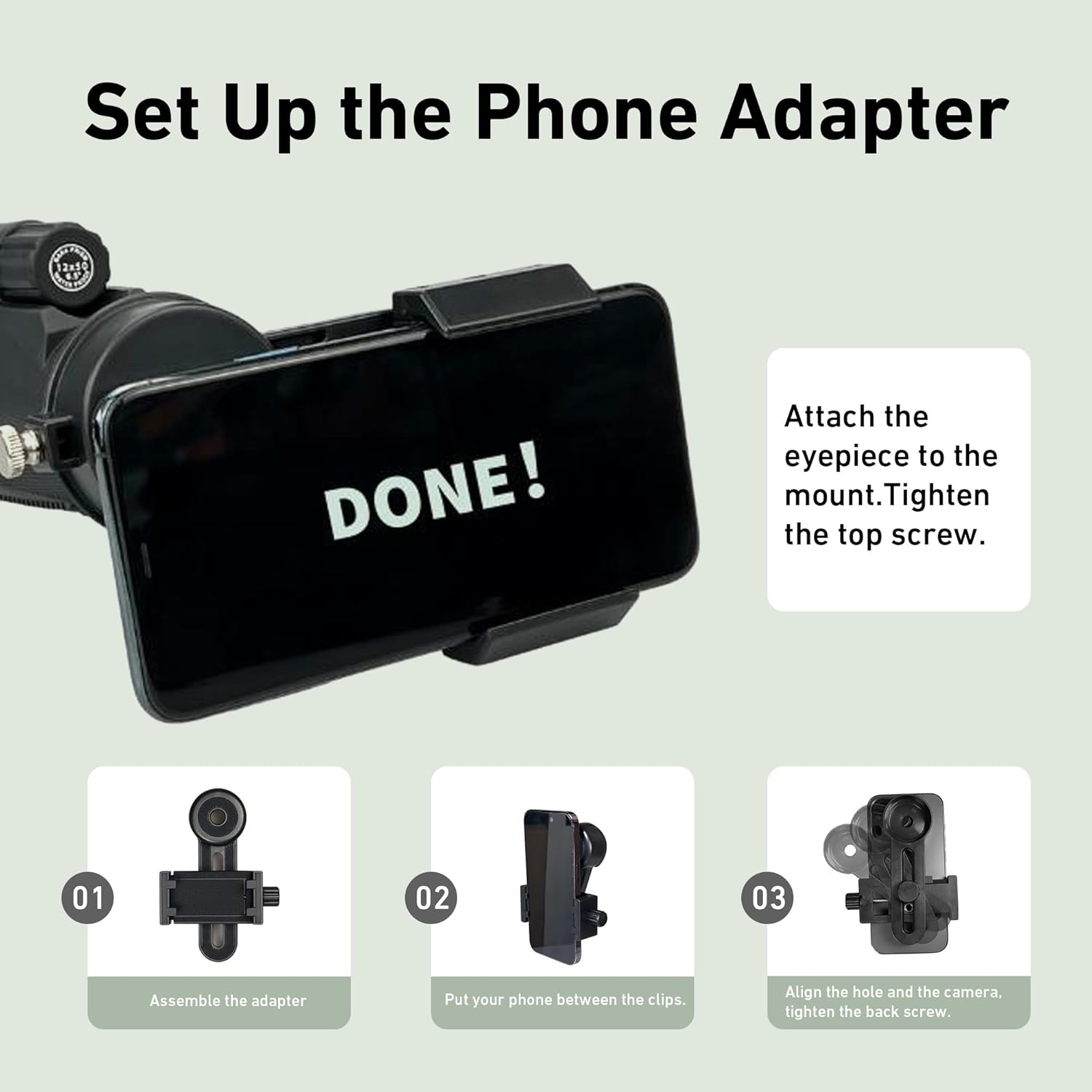
Image 2.1: All items included in the Gosky 15x52 HD Monocular package.
3. Components Overview
Familiarize yourself with the main components of your Gosky monocular:
- Objective Lens (52mm): The large front lens that gathers light.
- Eyepiece: The lens you look through. Features an adjustable eye cup.
- Focus Wheel: Located on top, used to adjust the image clarity.
- Tripod Mount: A threaded hole at the bottom for attaching the tripod.
- Hand Strap Attachment Point: For securing a wrist strap.

Image 3.1: Labeled components of the Gosky 15x52 HD Monocular.
4. Setup
4.1 Attaching the Tripod
- Unfold the legs of the mini tripod to create a stable base.
- Locate the threaded hole on the bottom of the monocular.
- Align the monocular's threaded hole with the screw on the tripod.
- Twist the monocular clockwise onto the tripod until it is securely fastened.
- Adjust the tripod legs and head as needed for your desired viewing angle.

Image 4.1: The monocular mounted on the included tripod for stable viewing.
4.2 Attaching the Smartphone Adapter
- Assemble the phone adapter by connecting its parts.
- Place your smartphone securely between the clips of the adapter and tighten the knob to hold it firmly.
- Flip the adapter over and align your phone's main camera lens with the center hole of the eyepiece cover on the adapter. Ensure the camera is not obstructed.
- Install the eyepiece cover of the phone adapter onto the monocular's eyepiece.
- Adjust the phone's position on the adapter until the monocular's view is centered and clear on your phone screen.
Image 4.2: Detailed steps for attaching your smartphone to the monocular using the adapter.
Video 4.1: A demonstration of setting up the monocular with its accessories.
5. Operating Instructions
5.1 Focusing the Monocular
- Remove the lens covers from both the objective lens and the eyepiece.
- Hold the monocular to one eye.
- Adjust the eyepiece by twisting it in or out to find a comfortable viewing position, especially if you wear glasses.
- While looking through the monocular, slowly turn the focus wheel on top until the image becomes sharp and clear.

Image 5.1: Focusing the monocular for a clear view.
5.2 Using with a Smartphone for Photography/Videography
- Ensure your smartphone is securely attached to the phone adapter and the adapter is mounted on the monocular (refer to Section 4.2).
- Open your phone's camera application.
- Adjust the monocular's focus wheel until the image on your phone screen is clear.
- Use the included Bluetooth camera remote to take photos or start/stop video recording without touching your phone, minimizing shake.
Video 5.1: Demonstration of capturing images and videos with the monocular and a smartphone.
6. Key Features
- High Magnification: 15x power for detailed long-distance viewing.
- Large Objective Lens: 52mm diameter for excellent light gathering and bright images.
- Premium Optics: Equipped with BAK4 prism and FMC (Fully Multi-Coated) lenses for superior clarity, contrast, and color fidelity.
- Durable and Waterproof: Designed with a robust framework and shock-absorbing rubber armor, featuring IPX7 waterproofing for use in various weather conditions.
- Portable Design: Compact and lightweight, ideal for single-hand operation and easy transport.
- Smartphone Compatibility: Includes a phone adapter and Bluetooth remote for capturing photos and videos through the monocular.

Image 6.1: Optical components ensuring bright and sharp images.

Image 6.2: The monocular is IPX7 waterproof for reliable outdoor use.
7. Maintenance
- Cleaning Lenses: Use the provided lens cleaning cloth or brush to gently remove dust and smudges. For stubborn marks, use a specialized optical lens cleaning solution. Avoid using abrasive cloths or harsh chemicals.
- Cleaning Body: Wipe the monocular's body with a soft, damp cloth.
- Storage: Store the monocular in its protective carry case in a cool, dry place when not in use. Avoid extreme temperatures and high humidity.
- Avoid Direct Sunlight: Never point the monocular directly at the sun, as this can cause permanent eye damage and damage to the optical components.
8. Troubleshooting
- Blurry Image: Ensure the focus wheel is properly adjusted. Check that the eyepiece is extended or retracted to suit your vision (and glasses, if applicable).
- Dark or Obstructed View: Verify that both objective lens and eyepiece covers are removed. Ensure no obstructions are blocking the lenses.
- Unstable Image: Use the tripod for enhanced stability, especially at high magnifications.
- Phone Adapter Issues: Confirm your phone's camera is perfectly aligned with the adapter's eyepiece hole. Ensure the phone is securely clamped and the adapter is tightly attached to the monocular.
- Bluetooth Remote Not Connecting: Check if the remote's battery is charged and if Bluetooth is enabled on your smartphone. Follow your phone's instructions for pairing new Bluetooth devices.
9. Specifications
| Brand | Gosky |
| Model Number | MW2 |
| Magnification | 15x |
| Objective Lens Diameter | 52 mm |
| Eyepiece Lens Description | BAK-4 Prism |
| Coating | Fully Multi-Coated (FMC) |
| Focus Type | Manual Focus |
| Product Dimensions | 6.5"D x 8.27"W x 2.95"H |
| Item Weight | 0.79 Kilograms |
| Waterproof Rating | IPX7 (implied from images) |
| Compatible Devices | Smartphone |
10. Warranty and Support
The Gosky 15x52 HD Monocular comes with a 1-year manufacturer's warranty. This warranty covers defects in materials and workmanship under normal use. For warranty claims or technical support, please refer to the contact information provided with your purchase or visit the official Gosky website. Please retain your proof of purchase for warranty validation.