
Introduction
This manual provides comprehensive instructions for the assembly, operation, maintenance, and troubleshooting of your SICOTAS Larger Rattan Night Stand. Please read this manual thoroughly before assembly and use to ensure proper function and safety. Keep this manual for future reference.
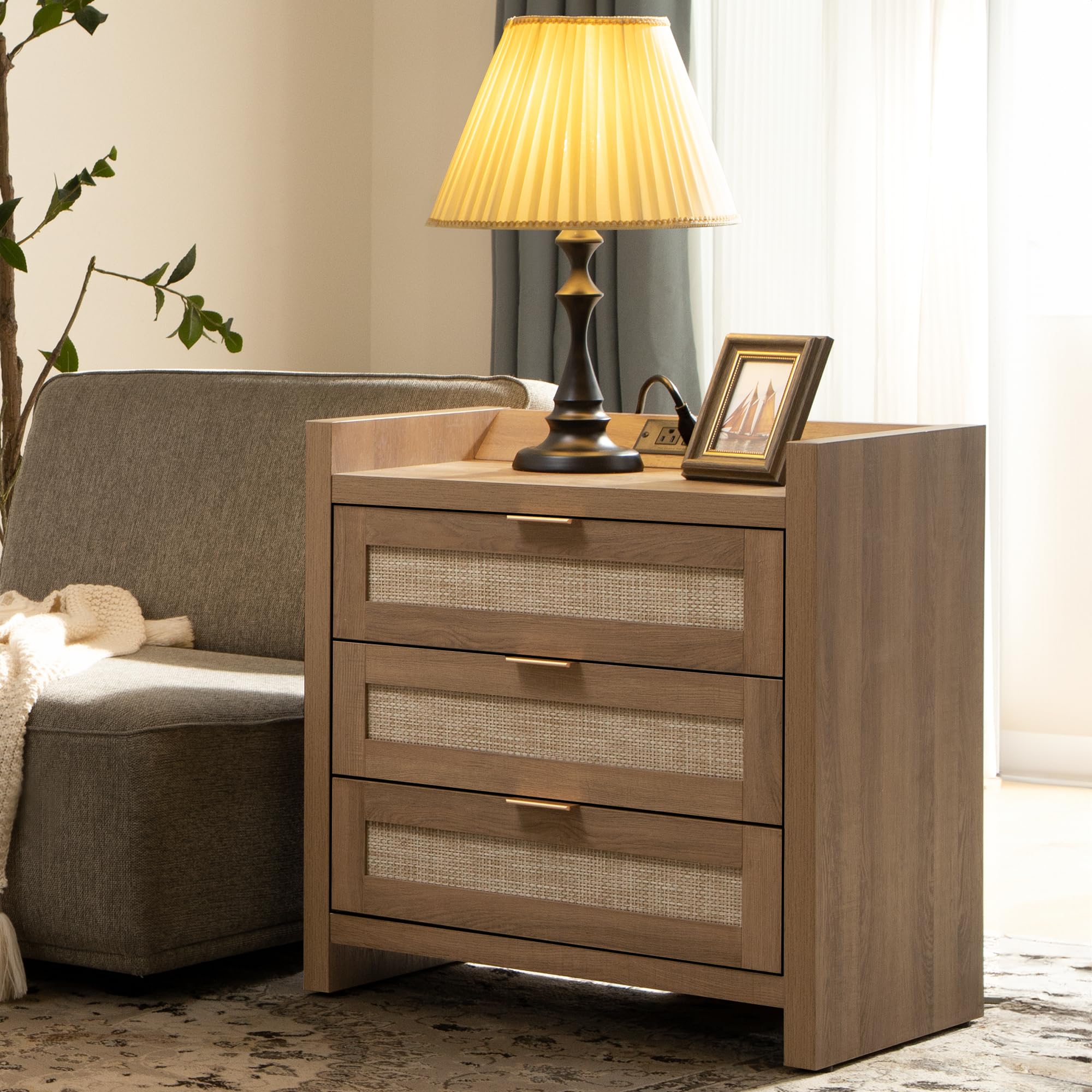
Image: The SICOTAS Larger Rattan Night Stand, featuring three drawers and an integrated charging station, in a reclaimed caramel oak finish.
Product Features
- Three Rattan Mesh Drawers: Provides ample storage space for various items. Note: Rattan patterns are made from durable plastic.
- Integrated Charging Station: Equipped with 1 Type-C port, 2 AC outlets, and 1 USB port for convenient device charging.
- Raised Edge Design: The charging station area features a raised edge to help protect devices from spills.
- Durable Construction: Made from high-quality engineered wood with sturdy spike feet for stability and longevity.
- Versatile Design: Suitable for use as a nightstand, end table, or side table in various rooms.
- Easy Assembly: Designed for straightforward assembly with clear instructions and numbered parts.
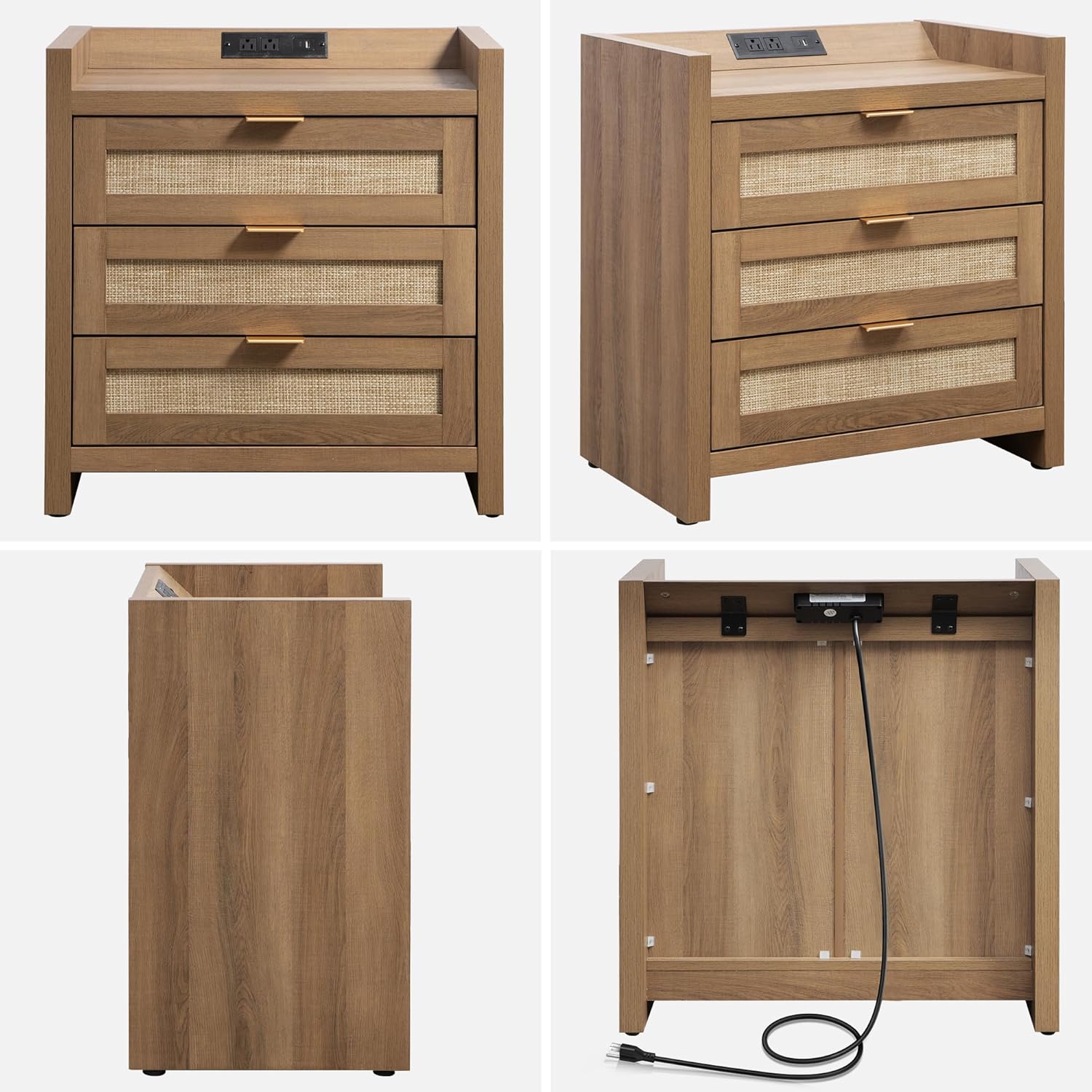
Image: Various angles of the nightstand, highlighting its construction and design elements.
Safety Information
- Always follow assembly instructions carefully.
- Do not overload drawers or the top surface.
- Ensure the nightstand is placed on a stable, level surface.
- Keep liquids away from the charging station to prevent electrical hazards.
- Do not allow children to climb on or play with the nightstand.
- Periodically check all fasteners to ensure they remain tight.
Package Contents
Before beginning assembly, ensure all parts and hardware are present. Refer to the included parts list in the assembly guide for detailed identification.
- All necessary wooden panels and drawer components.
- 3 Rattan mesh drawer fronts.
- Metal handles and associated fasteners.
- Charging station unit (1 Type-C port, 2 AC outlets, 1 USB port).
- Drawer slides (left and right).
- Assembly hardware (screws, dowels, cam locks, etc.).
- Installation tool (screwdriver).
- Assembly Guide.
Assembly Instructions
Assembly is required for this product. It is recommended that one person performs the assembly using a screwdriver (included). Please follow the steps below and refer to the provided assembly video for visual guidance.
Video: Step-by-step guide on how to assemble your SICOTAS nightstand.
General Assembly Steps:
- Prepare Components: Unpack all parts and lay them out on a clean, soft surface to prevent scratches. Identify each component using the included parts list.
- Attach Drawer Slides to Side Panels: Secure the drawer slides to the inner side panels of the nightstand frame using the provided screws. Ensure they are correctly oriented (left and right).
- Assemble the Main Frame: Connect the bottom panel to the side panels using cam locks and dowels. Ensure all connections are secure.
- Install Back Panel: Slide the back panel into the grooves of the assembled frame and secure it with small nails or screws as indicated in the guide.
- Assemble Drawers: For each of the three drawers, attach the side panels to the front and back panels. Insert the rattan mesh front panel. Secure the bottom panel.
- Attach Drawer Slides to Drawers: Fasten the remaining drawer slides to the sides of each assembled drawer.
- Install Drawer Handles: Attach the metal handles to the front of each drawer using the provided screws.
- Install Charging Station: Carefully place the charging station unit into the designated cutout on the top panel. Secure it with screws.
- Attach Top Panel: Secure the top panel to the main frame using cam locks and dowels.
- Insert Drawers: Carefully slide each assembled drawer into its respective slot in the nightstand frame.
For detailed visual instructions, please refer to the 'How to Assemble Your Nightstand Step by Step' video above.
Operating Instructions
Using the Integrated Charging Station:
The SICOTAS Night Stand features a convenient charging station built into the top surface, providing easy access to power for your electronic devices.
- Connect to Power: Ensure the nightstand's main power cord is securely plugged into a functional wall outlet.
- Utilize AC Outlets: Plug in devices such as lamps, alarm clocks, or other small appliances into the two standard AC outlets.
- Use USB Ports: Connect your USB-A compatible devices (e.g., smartphones, smartwatches) to the USB-A port for charging.
- Use Type-C Port: Connect your USB-C compatible devices (e.g., tablets, newer smartphones) to the Type-C port for faster charging.
- Device Placement: Place devices being charged within the raised edge area of the charging station to prevent them from sliding off or being exposed to spills.

Image: A close-up view of the integrated charging station, showing a tablet and smartphone connected for charging.
Maintenance and Care
- Cleaning: Wipe the nightstand surfaces with a soft, damp cloth. Avoid harsh chemicals or abrasive cleaners, which can damage the finish.
- Dusting: Regularly dust with a dry, soft cloth.
- Spills: Immediately wipe up any spills to prevent staining or damage to the wood and electrical components.
- Drawer Care: Ensure drawers slide smoothly. If they become stiff, check for obstructions or apply a silicone-based lubricant to the slides.
- Rattan Mesh: The plastic rattan mesh can be gently wiped clean with a damp cloth. Avoid excessive moisture.
- Avoid Direct Sunlight: Prolonged exposure to direct sunlight can cause fading or discoloration of the wood finish.
- Avoid Extreme Temperatures: Do not place the nightstand near heat sources or in areas with extreme temperature fluctuations.
Troubleshooting
- Drawers are Stiff or Jammed:
- Check for any objects obstructing the drawer slides.
- Ensure the drawer slides are properly aligned and securely fastened.
- Apply a small amount of silicone lubricant to the drawer slides if needed.
- Charging Station Not Working:
- Verify that the nightstand's main power cord is securely plugged into a live wall outlet.
- Test the outlet with another device to confirm it is functional.
- Ensure devices are properly connected to the USB or AC ports.
- If the issue persists, discontinue use and contact customer support.
- Nightstand is Wobbly:
- Check all assembly fasteners (cam locks, screws) and tighten them if loose.
- Ensure the nightstand is on a level surface. Adjust the feet if necessary.
Specifications
| Brand | SICOTAS |
| Model Number | B0DCZLP8BK |
| Product Dimensions | 15.4"D x 24.8"W x 26.5"H |
| Item Weight | 47.4 Pounds |
| Frame Material | Engineered Wood |
| Top Material Type | Rattan (Plastic) |
| Handle Material | Metal |
| Color | Reclaimed Caramel Oak |
| Number of Drawers | 3 |
| Charging Ports | 1 Type-C, 2 AC Outlets, 1 USB-A |
| Assembly Required | Yes |
| Recommended People for Assembly | 1 |

Image: Detailed dimensions of the nightstand, including height, width, and depth.
Warranty and Support
For warranty information or customer support, please refer to the contact details provided with your purchase documentation or visit the official SICOTAS website. Keep your proof of purchase for any warranty claims.