Introduction
This manual provides instructions for the VINABTY AXD7596 replacement remote control. It is designed to operate various Pioneer AV Receiver models, offering a straightforward and easy-to-use solution for your audio-video system.
Product Overview
The AXD7596 is a direct replacement remote control, requiring no programming for compatible Pioneer AV Receivers. It replicates the functionality of the original remote, ensuring seamless integration with your existing setup.
Compatibility
This remote control is compatible with the following Pioneer AV Receiver models:
- VSX-1020-K
- VSX-1020
- VSX1020K
- VSX-1025
- VSX-925
- VSX-1021-K
- VSX-921-K
It also serves as a replacement for sub remote controls AXD7595 and AXD7615.
Setup
Battery Installation
The remote control requires two (2) AAA batteries (not included).
- Locate the battery compartment on the back of the remote control.
- Slide the battery compartment cover downwards to open it.
- Insert two AAA batteries, ensuring the positive (+) and negative (-) terminals align correctly with the markings inside the compartment.
- Slide the battery compartment cover back into place until it clicks securely.

Image showing the rear of the VINABTY AXD7596 remote control, highlighting the battery compartment cover.
Operating Instructions
This remote control is designed for immediate use with compatible Pioneer AV Receivers without requiring any setup or programming. Simply point the remote towards your receiver and press the desired function button.
Basic Functions
- Power On/Off: Press the POWER button (usually located at the top right) to turn the receiver on or off.
- Input Selection: Use the INPUT SELECT buttons (e.g., BD, DVD, TV, CD, HDMI) to choose your desired audio/video source.
- Volume Control: Adjust the volume using the MASTER VOLUME + and - buttons.
- Mute: Press the MUTE button to temporarily silence the audio. Press again to restore sound.
- Channel/Track Navigation: Use the CH + / - buttons for channel selection or track navigation.
- Navigation Pad: The central navigation pad with ENTER allows for menu navigation and selection.

Image showing the front of the VINABTY AXD7596 remote control with all buttons clearly visible, including power, input, volume, and navigation controls.
Maintenance
Cleaning
To clean the remote control, wipe it gently with a soft, dry cloth. Do not use liquid cleaners, abrasive materials, or harsh chemicals, as these may damage the surface or internal components.
Battery Replacement
Replace batteries when the remote control's response becomes sluggish or stops functioning. Always replace both batteries simultaneously with new AAA batteries. Do not mix old and new batteries or different battery types, as this can lead to improper operation or battery leakage.
Troubleshooting
Remote Control Not Responding
- Check Batteries: Ensure batteries are inserted correctly with the positive (+) and negative (-) terminals aligned as indicated in the battery compartment.
- Replace Batteries: If batteries are old or depleted, replace them with two new AAA batteries.
- Line of Sight: Ensure there is a clear, unobstructed line of sight between the remote control's infrared emitter and the AV receiver's infrared sensor.
- Receiver Power: Confirm that the Pioneer AV Receiver is powered on and functioning correctly.
- Compatibility: Verify that your specific Pioneer AV Receiver model is listed as compatible with the AXD7596 remote control.
Specifications
| Feature | Detail |
|---|---|
| Model Number | AXD7596 |
| Brand | VINABTY |
| Compatible Devices | Pioneer AV Receivers (VSX-1020-K, VSX-1020, VSX-1025, VSX-925, VSX-1021-K, VSX-921-K) |
| Battery Type | 2 x AAA (not included) |
| Dimensions (L x W x D) | Approx. 5 x 1.9 x 0.5 inches (12.7 x 4.8 x 1.3 cm) |
| Item Weight | Approx. 1.9 ounces (54 grams) |
| Special Feature | Ergonomic design |
| Color | Black |
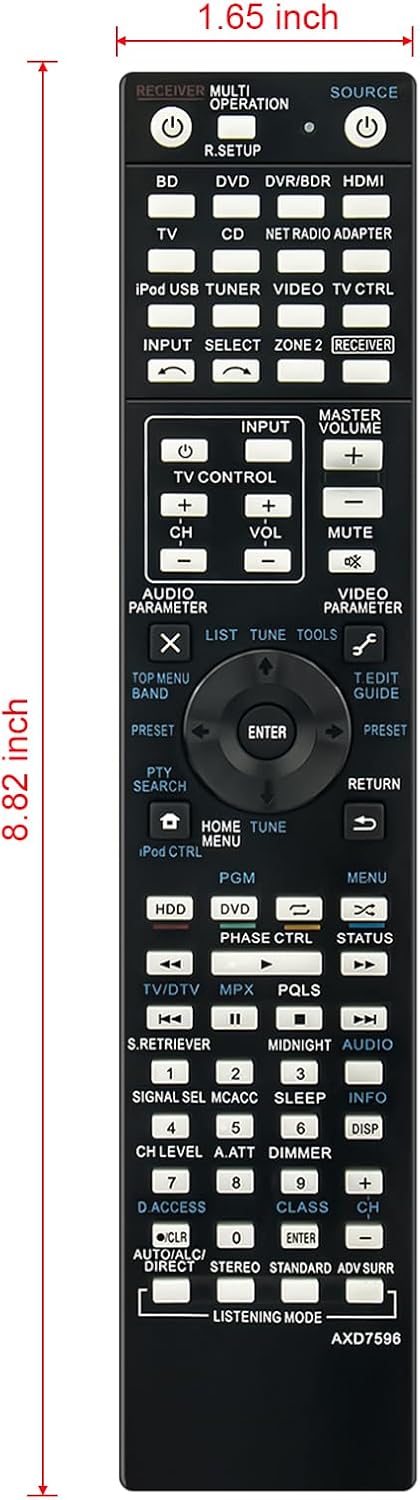
Image illustrating the dimensions of the VINABTY AXD7596 remote control, showing a length of 8.82 inches and a width of 1.65 inches.
Warranty and Support
For warranty information or technical support regarding your VINABTY AXD7596 remote control, please refer to the retailer or manufacturer's official website where the product was purchased. It is recommended to keep your purchase receipt as proof of purchase for any warranty claims.
