
1. Product Overview
The DATOUBOSS Pure Sine Wave Inverter is a high-performance device designed to convert 12V DC power from a battery into stable 100V AC power, suitable for a wide range of electronic appliances. Utilizing advanced SPWM technology, it delivers a clean and reliable power output, minimizing the risk of damage to sensitive electronics. With a continuous output of 1200W and a peak output of 2400W, this inverter is ideal for various applications, including solar power systems, vehicle use (cars, trucks, boats, RVs), camping, outdoor activities, and as an emergency power source during outages.

Image: The DATOUBOSS Pure Sine Wave Inverter providing power to a laptop, tablet, and smartphone, illustrating its versatile AC output capabilities.
This inverter features multiple output ports, including standard AC outlets, a USB port, and a Type-C port, ensuring compatibility with diverse devices. Its robust construction and efficient cooling system contribute to its durability and quiet operation, making it a reliable power solution.
2. Safety Information and Protections
Your safety and the protection of your devices are paramount. The DATOUBOSS Pure Sine Wave Inverter is equipped with five powerful protection functions to ensure safe and stable operation under various conditions:
- Overheat Protection: Automatically shuts down the inverter if internal temperatures exceed safe limits.
- Overvoltage Protection: Prevents damage from excessively high input voltage.
- Undervoltage Protection: Protects your battery from deep discharge by shutting off when input voltage is too low.
- Short Circuit Protection: Safeguards the inverter and connected devices against short circuits.
- Overload Protection: Automatically cuts power if the connected load exceeds the inverter's capacity.
Always adhere to the following safety guidelines:
- Do not open the inverter casing; there are no user-serviceable parts inside.
- Ensure proper ventilation around the inverter to prevent overheating.
- Keep the inverter away from water, moisture, and flammable materials.
- Connect the inverter to a 12V DC power source only.
- Always use appropriate cables for connection, ensuring they can handle the required current.

Image: Visual representation of the inverter's five safety protection features, ensuring secure operation.
3. Product Components
Familiarize yourself with the various parts of your DATOUBOSS Pure Sine Wave Inverter:

Image: Detailed diagram showing the front and rear panels of the inverter, highlighting all input/output ports, controls, and cooling components.
- AC Outlets: Three standard 100V AC outlets for connecting appliances.
- USB Port: For charging USB-powered devices.
- Type-C Port: For charging compatible Type-C devices.
- LED Display: Shows input voltage, output voltage, and output wattage.
- LED Indicators: Status lights for power and fault conditions.
- 50Hz/60Hz Switch: Allows selection of output frequency to match regional standards.
- Remote Port: Connects to the included remote control for convenient operation.
- Ground Terminal: For safety grounding.
- Power Switch: Main ON/OFF switch for the inverter.
- Cooling Fans: Two built-in fans for efficient heat dissipation.
- Positive (+) and Negative (-) Terminals: For connecting to the 12V DC battery.
The package includes the pure sine wave inverter unit, a remote control, connection cables, and this instruction manual.
4. Setup Instructions
Follow these steps to set up your inverter:
- Choose a Location: Place the inverter in a dry, well-ventilated area, away from direct sunlight, heat sources, and flammable materials. Ensure there is sufficient space around the cooling fans for airflow.
- Prepare Cables: The included cables are suitable for initial use. However, for prolonged use at maximum power (1200W continuous, 2400W peak), it is highly recommended to use 4 AWG (American Wire Gauge) cables to ensure optimal performance and safety. The inverter requires a battery capable of supplying at least 115A continuously for maximum output.
- Connect to Battery:
- Connect the positive (+) cable (red) from your 12V DC battery to the positive (+) terminal on the inverter.
- Connect the negative (-) cable (black) from your 12V DC battery to the negative (-) terminal on the inverter.
- Ensure all connections are tight and secure to prevent arcing and overheating.
- Grounding: Connect a grounding wire from the inverter's ground terminal to a suitable ground point (e.g., vehicle chassis or earth ground) for added safety.
- Connect Remote Control (Optional): If using the remote control, plug its cable into the remote port on the inverter. The remote control cable is 6 meters long, offering flexible placement.
- Select Frequency: Use the 50Hz/60Hz switch on the inverter to select the appropriate output frequency for your region (e.g., 50Hz for Eastern Japan, 60Hz for Western Japan).

Image: The inverter highlighting its 50Hz/60Hz frequency selection switch, adaptable for different regional power standards in Japan.

Image: The inverter's remote control, illustrating its compact size and the generous 6-meter cable for convenient operation.
5. Operating Instructions
To operate your DATOUBOSS Pure Sine Wave Inverter:
- Power On: Ensure all connections are secure. Flip the main power switch on the inverter to the "ON" position. If using the remote control, ensure the inverter's main switch is ON, then press the ON button on the remote. The LED display will illuminate, showing current voltage and wattage.
- Connect Devices: Plug your AC appliances into the AC outlets, or USB/Type-C devices into their respective ports. Ensure the total wattage of connected devices does not exceed 1200W continuously or 2400W momentarily.
- Monitor Performance: Observe the LED display for real-time input voltage, output voltage, and output wattage. The output voltage typically ranges from 95V to 105V AC.
- Power Off: Before disconnecting any devices, turn off the inverter by flipping the main power switch to "OFF" or pressing the OFF button on the remote control. Then, disconnect your appliances.
Note: If using the remote control, avoid turning the remote ON before starting your vehicle's engine if the inverter is connected to the vehicle battery. This can sometimes trigger an error. It is recommended to start the engine first, then turn on the inverter via the remote.
6. Maintenance
Regular maintenance ensures the longevity and optimal performance of your inverter:
- Keep Clean: Periodically clean the exterior of the inverter with a dry, soft cloth. Ensure the cooling fan vents are free from dust and debris to maintain proper airflow.
- Check Connections: Regularly inspect all cable connections to the battery and inverter terminals. Ensure they are tight and free from corrosion. Loose connections can cause overheating and power loss.
- Storage: When not in use for extended periods, store the inverter in a cool, dry place. Disconnect it from the battery to prevent parasitic drain.
- Battery Health: Maintain your 12V DC battery in good condition. A healthy battery is crucial for the inverter's efficient operation.
7. Troubleshooting
If you encounter issues with your inverter, refer to the following common problems and solutions:
| Problem | Possible Cause | Solution |
|---|---|---|
| Inverter does not turn on. | Loose battery connections, low battery voltage, faulty power switch. | Check battery connections. Ensure battery is charged. Verify power switch is fully engaged. |
| No AC output. | Overload protection activated, short circuit, undervoltage/overvoltage protection. | Reduce connected load. Check for short circuits in appliances. Ensure battery voltage is within operating range. |
| Cooling fan is noisy. | Normal operation under load, dust in fan, fan bearing wear. | Fan noise is normal when cooling is required. Ensure vents are clear. If noise is excessive or grinding, contact support. |
| Output power is lower than expected (e.g., 700W instead of 1200W). | Inadequate input cables, battery unable to supply sufficient current, internal component issue. | Ensure you are using appropriate gauge cables (e.g., 4 AWG for high loads). Verify battery health and capacity. |
| Inverter shuts off prematurely during charging. | Overvoltage protection triggered by charging system. | Monitor battery voltage during charging. Ensure charging voltage does not exceed the inverter's maximum input voltage threshold (typically around 15V for 12V systems). |
If the problem persists after attempting these solutions, please contact DATOUBOSS customer support.
8. Specifications
| Feature | Specification |
|---|---|
| Brand | DATOUBOSS |
| Model Name | B-SAK-1200W-12V |
| Wattage (Continuous) | 1200 W |
| Peak Output Power | 2400 W |
| Input Voltage | 12 Volts DC |
| Output Voltage | 100 Volts AC (95V-105V) |
| Output Waveform | Pure Sine Wave |
| Frequency | 50 Hz / 60 Hz (Switchable) |
| Number of AC Outlets | 3 |
| USB Ports | 1 |
| Type-C Ports | 1 |
| Display Type | LED |
| Item Dimensions (L x W x H) | 32.5 cm x 22.8 cm x 7.8 cm |
| Color | Blue |
| Included Components | Inverter unit, remote control, cables, instruction manual |
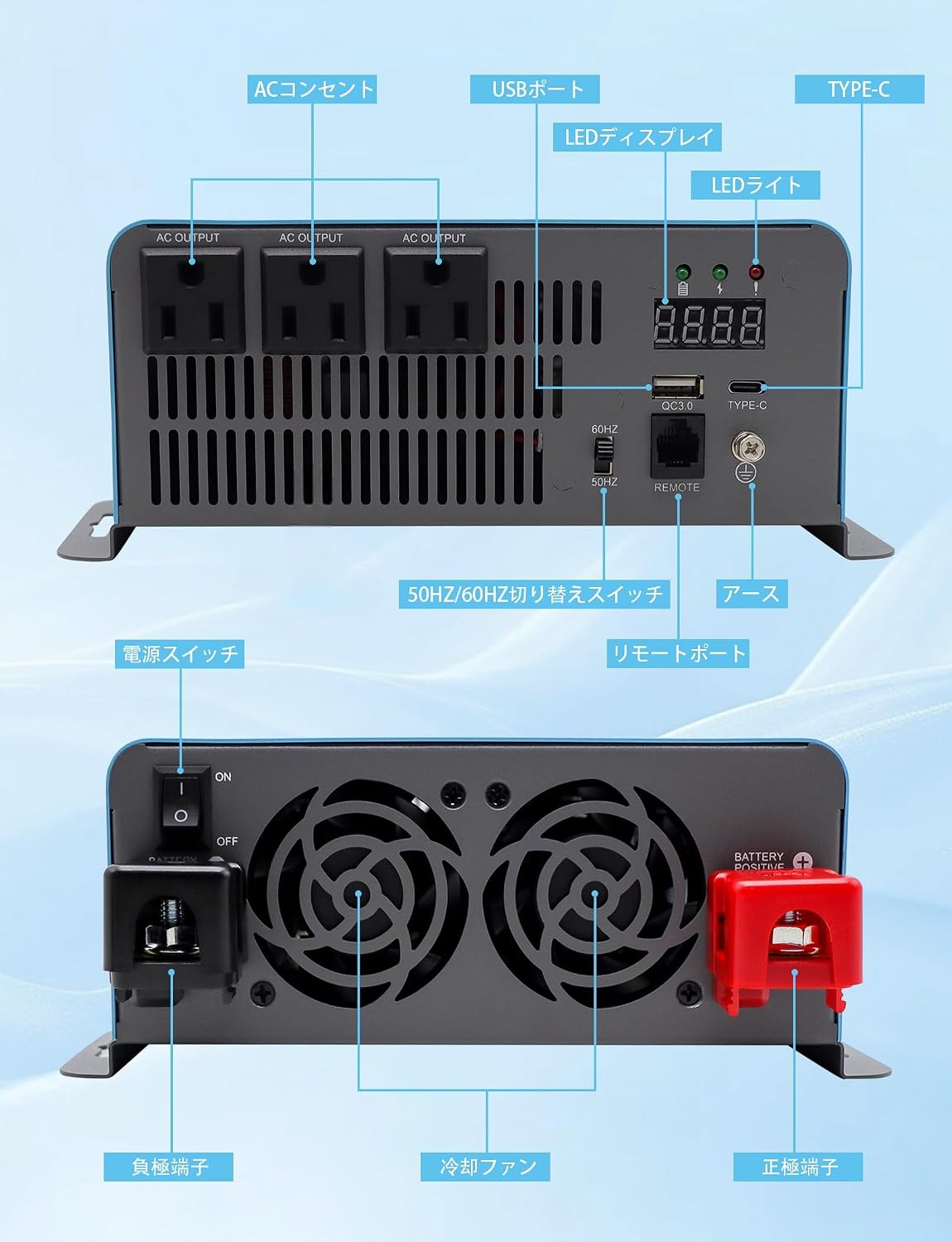
Image: The inverter with its physical dimensions labeled, indicating its compact and portable design.
9. Warranty and Support
The DATOUBOSS Pure Sine Wave Inverter comes with a 1-year manufacturer warranty from the date of purchase. This warranty covers defects in materials and workmanship under normal use.
For warranty claims, technical assistance, or any questions regarding your product, please contact DATOUBOSS customer support through the retailer where you purchased the item. Please have your purchase receipt and product model number (B-SAK-1200W-12V) ready when contacting support.
For more information about DATOUBOSS products, you can visit the official brand store: DATOUBOSS Brand Store.
