
1. Introduction
Thank you for choosing the INIU 20000mAh 45W Fast Charging Power Bank, Model P51L. This portable charger is designed to provide reliable and efficient power for your electronic devices on the go. Please read this manual carefully before use to ensure optimal performance and safety.
2. Safety Information
- Do not expose the power bank to extreme temperatures (above 60°C/140°F) or direct sunlight.
- Avoid dropping, disassembling, or modifying the device.
- Keep away from water, moisture, and flammable materials.
- Use only certified charging cables and adapters.
- Keep out of reach of children.
- If the power bank swells, leaks, or emits an unusual odor, discontinue use immediately.
3. Package Contents
Verify that all items are present in your package:
- INIU 20000mAh Power Bank (Model P51L) x 1
- User Manual x 1

Image: The INIU 20000mAh Power Bank and its included user manual and packaging.
4. Product Overview
The INIU P51L Power Bank features a compact design with a built-in USB-C cable, a digital display, and multiple output ports for versatile charging.
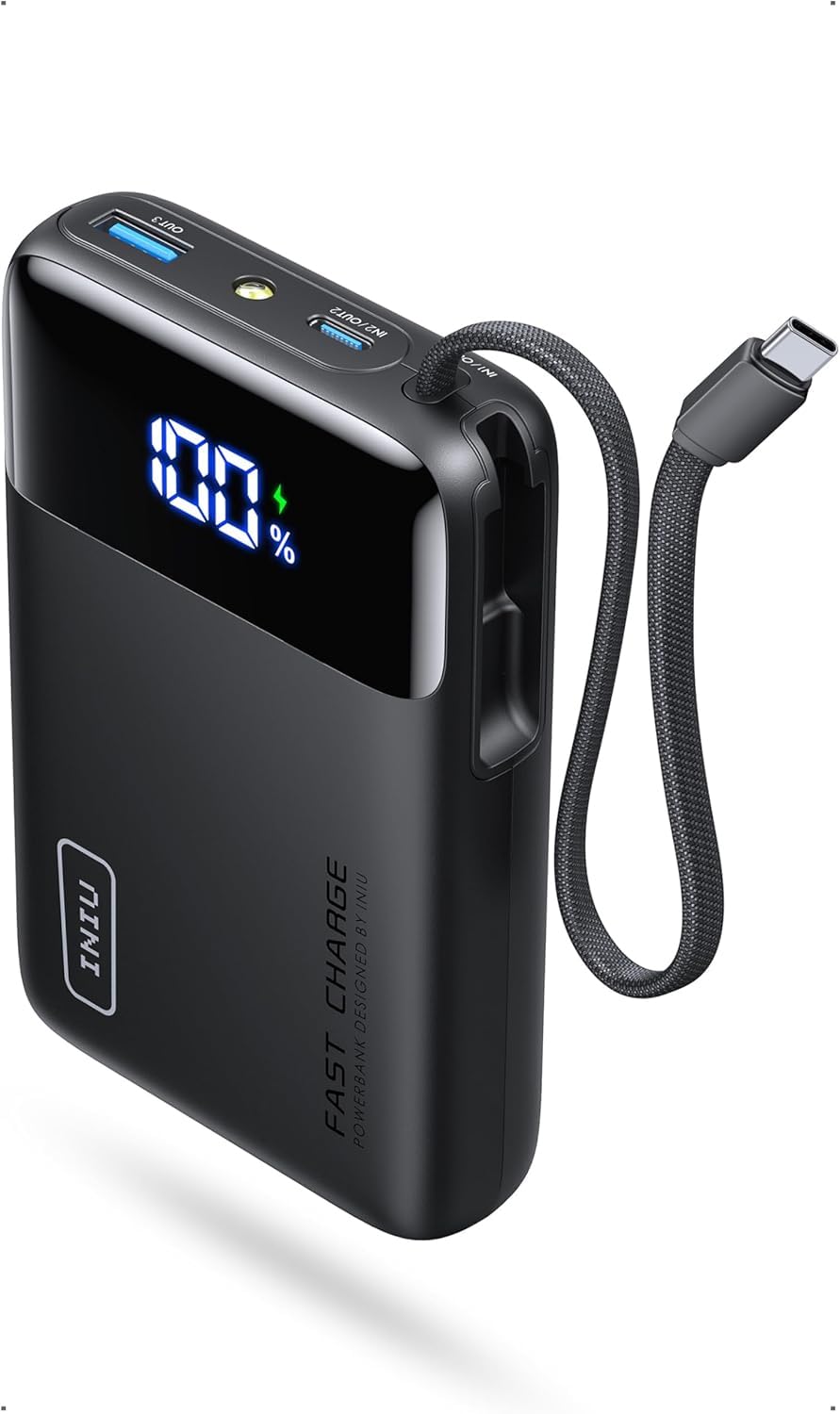
Image: Front view of the INIU 20000mAh Power Bank, highlighting its digital display and integrated USB-C cable.
4.1 Components
- Digital Display: Shows the remaining battery percentage.
- Built-in USB-C Cable: For convenient charging without extra cables.
- USB-C Input/Output Port: Supports fast charging for both the power bank and connected devices.
- USB-A Output Port: For charging devices with a standard USB-A cable.
- Power Button: Activates the display and initiates charging.
- Flashlight: Integrated for emergency use.

Image: Detail of the power bank's built-in USB-C cable and the integrated flashlight in operation.
5. Charging the Power Bank
Before first use, fully charge the power bank. To recharge the power bank:
- Connect a USB-C charging cable to the power bank's USB-C input port or use the built-in USB-C cable.
- Connect the other end of the cable to a compatible USB wall adapter (not included).
- The digital display will show the charging progress. The power bank is fully charged when the display shows 100%.

Image: The power bank's digital display indicating the current charge level.
6. Charging Your Devices
The INIU P51L Power Bank can charge up to three devices simultaneously.
- Using the Built-in USB-C Cable: Extend the built-in USB-C cable and plug it directly into your compatible device's USB-C port.
- Using External Cables: Connect your device's charging cable to either the USB-C output port or the USB-A output port on the power bank.
- The power bank will automatically begin charging. The digital display will show the remaining battery level.
Note: For iPhone 14 series or earlier models, a Lightning cable (not included) is required.

Image: The INIU Power Bank actively fast charging an iPhone 17 Pro.

Image: The power bank charging a smartphone, tablet, and wireless earbuds concurrently.
6.1 Using the Flashlight
To activate the flashlight, press and hold the power button for a few seconds. Repeat the action to turn it off.
7. Key Features
- Compact and Portable: Approximately 30% smaller than other 20,000mAh power banks, weighing 326.1g (11.5oz).
- 45W PD Fast Charging: Delivers rapid charging speeds, boosting an iPhone 17 Pro from 20% to 76% in 30 minutes.
- 20,000mAh Capacity: Provides approximately 4 full phone charges or 2 full tablet charges. Airline-approved for travel.
- Built-in Braided USB-C Cable: Eliminates the need for extra cables, tested for over 10,000 bends and 6kg anti-pulling strength.
- Multi-Device Charging: Charge up to 3 devices simultaneously.
- 18-Layer SmartProtect System: Advanced safety features for secure charging.

Image: The INIU Power Bank's compact size compared to other personal electronic devices.

Image: The power bank easily fitting into a pocket, emphasizing its travel-friendly design.

Image: Durability test of the built-in USB-C cable, showing its resistance to pulling force.
Image: Visual representation of the power bank's comprehensive 18-layer safety system.
8. Specifications
| Feature | Detail |
|---|---|
| Model Number | P51L |
| Battery Capacity | 20000 Milliamp Hours (20000mAh) |
| Output Power | Up to 45W (USB-C) |
| Input Power | USB Type C |
| Connector Types | USB Type A, USB Type C |
| Number of Ports | 2 (1x USB-A, 1x USB-C) + Built-in USB-C cable |
| Product Dimensions | 11.5 x 2.9 x 7.3 cm |
| Item Weight | 370 g (Battery Weight: 320 g) |
| Battery Type | Lithium Polymer |
| Special Features | Built-in Cable, Digital Display, Fast Charging, Flashlight, Mini Size, Compact Design |
| Country of Origin | China |
9. Troubleshooting
- Device not charging:
- Ensure the power bank has sufficient charge.
- Check if the cable is securely connected to both the power bank and your device.
- Try a different charging cable or port.
- Verify your device is compatible with the power bank's output.
- Slow charging:
- Ensure your device supports fast charging and you are using a compatible cable.
- If multiple devices are connected, the output power per port may be reduced.
- Power bank not charging:
- Ensure the charging adapter is working and the cable is properly connected.
- Try a different USB wall adapter or cable.
10. Maintenance
- Clean the power bank with a soft, dry cloth. Do not use harsh chemicals or abrasive materials.
- Store in a cool, dry place away from direct sunlight and extreme temperatures.
- Recharge the power bank at least once every three months to maintain battery health if not used regularly.
11. Warranty and Support
INIU provides an industry-leading 3-Year INIU Care warranty for this product, plus lifetime technical support. For any quality issues within 3 years, a replacement will be provided.
For further assistance, please contact INIU customer support through their official channels or visit their brand store:
Visit the INIU Store on Amazon

Image: An INIU customer service representative highlighting the 3-year warranty.
12. Product Videos
12.1 INIU P51L-E2 Product Overview
Video: A comprehensive overview of the INIU P51L-E2 Power Bank, demonstrating its compact size, built-in USB-C cable, fast charging capabilities, and suitability for daily use and travel.
12.2 INIU Portable Charger Features
Video: This video showcases the INIU Portable Charger's key features, including its ready-to-use USB-C cable, fast charging performance for devices like the iPhone 15, and its impressive capacity for multiple charges across various devices.


