
1. Introduction
Thank you for choosing the AILINKE Smart Humidifier. This manual provides essential information for the safe and efficient operation, maintenance, and troubleshooting of your device. Please read it thoroughly before use and retain it for future reference.
2. Product Overview
The AILINKE Smart Humidifier is designed to improve air quality and comfort in large rooms, bedrooms, offices, and warehouses. It features smart controls, a large water capacity, and customizable settings.
Key Features:
- Smart Control: Compatible with Wi-Fi, Smart Life app, and voice control (Alexa).
- Large Capacity: 2.1 Gallon (8 Liter) water tank for up to 48 hours of continuous misting.
- High Output: Up to 350 mL/h mist output, covering areas up to 500 sq.ft.
- Adjustable Humidity: Built-in humidistat with 3 levels of humidification and automatic adjustment between 40% and 90% relative humidity.
- Essential Oil Tray: Integrated tray for aromatherapy diffusion.
- Extended Mist Tube: Includes an extended tube for wider mist distribution without wetting surfaces.
- 360° Rotating Nozzle: Allows directional control of mist output.
- Night Light: 5-color LED mood light for a relaxing ambiance.
- Sleep Mode: Operates quietly (below 35dB) with lights off for undisturbed sleep.
- Timer Function: Programmable timer for automatic shut-off.
- Top-Fill Design: Easy and convenient water refilling.
Product Components:
Familiarize yourself with the main components of your humidifier.

Image 2.1: The AILINKE Smart Humidifier ALK-KH-K20SMA. This image displays the humidifier in a living room setting, showcasing its sleek design and the mist output from the top. A smartphone displaying the control app is also visible.

Image 2.2: Humidifier coverage and capacity details. This image highlights the humidifier's ability to cover 500 sq.ft., its 350 ml/h max mist output, and its 2.1 Gallon (8 Liter) transparent tank, shown in a living room with people and a pet.
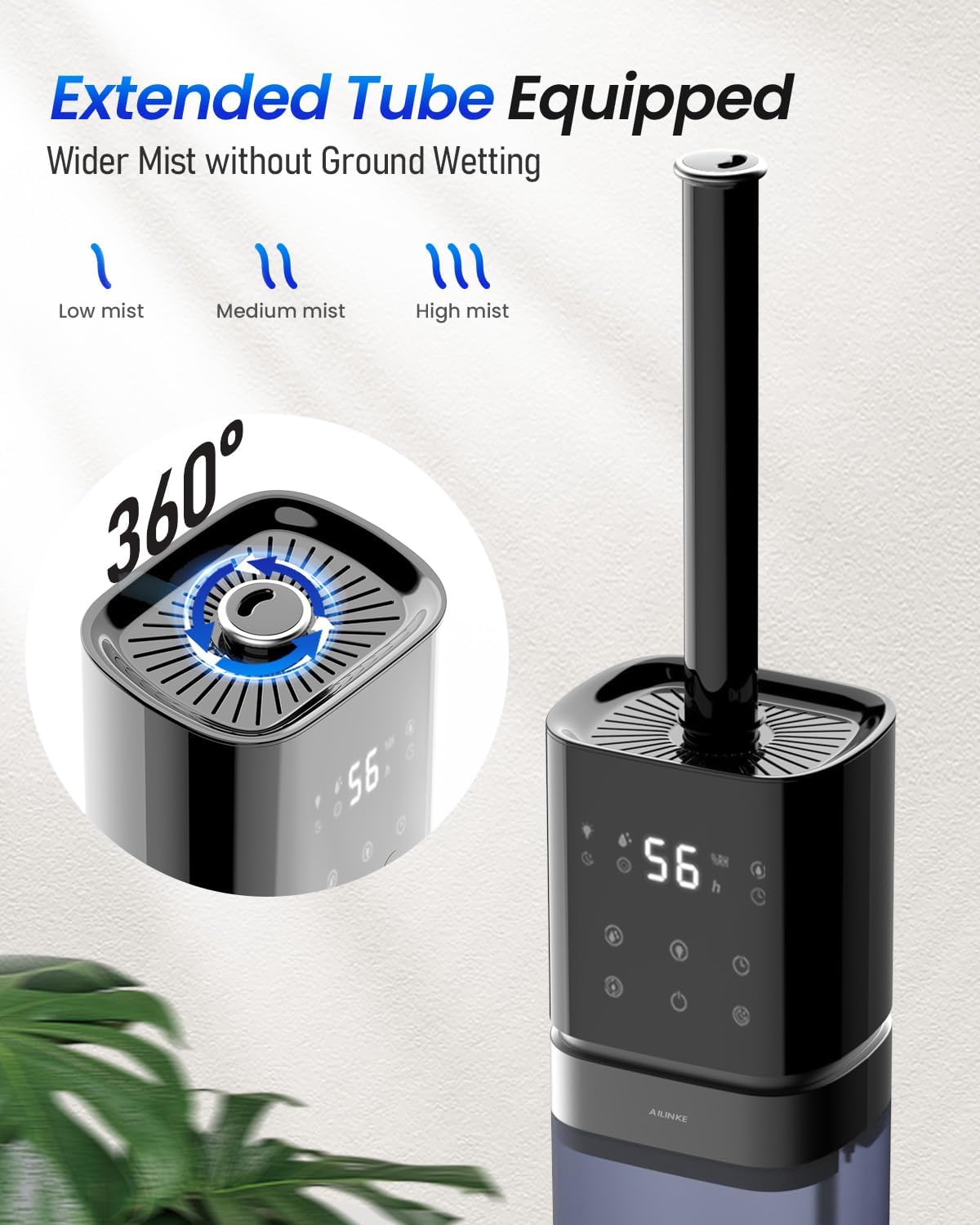
Image 2.3: Humidifier with extended mist tube and 360-degree nozzle. This image illustrates the extended tube accessory and the rotating mist nozzle, demonstrating how mist can be directed and distributed.
3. Setup
3.1 Unpacking and Placement
- Carefully remove all packaging materials from the humidifier.
- Place the humidifier on a flat, stable, and water-resistant surface at least 6 inches (15 cm) away from walls and furniture.
- Ensure the mist outlet is not directed towards walls, furniture, or electronic devices.
3.2 Assembling the Extended Mist Tube (Optional)
For wider mist distribution, you can attach the extended mist tube:

Image 3.1: Step-by-step guide for assembling the extended mist tube. This image shows four steps: removing the top cover, detaching the inner mist outlet, inserting the extended tube, and demonstrating its 360-degree rotation.
- Remove the top cover of the humidifier.
- Detach the small inner mist outlet from the top.
- Insert the extended mist tube into the opening.
- Ensure the tube is securely in place. The extended tube can rotate 360 degrees.
3.3 Filling the Water Tank
The humidifier features a convenient top-fill design:

Image 3.2: Humidifier top-fill design. This image demonstrates the ease of refilling the water tank by pouring water directly into the top opening.
- Ensure the humidifier is unplugged before filling.
- Open the top cover of the humidifier.
- Pour clean, cool tap water directly into the water tank. Do not exceed the maximum fill line.
- Replace the top cover securely.
4. Operating Instructions
4.1 Power On/Off
Plug the power cord into a suitable electrical outlet. Press the power button on the control panel or use the remote control/app to turn the humidifier on or off.
4.2 Mist Level Adjustment
The humidifier offers multiple mist output levels. Use the mist level button on the control panel, remote, or app to cycle through low, medium, and high mist settings.
4.3 Humidity Control (Humidistat)
Set your desired humidity level between 40% and 90% using the control panel, remote, or app. The humidifier will automatically adjust its mist output to maintain the set humidity.

Image 4.1: Smart constant humidity feature. This image illustrates the humidifier's ability to automatically maintain a preset humidity level between 40% and 90% for up to 48 hours of continuous operation with its 8-liter capacity.
4.4 Timer Function
Activate the timer function via the control panel, remote, or app to set the humidifier to operate for a specific duration before automatically shutting off.
4.5 Night Light and Sleep Mode
The humidifier includes a 5-color LED night light. Press the light button to cycle through colors or turn it off. Activate Sleep Mode to turn off all lights and operate the humidifier at its lowest, quietest setting (below 35dB) for undisturbed sleep.

Image 4.2: 5-colored mood light and sleep mode. This image shows the humidifier with its ambient lighting feature and highlights its quiet operation (30dB) in sleep mode, ideal for overnight use in a bedroom.
4.6 Essential Oil Tray
To use the aromatherapy function:
- Locate the essential oil tray at the back of the humidifier.
- Add 1-2 drops of your preferred essential oil onto the aroma pad in the tray.
- Close the tray. The mist will carry the fragrance into the air.
4.7 Smart App and Voice Control
The AILINKE Smart Humidifier can be controlled via the Smart Life app and voice commands through Alexa.

Image 4.3: Smart app and voice control interface. This image displays a smartphone screen showing the Smart Life app interface for controlling the humidifier, including settings for humidity, timer, and lighting.

Image 4.4: Voice control with Alexa. This image shows a user interacting with the humidifier using voice commands, demonstrating its compatibility with Alexa for hands-free operation.
- Download the 'Smart Life' app from your device's app store.
- Follow the in-app instructions to connect your humidifier to your Wi-Fi network.
- Once connected, you can control all functions (mist volume, timer, lighting, humidity) remotely.
- For voice control, enable the 'Smart Life' skill in your Alexa app and link your accounts. You can then use commands like "Alexa, turn on the Smart Humidifier."
5. Maintenance
Regular cleaning is essential for optimal performance and hygiene.
5.1 Daily Maintenance
- Empty and rinse the water tank daily.
- Wipe the mist nozzle and exterior surfaces with a soft, damp cloth.
5.2 Weekly Cleaning
- Unplug the humidifier and empty any remaining water.
- Remove the water tank and any detachable parts.
- Fill the water tank with 1 cup of white vinegar and 1 cup of water. Let it soak for 30 minutes.
- Use a soft brush or cloth to clean the inside of the tank and the base unit, paying attention to the nebulizer and water sensor.
- Rinse all components thoroughly with clean water until the vinegar smell is gone.
- Dry all parts completely before reassembling or storing.
5.3 Essential Oil Tray Cleaning
Clean the essential oil tray and aroma pad regularly to prevent residue buildup. Remove the pad, rinse it with warm water, and allow it to air dry. Wipe the tray with a damp cloth.
6. Troubleshooting
If you encounter issues with your humidifier, refer to the following common problems and solutions:
| Problem | Possible Cause | Solution |
|---|---|---|
| No mist or low mist output | Lack of water; mineral buildup on nebulizer; mist outlet blocked. | Refill water tank; clean the nebulizer and base unit; ensure mist outlet is clear. |
| Water leakage | Water tank not properly seated; overfilled tank; damaged tank. | Ensure tank is correctly placed; do not overfill; check for cracks. |
| Humidifier not turning on | No power; power button not pressed; auto shut-off activated. | Check power connection; press power button; refill water if empty. |
| App/Voice control not working | Wi-Fi disconnected; incorrect app settings; Alexa skill not linked. | Check Wi-Fi connection; reconfigure app settings; relink Alexa skill. |
| Unusual noise | Water level too low; foreign object in water tank; unit not level. | Refill water; check and remove any objects; place on a flat surface. |
If the problem persists after attempting these solutions, please contact customer support.
7. Specifications
| Brand | AILINKE |
| Model Name | ALK-KH-K20SMA |
| Operation Mode | Ultrasonic |
| Water Tank Capacity | 2.1 Gallons (8 Liters) |
| Max Mist Output | 350 mL/h |
| Coverage Area | Up to 500 Square Feet |
| Product Dimensions | 7"D x 8"W x 25"H |
| Item Weight | 5 Pounds |
| Voltage | 120 Volts |
| Wattage | 23 Watts |
| Special Features | Adjustable Humidity Control, Aroma Diffuser, Auto Shut Off, Digital Display, Humidistat |
8. Warranty and Support
AILINKE provides the following support for your humidifier:
- 30-Day Replacement: If your product has any quality issues within 30 days of purchase, it is eligible for a replacement.
- 1-Year Assurance: The humidifier is covered by a 1-year assurance period from the date of purchase.
- Customer Service: 24-hour online service is available for any refund, return, or technical assistance inquiries.
For support, please refer to the contact information provided with your product packaging or visit the official AILINKE website.