
AMBITFUL GT-07
Contents
AMBITFUL GT-07 Mini Tripod Stand Holder
Instruction Manual
Model: GT-07 | Brand: AMBITFUL
Introduction
The AMBITFUL GT-07 Mini Tripod Stand Holder is a versatile and portable accessory designed for photographers and videographers. Its robust aluminum alloy construction ensures stability for various devices, including DSLR cameras, camcorders, mobile phones, and action cameras. Featuring a 360-degree swivel ball head and a cold shoe mount, it offers flexible shooting angles and expanded connectivity for accessories like microphones and lights.
Key Features:
- Portable Vlog Selfie Tripod: Integrated side cold shoe design for VLOG cameras, allowing simultaneous connection of microphones or lights.
- Strong & Stable Construction: Crafted from durable aluminum alloy with non-slip feet for maximum stability. Supports a maximum load of 6.6 lbs (3 kg).
- Flexible 360° Ball Head: Equipped with a 360-degree swivel ball head for panoramic views and a 2-position leg angle adjustment system for versatile shooting.
- Compact & Lightweight Design: Features 2-section adjustable-height legs. Weighing 0.69 lbs (317g) and measuring 8.3 inches (212mm) when folded, it is highly portable and fits easily into pockets or bags.
- Wide Compatibility: Designed for use with DSLR cameras, camcorders, mobile phones, and action cameras, making it suitable for various applications such as video recording, selfies, parties, weddings, hiking, and live streaming.
Product Overview
Familiarize yourself with the components of your AMBITFUL GT-07 Mini Tripod.

Figure 1: Overview of the AMBITFUL GT-07 Mini Tripod components, highlighting the 2-in-1 interface, adjustable knob, 360° rotation scale, U-shaped notch, and maximum load capacity.

Figure 2: The package includes the GT07 Desktop Tripod, GT02 Ball Head, and a Phone Holder.

Figure 3: The 2-in-1 interface offers both a 1/4 inch screw and a cold shoe mount for versatile accessory attachment.
Setup
- Attach the Ball Head: Screw the GT02 Ball Head onto the 1/4 inch screw on top of the GT07 Desktop Tripod until secure.
- Attach Device (Camera/Phone):
- For Cameras: Directly screw your DSLR camera or camcorder onto the 1/4 inch screw on the ball head.
- For Mobile Phones: Attach the provided phone holder to the 1/4 inch screw on the ball head. Secure your mobile phone within the phone holder.
- Adjust Leg Angles: Press the leg angle adjustment buttons on each leg to select between the two available leg angles for desired height and stability.
- Extend Legs (Optional): If needed, extend the 2-section legs by pulling them outwards until they lock into place.

Figure 4: The tripod set up with a camera, external light, and microphone, utilizing the cold shoe mounts for expanded functionality.

Figure 5: The 1/4 inch screw provides compatibility for mounting phones, DSLR cameras, and LED lights.
Operating Instructions
- Adjusting the Ball Head: Loosen the adjustable knob on the ball head to freely rotate and tilt your device to achieve the desired shooting angle. Tighten the knob to secure the position.
- Panoramic Shooting: The 360-degree rotation scale on the ball head allows for precise panoramic adjustments. Loosen the base knob to rotate the head horizontally, then tighten to lock.
- Switching between Horizontal and Vertical Shooting: The ball head's U-shaped notch allows for quick transitions between horizontal and vertical orientations. Loosen the adjustable knob, tilt the device into the notch, and then tighten.
- Low Angle Mode: For low-angle shots, fully spread the tripod legs to their widest position.
- Handheld Use (Selfie Stick Mode): Fold the tripod legs together to use the GT-07 as a comfortable one-handed grip for handheld shooting or as a short selfie stick.

Figure 6: The 360° ball head enables multiple shooting angles, including horizontal, vertical, and overhead perspectives.

Figure 7: The tripod can be folded into a stabilizing one-handed grip for comfortable use during extended periods.
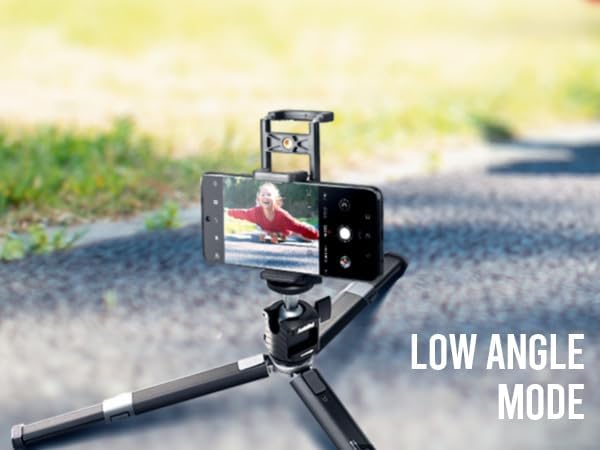
Figure 8: Achieve unique perspectives with the low angle mode, ideal for creative shots.
Video 1: A detailed demonstration of the AMBITFUL GT-07 Mini Tripod's durable metal base, ball head, and the unique spring mount for various devices. This video highlights the product's construction and how to adjust its components for different shooting needs.
Maintenance
- Cleaning: Wipe the tripod with a soft, dry cloth after each use to remove dust and dirt. For stubborn grime, use a slightly damp cloth and mild soap, then dry thoroughly.
- Storage: Store the tripod in a cool, dry place away from direct sunlight and extreme temperatures. Ensure it is clean and dry before storage.
- Avoid Overloading: Do not exceed the maximum load capacity of 6.6 lbs (3 kg) to prevent damage to the tripod and your equipment.
- Check Connections: Periodically check all screws and connections to ensure they are tight. Do not overtighten.
Troubleshooting
- Tripod is Unstable:
- Ensure all legs are fully extended and locked into position.
- Verify that the leg angle adjustment is set correctly for the surface.
- Check if the device mounted exceeds the maximum load capacity.
- Ball Head Not Holding Position:
- Ensure the adjustable knob on the ball head is tightened sufficiently.
- Confirm that the device mounted is within the weight limit.
- Device Not Attaching Securely:
- Ensure the 1/4 inch screw is fully engaged with your device or phone holder.
- For phone holders, ensure the phone is centered and securely gripped by the clamps.
Specifications
| Feature | Specification |
|---|---|
| Brand | AMBITFUL |
| Model | GT-07 |
| Material | Aluminum Alloy |
| Item Weight | 1.15 pounds (0.52 kg) |
| Max Load Weight | 6.6 pounds (3 kg) |
| Folded Size | 8.3 inches (212mm) |
| Tripod Head Type | Ball Head |
| Mounting Screw | 1/4 Inch |
| Special Feature | Cold Shoe Mount, 360° Rotation, Adjustable Leg Angles |
Warranty & Support
For warranty information and customer support, please refer to the product packaging or contact AMBITFUL customer service directly through their official website or the retailer where the product was purchased. Keep your purchase receipt as proof of purchase for any warranty claims.
Ask a question about this manual
Ask about setup, troubleshooting, compatibility, parts, safety, or missing instructions. Manuals+ will review the question and use this page’s manual context to help answer it.