
1. Introduction
This manual provides essential information for the safe and efficient operation, installation, and maintenance of the ABB Main Computer M2004HW 3HAC020929-006/01. This industrial computer is designed for robust performance in various control system applications. Please read this manual thoroughly before attempting any installation or operation.
2. Setup and Installation
Proper installation is crucial for the reliable operation of the M2004HW computer. Follow these guidelines carefully.
2.1 Unpacking and Inspection
- Carefully remove the computer from its packaging.
- Inspect the unit for any signs of physical damage that may have occurred during transit. Report any damage to the supplier immediately.
- Ensure all components listed in the packing slip are present.
2.2 Mounting
The M2004HW is designed for secure mounting within an industrial enclosure or rack. Use appropriate fasteners and ensure adequate ventilation space around the unit, especially near the cooling fans.
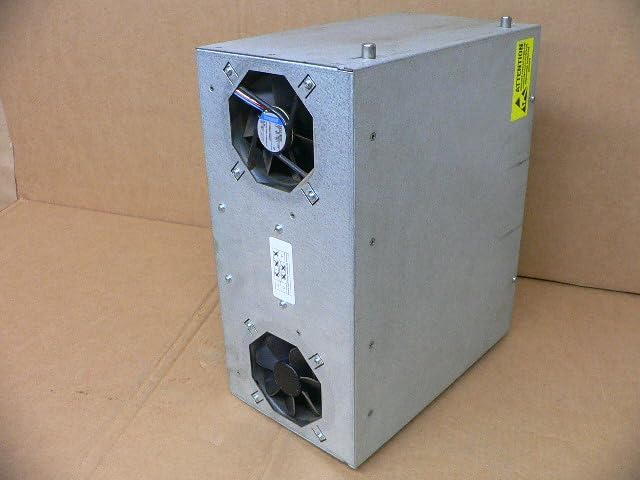
Figure 2.1: Side view of the ABB M2004HW computer, illustrating the location of the two cooling fans for proper airflow and heat dissipation.
2.3 Power Connection
The computer requires a 24V DC power supply with a maximum current draw of 7A. Connect the power cable to the designated terminal block on the rear panel. Ensure correct polarity (+ and -) to prevent damage.

Figure 2.2: Product label indicating model number M2004HW, power requirements (24VDC, max 7A), and part numbers 3HAC020929-006/01 and 2-D150-0006.
2.4 Peripheral Connections
Connect necessary peripherals to the rear panel ports:
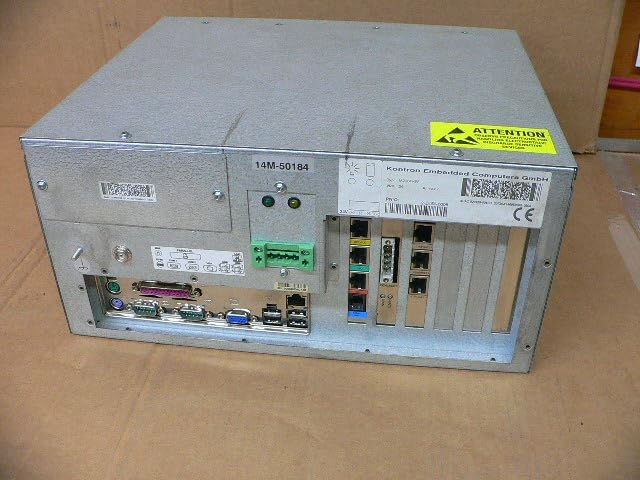
Figure 2.3: Rear panel of the ABB M2004HW computer, displaying a range of input/output ports including VGA, USB, Ethernet, and serial connections, along with the power input terminal.
- Video Output: Connect a monitor to the VGA port.
- USB Ports: For keyboard, mouse, and other USB devices.
- Ethernet Ports: For network connectivity.
- Serial Ports: For communication with industrial devices.
- Other I/O: Utilize specialized industrial I/O as required by your application.
3. Operating Instructions
3.1 Powering On
- Ensure all necessary cables are securely connected.
- Apply 24V DC power to the unit. The system should initiate its boot sequence.
- Observe the status indicator LEDs on the front or rear panel for system status.
3.2 System Interaction
Once the operating system has loaded, interact with the computer using the connected keyboard, mouse, and monitor. Refer to the operating system's documentation for specific usage instructions.
3.3 Powering Off
Always shut down the operating system gracefully before removing power to prevent data corruption or system damage. After the OS has shut down, disconnect the 24V DC power supply.
4. Maintenance
Regular maintenance ensures the longevity and optimal performance of your ABB Main Computer.
4.1 Cleaning
- Periodically clean the exterior of the unit with a soft, dry cloth.
- Ensure cooling fan vents are free from dust and debris to maintain proper airflow. Use compressed air if necessary, ensuring the system is powered off during cleaning.
- Do not use liquid cleaners directly on the unit.
4.2 Environmental Considerations
Operate the computer within its specified temperature and humidity ranges. Avoid exposure to excessive dust, moisture, or corrosive environments.
5. Troubleshooting
This section addresses common issues you might encounter.
5.1 No Power
- Verify the 24V DC power supply is active and correctly connected to the terminal block.
- Check the polarity of the power connection.
- Inspect the power cable for damage.
5.2 No Display Output
- Ensure the monitor is powered on and correctly connected to the VGA port.
- Check the monitor's input selection.
- Try a different monitor or VGA cable if available.
5.3 System Not Responding
- If the system is unresponsive, perform a controlled shutdown if possible. If not, disconnect power, wait 30 seconds, and then reconnect.
- Check for any error indicators or messages on the display.
6. Specifications
| Feature | Detail |
|---|---|
| Brand | ABB |
| Model Number | M2004HW |
| Part Number | 3HAC020929-006/01, 2-D150-0006 |
| Product Dimensions (L x W x H) | 11.02 x 6.69 x 13.78 inches (28 x 17 x 35 cm) |
| Item Weight | 12.79 pounds (5.8 kg) |
| Power Input | 24V DC, max 7A |
| Manufacturer | Abb |
| ASIN | B0DCW2R6ZN |
| Date First Available | January 15, 2024 |
7. Warranty and Support
This product is listed as a used item. Therefore, any original manufacturer's warranty may no longer be applicable. For warranty information specific to your purchase, please refer to the terms and conditions provided by the seller (Rylan-MRO).
For general product information or technical documentation from the manufacturer, you may visit the official ABB website or their store on Amazon: ABB Store on Amazon.