1. Introduction
This manual provides instructions for the safe and efficient operation of your ALITOVE AC to DC Converter, Model S-360-12. This device converts alternating current (AC) from a standard wall outlet to direct current (DC) suitable for various 12V electronic devices. Please read this manual thoroughly before use and retain it for future reference.
2. Safety Information
WARNING: Improper use can lead to electric shock, fire, or damage to the device. Always follow safety guidelines.
- This power supply is designed for indoor use only.
- Ensure the input voltage switch (110V/220V) is set correctly for your region before connecting to power. For USA/CA, set to 110V. For EUR, set to 220V. Incorrect setting can cause damage.
- Always turn off the power switch before making or disassembling any connections.
- Do not exceed 80% of the full load capacity to ensure optimal lifespan. For this 12V 30A 360W unit, power devices less than 288W.
- For resistive devices, the power supply's peak power should be at least 1.25 times the device power.
- For motor devices, the power supply's peak power should be at least 2 times the motor's power.
- Do not disassemble the unit. Non-professionals should not attempt repairs.
- The unit features multiple safety protections including overload cut-off, over voltage cut-off, over temperature cut-off, and short-circuit cut-off.


3. Product Overview
The ALITOVE S-360-12 is a switching AC/DC power adapter designed for stable 12V output. It features a robust aluminum shell with heat dissipation holes and a temperature-controlled cooling fan for efficient thermal management. The unit includes a red button on/off switch for convenient power control.
Included Accessories:
- 12V AC/DC Adapter unit
- Car cigarette lighter socket adapter
- Alligator clips
- Heavy-duty copper power cord
- Wire lugs
- Metal clip and screws for mounting


4. Specifications
| Feature | Specification |
|---|---|
| Product Name | AC/DC Power Adapter |
| Brand | ALITOVE |
| Input Voltage | AC 110V / 220V (85-140V / 185-265V), 50/60Hz |
| Output Voltage | DC 12V ± 0.5% |
| Output Current | 0-30A (Peak) |
| Output Wattage | 360W (Max) |
| Item Model Number | S-360-12 |
| Dimensions | 10.67 x 8.74 x 2.91 inches |
| Item Weight | 2.72 pounds |
| Color | Silver |
| Plug Format | Type B-USA |

5. Setup and Installation
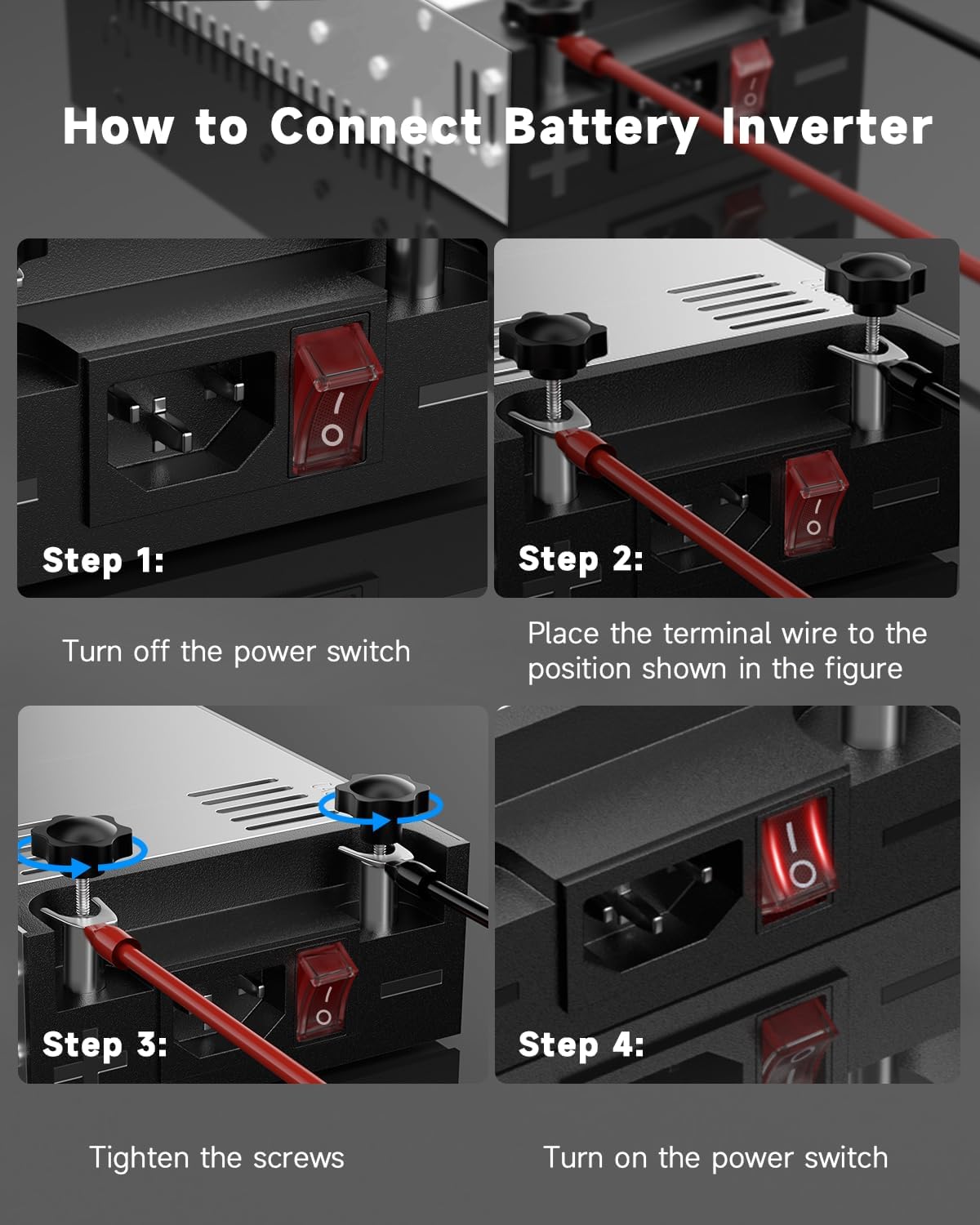
Follow these steps to connect your ALITOVE AC to DC Converter to your 12V device:
- Step 1: Turn off the power switch. Ensure the red on/off switch on the converter is in the 'OFF' position before making any connections.
- Step 2: Connect the terminal wire. Place the positive (+) and negative (-) terminal wires from your 12V device into the corresponding screw terminals on the converter. Ensure correct polarity.
- Step 3: Tighten the screws. Securely tighten the black knob screws to firmly hold the terminal wires in place. A loose connection can cause overheating or malfunction.
- Step 4: Connect AC power. Plug the provided AC power cord into the converter's AC inlet and then into a standard wall outlet.
- Step 5: Turn on the power switch. Flip the red on/off switch to the 'ON' position. The LED power indicator light will illuminate, indicating the unit is operational.
6. Operating Instructions
Input Voltage Selection:
Before connecting the power supply to an AC source, verify the input voltage selector switch is set to the correct voltage for your region (110V for North America, 220V for Europe). This switch is typically located on the side of the unit (refer to Figure 2).
Power Usage Recommendations:
To maximize the lifespan and ensure stable operation of the power supply, it is recommended that the maximum continuous power draw from connected devices does not exceed 80% of the unit's rated power. For this 360W model, the recommended maximum continuous load is 288W.
The built-in temperature-controlled cooling fan will activate automatically when the internal temperature reaches 113°F (45°C) to maintain optimal operating temperature.
7. Applications
This ALITOVE AC to DC Converter is suitable for a wide range of 12V DC devices that require up to 360W of power. Common applications include:
- DC 12V Pumps
- Winches
- Car Jacks
- Car Stereos and Amplifiers
- Radios
- Air Compressors
- LED Light Strips
- Brushless Motors
- DVR NVR CCTV Security Camera Systems
- Household Appliances
- Electronic Devices
- Diesel Heaters
- 3D Printers
- Automation Equipment
NOTE: This device is NOT suitable for electrolysis tanks.

8. Maintenance
The ALITOVE AC to DC Converter is designed for reliable operation with minimal maintenance. To ensure longevity:
- Keep the unit clean and free from dust and debris, especially around the ventilation holes and fan.
- Ensure adequate airflow around the unit to prevent overheating. Do not block the fan or vents.
- Store the unit in a dry environment when not in use.
- Regularly check all connections for tightness and ensure no wires are frayed or damaged.
9. Troubleshooting
If you encounter issues with your ALITOVE AC to DC Converter, consider the following:
- No Power Output:
- Check if the AC power cord is securely plugged into both the converter and the wall outlet.
- Ensure the red on/off switch is in the 'ON' position.
- Verify the input voltage selector switch (110V/220V) is set correctly for your region.
- Check the connected device for any internal issues or short circuits.
- Intermittent Power:
- Inspect all terminal connections for looseness. Tighten if necessary.
- Ensure the load does not exceed the recommended 80% capacity. Overloading can trigger safety cut-offs.
- Overheating:
- Ensure the unit has sufficient ventilation and the cooling fan is not obstructed.
- Reduce the load if the unit consistently runs hot.
If problems persist after following these steps, please contact customer support.
10. Warranty and Support
ALITOVE products undergo rigorous quality control to ensure reliable operation. For warranty information or technical support, please refer to the contact details provided with your purchase or visit the official ALITOVE website. Please have your model number (S-360-12) and purchase date available when contacting support.


