
1. Introduction
This manual provides essential information for the safe and efficient operation, installation, and maintenance of the ABB Robotics IRC5 Rectifier, model 3HAC14549-1/03B. Please read this manual thoroughly before using the product.
2. Safety Information
Always observe local safety regulations and guidelines when installing, operating, or maintaining the rectifier. Only qualified personnel should perform installation and service procedures.
- Ensure power is disconnected before any installation or maintenance work.
- Avoid contact with live electrical components.
- Use appropriate personal protective equipment (PPE).
- Do not operate the unit if it appears damaged.
3. Product Overview
The ABB Robotics IRC5 Rectifier 3HAC14549-1/03B is a critical component designed for industrial robotic systems, specifically within the ABB IRC5 controller series. It is responsible for converting AC power to DC power, providing stable and regulated voltage for the robot's control and motor systems.
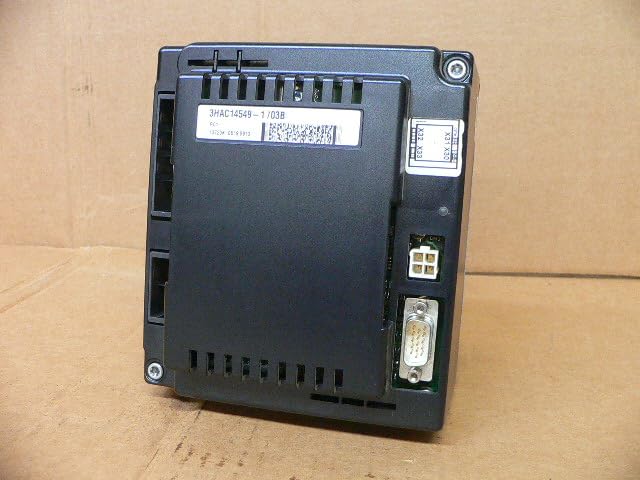
Figure 3.1: Rear view of the ABB IRC5 Rectifier. This image displays the main body of the rectifier unit, highlighting the product label with the model number "3HAC14549-1/03B" and a barcode. Various electrical connectors are visible, including a D-sub connector (likely for data or control signals) and a multi-pin power connector, indicating its role in power distribution within a robotic system.
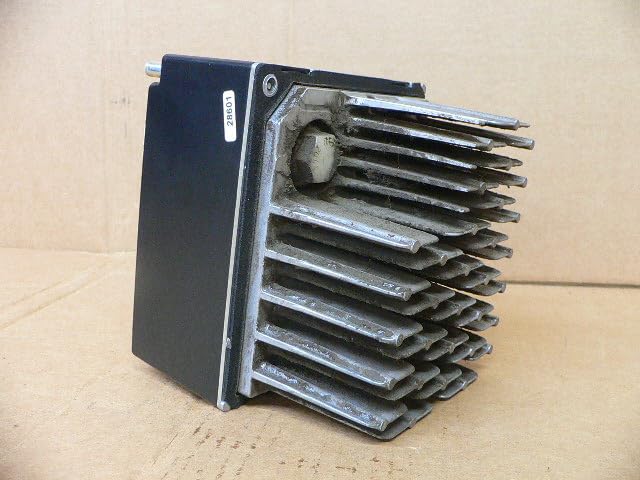
Figure 3.2: Side view of the ABB IRC5 Rectifier. This perspective clearly shows a prominent finned heatsink, which is essential for dissipating heat generated during power conversion. The robust design of the heatsink suggests the unit is designed for continuous operation and efficient thermal management in industrial environments.
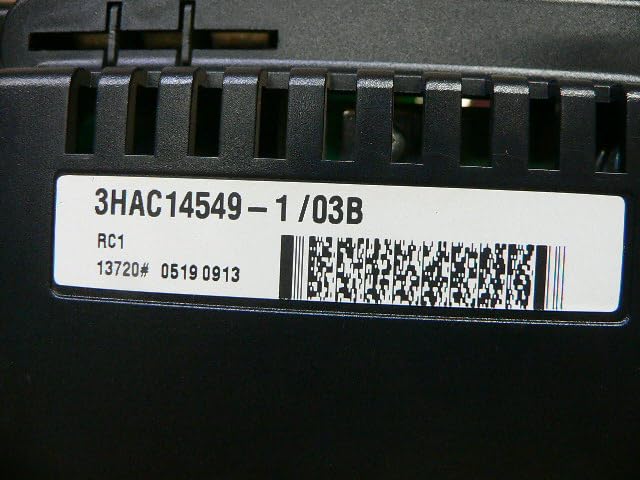
Figure 3.3: Close-up of the product label. This detailed view highlights the specific model number "3HAC14549-1/03B" and associated manufacturing information, including a barcode and a QR code. This label is crucial for product identification, tracking, and ensuring compatibility with ABB IRC5 robotic systems.
4. Setup and Installation
The IRC5 Rectifier is designed for integration into an ABB IRC5 controller cabinet. Installation should only be performed by certified technicians.
- Power Disconnection: Ensure all power to the IRC5 controller cabinet is completely disconnected and locked out before beginning installation.
- Mounting: Securely mount the rectifier unit within the designated slot or area inside the IRC5 controller cabinet using appropriate fasteners. Ensure proper ventilation around the heatsink.
- Electrical Connections: Connect the input power cables to the rectifier's designated terminals. Connect the output DC power cables to the appropriate components within the IRC5 system (e.g., drive units, control modules). Refer to the IRC5 controller wiring diagrams for specific connection points.
- Signal Connections: Connect any necessary control or feedback signal cables (e.g., to the D-sub connector) as per the system's electrical schematics.
- Verification: Double-check all connections for tightness and correct polarity. Ensure no loose wires or debris are present.
- Power Restoration: Once installation is complete and verified, restore power to the IRC5 controller cabinet.
5. Operating Instructions
The IRC5 Rectifier operates as an integral part of the ABB IRC5 controller. Its operation is largely automatic once installed and powered correctly.
- Power-Up Sequence: The rectifier will power up automatically with the IRC5 controller. Monitor the controller's diagnostic indicators for any error codes related to power supply.
- Normal Operation: During normal operation, the rectifier provides stable DC power to the robot's components. No direct user interaction with the rectifier itself is typically required.
- Monitoring: System status and power supply health can be monitored through the IRC5 controller's HMI or diagnostic software.
6. Maintenance
Regular maintenance ensures the longevity and reliable operation of the rectifier.
- Cleaning: Periodically inspect the heatsink and surrounding areas for dust and debris accumulation. Clean with compressed air or a soft brush. Ensure power is off before cleaning.
- Connection Check: Annually, or as part of routine system maintenance, inspect all electrical connections for tightness and signs of corrosion or wear.
- Environmental Conditions: Ensure the operating environment remains within specified temperature and humidity ranges to prevent overheating or condensation.
7. Troubleshooting
If you encounter issues with the rectifier, consider the following common problems and solutions:
| Problem | Possible Cause | Solution |
|---|---|---|
| No Power Output | Input power disconnected; Internal fault; Blown fuse (if applicable). | Check input power supply and connections. Consult IRC5 controller diagnostics. Contact ABB service if fault persists. |
| Overheating | Blocked ventilation; Excessive ambient temperature; Overload. | Ensure heatsink is clear of obstructions. Verify cabinet cooling. Reduce load if possible. |
| Unstable Output Voltage | Loose connections; Internal component failure. | Check all output connections. Contact ABB service for diagnosis. |
For complex issues or internal faults, contact ABB technical support or a certified service provider.
8. Specifications
- Model: 3HAC14549-1/03B
- Product Dimensions: 7.09 x 6.3 x 8.27 inches; 4 Pounds
- Manufacturer: ABB
- ASIN: B0DCVYY5PK
- First Available: January 15, 2024
9. Warranty and Support
This ABB Robotics IRC5 Rectifier is typically covered by ABB's standard industrial equipment warranty. For specific warranty terms and conditions, please refer to your purchase agreement or contact ABB directly. Technical support and service are available through authorized ABB service centers worldwide.
For further assistance, visit the official ABB Store on Amazon or the main ABB website.