
Pastigio M15R5-Golden
Pastigio Frameo 15.6" Digital Picture Frame User Manual
Model: M15R5-Golden
Introduction
This manual provides instructions for setting up and operating your Pastigio Frameo 15.6" Digital Picture Frame. This device allows you to display photos and videos, share memories with loved ones, and enjoy a personalized visual experience. The frame features a 15.6-inch Full HD IPS touch screen, 32GB of internal storage, and supports both Wi-Fi and non-Wi-Fi media transfer methods.

Image: The Pastigio Frameo 15.6-inch Digital Picture Frame, showcasing its elegant design.
Package Contents
Before you begin, please ensure all items are present in the package:
- Pastigio Frameo 15.6" Digital Picture Frame
- Power Adapter
- Magnetic Detachable Stand
- User Manual
Video: Unboxing the Pastigio 15.6 inch Digital Picture Frame, showing the contents and initial setup steps.
Setup
- Power Connection: Connect the power adapter to the DC port on the back of the frame and plug it into a power outlet. The frame will automatically power on.
- Stand Installation: Attach the magnetic detachable stand to the back of the frame for desktop placement. For wall mounting, use the integrated wall-mount support design.
- Initial Setup: Follow the on-screen prompts to select your language, time zone, and connect to a Wi-Fi network. A stable Wi-Fi connection is required for using the Frameo app features.
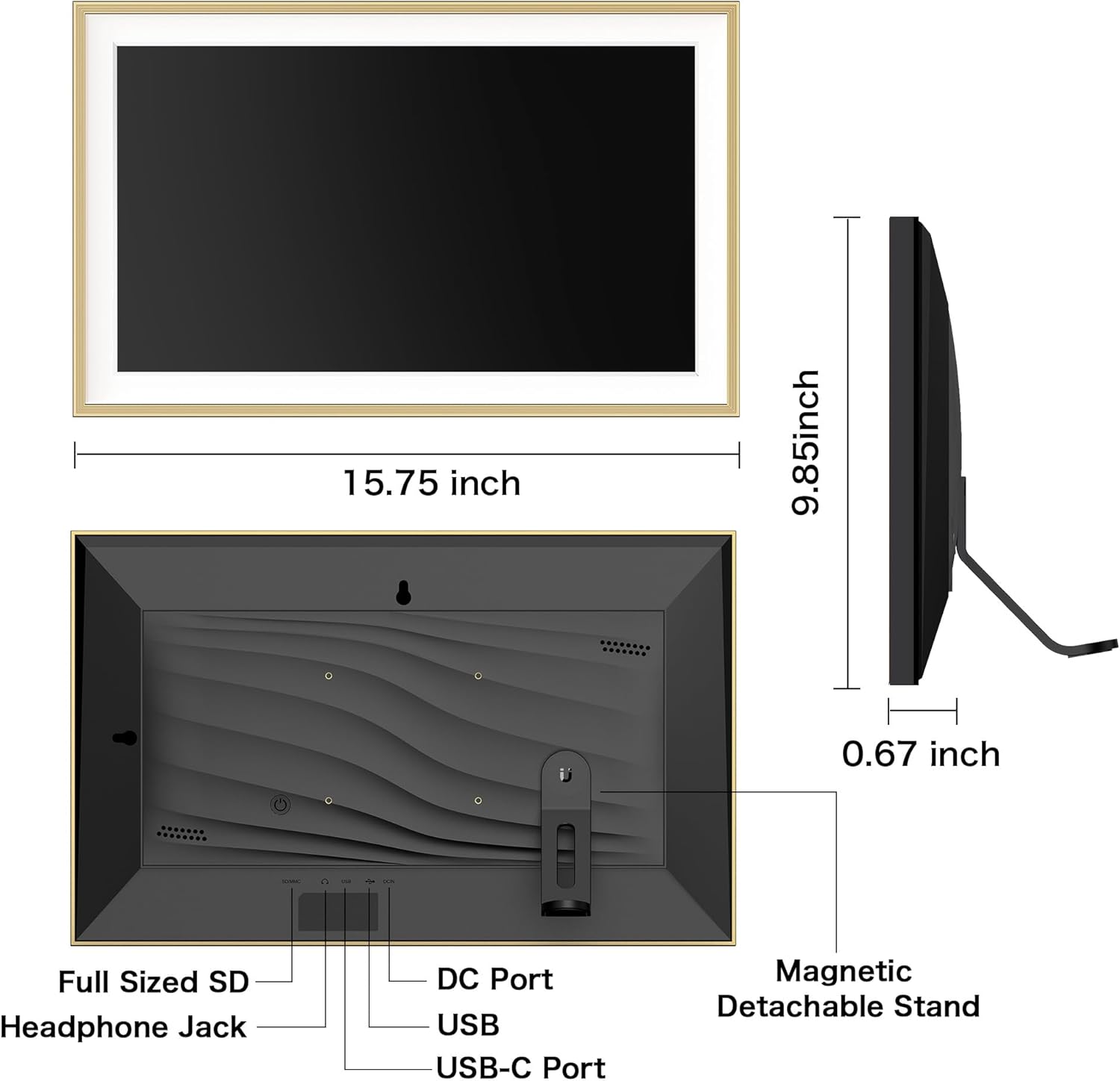
Image: Rear view of the digital picture frame, highlighting the DC port, USB ports, headphone jack, and full-sized SD card slot.

Image: The digital picture frame displayed in a wall-mounted orientation.
Operating Instructions
Touch Screen Navigation
The frame features a responsive touch screen for easy navigation. Swipe left or right to browse photos, tap to access settings, and pinch to zoom.

Image: A hand interacting with the 1920x1080 IPS FHD touch screen for effortless control.
Adjusting Settings
Access the settings menu by tapping the screen. Here you can adjust:
- Brightness: Adjust screen brightness for optimal viewing in different lighting conditions.
- Volume: Control the audio level for videos.
- Sleep Mode: Set a schedule for the frame to automatically turn on and off to conserve energy.
- Photo Display: Configure slideshow intervals, shuffle photos, and choose how photos fill the frame (e.g., fit to frame, fill frame).
- Auto-Rotate: The frame automatically adjusts photo orientation for portrait or landscape display.
Media Management
Sharing via Frameo App (Wi-Fi Required)
The Frameo app allows you to instantly share photos and videos (up to 15 seconds) to your digital frame from anywhere. Ensure your frame is connected to Wi-Fi.
- Download the official Frameo app from your device's app store.
- Create an account and connect your frame using the unique code displayed on the frame.
- Select photos or videos from your phone and send them directly to the frame.
- Use the "React" feature within the app to send emojis to the sender, indicating your appreciation for the shared content.

Image: Illustration of sharing photos instantly to the digital frame using the Frameo app.

Image: The digital frame displaying photos received through the Frameo app, emphasizing Wi-Fi connectivity.
Non-Wi-Fi Transmission
For users who prefer not to use Wi-Fi or the app, media can be transferred directly:
- SD Card/USB Drive: Insert a full-sized SD card or USB drive (FAT32 format only) into the corresponding port on the frame. The frame supports up to 32GB external storage.
- Computer Transfer: Connect the frame to a computer using a USB-C cable (not included). This method is primarily for Windows systems.

Image: Visual representation of the 32GB built-in storage and support for external SD cards or USB drives.

Image: Overview of non-Wi-Fi transmission methods, including SD card, USB drive, and computer connection.
Supported Formats
The frame supports multiple image formats including JPG, JPEG, BMP, and PNG. Video format supported is MP4.
Troubleshooting
- Frame Not Powering On: Ensure the power adapter is securely connected to both the frame and a working power outlet.
- Cannot Connect to Wi-Fi: Verify your Wi-Fi password is correct. Ensure the frame is within range of your Wi-Fi router. Try restarting both the frame and your router.
- Photos/Videos Not Transferring via App:
- Check if the frame is connected to Wi-Fi.
- Ensure the Frameo app on your phone is updated to the latest version.
- Confirm the frame code is correctly entered in the app.
- For videos, ensure they are no longer than 15 seconds.
- Try sending fewer photos at a time if experiencing issues with large batches.
- External Storage Not Recognized: Ensure the SD card or USB drive is formatted to FAT32. Check if the storage device is inserted correctly.
- Image Quality Issues: Ensure the photos are of sufficient resolution. The frame supports FHD 1920x1080P for vivid display.
Specifications
| Brand | Pastigio |
| Model Number | M15R5-Golden |
| Screen Size | 15.6 inches |
| Display Resolution | 1920x1080P (FHD) |
| Display Type | IPS Touch Screen |
| Internal Memory | 32 GB |
| External Storage Support | Full Sized SD Card, USB Drive (FAT32 format, up to 32GB) |
| Connectivity | Wi-Fi, SD Card, USB, USB-C Cable |
| Compatible Devices | Personal Computer, Smartphone |
| Power Source | Corded Electric |
| Control Method | Touch |
Image: Detailed diagram showing the dimensions and various ports on the digital picture frame.
Warranty and Support
Your Pastigio Digital Picture Frame comes with a 24-month warranty covering manufacturing defects. For technical support or any issues you encounter, please contact our support team. User-friendly, comprehensive user instructions are included in the package. We are committed to providing quality assurance and prompt assistance.
As an official Frameo APP partner, Pastigio ensures reliable and stable app performance. We continuously optimize our products and the Frameo app to meet user needs.
Ask a question about this manual
Ask about setup, troubleshooting, compatibility, parts, safety, or missing instructions. Manuals+ will review the question and use this page’s manual context to help answer it.