1. Introduction and Overview
The SDLOGAL OBD II Vehicle Code Reader V601 is an automotive diagnostic scan tool designed to help users quickly identify and resolve issues related to their vehicle's engine and emissions systems. This device provides comprehensive fault information and vehicle parameters, enabling efficient troubleshooting and maintenance.
2. Product Features
- Plug and Play: Quickly reads car fault information and vehicle parameters. Easily determines the cause of the check engine light, reads and clears diagnostic trouble codes (DTCs), reads live data, and views freeze frame data.
- Accurate, Fast, and Easy to Use: Provides exceptionally accurate and fast results, reading and clearing engine trouble codes in seconds. Designed for immediate problem identification without extensive car knowledge.
- Car Compatibility: Supports all OBDII protocols including KWP2000, J1850 VPW, ISO9141, J1850 PWM, and CAN. Compatible with 1996 US-based, 2000 EU-based, and Asian cars, light trucks, SUVs, as well as newer OBD2 and CAN vehicles.
- Cost-Effective: Empowers car owners and auto mechanics to save on car maintenance costs, time, and effort by performing self-diagnostics.
3. What's in the Box
- SDLOGAL OBD II Vehicle Code Reader Unit (V601)
- User Manual
4. Setup
- Locate the OBD-II Port: The OBD-II port is typically located under the dashboard on the driver's side of the vehicle. Refer to your vehicle's owner's manual for the exact location if needed.
- Connect the Scanner: Plug the SDLOGAL V601 scanner's cable into the vehicle's OBD-II port. Ensure a secure connection.
- Turn Ignition On: Turn the vehicle's ignition key to the 'ON' position without starting the engine. The scanner will power on automatically.
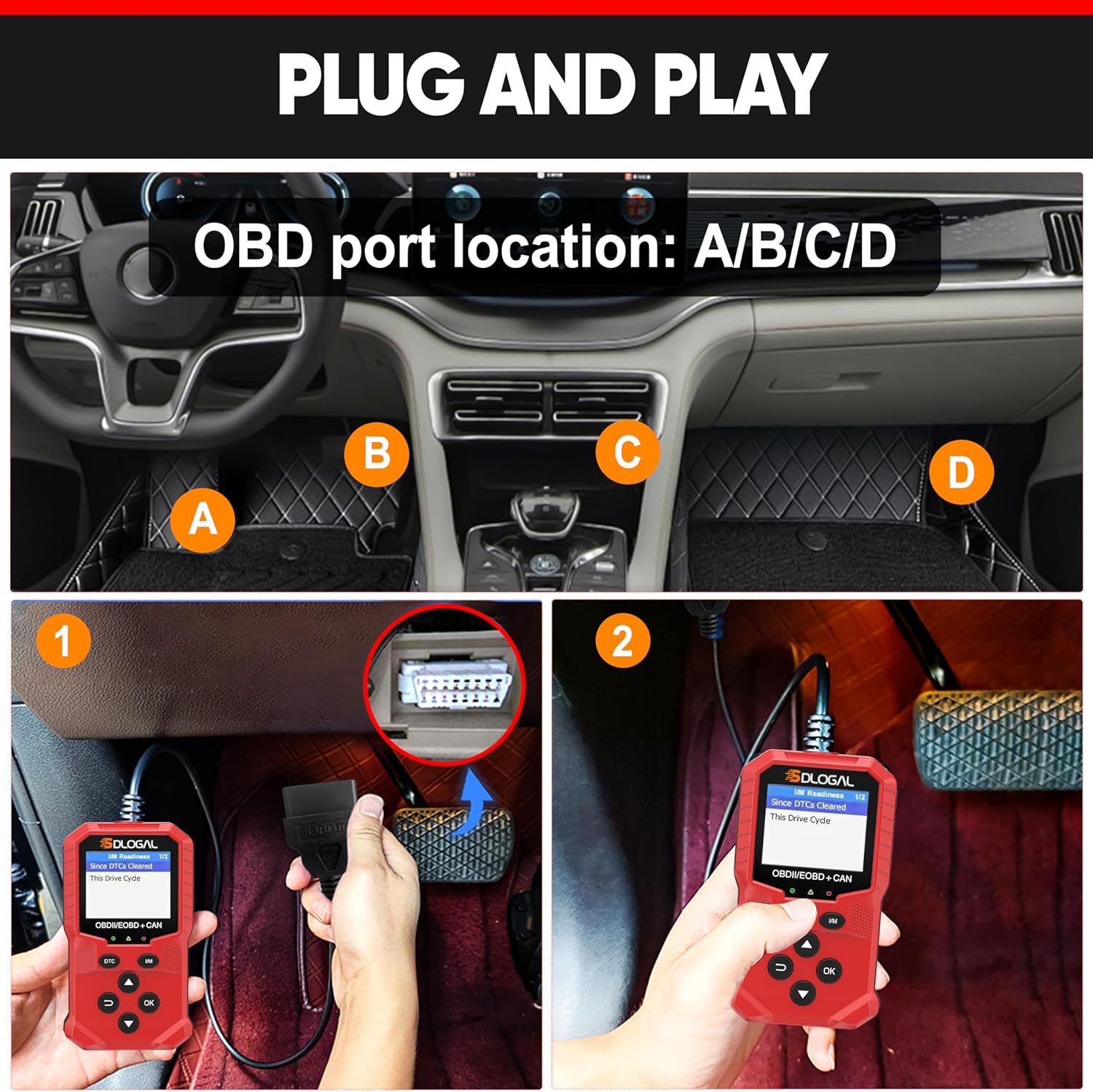
Figure 4.1: Locating and connecting the OBD-II scanner to the vehicle's diagnostic link connector (DLC).
5. Operating Instructions
Once connected and powered on, the SDLOGAL V601 provides a simple interface for various diagnostic functions. Use the directional buttons (Up/Down) to navigate menus and the 'OK' button to confirm selections.
5.1. Main Menu Options
- Diagnosis: Accesses the main diagnostic functions.
- Battery: Checks the current voltage of the car battery.
- DTC Lib: Provides a library to look up Diagnostic Trouble Code definitions.
- Setting: Configures system settings such as language and unit of measure.

Figure 5.1: SDLOGAL V601 main interface and packaging highlighting key features.
5.2. Diagnostic Functions
From the 'Diagnosis' menu, you can perform the following operations:
- Read Codes: Retrieves stored, pending, and permanent diagnostic trouble codes from the vehicle's computer.
- Erase Codes: Clears diagnostic trouble codes from the vehicle's computer. This will turn off the Check Engine Light.
- View Freeze Frame: Displays a snapshot of the vehicle's operating conditions at the moment a fault code was set.
- I/M Readiness: Checks the readiness status of various emission-related monitors to determine if the vehicle is ready for an emissions test.
- Vehicle Information: Retrieves vehicle identification number (VIN), calibration ID, and calibration verification number.
- Live Data Stream: Displays real-time data parameters from the vehicle's sensors and modules.
- Realtime Curve: Visualizes live data parameters in a graphical format for easier analysis.
- O2 Sensor Test: Monitors the performance index of the oxygen sensor.
- Fuel Evaporation Control System (EVAP) Test: Tests the integrity of the EVAP system.

Figure 5.2: Overview of diagnostic capabilities.

Figure 5.3: Real-time data display showing engine parameters.

Figure 5.4: Clearing fault codes and turning off the Check Engine Light.

Figure 5.5: I/M Readiness status for emissions testing.

Figure 5.6: Additional diagnostic information including battery voltage and DTC lookup.
6. Maintenance
- Keep the device clean and free from dust and debris. Use a soft, dry cloth for cleaning.
- Do not use abrasive cleaners or solvents on the product.
- Avoid exposing the device to direct sunlight or extreme temperatures for prolonged periods.
- Do not attempt to disassemble or modify the product. There are no user-serviceable parts inside.
- Store the device in a dry, cool place when not in use.
7. Troubleshooting
If you encounter issues while using the SDLOGAL V601, consider the following:
- "Failed to connect" message:
- Verify that the vehicle ignition is in the 'ON' position (engine off).
- Check if the scanner's OBD-II connector is securely connected to the vehicle's DLC.
- Ensure your vehicle is OBD2/EOBD compliant. This product is not compatible with new energy vehicles, hybrid vehicles, diesel vehicles, and non-OBD2 compliant models.
- No Power: The scanner draws power directly from the vehicle's OBD-II port. Ensure the connection is secure and the vehicle's battery has sufficient charge.
- Incorrect Readings/Data: Ensure the device's firmware is up to date (if applicable, check manufacturer's website). Verify the vehicle's information is correctly entered if prompted.
For persistent issues, refer to the detailed user manual provided with the product or contact SDLOGAL customer support.
8. Specifications
| Model | V601 |
| Item Weight | 7.8 ounces |
| Package Dimensions | 7.17 x 5.04 x 1.5 inches |
| Display | 160*128 dpi display, 1.8-inch TFT color screen |
| Working Temperature | 0-60°C (32-140°F) |
| Storage Temperature | -20-70°C (-4-158°F) |
| External Power Supply | Vehicle batteries supply 9.0 to 16.0V |
9. Warranty and Support
SDLOGAL offers a comprehensive support policy for the V601 OBD II Vehicle Code Reader:
- 3-Year Repair Service: For non-human-caused hardware issues.
- 10 Years of Technical Support: For any software-related issues.
For technical assistance, warranty claims, or any inquiries, please contact SDLOGAL customer service through the contact information provided on your product packaging or the official SDLOGAL website.


