
1. Introduction
The UGREEN Active HDMI to USB C Adapter Cable (Model CM773) is designed to facilitate a unidirectional connection from HDMI-enabled source devices to USB-C compatible display devices. This cable supports high-resolution video and audio transmission, making it suitable for various applications including gaming, office presentations, and extended desktop setups. It requires an external USB power supply for stable operation.

Image 1.1: UGREEN Active HDMI to USB C Adapter Cable. This image displays the cable with its HDMI, USB-A, and USB-C connectors, highlighting its design.
2. Setup Instructions
Follow these steps to correctly set up your UGREEN HDMI to USB C Adapter Cable:
- Connect the HDMI End: Plug the HDMI connector of the cable into the HDMI output port of your source device (e.g., Nintendo Switch, PS5, laptop, desktop computer).
- Connect the USB-C End: Connect the USB-C connector of the cable to the USB-C input port of your display device (e.g., USB-C monitor, portable monitor, AR/XR headset). Ensure your USB-C display supports "DP Alt Mode" for video input.
- Provide USB Power: Connect the USB-A power cable to a USB power source (e.g., a USB wall charger, a USB port on your source device, or a power bank). This step is crucial for the stable operation of the adapter cable itself. Note that this USB cable powers the adapter, not the connected display devices.
Once all connections are made, your display device should automatically detect the signal. No additional drivers are typically required for installation.

Image 2.1: Connection Diagram. This image illustrates the three connection points: HDMI to source, USB-C to display, and USB-A for power supply.

Image 2.2: External USB Power Supply. This image shows the USB-A connector plugged into a power adapter, emphasizing the need for external power.
3. Operating Instructions
The UGREEN HDMI to USB C Adapter Cable supports various display modes and high-quality audio/video features:
- High Resolution and Refresh Rates: The cable supports video resolutions up to 4K@60Hz and 1080P@120Hz, providing clear and smooth visuals. It is compatible with HDMI 2.0 standards.
- Advanced Audio/Video Features: Enjoy an immersive experience with support for 3D, HDR (High Dynamic Range), HDCP 2.2/1.4, DTS 7.1, and Dolby audio.
- Display Modes:
- Mirror Mode: Duplicate your source device's screen onto the USB-C display.
- Extend Mode: Expand your desktop across multiple screens, allowing different content to be displayed on the external USB-C monitor.
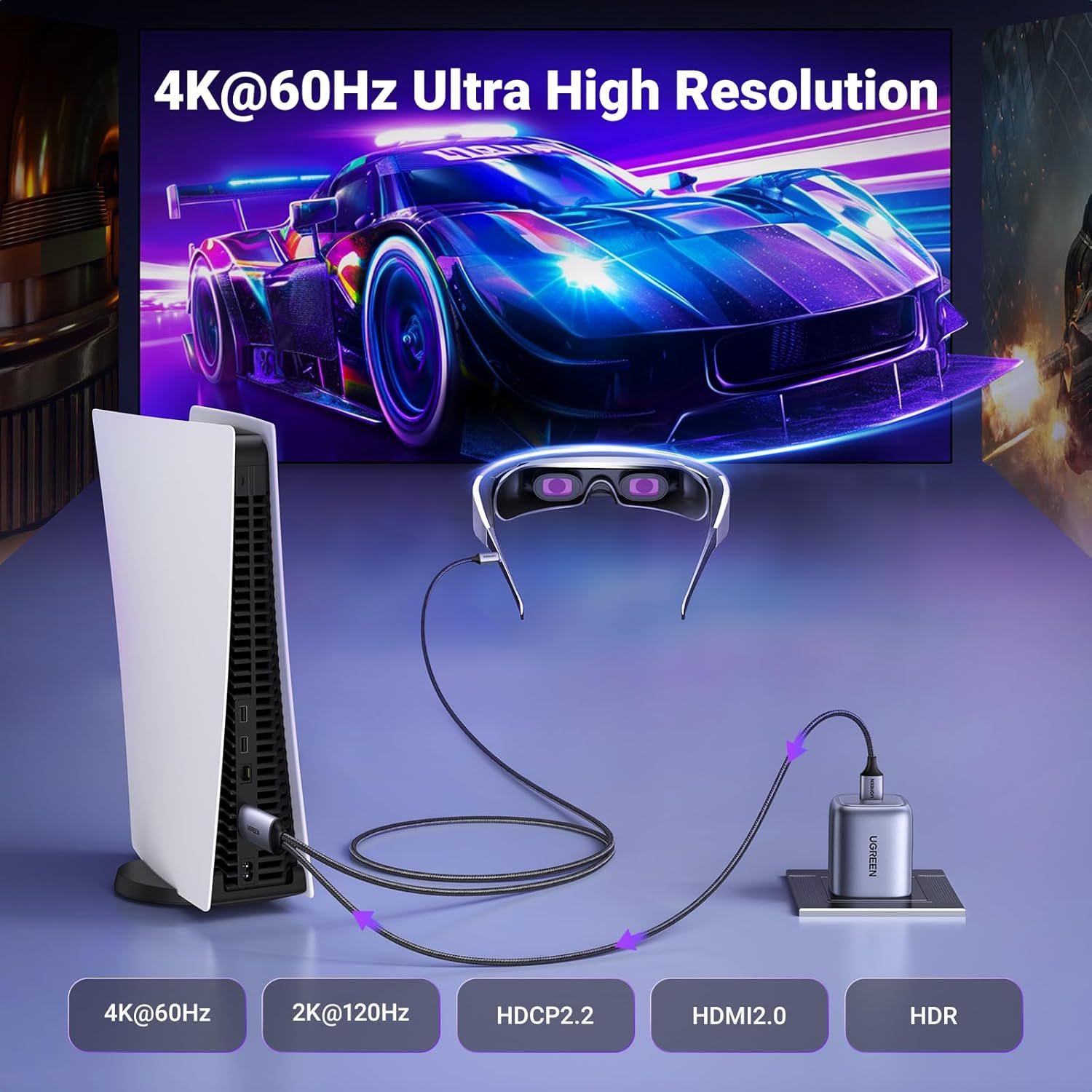
Image 3.1: 4K@60Hz Ultra High Resolution. This image shows a PS5 connected to an AR/XR headset, displaying a high-resolution game scene, with indicators for 4K@60Hz, 2K@120Hz, HDCP2.2, HDMI2.0, and HDR.

Image 3.2: Immersive Audio & Visual Feast. This image illustrates a home theater setup with a laptop connected to a large screen, highlighting support for Dolby, ARC, DST 7.1/5.1, HDR, and 3D.

Image 3.3: Boost Working Efficiency. This image demonstrates a laptop connected to an external monitor in 'Extended Mode' and a tablet in 'Mirror Mode', showcasing workspace expansion.
4. Compatibility
This adapter cable is designed for broad compatibility with various devices:
- HDMI Source Devices: Compatible with Nintendo Switch, PlayStation 5 (PS5), Steam Deck, laptops, desktop computers, and Blu-Ray players.
- USB-C Display Devices: Compatible with USB-C monitors, LG UltraFine, Dell UltraSharp, BenQ monitors, portable monitors, AR/XR headsets, and projectors. The USB-C port on the display device must support the "DP Alt Mode" video output function.
Important Notes:
- This cable is unidirectional, transmitting signals only from HDMI to USB-C. It will not work for USB-C to HDMI connections.
- Not compatible with USB-C laptops/phones/tablets as source devices.
- Not compatible with HDMI-only monitors/TVs/projectors as target displays.
- Not compatible with Apple Studio Display.
- Not compatible with VR headsets.
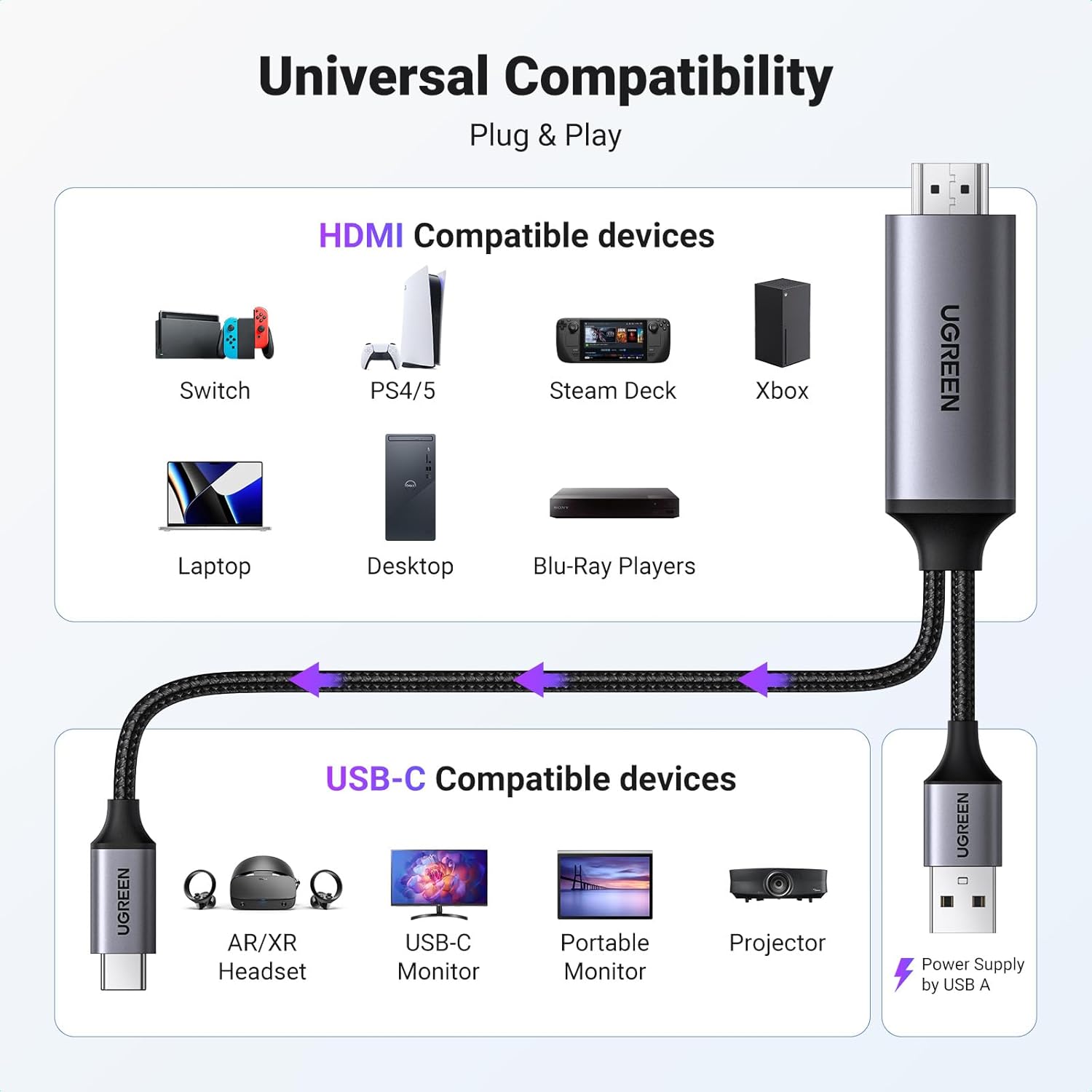
Image 4.1: Universal Compatibility. This diagram visually lists compatible HDMI source devices (Switch, PS4/5, Steam Deck, Xbox, Laptop, Desktop, Blu-Ray Players) and USB-C compatible display devices (AR/XR Headset, USB-C Monitor, Portable Monitor, Projector), along with the USB-A power supply.
5. Maintenance
To ensure the longevity and optimal performance of your UGREEN HDMI to USB C Adapter Cable, consider the following maintenance tips:
- Storage: Store the cable in a cool, dry place away from direct sunlight and extreme temperatures. Avoid sharp bends or kinks in the cable.
- Cleaning: Gently wipe the cable and connectors with a soft, dry cloth to remove dust or debris. Do not use liquid cleaners or solvents.
- Handling: Always grasp the connector housing when plugging or unplugging the cable, rather than pulling on the cable itself.
- Durability: The cable features an aluminum shell and nylon braided design for enhanced durability and anti-corrosion properties. Despite its robust construction, avoid excessive force or strain on the connectors and cable.

Image 5.1: Build to Last. This image showcases the robust construction of the cable, detailing its aluminum shell, nickel-plated connector, and nylon braided exterior, along with a mention of over 30,000 bending tests.
6. Troubleshooting
If you encounter issues with your UGREEN HDMI to USB C Adapter Cable, please refer to the following troubleshooting steps:
| Problem | Possible Cause | Solution |
|---|---|---|
| No display or signal on USB-C monitor. |
|
|
| Flickering display or unstable signal. |
|
|
| No audio output. |
|
|
If the issue persists after following these steps, please contact UGREEN customer support for further assistance.
7. Specifications
Detailed technical specifications for the UGREEN Active HDMI to USB C Adapter Cable (CM773):

Image 7.1: Product Specifications. This image presents a table summarizing the input, output, resolution, audio formats, audio sampling rate, HDMI bandwidth, power supply input, compatible systems, cable length, power cable length, and dimensions of the adapter.
| Feature | Detail |
|---|---|
| Model Number | CM773 |
| Input | 1x HDMI, 1x USB-A (for Power Supply) |
| Output | 1x USB-C |
| Resolution | Up to 4K@60Hz |
| Audio Formats | Supports AC-3/LPCM/DTS/DSD, 2.0/2.1/5.1/7.1 channel |
| Audio Sampling Rate | 24-bit/192kHz Max |
| HDMI Bandwidth | Up to 18Gbps |
| Power Supply Input | USB-A 5.0V⎓1.0A Max |
| Compatible Systems | Windows/macOS/Linux |
| Cable Length | 2m / 6.6ft |
| Power Cable Length | 1m / 3.3ft |
| Dimensions | L52×W24×H12 (mm) / L2.1×W1.0×H0.5 (inch) |
| Special Feature | Aluminum Braided, High Speed, Video Transfer |
Note: The data are measured by UGREEN lab but may vary based on specific circumstances.
8. Warranty and Support
UGREEN products are designed and manufactured to the highest quality standards. For information regarding warranty coverage, technical support, or customer service, please refer to the official UGREEN website or contact your local retailer.
You can typically find support contact information on the UGREEN official website: www.ugreen.com