
INIU P64-P1
INIU 140W 25000mAh Power Bank User Manual
Model: P64-P1
1. Product Overview
The INIU 140W 25000mAh Power Bank (Model P64-P1) is a high-capacity portable charger designed to provide rapid and efficient power to a wide range of devices, including laptops, smartphones, and tablets. Featuring advanced PD 3.1 technology, it delivers up to 140W of power output, making it suitable for even high-power-demand electronics. Its intelligent digital display provides real-time information on charging status, and its robust design ensures reliable performance on the go.

This image displays the INIU 140W Power Bank, showcasing its sleek design and the intelligent digital display. The display provides real-time information on power output, remaining battery percentage, and estimated charging time. Clearly visible are the three charging ports: a 140W USB-C1 port for both input and output, a 45W USB-C2 output port, and an 18W USB-A output port, offering versatile charging options.
2. Setup
2.1 Initial Charge
Before using your INIU 140W Power Bank for the first time, it is recommended to fully charge it to 100%. This ensures optimal battery performance and longevity.
2.2 Charging the Power Bank
To recharge the power bank, connect a compatible USB-C power adapter (not included) to the USB-C1 (IN/OUT) port. The power bank supports a maximum input of 80W. For the fastest recharge times, use a high-wattage USB-C PD charger (e.g., a 65W or 100W GaN charger).

To prepare your INIU 140W Power Bank for first use or after depletion, connect a compatible USB-C power adapter to the USB-C1 (IN/OUT) port. The power bank supports up to 80W input for rapid recharging. The digital display will show the charging wattage and progress.
3. Operating Instructions
3.1 Charging Your Devices
Connect your device to the appropriate output port on the power bank using a compatible charging cable. The power bank features three output ports:
- USB-C1 (IN/OUT): Up to 140W output. Ideal for laptops and other high-power devices.
- USB-C2 (OUT): Up to 45W output. Suitable for tablets, smartphones, and smaller laptops.
- USB-A (OUT): Up to 18W output. For smartphones and other standard USB devices.
The power bank can charge multiple devices simultaneously:
- USB-C1 + USB-C2: 100W (C1) + 45W (C2) = 145W Total Max.
- USB-C1 + USB-A: 100W (C1) + 18W (A) = 118W Total Max.
- USB-C1 + USB-C2 + USB-A: 100W (C1) + 24W (C2+A combined) = 124W Total Max.

This image illustrates the INIU 140W Power Bank actively charging a laptop, highlighting its ability to deliver significant power for demanding devices. Connect your device to the appropriate USB-C or USB-A port using a compatible cable. The power bank intelligently adjusts output to provide optimal charging speed.

The INIU 140W Power Bank is capable of charging multiple devices concurrently. This image shows a smartphone connected to one USB-C port and a laptop to another, demonstrating the power bank's versatility in managing power distribution across different devices.
3.2 Smart LED Digital Display
The power bank features a hidden digital display that provides crucial information. Press the power button once to activate the display.
- EZ Mode (Default): Shows the remaining battery percentage.
- Pro Mode: Long press the power button for 3 seconds to switch to Pro Mode. This mode displays the real-time wattage input/output, remaining battery percentage, and estimated time remaining for charging or discharging.

The smart digital display on the INIU 140W Power Bank provides comprehensive real-time information. As shown, it clearly indicates the current output power in watts, identifies the active USB port, displays the remaining battery percentage, and estimates the remaining battery life in hours, allowing for precise power management.
4. Maintenance
Proper maintenance ensures the longevity and optimal performance of your power bank.
- Storage: Store the power bank in a cool, dry place away from direct sunlight and extreme temperatures.
- Cleaning: Use a soft, dry cloth to clean the exterior of the power bank. Avoid using liquid cleaners, aerosols, or abrasive materials.
- Battery Health: If storing the power bank for extended periods, recharge it to approximately 50-70% every three months to maintain battery health.
- Avoid Physical Damage: Do not drop, puncture, or disassemble the power bank.
5. Troubleshooting
If you encounter issues with your INIU 140W Power Bank, refer to the following common troubleshooting steps:
- Power Bank Not Charging:
- Ensure the charging cable is securely connected to both the power bank's USB-C1 port and the power adapter.
- Verify that the power adapter is functioning correctly and provides sufficient power (e.g., 65W or higher for optimal charging).
- Try a different USB-C cable and power adapter.
- Device Not Charging from Power Bank:
- Check if the power bank has sufficient charge.
- Ensure the charging cable is securely connected to both the power bank and your device.
- Try a different port on the power bank (USB-C1, USB-C2, or USB-A).
- Verify that your device's charging port is clean and undamaged.
- Try a different charging cable.
- Slow Charging:
- Ensure you are using a high-quality cable that supports fast charging.
- Check the power bank's display to confirm the output wattage.
- Some devices may limit charging speed based on their battery level or temperature.
- Display Not Working:
- Press the power button to activate the display.
- If the display remains off, the power bank might be fully discharged or require a reset (disconnect all cables and reconnect after a few minutes).
- Overheating:
- It is normal for the power bank to become slightly warm during high-power charging or discharging.
- If it becomes excessively hot, disconnect all devices and allow it to cool down. The INIU 140W Power Bank features Temp Guard 2.0 technology to prevent overheat damage.
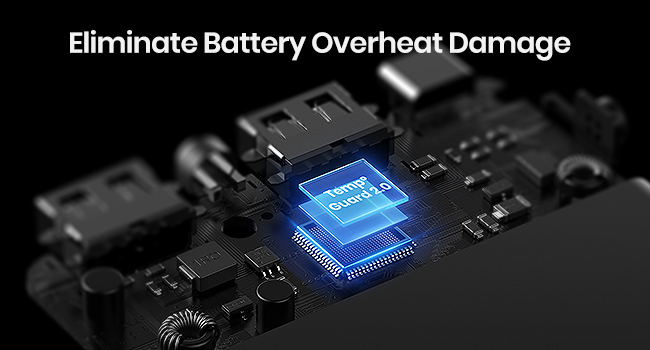
The INIU 140W Power Bank incorporates advanced safety features like Temp Guard 2.0, depicted here as an internal chip system. This technology actively monitors and regulates the internal temperature of the power bank, preventing overheating and protecting both the device and connected electronics from potential damage during charging or discharging.
6. Specifications
| Feature | Detail |
|---|---|
| Model Number | P64-P1 |
| Battery Capacity | 25000mAh / 92.5Wh |
| USB-C1 Input (IN/OUT) | 80W Max (5V-3A, 9V-3A, 15V-3A, 20V-4A, 28V-2.85A) |
| USB-C1 Output (IN/OUT) | 140W Max (5V-3A, 9V-3A, 15V-3A, 20V-5A, 28V-5A) |
| USB-C2 Output (OUT) | 45W Max (5V-3A, 9V-3A, 12V-3A, 15V-3A) |
| USB-A Output (OUT) | 18W Max (5V-3A, 9V-2A, 12V-1.5A) |
| Combined Output (C1+C2) | 100W (C1) + 45W (C2) = 145W Max |
| Combined Output (C1+A) | 100W (C1) + 18W (A) = 118W Max |
| Combined Output (C1+C2+A) | 100W (C1) + 24W (C2+A) = 124W Max |
| Product Dimensions | 6.3 x 3.2 x 1 inches |
| Item Weight | 1.14 pounds |
| Battery Type | Lithium Polymer |
| Special Features | 140W Fast Charging, Smart LED Display, Temp Guard 2.0 |
7. Warranty and Support
INIU stands behind the quality of its products. The INIU 140W 25000mAh Power Bank comes with an industry-leading 3-year warranty, referred to as "Refresh Care."

INIU provides an industry-leading 3-year warranty, referred to as 'Refresh Care,' for this power bank. This commitment reflects the manufacturer's confidence in the product's quality and durability, offering peace of mind to users.
Customer Support
For any questions, technical assistance, or warranty claims, please contact INIU customer support through their official website or the contact information provided with your product packaging. Please have your model number (P64-P1) and purchase details ready when contacting support.
Related documentsP64-P1


Ask a question about this manual
Ask about setup, troubleshooting, compatibility, parts, safety, or missing instructions. Manuals+ will review the question and use this page’s manual context to help answer it.