1. Introduction
This manual provides detailed instructions for the installation, operation, and maintenance of your PHORUS RGB Ceiling Fan. This 48-inch low-profile ceiling fan features a quiet reversible DC motor, RGB lighting with 7 color options, 3 color temperatures for white light, 6 fan speeds, and convenient control via both remote and a dedicated mobile application. Please read this manual thoroughly before installation and use to ensure safe and optimal performance.
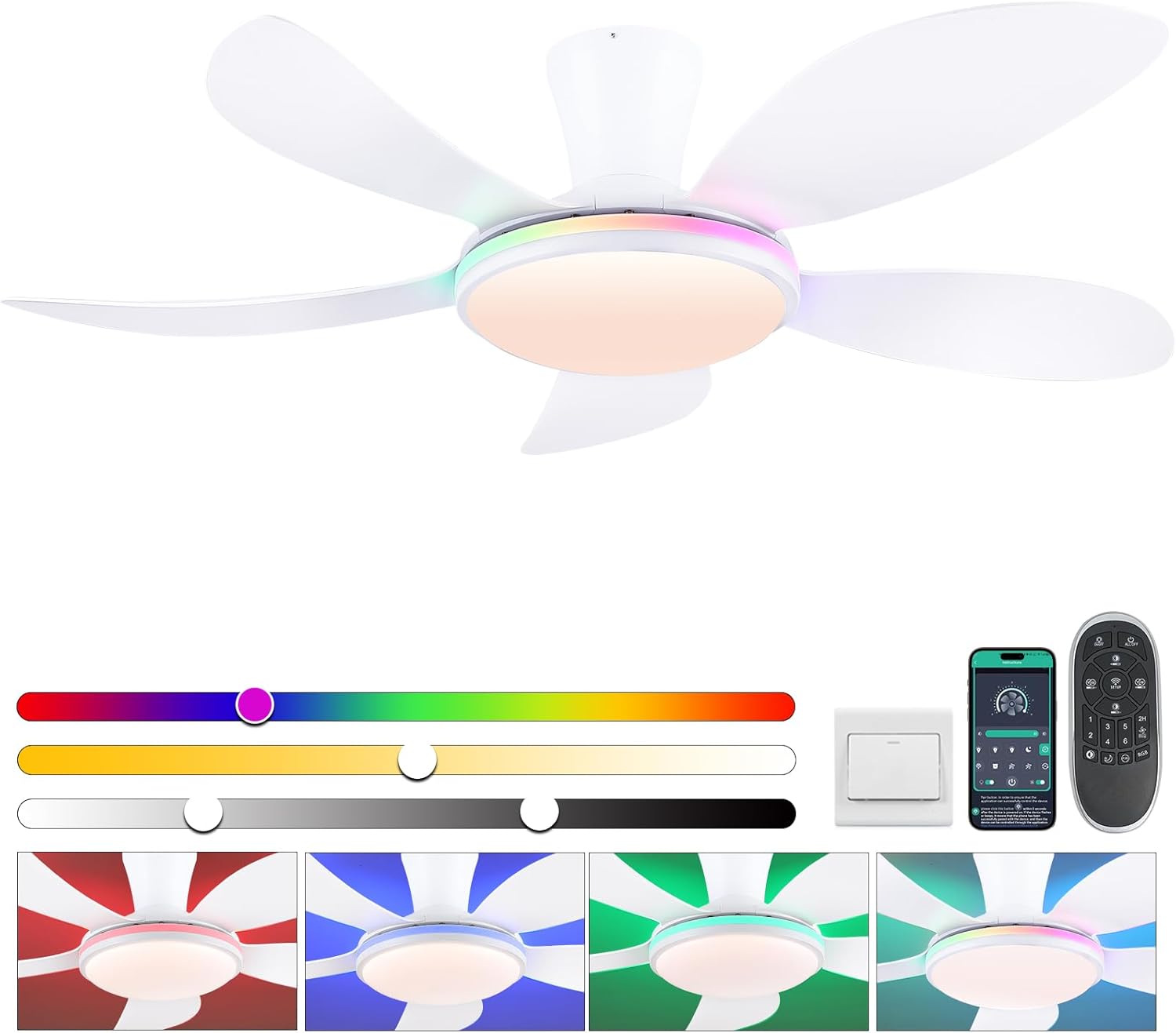
Figure 1: PHORUS 48-inch RGB Ceiling Fan with Lights.
2. Safety Information
To reduce the risk of electric shock, fire, or personal injury, always follow these basic safety precautions:
- Read all instructions: Familiarize yourself with the manual before beginning installation.
- Electrical Safety: Ensure the main power supply is turned off at the circuit breaker before installation or maintenance. All electrical wiring must be performed by a qualified electrician and comply with local and national electrical codes.
- Mounting: The mounting structure must be capable of supporting the weight of the fan (approximately 10.88 pounds) and its rotational forces.
- Blade Clearance: Ensure there is adequate clearance between the fan blades and any obstacles, including walls, furniture, and other objects.
- Do not insert objects: Never insert fingers or any objects into the fan blades while the fan is operating.
- Cleaning: Always disconnect power before cleaning the fan. Use a soft, damp cloth for cleaning; avoid harsh chemicals.
- Children and Pets: Keep children and pets away from the fan during operation and installation.
3. Package Contents
Verify that all components are present and undamaged before beginning installation. If any parts are missing or damaged, contact customer support.
- Fan Motor Assembly
- Hanging Board
- Fan Blades (5x)
- LED Lampshade
- Remote Control
- Screws and Fasteners
- Instruction Manual

Figure 2: Included components of the PHORUS Ceiling Fan.
4. Installation Guide
Follow these steps for proper installation. For a visual guide, please refer to the official installation videos provided by PHORUS.
4.1. Pre-Installation
- Turn off power at the circuit breaker.
- Unpack all components and verify against the package contents list.
4.2. Assembling the Fan
- Attach Blades: Secure each fan blade to the motor assembly using the provided screws. Ensure the side marked "THIS SIDE UP" on the blade attachment point faces towards the ceiling when installed.
- Install LED Lampshade: Carefully attach the LED lampshade to the bottom of the fan motor assembly. Ensure it is securely fastened.
Video 1: Installation Guide for 42-inch Ceiling Fans with Lights. This video demonstrates the assembly of the fan components and the wiring process.
Video 2: Installation Guide for 52-inch Ceiling Fans with Remote & APP. This video provides additional details for larger models, applicable to the 48-inch model's general installation steps.
4.3. Wiring and Mounting
- Mount Hanging Board: Secure the hanging board to the ceiling junction box. Ensure it is firmly attached to a structural support.
- Connect Wiring: Connect the fan's electrical wires to your household wiring according to the wiring diagram in the manual and local electrical codes. Typically, this involves connecting live, neutral, and ground wires.
- Secure Fan: Carefully lift the fan assembly and attach it to the hanging board. Ensure all connections are secure and the fan is stable.
4.4. Remote Control Pairing
After installation, pair the remote control with the fan:
- Turn off the main power supply to the fan for at least one minute.
- Turn on the main power supply. Within 3-5 seconds, long press the "SETUP" button on the remote control.
- The fan light will blink 2-3 times, indicating successful pairing.
Video 3: Remote Code Pairing Guide. This video demonstrates the steps to pair your remote control with the ceiling fan.
5. Operating Instructions
5.1. Remote Control Functions
The included remote control allows for convenient operation of your ceiling fan:
- Light On/Off: Toggle the main light.
- ALL OFF: Turns off both fan and light.
- Brightness +/-: Adjust light brightness (stepless dimming).
- Color Temperature +/-: Cycle through 3 color temperatures (White, Warm, Neutral).
- Wind Speed Control (1-6): Select from 6 fan speeds.
- RGB Changing: Cycle through 7 RGB colors for ambient lighting.
- Night Light: Activates a low-brightness night light mode.
- Forward/Reverse (F/R): Changes blade rotation direction for summer (downdraft) or winter (updraft) modes. Press the F/R key and wait 5-8 seconds for the fan to stop completely and then automatically reverse.
- 2H Timer: Sets a 2-hour timer for the fan to automatically turn off.
- Fan Off: Turns off the fan only.
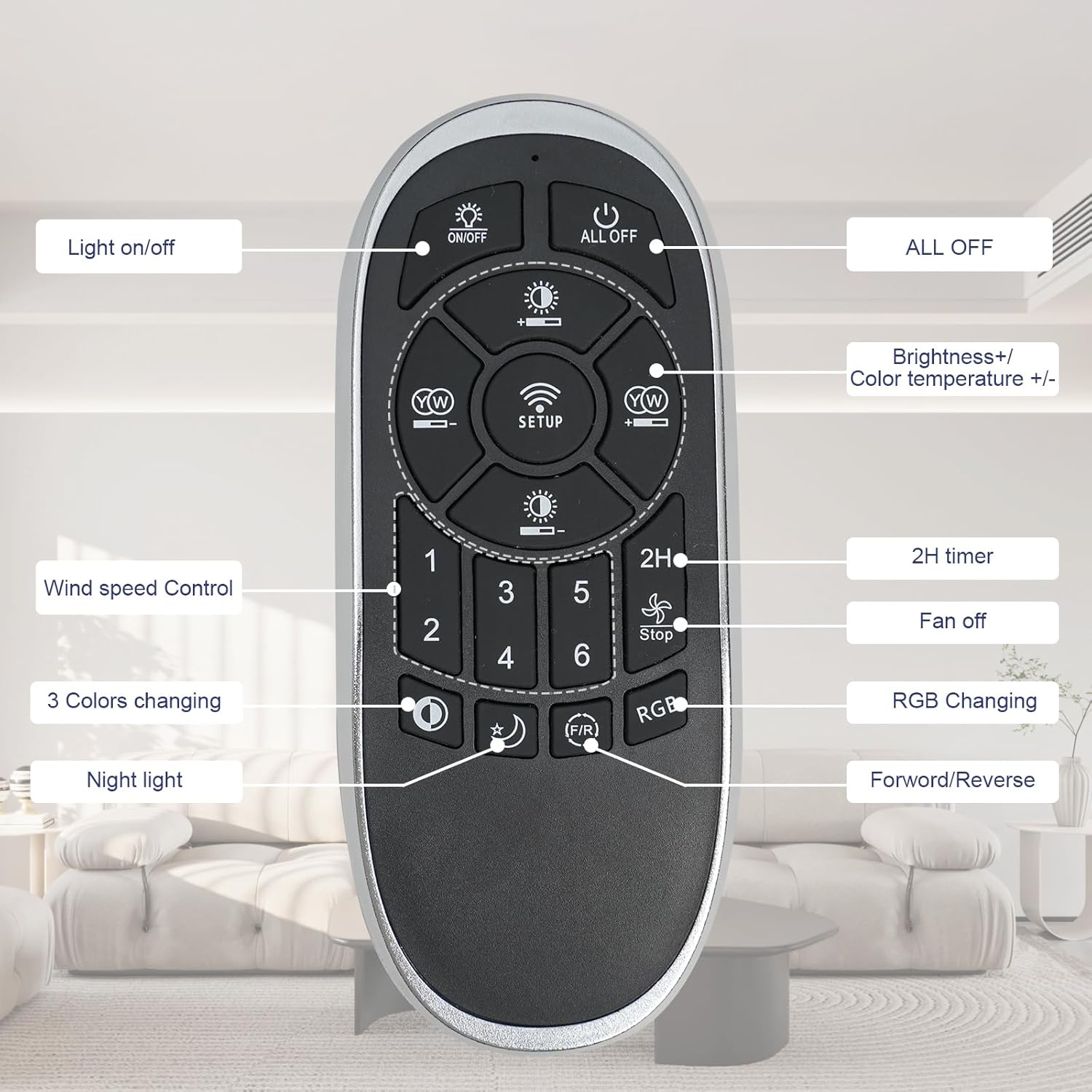
Figure 3: Remote control button layout and functions.

Figure 4: Examples of customized light effects and color temperatures.
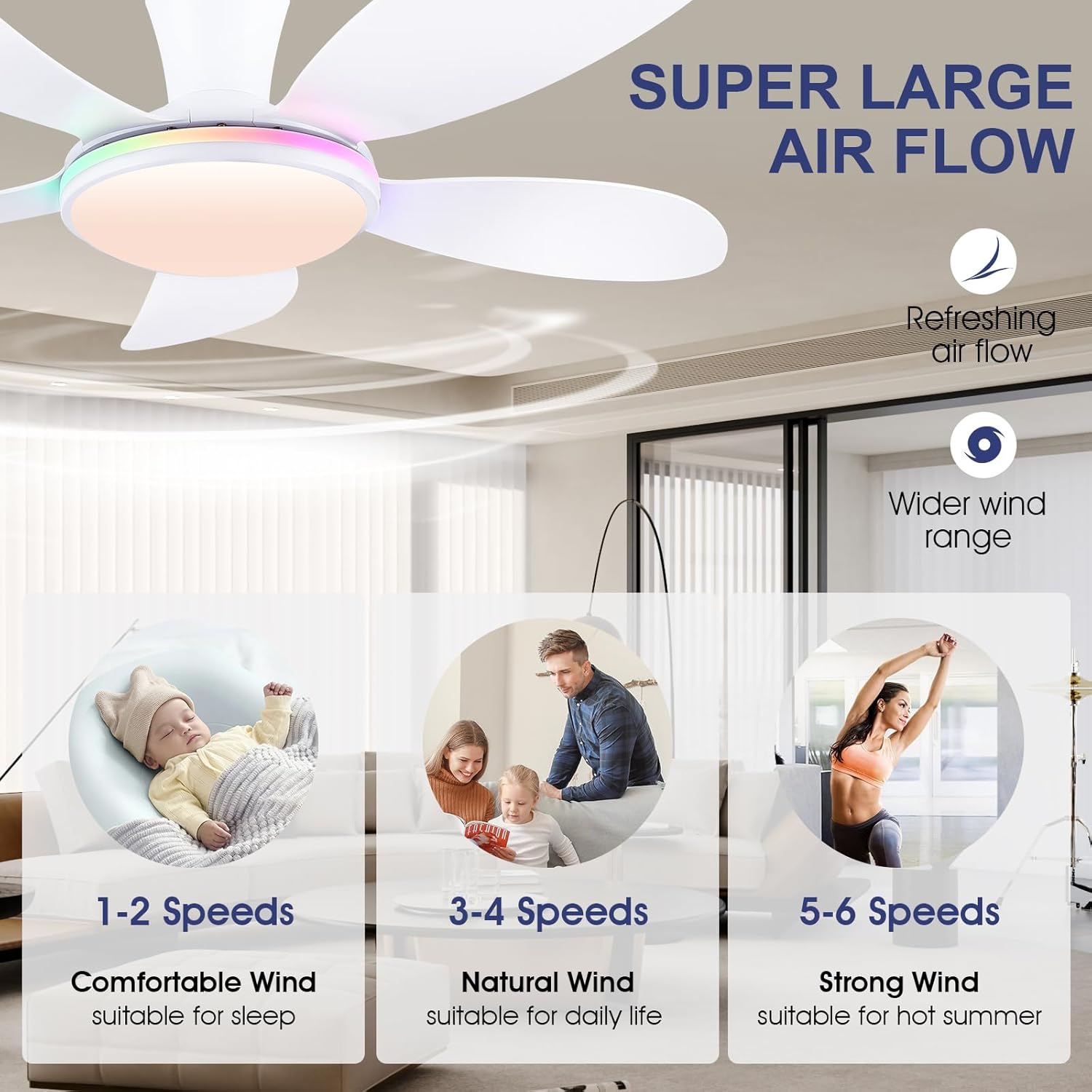
Figure 5: Fan speed settings for various comfort levels.
Figure 6: Illustration of summer (downdraft) and winter (updraft) modes for optimal airflow.

Figure 7: Noise level comparison for the quiet DC motor.
5.2. Mobile Application Control
The PHORUS ceiling fan can also be controlled via a mobile application. Scan the QR code provided in the product images or manual to download the "Fan Lamp Pro" APP. The app offers all remote control functionalities and more, ensuring control even if the remote is misplaced.
- Download APP: Scan the QR code or visit https://www.jasonghost.com/fanlamppro/ or https://f.afbkw.cn/xkBvEQ to download "Fan Lamp Pro".
- Pairing with APP: Turn on the main power supply. Ensure Bluetooth is enabled on your phone. Open the app and follow the on-screen instructions to add the device. The fan light will blink twice upon successful connection.
- Full Control: Adjust fan speeds, light colors (including RGB), dimming, timing, and reverse function directly from your smartphone.
Video 4: 48-inch White RGB Ceiling Fans with Lights and Remote/APP. This video showcases the RGB lighting features and APP control capabilities.
Video 5: APP Settings Guide for 42-inch Black Ceiling Fan. This video provides a detailed guide on setting up and using the mobile application for fan control.
6. Maintenance
Regular maintenance ensures the longevity and optimal performance of your ceiling fan:
- Cleaning: Dust the fan blades and light fixture regularly with a soft, lint-free cloth. For deeper cleaning, wipe with a damp cloth and mild soap, then dry immediately. Do not use abrasive cleaners or solvents.
- Check Connections: Periodically check all screws and electrical connections to ensure they are secure. Loose connections can cause humming or wobbling.
- Blade Balance: If the fan wobbles, check that all blades are securely attached and balanced. Balancing kits can be purchased if needed.
7. Troubleshooting
If you encounter issues with your PHORUS ceiling fan, refer to the common problems and solutions below:
| Problem | Possible Cause | Solution |
|---|---|---|
| Fan does not operate. | No power, loose wiring, remote not paired. | Check circuit breaker. Ensure all wires are securely connected. Re-pair remote control (see Section 4.4). |
| Light does not turn on. | Loose wiring, LED lampshade not properly installed, power issue. | Check light wiring connections. Ensure lampshade is securely twisted on. Verify power supply. |
| Fan wobbles. | Loose blades, unbalanced blades, loose mounting. | Ensure all blade screws are tightened. Use a blade balancing kit if necessary. Check mounting bracket for secure installation. |
| Fan is noisy. | Loose screws, motor issue, obstruction. | Tighten all screws. Ensure no wires are rubbing against internal components. The DC motor is designed for quiet operation (less than 35dB). |
| Remote/APP not responding. | Remote batteries low, pairing lost, Bluetooth off (for APP). | Replace remote batteries. Re-pair remote (Section 4.4). Ensure Bluetooth is on and app is connected. |
| Cannot install on sloped ceiling. | Incorrect fan type for sloped ceiling. | This fan is a flush mount type. Only ceiling fans with a downrod can be installed on a sloped ceiling (less than 15°). |
8. Product Specifications
| Feature | Detail |
|---|---|
| Brand | PHORUS |
| Model Name | 8907 |
| Size | 48 Inch |
| Color | White RGB |
| Material | Plastic, Acrylic |
| Style | Modern |
| Room Type | Kids Room, Kitchen, Bedroom, Study Room, Dining Room |
| Indoor/Outdoor Usage | Indoor |
| Power Source | DC |
| Special Features | Remote Controlled, Quiet Operation, LED Light, Timer, App Operable |
| Control Method | App, Remote |
| Voltage | 110 Volts (DC) |
| Included Components | Light Kit, Remote Control |
| Item Weight | 10.88 Pounds |
| Wattage | 28 watts |
| Sound Level | 35 dB |
| Blade Length | 18.89 Inches |
| Speed | 200 RPM |
| Batteries Required | Yes (2 AAA batteries included) |
9. Warranty and Support
PHORUS provides a one-year quality warranty for this product. We also offer replacement service for any damage and quality problems.
If you have any questions, require assistance with installation, operation, or troubleshooting, please do not hesitate to contact our customer support. We are committed to providing a satisfactory answer within 24 hours.
For support, please refer to the contact information provided with your purchase or on the official PHORUS website.


