1. Introduction
Thank you for choosing the HUANUO Electric Standing Desk. This manual provides essential information for the safe and efficient assembly, operation, and maintenance of your new desk. This electric standing desk features a robust design with a seamless one-piece desktop, adjustable height settings, and convenient memory functions to enhance your workspace ergonomics and productivity.

Image 1: HUANUO Electric Standing Desk with a laptop, two monitors, and headphones hanging from a hook.
2. Safety Information
Please read and understand all safety instructions before assembly and use. Failure to follow these instructions may result in injury or damage to the product.
- Always ensure the desk is placed on a stable, level surface.
- Do not exceed the maximum weight capacity of 176 lbs (80 kg).
- Exercise caution when adjusting the desk height to prevent pinching or crushing injuries. Keep hands and objects clear of moving parts.
- Follow the assembly instructions precisely to ensure proper function and safety.
- Keep the desk away from heat sources, open flames, and liquids to prevent damage to electrical components.
- Do not allow children to operate the desk without adult supervision.
- Ensure all cables are properly managed and secured to avoid entanglement during height adjustments.
3. Package Contents
Verify that all components are present and undamaged before beginning assembly. If any parts are missing or damaged, please contact customer support.
- Whole Piece Desktop (non-split desktop)
- Electric Desk Frame (176 lbs powerful lift system)
- 2 Headphone Hooks
- LED Multi-Function Control Panel
- Assembly Tools (Allen wrenches, screws)

Image 2: All components of the HUANUO Electric Standing Desk laid out for assembly, including the desktop, frame parts, control panel, and tools.
4. Setup and Assembly
The HUANUO Electric Standing Desk is designed for hassle-free assembly. Follow these steps carefully.
4.1 Assembling the Frame
Begin by attaching the crossbars to the desk legs and then securing the leg bases. Ensure all screws are tightened for stability.
Video 1: This video demonstrates the assembly process of the HUANUO Electric Standing Desk, including attaching the frame components and the desktop. It also shows the height adjustment feature.
4.2 Attaching the Desktop and Accessories
Once the frame is assembled, carefully place the one-piece desktop onto the frame and secure it with the provided screws. Attach the control panel, headphone hooks, and manage cables for a tidy setup.

Image 3: Detail showing the integrated cable management slots and the attachable headphone hooks for organizing the workspace.
5. Operating Instructions
Your HUANUO Electric Standing Desk features an intuitive control panel for easy height adjustments.
5.1 Control Panel Overview

Image 4: The LED multi-function control panel displaying current height and featuring four memory preset buttons, along with up and down adjustment arrows.
- LED Display: Shows the current desk height in inches.
- Up/Down Arrows: Press and hold to manually adjust the desk height.
- Memory Buttons (1, 2, 3, 4): Save and recall your preferred height settings.
5.2 Adjusting Height
You can adjust the desk height manually or use the memory presets.
- Manual Adjustment: Press and hold the up or down arrow button until the desk reaches your desired height. Release the button to stop.
- Setting Memory Presets: Adjust the desk to your desired height. Press the 'M' button (if available, or hold the number button directly) followed by one of the number buttons (1, 2, 3, or 4) until the display flashes or beeps, indicating the height is saved.
- Recalling Memory Presets: Press the desired number button (1, 2, 3, or 4) to automatically move the desk to the saved height.
Video 2: This video demonstrates the smooth and quiet electric height adjustment of the desk, showcasing its sit-stand functionality.
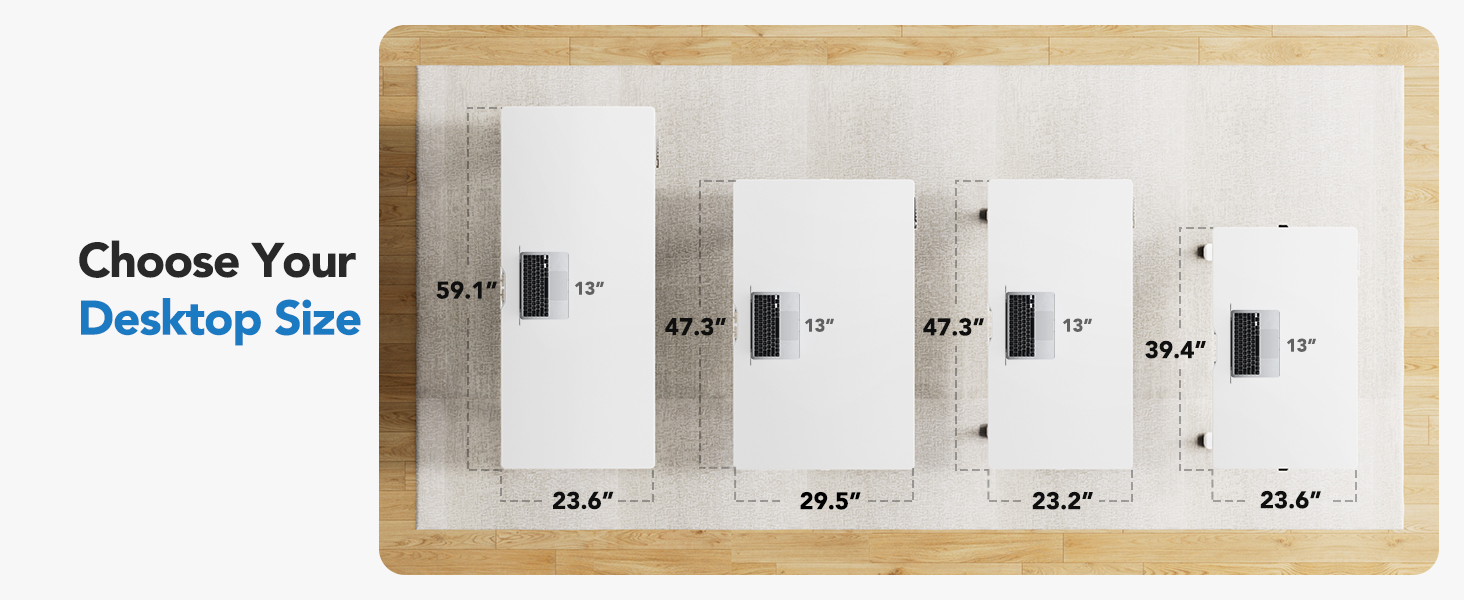
Image 5: Visual representation of the four programmable height presets, allowing users to easily switch between sitting and standing positions.
6. Maintenance
Proper maintenance ensures the longevity and optimal performance of your standing desk.
- Cleaning: Wipe the desktop and frame with a soft, damp cloth. Avoid abrasive cleaners or harsh chemicals.
- Cable Management: Periodically check and reorganize cables to prevent tangles and ensure smooth operation.
- Regular Checks: Ensure all screws and connections remain tight. Retighten if necessary.
- Avoid Overloading: Do not place excessive weight on the desk beyond its specified capacity.
7. Troubleshooting
If you encounter any issues with your desk, please refer to the following general troubleshooting tips. For persistent problems, contact customer support.
- Desk Not Moving: Check all power connections to ensure the desk is properly plugged in. Verify that no objects are obstructing the desk's movement.
- Unusual Noises: Ensure the desk is on a level surface and that all assembly screws are tight.
- Error Codes: If the LED display shows an error code, try unplugging the desk for 10 seconds and then plugging it back in to reset the system.
8. Specifications
| Feature | Detail |
|---|---|
| Brand | HUANUO |
| Model Number | HNESD155W-US |
| Product Dimensions | 23.2"D x 47.3"W x 28.3"H |
| Size | 48" x 24" |
| Color | White |
| Minimum Height | 28.3 Inches |
| Maximum Height | 46.5 Inches |
| Maximum Weight Recommendation | 176 Pounds |
| Top Material Type | Engineered Wood |
| Base Material | Carbon Steel |
| Special Feature | Whole Piece Desktop, Electric Height Adjustment, 4 Height Memory Settings, Stable T-Frame |
| Lifting Mechanism | Electric |
| Noise Level | 55 dB (from A+ content image) |
9. Warranty
The HUANUO Electric Standing Desk comes with a Limited Warranty. Please refer to the warranty documentation included with your product for specific terms and conditions.
10. Customer Support
For any questions regarding assembly, operation, troubleshooting, or product selection, please contact our U.S.-based product support team:
- Support Email: support@huanuo.com


