
RATION P2-41285
Instruction Manual
RATION Wells Cover Element P2-41285
Model: P2-41285
Product Overview
The RATION P2-41285 Wells Cover Element is a precision-engineered replacement part designed to seamlessly fit specific Wells Cover Elem Hmp-6 and Rohs P2-41285 systems. Crafted from high-quality materials, this component provides full coverage and protection for your household appliances, ensuring proper function and longevity.
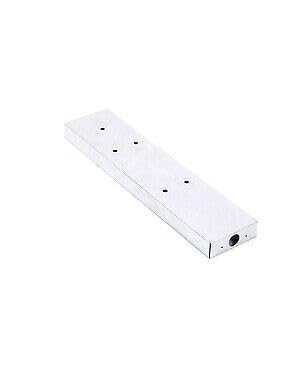
This image displays the RATION P2-41285 Wells Cover Element, a rectangular component with several small circular openings on its surface, designed for specific appliance applications.
Setup and Installation
Before beginning installation, ensure the appliance is disconnected from its power source to prevent electrical hazards. Refer to your appliance's specific service manual for detailed instructions on accessing the component area.
- Preparation: Identify the location of the existing cover element within your appliance. Ensure you have any necessary tools, such as screwdrivers or wrenches, as specified by your appliance's manual.
- Removal of Old Component: Carefully remove the old Wells Cover Element. Note its orientation and any connecting points for proper installation of the new part.
- Installation of New Component: Position the RATION P2-41285 Wells Cover Element in the designated area. Align any mounting holes or clips.
- Secure Fasteners: Secure the new element using the original fasteners or new ones if provided and required. Ensure it is firmly seated and does not wobble.
- Reassembly: Reassemble any panels or covers that were removed during the installation process.
- Testing: Once installation is complete, reconnect the appliance to its power source and perform a functional test to ensure the new element is working correctly and the appliance operates as expected.
Operating Principles
The RATION P2-41285 Wells Cover Element functions as a protective and integral component within compatible appliance systems. Its primary role is to cover and shield internal elements, contributing to the overall efficiency and safety of the appliance. This part does not require active "operation" by the user but rather performs its function passively as part of the appliance's design.
Proper installation ensures the element maintains its intended protective barrier and structural integrity within the appliance's operational environment.
Maintenance
Regular inspection and light cleaning can help prolong the life of the Wells Cover Element and ensure continued optimal performance of your appliance.
- Visual Inspection: Periodically inspect the element for any signs of physical damage, cracks, or deformation. Ensure it remains securely in place.
- Cleaning: If accessible and safe to do so (with the appliance disconnected from power), gently wipe the surface of the element with a soft, damp cloth to remove dust or debris. Avoid using harsh chemicals or abrasive cleaners.
- Professional Check: If you notice any significant wear or damage, or if the appliance's performance is affected, consult a qualified service technician.
Troubleshooting
This section addresses common issues related to the Wells Cover Element. For complex appliance malfunctions, consult your appliance's user manual or a professional technician.
| Problem | Possible Cause | Solution |
|---|---|---|
| Element does not fit correctly. | Incorrect part for your appliance model; improper alignment during installation. | Verify the part number against your appliance's requirements. Re-align and re-install the element carefully. |
| Visible damage to the element after installation. | Physical impact; improper handling during installation. | The element may need replacement. Handle with care during installation. |
| Appliance not functioning after element replacement. | Incorrect installation; unrelated appliance issue. | Double-check all connections and ensure the element is securely installed. Consult your appliance's manual or a technician for further diagnosis. |
Specifications
- Brand: RATION
- Model Number: P2-41285 (as part of product title, actual model number from data is "Description")
- Part Number: P2-41285
- ASIN: B0DCT943ZC
- Material: High-quality materials (as per product description)
- Compatibility: Designed for Wells Cover Elem Hmp-6 and Rohs P2-41285 systems.
Warranty and Support
For specific warranty information regarding the RATION P2-41285 Wells Cover Element, please refer to the documentation provided with your purchase or contact RATION customer support directly. Warranty terms typically cover manufacturing defects and material flaws.
For technical assistance or further inquiries, please reach out to the manufacturer's official support channels. Always provide your product model number and ASIN when seeking support.
Note: This manual provides general guidance. Always prioritize safety and consult a qualified professional for complex installations or repairs.
Ask a question about this manual
Ask about setup, troubleshooting, compatibility, parts, safety, or missing instructions. Manuals+ will review the question and use this page’s manual context to help answer it.