
1. Introduction
Thank you for purchasing the WOCKODER All-in-one Record Player Turntable. This manual provides essential information for the safe and efficient operation of your new device. Please read it thoroughly before use and retain it for future reference.
2. Safety Instructions
- Read all instructions carefully before operating the turntable.
- Keep the manual for future reference.
- Do not use this apparatus near water.
- Clean only with a dry cloth.
- Do not block any ventilation openings. Install in accordance with the manufacturer's instructions.
- Do not install near any heat sources such as radiators, heat registers, stoves, or other apparatus (including amplifiers) that produce heat.
- Protect the power cord from being walked on or pinched, particularly at plugs, convenience receptacles, and the point where they exit from the apparatus.
- Only use attachments/accessories specified by the manufacturer.
- Unplug this apparatus during lightning storms or when unused for long periods of time.
- Refer all servicing to qualified service personnel. Servicing is required when the apparatus has been damaged in any way, such as power-supply cord or plug is damaged, liquid has been spilled or objects have fallen into the apparatus, the apparatus has been exposed to rain or moisture, does not operate normally, or has been dropped.
3. Package Contents
Ensure all items listed below are present in the package:
- 1 x WOCKODER Turntable with Built-in Speakers
- 1 x Power Adapter
- 1 x Dust Cover
- 1 x Slip Mat
- 1 x User Manual (this document)
4. Product Overview
Familiarize yourself with the components of your WOCKODER turntable.

Figure 4.1: Overall view of the WOCKODER Turntable with the dust cover open, showcasing its mahogany finish and front speaker grille.
4.1 Key Components
- Platter: The rotating platform where records are placed.
- Tonearm: Holds the cartridge and stylus, guiding it across the record grooves.
- Counterweight: Balances the tonearm and adjusts tracking force.
- Stylus (ATN 3600L Cartridge): The needle that reads the record grooves.
- Built-in Speakers: Integrated audio output (2 mid-bass, 2 tweeter speakers).
- Dust Cover: Protects the platter and tonearm from dust.
- Control Knobs/Switches: For power, volume, speed selection, and auto-stop function.
- RCA Line Out: For connecting to external active speakers or an amplifier.
- AUX In: For connecting external audio devices via a 3.5mm cable.
- Wireless Playback (Bluetooth): For streaming audio from compatible devices.

Figure 4.2: Detailed view of the turntable platter, highlighting the adjustable counterweight, auto-stop feature, and the ATN 3600L stylus.
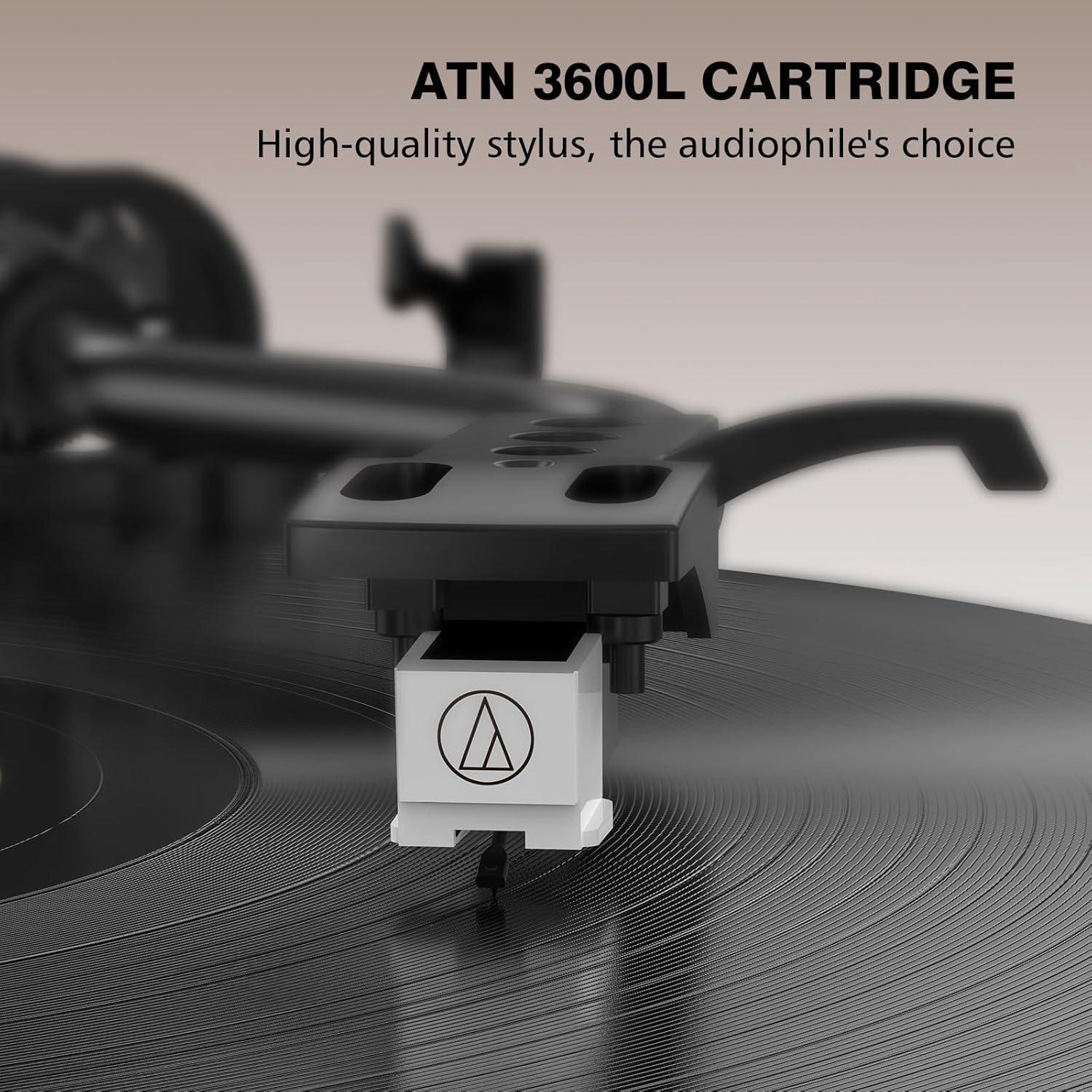
Figure 4.3: A close-up image of the ATN 3600L cartridge and stylus, designed for precise tracking of record grooves.

Figure 4.4: An exploded diagram illustrating the four built-in speakers (two mid-bass and two tweeter speakers) for stereo sound.
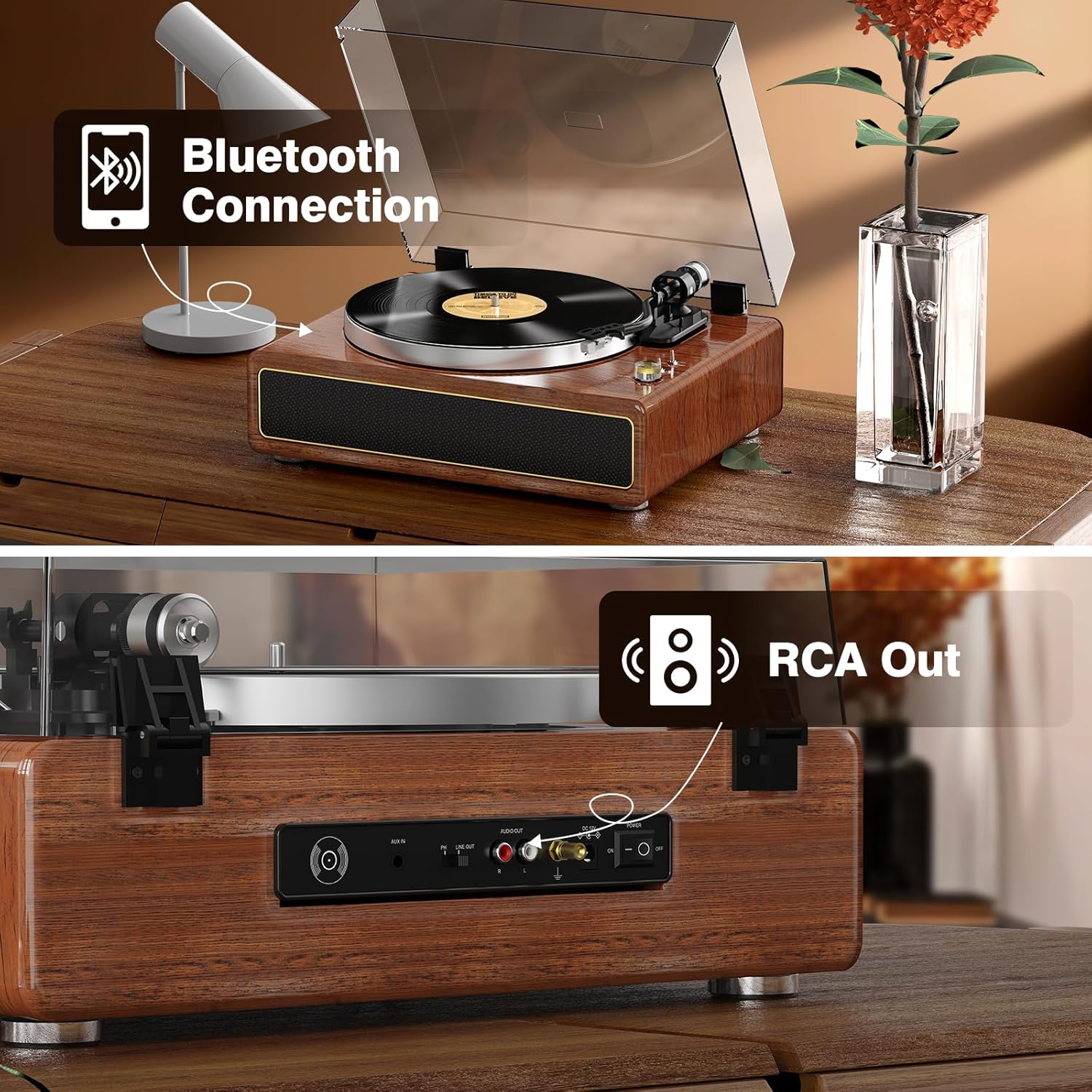
Figure 4.5: The rear panel of the turntable, indicating the Bluetooth connection capability and the RCA Line Out ports for external audio connections.

Figure 4.6: A composite image detailing various controls and connection points: the volume knob, speed selector switch, auto-stop switch, adjustable counterweight, and the rear input/output ports.
5. Setup
5.1 Unpacking
- Carefully remove the turntable from its packaging.
- Place the turntable on a stable, level surface away from direct sunlight, heat sources, or excessive vibration.
- Remove all protective packaging materials.
5.2 Dust Cover Installation
Align the hinges of the dust cover with the slots on the back of the turntable and gently insert them until secure.
5.3 Platter and Belt Installation
- Place the metal platter onto the center spindle.
- Locate the drive belt under the platter. Carefully stretch the belt around the motor pulley.
- Place the slip mat on top of the platter.
5.4 Counterweight Adjustment
The counterweight ensures proper tracking force for the stylus, preventing skips and protecting your records.
- Gently remove the stylus protector.
- Balance the tonearm: With the tonearm free, rotate the counterweight until the tonearm floats horizontally.
- Set tracking force: Once balanced, hold the counterweight steady and rotate the numbered ring to '0'. Then, rotate the entire counterweight (including the numbered ring) to the recommended tracking force (typically 2.5-3.5 grams for the ATN 3600L cartridge, refer to cartridge specifications if available).
5.5 Power Connection
Connect the power adapter to the DC IN port on the back of the turntable, then plug it into a wall outlet.
6. Operating Instructions
6.1 Playing a Vinyl Record
- Place a record on the platter, ensuring the slip mat is underneath.
- Select the appropriate speed (33 or 45 RPM) using the speed selector switch. For 45 RPM records, use the included 45 RPM adapter if necessary.
- Turn the power/volume knob clockwise to power on the unit and adjust to a low volume.
- Lift the tonearm using the cueing lever.
- Move the tonearm over the desired starting groove of the record.
- Gently lower the tonearm onto the record using the cueing lever. The record will begin to play.
- Adjust the volume to your preference.
- When the record finishes, the auto-stop function (if enabled) will stop the platter rotation. Lift the tonearm and return it to the tonearm rest.
6.2 Wireless Playback (Bluetooth)
- Turn on the turntable.
- Switch the function selector to the Bluetooth mode. The indicator light will flash, indicating it's ready for pairing.
- Enable Bluetooth on your external device (e.g., smartphone, tablet) and search for 'WOCKODER Turntable'.
- Select the turntable from the list to pair. Once connected, the indicator light will stop flashing.
- Play music from your device. Adjust volume on both your device and the turntable.
6.3 AUX Input
- Connect an external audio device (e.g., MP3 player, CD player) to the AUX IN port on the back of the turntable using a 3.5mm audio cable.
- Switch the function selector to AUX mode.
- Play audio from your external device. Adjust volume on both your device and the turntable.
6.4 RCA Line Out
The RCA Line Out allows you to connect your turntable to external active speakers or an amplifier for enhanced sound.
- Connect RCA cables (red for right channel, white for left channel) from the RCA OUT ports on the turntable to the corresponding input ports on your active speakers or amplifier.
- Ensure the function selector is set to PH (Phono) for playing records through external passive speakers or LINE OUT for active speakers.
- Adjust the volume on your external audio system.
7. Maintenance
7.1 Cleaning
- Turntable Body: Wipe with a soft, dry, lint-free cloth. Do not use abrasive cleaners or solvents.
- Dust Cover: Clean with a soft cloth and a mild, non-abrasive cleaner.
- Stylus: Use a soft brush designed for stylus cleaning, brushing gently from back to front. Avoid touching the stylus with your fingers.
7.2 Stylus Replacement
The stylus is a consumable part and will wear out over time. A worn stylus can damage your records and degrade sound quality. Replace the stylus after approximately 300-500 hours of playback, or if you notice a significant drop in sound quality or increased skipping.
- Gently grasp the front of the cartridge and pull the old stylus assembly downwards and forwards to remove it.
- Align the new stylus assembly with the cartridge body and push it upwards and backwards until it clicks into place.
- Re-adjust the counterweight if necessary.
8. Troubleshooting
| Problem | Possible Cause | Solution |
|---|---|---|
| No power | Power adapter not connected; Power outlet not working; Power switch off. | Ensure power adapter is securely connected; Try a different outlet; Turn the power/volume knob clockwise to power on. |
| No sound from built-in speakers | Volume too low; Function mode incorrect. | Increase volume; Ensure correct function mode is selected (e.g., PH for records). |
| Sound distortion or skipping | Stylus dirty or worn; Tracking force incorrect; Record dirty or damaged; Turntable not level. | Clean or replace stylus; Re-adjust counterweight; Clean record; Place turntable on a level surface. |
| Bluetooth not connecting | Turntable not in Bluetooth mode; Device too far; Device already connected to another unit. | Switch to Bluetooth mode; Move device closer; Disconnect from other devices and try again. |
| Record stops prematurely (Auto-Stop) | Auto-stop function enabled for a record that requires it to be off. | Some records, especially older or non-standard ones, may require the auto-stop switch to be set to OFF for full playback. |
9. Specifications
- Brand: WOCKODER
- Model: B0DCS4RNB1
- Playback Speeds: 33 1/3, 45 RPM
- Drive Type: Belt-Drive
- Cartridge Type: Magnetic (ATN 3600L)
- Speakers: Built-in (2 mid-bass, 2 tweeter)
- Connectivity: Wireless Playback (Bluetooth), AUX In, RCA Line Out
- Special Features: Auto Stop, Adjustable Counterweight
- Material: Wood (Mahogany finish)
- Item Weight: 12.87 pounds
- Package Dimensions: 20.25 x 18.4 x 11.2 inches
10. Warranty and Support
WOCKODER products are designed and manufactured to the highest quality standards. For warranty information, please refer to the warranty card included with your purchase or contact WOCKODER customer support.
If you encounter any issues or have questions regarding your turntable, please contact our technical support team for assistance. Contact details can typically be found on the manufacturer's website or on the product packaging.


