
Aquasonic FLOS ICON
Contents
AquaSonic Icon Water Flosser User Manual
Model: FLOS ICON | Brand: Aquasonic
Introduction
Welcome to the AquaSonic Icon Water Flosser user manual. This guide provides comprehensive instructions for setting up, operating, maintaining, and troubleshooting your new water flosser. The AquaSonic Icon is designed to provide superior and gentle oral care, cleaning teeth more effectively than traditional string floss with its advanced technology and ultra-fine water jet.
Product Overview
Components Included
- AquaSonic Icon Water Flosser Unit
- One Standard Jet Tip
- USB Charging Cord
Key Features
- Dentist-Recommended Technology: Utilizes advanced technology for superior and gentle oral care.
- 3 Flossing Modes: Normal (standard cleaning), Soft (gentle for sensitive teeth/gums), and Pulse (massages gums).
- Long-Lasting Battery: Powerful rechargeable lithium-ion battery provides 90+ days of flossing on a single charge.
- Waterproof Design: Ensures safe use in wet environments.
- Portable & Travel-Friendly: Sleek, compact design ideal for home and travel.
- Ultra-Fine Water Jet: Expertly cleans between teeth and along the gumline.
- 360° Rotating Tip: Allows for easy access to all areas of the mouth.
- Removable Water Tank: Detachable reservoir for easy filling and cleaning.
- Textured, Non-Slip Grip: Provides secure handling during use.
- Simple 2-Button Operation: For ease of use.

Figure 1: The AquaSonic Icon Water Flosser, including the main unit, a jet tip, and the USB charging cable.

Figure 2: Demonstrates the "Ultimate Deep Clean" capability of the water flosser, highlighting its ability to clean faster and better than string floss, reach hard-to-reach areas, and improve gum health.

Figure 3: Details the three custom flossing modes: Normal for standard cleaning, Soft for sensitive teeth and gums, and Pulse for gum massage. The device is safe for braces and other dental work.
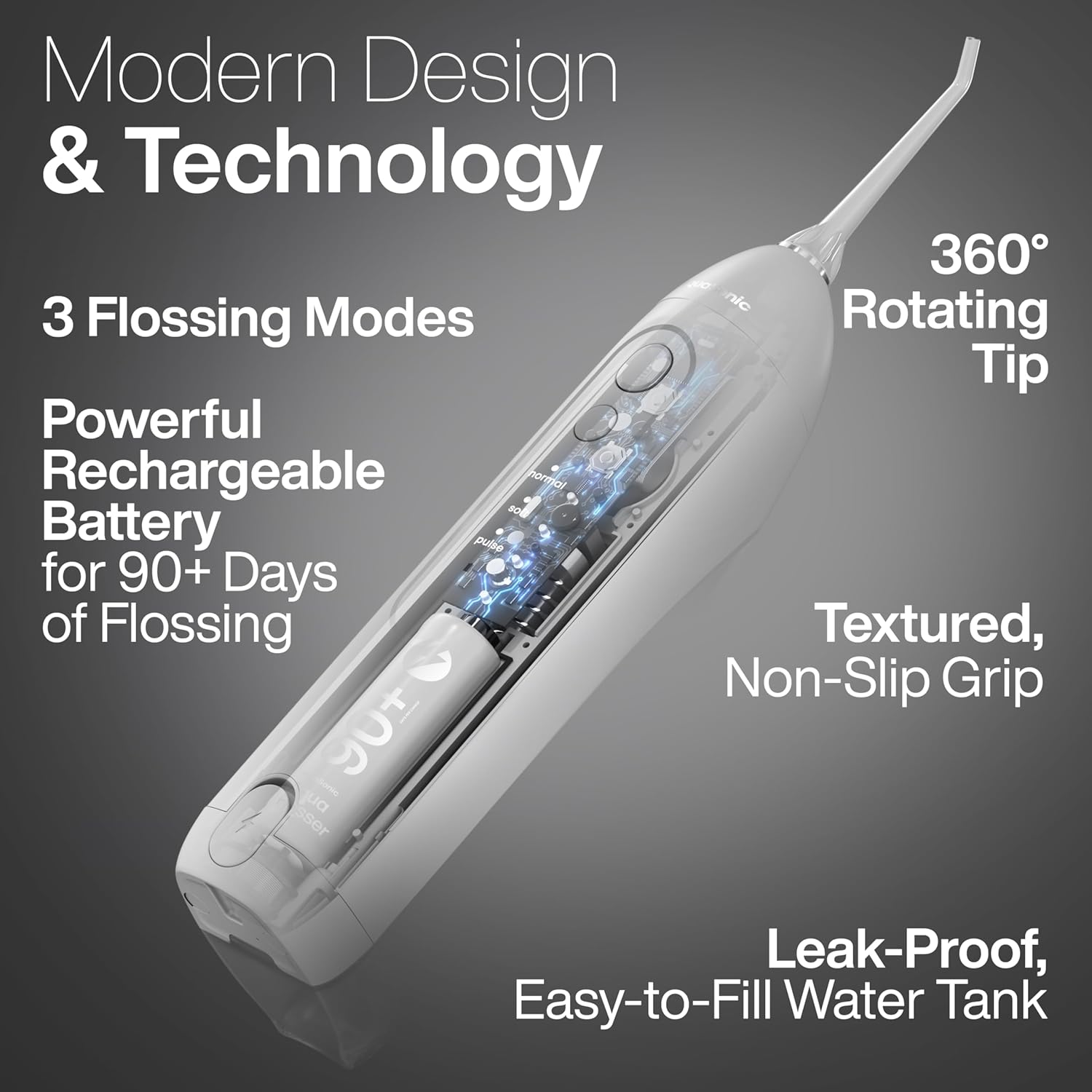
Figure 4: Illustrates the modern design and technology, including the powerful rechargeable battery providing 90+ days of flossing, 360° rotating tip, textured non-slip grip, and leak-proof water tank.

Figure 5: Shows the ease of use with a simple 2-button operation, removable tank for easy cleaning, and an easy-access tank door for quick filling.

Figure 6: Highlights the ultimate convenience of the device, being travel-friendly, portable, and lightweight, with a large tank for flossing on a single fill.
Setup
1. Initial Charging
Before first use, fully charge your AquaSonic Icon Water Flosser. Connect the provided USB charging cord to the charging port on the device and plug the other end into a compatible USB power adapter (not included). A full charge typically takes 2-3 hours and provides approximately 90 days of use.
2. Attaching the Jet Tip
Insert the jet tip into the opening at the top of the flosser handle until it clicks into place. Ensure it is securely seated.
3. Filling the Water Tank
Open the water tank door located on the side of the device. Fill the tank with lukewarm water. Close the door firmly to prevent leaks. The tank is designed for a single fill per flossing session.
Operating Instructions
1. Powering On/Off
Press the Power button once to turn the device on. Press it again to turn it off.
2. Selecting a Mode
After turning on the device, press the Mode button to cycle through the three available settings: Normal, Soft, and Pulse. Select the mode that best suits your comfort and cleaning needs.
- Normal Mode: Standard, powerful cleaning for daily use.
- Soft Mode: Gentle pressure for sensitive teeth and gums.
- Pulse Mode: Rhythmic pulses for gum massage and improved circulation.
3. Proper Flossing Technique
For best results, lean over a sink. Place the jet tip into your mouth, aiming the stream at the gumline at a 90-degree angle. Move the tip along the gumline, pausing briefly between teeth. Allow the water to flow into the sink. For optimal cleaning, start with your back teeth and work your way forward, covering both the front and back surfaces of your teeth.
4. Frequency of Use
It is recommended to use the AquaSonic Icon Water Flosser at least once a day, preferably after brushing, to remove food particles and plaque from between teeth and below the gumline.
Maintenance and Cleaning
1. Cleaning the Water Tank
The water reservoir is detachable for easy cleaning. After each use, empty any remaining water. For thorough cleaning, the reservoir can be placed on the top shelf of a dishwasher to sanitize. Ensure it is completely dry before reattaching.
2. Cleaning the Exterior
Wipe the exterior of the flosser with a soft, damp cloth. Do not use abrasive cleaners or harsh chemicals. Ensure the charging port cover is securely closed before cleaning.
3. Storing the Device
Store the AquaSonic Icon Water Flosser in a cool, dry place away from direct sunlight when not in use. Ensure the water tank is empty and dry before storing for extended periods.
Troubleshooting
| Problem | Possible Cause | Solution |
|---|---|---|
| Device does not turn on. | Battery is depleted. | Charge the device fully using the provided USB cord. |
| Weak water pressure. | Low battery or clogged tip. | Ensure the device is fully charged. Remove and clean the jet tip. |
| Water leaks from the tank. | Tank door not properly closed or tank not seated correctly. | Ensure the tank door is firmly closed and the tank is securely attached to the main unit. |
| Water pressure is too strong/uncomfortable. | Incorrect mode selected. | Switch to "Soft" mode for a gentler experience. Adjust the angle of the jet tip. |
Specifications
- Model Number: FLOS ICON
- Power Source: Battery Powered (1 AA battery required, included)
- Battery Type: Rechargeable Lithium-Ion
- Special Feature: Rotatable Tip
- Product Benefits: Removes Plaque
- Unit Count: 1.0 Count
- Manufacturer: Aquasonic
- Package Dimensions: 9.57 x 5.24 x 3.82 inches
- Item Weight: 15.52 ounces
Warranty and Support
The AquaSonic Icon Water Flosser typically comes with a manufacturer's warranty. Please refer to the product packaging or the official Aquasonic website for specific warranty terms and conditions. For product support, technical assistance, or to inquire about replacement parts, please contact the manufacturer, Aquasonic, directly.
Return Policy: This product is eligible for a refund or replacement within 30 days of purchase, subject to the retailer's return policy.
Ask a question about this manual
Ask about setup, troubleshooting, compatibility, parts, safety, or missing instructions. Manuals+ will review the question and use this page’s manual context to help answer it.