
1. Introduction
This manual provides detailed instructions for the installation, operation, and maintenance of your GLOBE Electric 4-Light LED Integrated Track Lighting. This modern fixture features a matte white finish, slim profile, and adjustable pivoting track heads, designed to provide versatile and efficient illumination for various indoor spaces.
Key features include:
- Integrated LED technology: 37W total (9.25W per shade), 1600 lumens total (400 lumens per shade), 90 CRI, 3000 Kelvin (soft white).
- Adjustable pivoting track heads for directional lighting.
- Dimmable functionality (dimmer switch not included).
- Slim, unobtrusive design suitable for modern interiors.
- Easy installation with included mounting hardware.
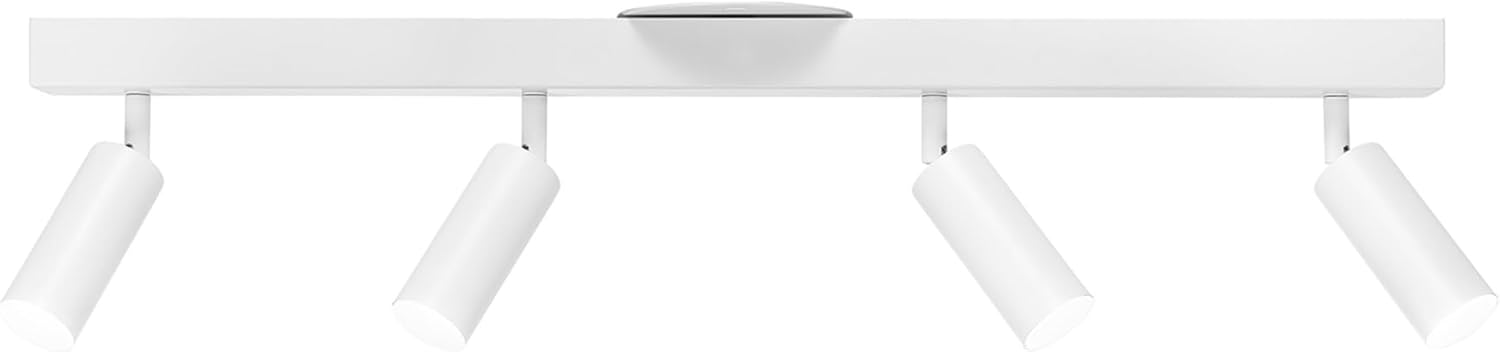
Figure 1.1: Overview of the GLOBE Electric 4-Light LED Integrated Track Lighting in matte white.
2. Setup and Installation
Before beginning installation, ensure the power supply to the fixture location is turned off at the circuit breaker to prevent electrical shock. All mounting hardware required for installation is included.
2.1 Pre-Installation Checks
- Verify that all components listed in the packaging are present and undamaged.
- Ensure the electrical box is securely mounted and capable of supporting the fixture's weight.
- Confirm the fixture's dimensions are suitable for your intended space.

Figure 2.1: Product dimensions, showing a length of 28 inches (71.1 cm) and a height of 7 inches (18 cm).
2.2 Mounting Instructions
- Turn off power at the main circuit breaker.
- Attach the mounting bracket to the electrical box using the provided screws.
- Connect the fixture's electrical wires to the corresponding household wires (black to black, white to white, ground to ground) using wire nuts.
- Carefully tuck the wires into the electrical box.
- Align the fixture base with the mounting bracket and secure it with the decorative nuts or screws.
- Ensure the fixture is flush with the ceiling and securely fastened.
- Restore power at the main circuit breaker.

Figure 2.2: Underside view of the track lighting, showing the four individual light heads and their attachment points to the main bar.
3. Operating Instructions
Once installed, your GLOBE Electric Track Lighting is ready for use.
3.1 Basic Operation
- Turn the light on or off using your standard wall light switch.
3.2 Adjusting Light Direction
The individual track heads are designed to pivot, allowing you to direct light precisely where needed. Gently grasp each cylindrical shade and pivot it to the desired angle. Avoid excessive force to prevent damage to the pivoting mechanism.

Figure 3.1: Close-up illustrating the adjustable pivoting motion of the individual light heads.
3.3 Dimming Functionality
This track light is fully dimmable. To utilize the dimming feature, you must install a compatible dimmer switch (not included) in place of your standard wall switch. Consult a qualified electrician if you are unsure about installing a dimmer switch.

Figure 3.2: Details of the integrated LED, showing 3000 Kelvin color temperature, 1600 lumens total output, and 37 watts power consumption.
4. Maintenance
The GLOBE Electric Track Lighting requires minimal maintenance. Follow these guidelines to ensure longevity and optimal performance:
- Cleaning: Before cleaning, ensure the power is turned off at the circuit breaker. Use a soft, dry cloth to wipe down the fixture. Do not use abrasive cleaners, solvents, or polishes as they may damage the finish or electrical components.
- LED Longevity: The integrated LED lights are designed for long-term use and are not replaceable.
- Inspection: Periodically check for any loose connections or signs of wear. If any issues are observed, consult a qualified electrician.
5. Troubleshooting
If you encounter issues with your track lighting, refer to the following common problems and solutions:
| Problem | Possible Cause | Solution |
|---|---|---|
| Light does not turn on. | No power to the fixture; loose wiring; faulty wall switch. | Check circuit breaker. Ensure all wire connections are secure. Test the wall switch. |
| Light flickers or dims inconsistently. | Incompatible dimmer switch; loose wiring; power fluctuations. | Ensure dimmer switch is LED compatible. Check wiring connections. Consult an electrician if power fluctuations persist. |
| Buzzing sound when dimmed. | Incompatible dimmer switch; electrical interference. | Replace dimmer with a high-quality, LED-specific dimmer. Ensure proper grounding. |
| Light heads do not pivot smoothly. | Obstruction; mechanism damage. | Check for any physical obstructions. Do not force movement. |
6. Specifications
| Attribute | Value |
|---|---|
| Brand | GLOBE |
| Model Name | Bianca |
| Part Number | 64000120 |
| Color | White, Bianca (Matte White Finish) |
| Material | Metal |
| Style | Modern |
| Light Fixture Form | Floodlight |
| Room Type | Living Room (suitable for Kitchen, Bedroom, Hallway, Office, Den) |
| Product Dimensions | 4.8"L x 28"W x 7"H |
| Indoor/Outdoor Usage | Indoor |
| Power Source | Hardwired |
| Special Feature | Dimmable |
| Light Source Type | Integrated LED |
| Number of Light Sources | 4 |
| Voltage | 120 Volts |
| Light Color | White (3000 Kelvin - Soft White) |
| Item Weight | 3.52 Pounds |
| Wattage | 37 watts |
| Brightness | 1600 lumens |
| Mounting Type | Ceiling Mount |
| Included Components | Mounting Hardware |
| Assembly Required | No |
| UPC | 058219211212 |
7. Warranty and Support
This product is sold with No Warranty as per the manufacturer's specifications. For any product inquiries, technical assistance, or support, please contact GLOBE Electric customer service directly. Refer to the product packaging or the official GLOBE Electric website for the most current contact information.
It is recommended to retain your purchase receipt for any potential support needs.


