
IMIKI IMIKI-T14-BLUE
IMIKI T14 BLUE True Wireless Earbuds User Manual
Model: IMIKI-T14-BLUE
Introduction
Thank you for choosing the IMIKI T14 BLUE True Wireless Earbuds. This manual provides essential information for setting up, operating, and maintaining your new earbuds. Please read it carefully before use to ensure optimal performance and longevity of your device.
Safety Information
- Do not disassemble, repair, or modify the product. This may cause fire, electronic breakdown, or complete damage to the product.
- Keep the device away from extreme temperatures, humidity, and corrosive environments.
- Avoid dropping or subjecting the earbuds and charging case to strong impacts.
- Do not expose the earbuds to water beyond their IPX5 rating. Do not submerge them.
- Use only the provided charging cable or a certified USB-C cable for charging.
- Prolonged exposure to high volume levels may cause hearing damage. Adjust volume to a moderate level.
Package Contents
Please check the package for the following items:
- IMIKI T14 BLUE True Wireless Earbuds (Left and Right)
- Charging Case
- USB-C Charging Cable
- Ear Tips (various sizes)
- User Manual (this document)
Product Overview
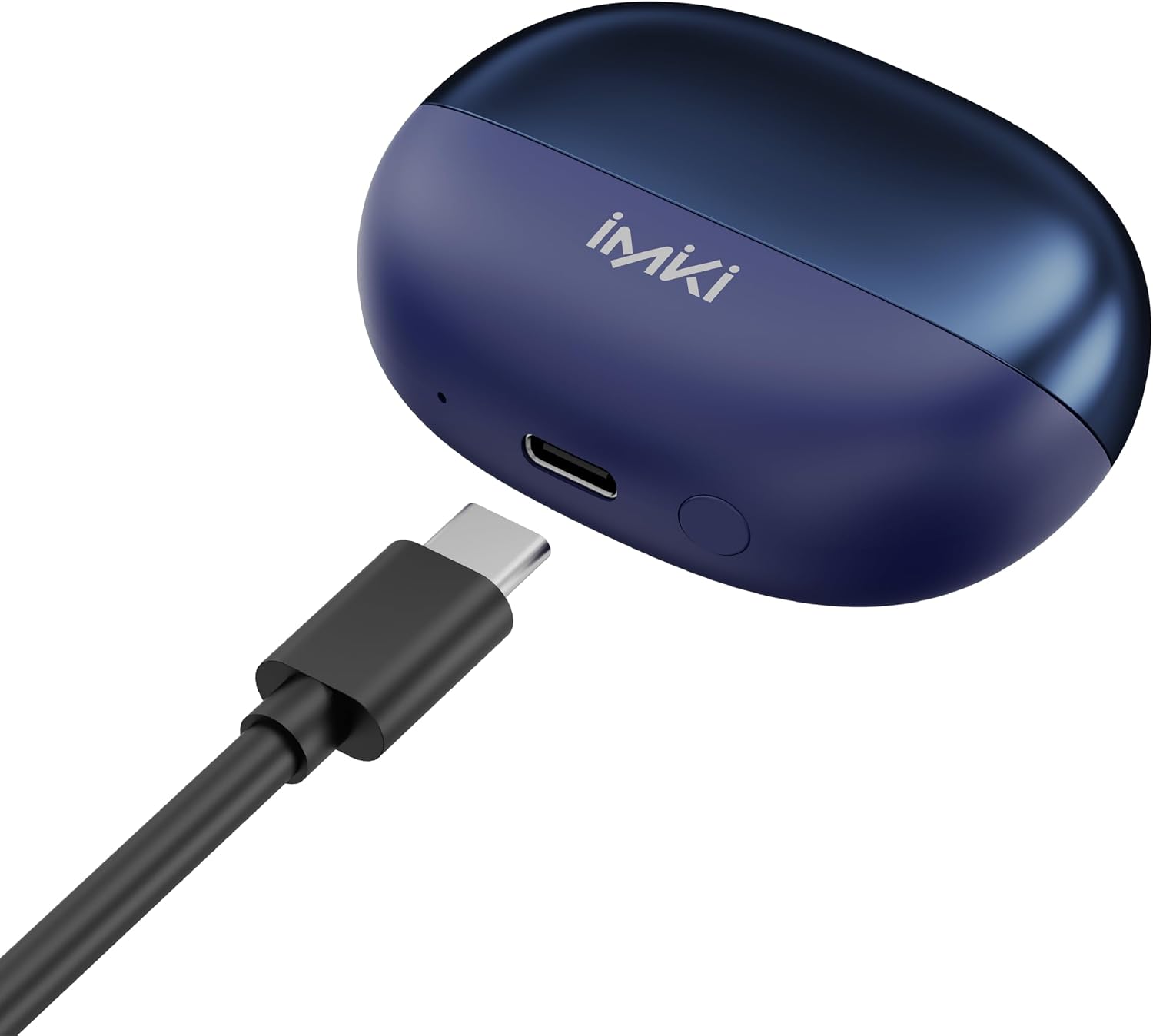
The IMIKI T14 BLUE earbuds feature a sleek design and advanced audio technology. Below are key components and their functions.


Setup
1. Charging the Earbuds and Case
Before first use, fully charge the earbuds and the charging case. Place the earbuds into the charging case. Connect the USB-C charging cable to the charging port on the case and the other end to a USB power source. The earbuds and case will fully charge in approximately 90 minutes.
2. Pairing with Your Device
- Ensure the earbuds are charged.
- Open the charging case. The earbuds will automatically enter pairing mode (indicated by flashing LED lights on the earbuds).
- On your device (smartphone, tablet, etc.), enable Bluetooth.
- Search for Bluetooth devices and select "IMIKI T14 BLUE" from the list.
- Once connected, the LED indicators on the earbuds will turn off or show a steady light, indicating successful pairing.
- If pairing fails, place the earbuds back into the case, close the lid, wait a few seconds, and then repeat the steps.
3. Fitting the Earbuds
For optimal sound quality and comfort, choose the ear tips that best fit your ears. The package includes soft silicone ear tips in three sizes. Gently insert the earbuds into your ear canal and twist slightly to secure them.
Operating
The IMIKI T14 BLUE earbuds feature intuitive touch controls for various functions.
Touch Controls
| Action | Function |
|---|---|
| Single Tap (L/R) | Play/Pause Music, Answer/End Call |
| Double Tap (Right) | Next Track |
| Double Tap (Left) | Previous Track |
| Triple Tap (L/R) | Activate Voice Assistant |
| Long Press (2s, L/R) | Reject Call, Toggle ANC/ENC Mode |
| Long Press (3s, L/R) | Enter/Exit Game Mode |
Advanced Noise Reduction (ANC/ENC)
The T14 earbuds are equipped with 6 microphones supporting Active Noise Cancellation (ANC) and Environmental Noise Cancellation (ENC). ANC reduces ambient noise for an immersive listening experience, while ENC ensures clear calls by isolating your voice from external noise. Toggle between modes using the long press touch control.
Game Mode
Activate Game Mode for an ultra-low latency experience (60ms), ideal for gaming. This mode minimizes audio delay, providing a more synchronized audio-visual experience. Use the long press (3s) touch control to switch to and from Game Mode.
Maintenance
Cleaning
- Regularly clean the earbuds and charging case with a soft, dry, lint-free cloth.
- Remove ear tips and clean them with mild soap and water, then dry thoroughly before reattaching.
- Use a cotton swab or a small, soft brush to clean the charging contacts on both the earbuds and the case.
- Do not use abrasive cleaners, alcohol, or chemical solvents.
Storage
When not in use, store the earbuds in their charging case to protect them from dust and damage. Store the case in a cool, dry place, away from direct sunlight and extreme temperatures.
Water Resistance (IPX5)
The IMIKI T14 BLUE earbuds are IPX5 water-resistant, meaning they can withstand splashes of water and sweat. They are suitable for workouts and light rain. Do not submerge the earbuds in water or expose them to strong jets of water. The charging case is not water-resistant.
Troubleshooting
If you encounter issues with your IMIKI T14 BLUE earbuds, try the following solutions:
- No Sound: Ensure earbuds are charged, connected to your device, and volume is up.
- Cannot Pair: Make sure Bluetooth is enabled on your device and the earbuds are in pairing mode. Try forgetting the device on your phone and re-pairing.
- One Earbud Not Working: Place both earbuds back into the charging case, close the lid, wait a few seconds, then open and try again. Ensure both earbuds are charged.
- Charging Issues: Check the USB-C cable and power source. Ensure charging contacts on earbuds and case are clean.
- Poor Sound Quality: Ensure ear tips are properly fitted and clean. Check for obstructions in the earbud nozzles.
- Lag in Game Mode: Ensure Game Mode is activated. Check for interference from other wireless devices.
If the problem persists, please contact customer support.
Specifications
| Feature | Detail |
|---|---|
| Model | IMIKI-T14-BLUE |
| Connectivity Technology | Wireless (Bluetooth 5.3) |
| Noise Reduction | ANC (Active Noise Cancellation), ENC (Environmental Noise Cancellation) with 6 microphones |
| Game Mode Latency | 60 ms |
| Music Playback Time | Up to 6 hours |
| Call Time | Up to 5 hours |
| Charging Time | Approx. 90 minutes (earbuds and case) |
| Charging Port | USB-C |
| Water Resistance Level | IPX5 (Earbuds) |
| Form Factor | In-Ear |
| Product Weight | 130 g |
| Included Components | Cable, Ear Tips |
| Color (as per spec) | khaki green |
Warranty and Support
Warranty Information
IMIKI products are manufactured to the highest quality standards. For information regarding warranty coverage and terms, please refer to the warranty card included with your purchase or visit the official IMIKI website.
Customer Support
If you have any questions, require technical assistance, or need to report an issue with your IMIKI T14 BLUE earbuds, please contact our customer support team. Contact details can typically be found on the official IMIKI website or on your product packaging.
Ask a question about this manual
Ask about setup, troubleshooting, compatibility, parts, safety, or missing instructions. Manuals+ will review the question and use this page’s manual context to help answer it.