
1. Introduction
Thank you for choosing the MSmask Twin Bed Frame. This bed frame is designed to provide a comfortable and functional sleeping solution, featuring an upholstered storage headboard with integrated LED lighting, a convenient charging station, and under-bed storage drawers. This manual provides detailed instructions for assembly, operation, maintenance, and troubleshooting to ensure safe and optimal use of your new bed frame.
Please read this manual thoroughly before assembly and retain it for future reference.
2. Safety Information
Important Safety Warnings:
- Do not exceed the maximum static load capacity of 800 lbs (363 kg). Exceeding this limit may cause damage to the bed frame and potential injury.
- Handle all electrical components, including the LED light strip and charging station, with care. Ensure they are properly installed and connected to prevent electrical hazards.
- Keep all packaging materials, especially plastic bags, away from children to prevent suffocation.
- Ensure all screws and bolts are securely tightened before using the bed frame. Periodically check and re-tighten fasteners as needed.
- Do not allow children to play on or around the bed frame without supervision.
- Use only the provided components and tools for assembly. Do not substitute parts.
- Place the bed frame on a flat, level surface to ensure stability.
3. Package Contents
Before beginning assembly, verify that all parts listed below are present and undamaged. If any parts are missing or damaged, please contact customer support.
- Upholstered Headboard with LED Lights and Charging Station
- Side Rails (Left and Right)
- Footboard with Storage Drawer
- Metal Frame Support Beams
- Solid Wood Slats
- Hardware Pack (screws, bolts, washers, Allen wrench)
- Installation Manual (this document)
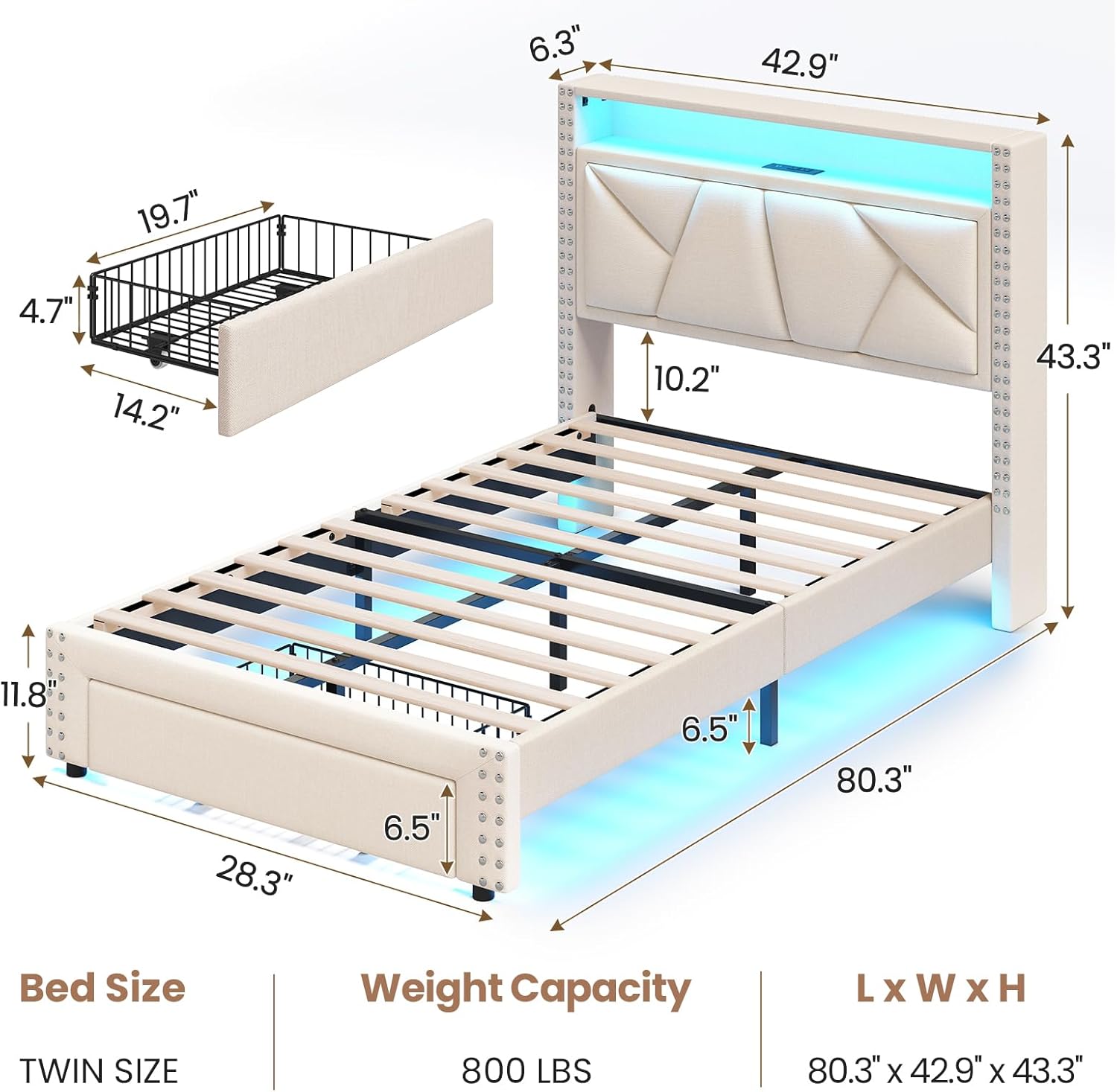
Figure 1: Exploded view of bed frame components and overall dimensions.
4. Assembly Instructions
Assembly typically requires two adults. Please follow the steps carefully.
- Prepare the Area: Clear a spacious area for assembly. Lay out all components and hardware.
- Attach Side Rails to Headboard: Connect the left and right side rails to the upholstered headboard using the provided bolts and Allen wrench. Ensure connections are secure but do not fully tighten until all major components are assembled.
- Attach Side Rails to Footboard: Connect the other ends of the side rails to the footboard. Ensure the footboard's storage drawer mechanism is facing the correct direction (outward). Tighten all bolts connecting the headboard, side rails, and footboard.
- Install Center Support Beam: Attach the metal center support beam(s) to the designated points on the side rails. This provides crucial support for the mattress.

Figure 2: Detail of metal frame connection for stability.
- Place Wood Slats: Unroll or place the solid wood slats across the bed frame. Many slats come with a Velcro strip for secure attachment to the frame. Ensure they are evenly spaced and firmly seated.

Figure 3: Wood slats with Velcro for secure placement.

Figure 4: Noise-reducing padding for quiet operation.
- Install Storage Drawer: Slide the storage drawer into the designated opening at the foot of the bed. Ensure the wheels are properly aligned and allow for smooth operation.
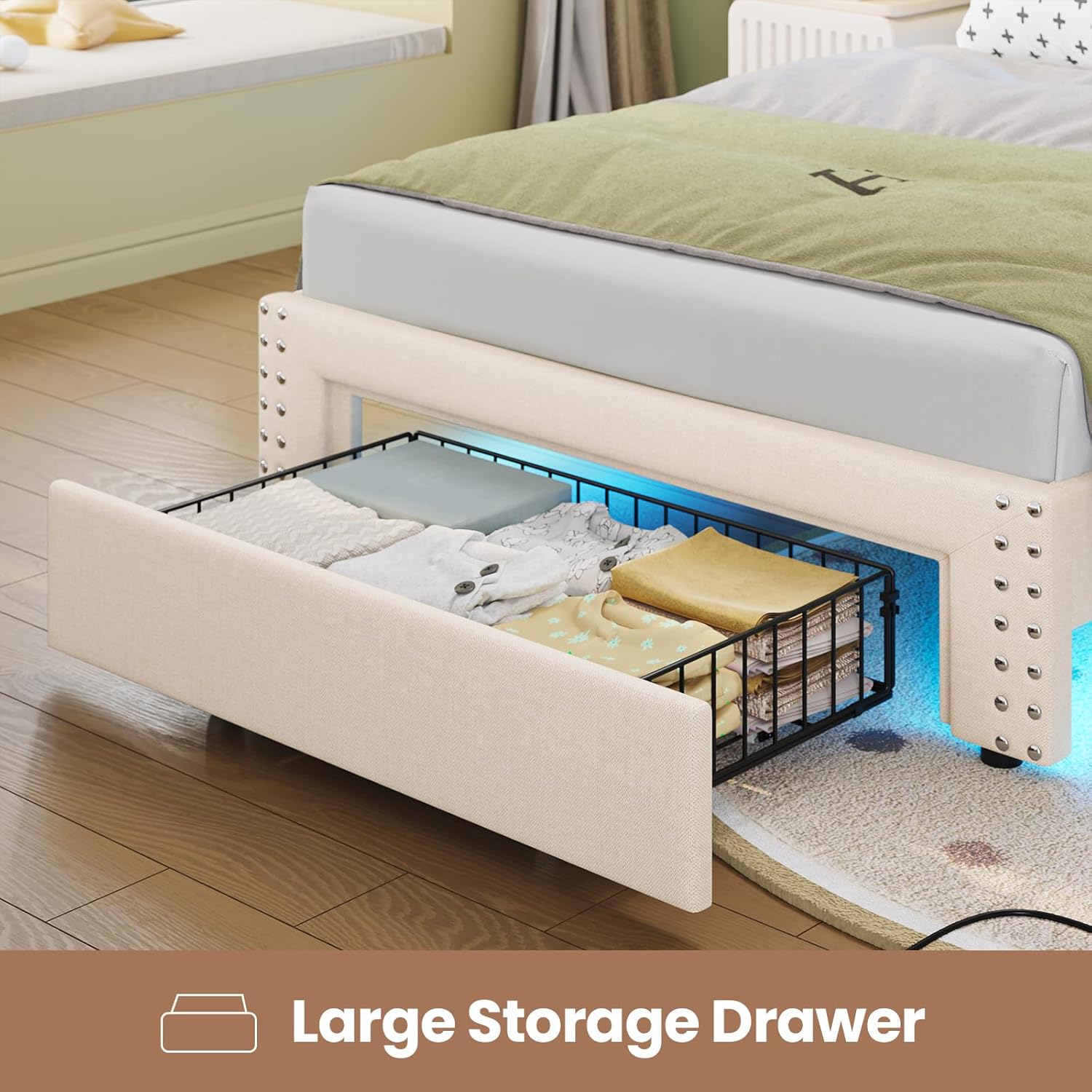
Figure 5: Large storage drawer with wheels for easy access.
- Connect LED Lights and Charging Station: Locate the power cables for the LED light strip and charging station. Connect them to a suitable power outlet. Ensure all cables are neatly tucked away to prevent tripping hazards.
- Final Check: Verify that all connections are tight and the bed frame is stable. Place your mattress on the slats.
5. Operating Instructions
5.1. LED Lighting System
The integrated LED light strip offers customizable ambient lighting.
- Power On/Off: Use the included remote control or the dedicated mobile application to turn the LED lights on or off.
- Color Selection: Choose from over 60,000 RGB colors via the remote or app to match your room's ambiance.
- Dynamic Modes: Select from 29 dynamic lighting modes for various effects.
- Timing Function: Set timers for the lights to automatically turn on or off.
- Music Mode/Mic Function: Some models may feature music synchronization or microphone functions, allowing lights to react to sound. Refer to the app for specific controls.

Figure 6: LED lighting features with remote and app control options.
5.2. Charging Station
The headboard features a built-in charging station for your electronic devices.
- AC Outlets: Two standard 125V/12A AC outlets are available for powering larger devices.
- USB Port: One 5V/2A USB port is provided for charging smartphones and other USB-powered devices.
- Type-C Port: One 5V/3A Type-C port offers faster charging for compatible devices.
- Ensure devices are compatible with the output specifications of each port before connecting.

Figure 7: Integrated charging station on the headboard.
5.3. Storage Drawers and Shelves
Utilize the integrated storage for organization.
- Headboard Shelves: The two-layer shelves (6.3 inches wide) are suitable for small items like books, glasses, and remote controls.
- Footboard Drawer: The large drawer at the foot of the bed is ideal for storing clothes, bedding, or other personal items. It is equipped with wheels for easy access.
6. Maintenance
- Cleaning the Upholstery: For general cleaning, gently vacuum the linen fabric to remove dust. For spills, blot immediately with a clean, dry cloth. For stubborn stains, use a mild fabric cleaner according to its instructions, testing on an inconspicuous area first.
- Cleaning Electrical Components: Ensure the bed frame is unplugged before cleaning the charging station or LED lights. Wipe surfaces with a dry, soft cloth. Do not use liquid cleaners directly on electrical components.
- Hardware Check: Periodically inspect all bolts and screws to ensure they remain tight. Re-tighten as necessary to maintain the bed frame's stability.
- Drawer Maintenance: Keep the drawer tracks clean and free of debris to ensure smooth operation.
7. Troubleshooting
7.1. LED Lights Not Working
- Check Power Connection: Ensure the LED light strip is properly plugged into a working power outlet.
- Remote/App Battery: If using a remote, check its battery. If using the app, ensure your device is connected via Bluetooth or Wi-Fi as required.
- Reset: Unplug the LED power adapter for a few minutes, then plug it back in.
7.2. Charging Station Not Functioning
- Check Power Connection: Verify the charging station's power cord is securely plugged into a live electrical outlet.
- Test with Different Devices: Try charging different devices to rule out a device-specific issue.
- Check Circuit Breaker: If multiple outlets or devices are not working, check your home's circuit breaker.
7.3. Bed Frame Squeaks or is Unstable
- Tighten All Bolts: Re-check and tighten all assembly bolts and screws. Loose connections are a common cause of squeaking.
- Ensure Slats are Secure: Verify that all wood slats are properly seated and, if applicable, the Velcro strips are firmly attached to the frame.
- Level Surface: Ensure the bed frame is on a flat, level floor. Uneven surfaces can cause stress on the frame and lead to instability or noise.
8. Specifications
| Feature | Detail |
|---|---|
| Model Number | 3661-TB |
| Size | Twin |
| Product Dimensions (L x W x H) | 80.3" x 42.9" x 43.3" |
| Max Static Load Capacity | 800 lbs |
| Material | Metal Frame, Wood Slats, Linen Fabric Upholstery |
| Charging Station Output | 2x AC 125V/12A, 1x USB 5V/2A, 1x Type-C 5V/3A |
| LED Lights | RGB, 60,000+ colors, Dynamic Modes, Timing Function, App Control |
| Assembly Required | Yes |
9. Warranty and Support
MSmask provides a limited warranty for this product against manufacturing defects. For specific warranty terms and conditions, please refer to the warranty card included with your purchase or contact MSmask customer support.
If you encounter any issues with delivery, assembly, missing parts, or product functionality, please do not hesitate to contact our customer service team for assistance. We are committed to ensuring your satisfaction.
Contact Information: Please refer to your purchase documentation or the MSmask official website for the most current customer support contact details.