
1. Introduction
This manual provides essential information for the safe and effective use of your UpBright AC/DC Adapter. This power supply is designed to provide stable 12V DC power to compatible Swann Digital Video Recorder (DVR) systems. It features global input voltage compatibility and multiple protection mechanisms to ensure reliable operation.
Please read this manual thoroughly before using the adapter and retain it for future reference.
2. Product Overview
The UpBright AC/DC Adapter is a compact and efficient power supply unit. It consists of the main adapter body with an attached DC output cable and a detachable AC input power cord.

Figure 2.1: Overview of the UpBright AC/DC Adapter and its detachable power cord. The adapter features a black casing with product information printed on its surface, and a barrel connector at the end of its DC output cable.
The adapter is equipped with a standard barrel connector, which is crucial for compatibility with the specified Swann DVR models. Ensure the connector type matches your device's input port.
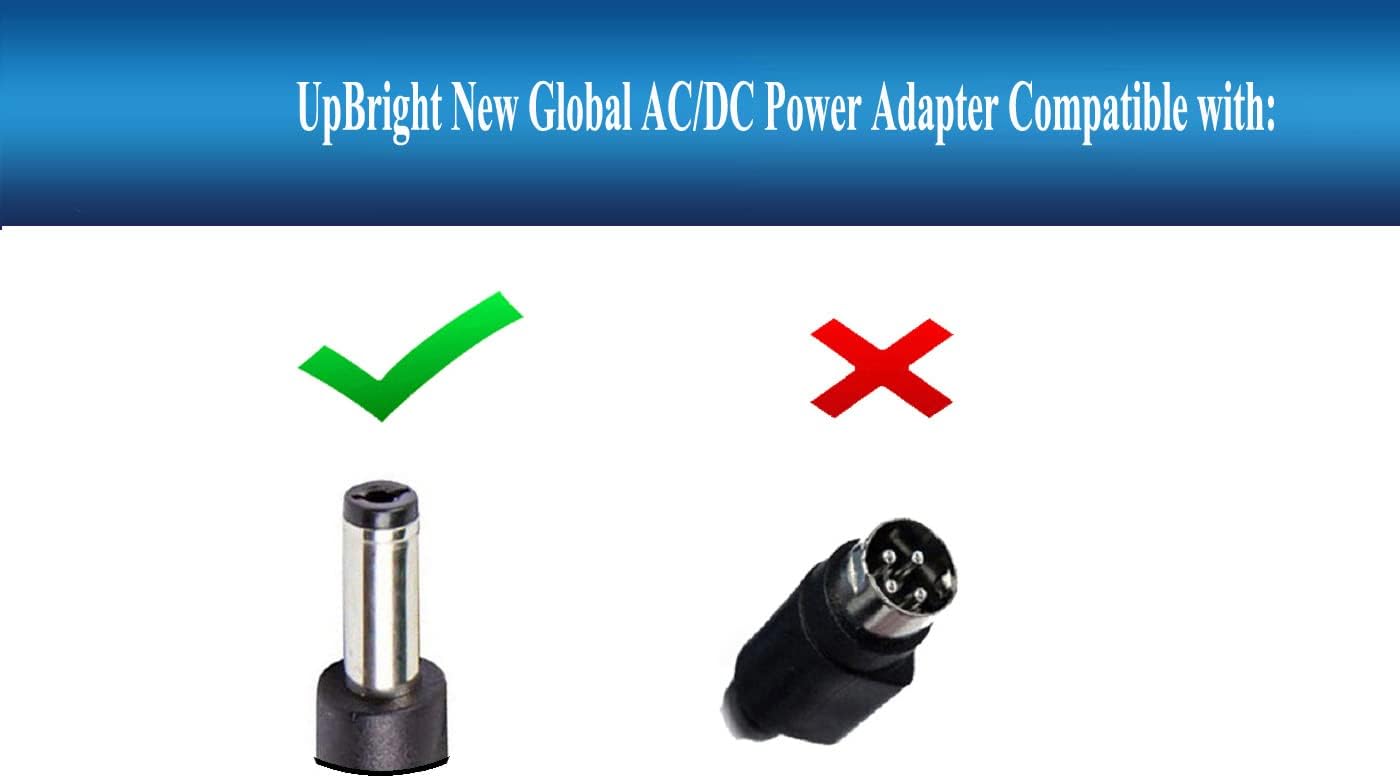
Figure 2.2: Illustration showing the correct barrel connector (left, indicated by a green checkmark) compatible with the adapter, and an incorrect 4-pin connector (right, indicated by a red 'X'). Always verify your device's power input port before connecting.
The adapter's label provides critical information regarding its electrical specifications and safety certifications.

Figure 2.3: Detailed view of the adapter's label, displaying model information, input/output specifications, and safety marks (e.g., CE, FC). The barrel connector is also clearly visible, highlighting its design.
3. Specifications
| Feature | Specification |
|---|---|
| Brand | UPBRIGHT |
| Model | AC/DC Adapter (Compatible with various Swann DVR models) |
| Input Voltage | 100-240VAC, 50/60Hz (World Wide Input Voltage) |
| Output Voltage | 12V DC |
| Output Current | 4A |
| Wattage | 48W |
| Connector Type | Barrel Connector |
| Color | Black |
| Protection Features | OVP (Over Voltage Protection), OCP (Over Current Protection), SCP (Short Circuit Protection) |
| Compatible Devices | Swann DVR4-4480, DVR4-4580, DVR4-4680, DVR4-4685, DVR4-4780V, DVR4-4980, DVR4-5580, DVR4-5680, DVR4-Alert 4 Channel Digital Video Recorders |
4. Setup and Installation
- Verify Compatibility: Before connecting, ensure your device (Swann DVR) requires a 12V DC power supply with a barrel connector and a current draw of 4A or less. Refer to your DVR's specifications.
- Connect to DVR: Insert the barrel connector of the UpBright AC/DC Adapter firmly into the DC input port of your Swann DVR.
- Connect AC Power Cord: Attach the detachable AC power cord to the adapter's AC input port.
- Plug into Wall Outlet: Plug the other end of the AC power cord into a standard 100-240VAC wall outlet. Ensure the outlet is easily accessible.

Figure 4.1: The UpBright AC/DC Adapter connected to a wall outlet, demonstrating a typical installation scenario. A framed certificate of compliance is visible in the background, indicating adherence to safety standards.
Once connected, your DVR system should power on. If it does not, refer to the Troubleshooting section.
5. Operation
The UpBright AC/DC Adapter operates automatically once connected to a power source and a compatible device. It provides a continuous and stable 12V DC output.
- Power Indicator: The adapter typically does not feature an external power indicator light. Operation is confirmed by the powered status of the connected DVR.
- Protection Features: The built-in OVP, OCP, and SCP protections safeguard both the adapter and your connected device from electrical anomalies. In case of an overload or short circuit, the adapter may temporarily cease operation to prevent damage. Disconnect and reconnect to reset.
6. Maintenance and Care
To ensure the longevity and optimal performance of your UpBright AC/DC Adapter, follow these maintenance guidelines:
- Cleaning: Disconnect the adapter from the power outlet and the device before cleaning. Use a soft, dry cloth to wipe the surface. Do not use liquid cleaners or aerosols.
- Storage: Store the adapter in a cool, dry place away from direct sunlight and extreme temperatures when not in use.
- Handling: Avoid dropping the adapter or subjecting it to strong impacts. Do not bend or crimp the cables excessively.
- Ventilation: Ensure the adapter has adequate ventilation during operation. Do not cover it or place it in an enclosed space that could lead to overheating.
- Environment: This adapter is designed for indoor use only. Do not expose it to water, high humidity, or corrosive environments.
7. Troubleshooting
| Problem | Possible Cause | Solution |
|---|---|---|
| DVR does not power on. |
|
|
| Adapter feels excessively hot. |
|
|
| Intermittent power to DVR. |
|
|
8. Warranty and Support
UpBright products are designed for reliability and performance. This AC/DC Adapter comes with the following support:
- Refund Policy: 30 days refund period from the date of purchase.
- Exchange Policy: 24 months exchange for defective units from the date of purchase.
For technical support, warranty claims, or any other inquiries, please contact your retailer or visit the official UpBright website for contact information.