
1. Introduction
This manual provides instructions for the installation and operation of the LPHUMEX Ceiling Fan Light Remote Control Kit. This kit is designed to convert a standard AC motor ceiling fan and its light into a remote-controllable unit, offering convenience and enhanced control over your fan and lighting.
The ultra-compact receiver is engineered to fit within most fan housings, making it suitable for various ceiling fan brands, including Hunter, Hampton Bay, Westinghouse, and Honeywell. The remote control allows for adjustment of fan speed, light activation, and includes a timer function.
2. Product Components
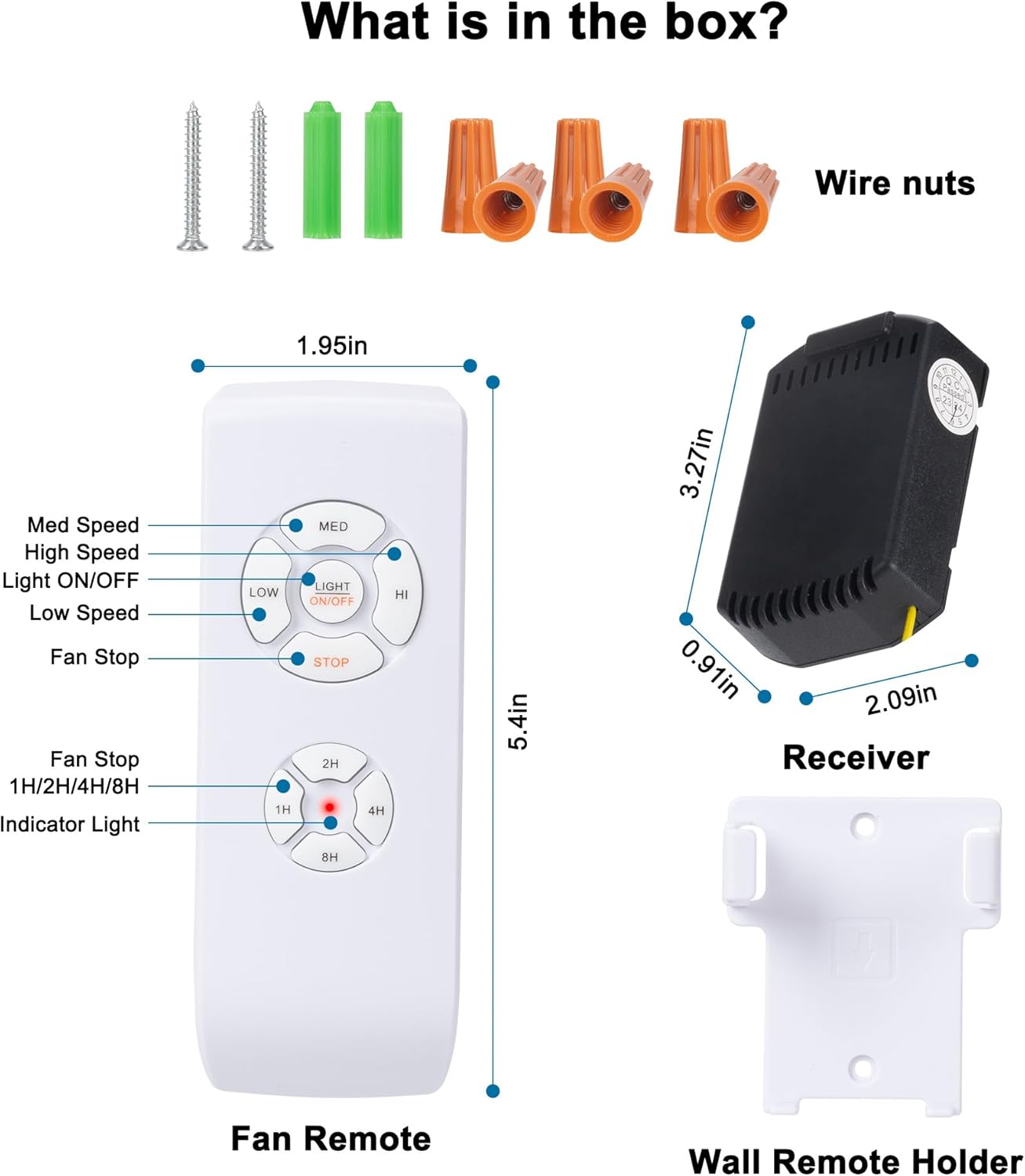
Verify that all components are present in the package:
- Remote Control Unit
- Receiver Unit
- Wall Mount Holder for Remote
- Wire Nuts (for electrical connections)
- Screws and Wall Anchors (for wall mount holder)
3. Specifications
| Feature | Specification |
|---|---|
| Model Number | 70e0a7f3-bdd8-4077-a531-a3bc97114ac4 |
| Receiver Dimensions (L x W x H) | 1.98 x 1.98 x 0.75 inches |
| Item Weight | 5.5 ounces |
| Input Voltage | AC 120V, 60Hz |
| Max Fan Load | 140W |
| Max Incandescent Light Load | 450W |
| Max LED Lamp Load | 15W |
| Remote Batteries | 2 AAA batteries (not included) |
4. Installation Instructions
WARNING: Before beginning installation, ensure the power to the ceiling fan at the circuit breaker is turned OFF to prevent electrical shock.
- Prepare the Fan: Turn off the power to the ceiling fan at the main circuit breaker. Remove the fan's canopy or mounting bonnet to access the wiring.
- Remove Existing Receiver (if applicable): If your fan has an existing receiver, carefully disconnect its wiring and remove it.
- Identify Wires: Identify the Live (Black), Neutral (White), Fan (Brown/Blue), and Light (Blue/Brown) wires coming from both the ceiling and the fan motor. The LPHUMEX receiver has corresponding input and output wires.
- Connect Receiver Input Wires:
- Connect the White input wire from the receiver to the Neutral wire from the ceiling.
- Connect the Black input wire from the receiver to the Live wire from the ceiling.
- Connect Receiver Output Wires:
- Connect the White output wire from the receiver to the Neutral wire of both the fan and light.
- Connect the Brown output wire from the receiver to the Fan wire of the ceiling fan.
- Connect the Blue output wire from the receiver to the Light wire of the ceiling fan.
- Ensure the Yellow antenna wire on the receiver is positioned for optimal signal reception.

Figure 4.1: Wiring Diagram. This diagram illustrates the connections between the ceiling wiring, the LPHUMEX receiver, and the ceiling fan/light unit. It shows input for Live (Black) and Neutral (White) from the ceiling, and outputs for Fan (Brown), Light (Blue), and a common Neutral (White) to the fan and light, along with the yellow antenna wire. - Secure Connections: Use the provided wire nuts to ensure all electrical connections are secure and insulated.
- Position Receiver: Carefully place the receiver unit inside the fan's canopy, ensuring it does not interfere with the fan's operation or wiring. The ultra-small design facilitates easy placement.
- Reassemble Fan: Reattach the fan canopy or mounting bonnet.
- Restore Power: Turn the power back ON at the circuit breaker.
- Install Remote Batteries: Insert 2 AAA batteries into the remote control unit (ensure correct polarity).
- Test Operation: Test all functions of the remote control (fan speeds, light on/off, timer).

5. Operation Instructions
The remote control provides comprehensive control over your ceiling fan and light. Familiarize yourself with the buttons and their functions:
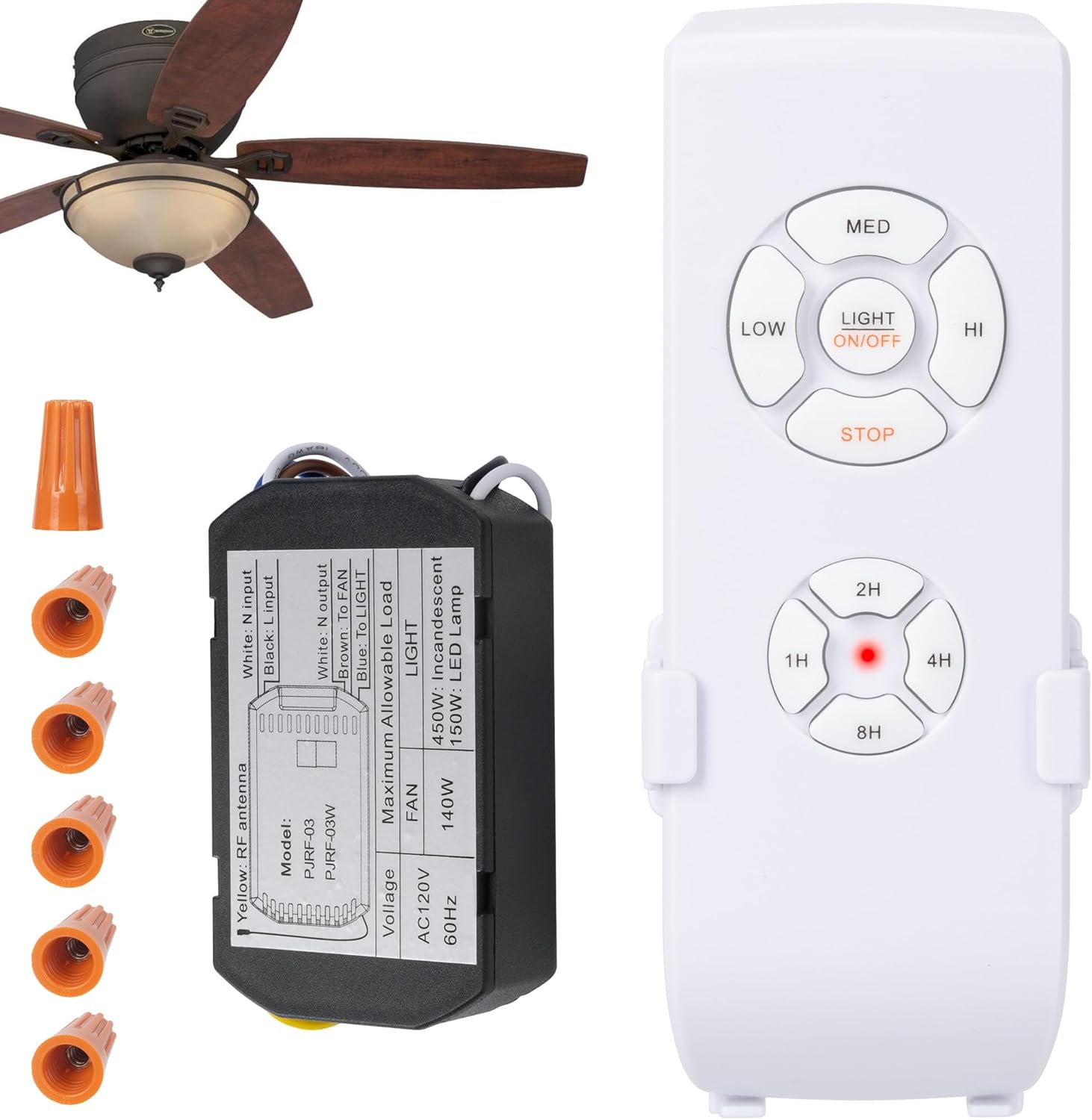
- Fan Speed Buttons (LOW, MED, HI): Press these buttons to cycle through low, medium, and high fan speeds.
- STOP Button: Press this button to turn the fan off.
- LIGHT ON/OFF Button: Press this button to turn the fan light on or off. Note that this kit provides on/off functionality and does not support dimming.
- Timer Buttons (1H, 2H, 4H, 8H): Press these buttons to set the fan to automatically turn off after 1, 2, 4, or 8 hours, respectively. The indicator light on the remote will confirm the timer setting.
- Indicator Light: A small LED on the remote illuminates to confirm button presses and timer settings.
The remote can be used handheld or placed in the included wall mount holder for convenient access.

6. Troubleshooting
If you encounter issues with your LPHUMEX Ceiling Fan Light Remote Control Kit, refer to the following common problems and solutions:
- Remote Not Responding:
- Check the batteries in the remote control. Ensure they are inserted correctly and are not depleted. Replace with new AAA batteries if necessary.
- Ensure the main power switch to the ceiling fan is in the ON position. The remote receiver requires continuous power to function.
- Verify that the receiver is correctly wired and receiving power.
- Fan or Light Not Turning On/Off:
- Confirm that all wiring connections between the ceiling, receiver, and fan/light are secure and correctly matched according to the wiring diagram (Figure 4.1).
- Check the light bulb in the fan to ensure it is functional and properly screwed in.
- Ensure the fan's pull chains (if any) are set to the desired speed/light setting, or that they are not interfering with the remote's operation.
- Intermittent Operation:
- Ensure the remote control is within range of the receiver.
- Check for any obstructions between the remote and the fan that might block the signal.
- Verify that the receiver's antenna wire is not pinched or damaged and is positioned for optimal reception.
- Fan Operates, But Light Does Not (or vice-versa):
- Re-check the specific wiring connections for the fan and light outputs from the receiver. Ensure the correct wires are connected to the fan motor and light fixture.
- For light issues, confirm the bulb is not faulty.
If these steps do not resolve the issue, it is recommended to consult a qualified electrician or contact LPHUMEX customer support for further assistance.
7. Warranty and Support
For warranty information or technical support, please refer to the product packaging or contact LPHUMEX customer service directly. Keep your purchase receipt as proof of purchase for any warranty claims.


