
Product Overview
The Marsail Electric Standing Desk offers a versatile and ergonomic solution for your workspace. This adjustable height desk allows for seamless transitions between sitting and standing positions, promoting better posture and reducing fatigue. It features a spacious 48x24 inch desktop, memory presets for customized heights, and convenient storage accessories.

Image: Marsail Electric Standing Desk in Black, showcasing its sleek design and ample workspace.
Setup and Assembly
Assembly of the Marsail Electric Standing Desk is designed to be straightforward. It is recommended that two people assist with the assembly process for ease and safety. While some tools are included, ensure you have basic assembly tools on hand.
Assembly Steps Overview:
- Assemble the frame components, ensuring all screws are securely tightened.
- Attach the desktop sections together using the provided hardware.
- Mount the assembled desktop onto the frame.
- Connect all necessary cables for the electric motor and control panel.
- Attach the side storage pocket and headphone hook as desired.
Video: Step-by-step installation guide for the Marsail Electric Standing Desk, demonstrating frame assembly, desktop attachment, and cable connections.
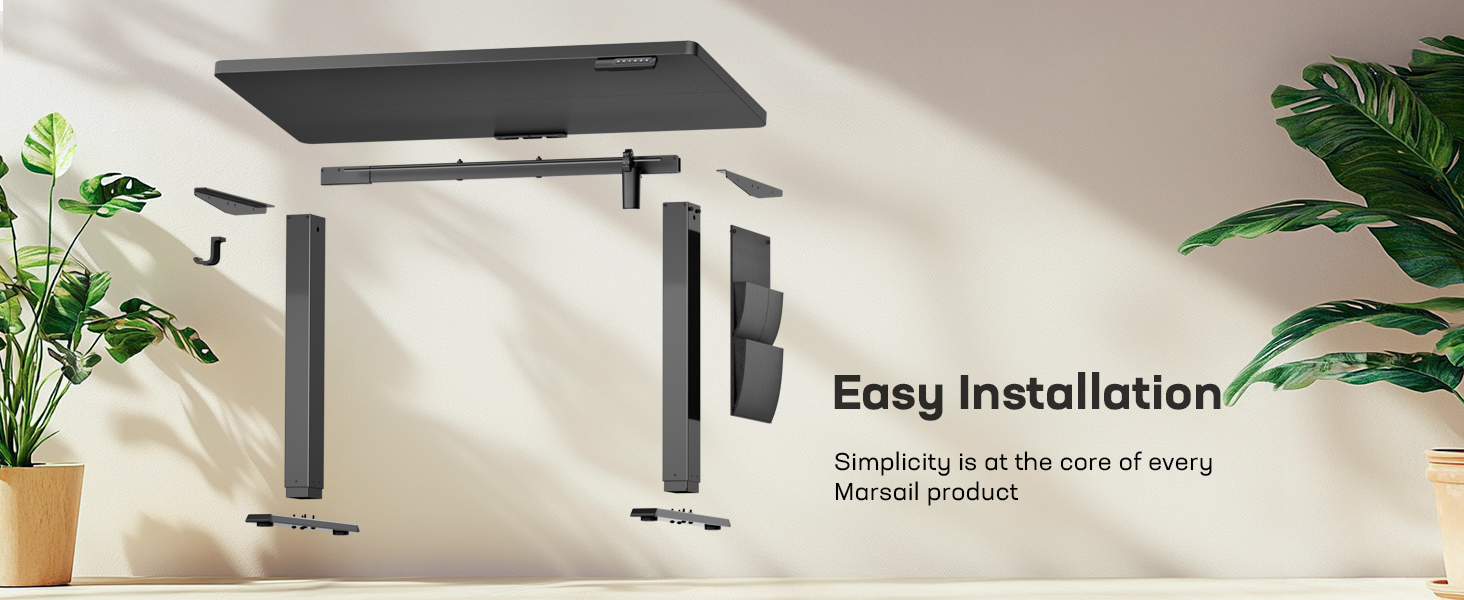
Image: Diagram illustrating the easy installation process of the Marsail Electric Standing Desk, showing components before and after assembly.
Operating Instructions
The Marsail Electric Standing Desk features a user-friendly control panel for effortless height adjustment and memory presets.
Height Adjustment:
- Use the Up (▲) and Down (▼) arrows on the control panel to manually adjust the desk height. The current height will be displayed on the digital screen.
- The desk offers a wide height range from 27.5 inches to 46.7 inches.
Memory Presets:
- The desk allows you to save up to four custom height settings for quick one-touch adjustments.
- To save a height: Adjust the desk to your desired height, then press the 'S' button followed by one of the number buttons (1, 2, 3, or 4). The height is now saved to that preset.
- To use a saved height: Simply press the corresponding number button (1, 2, 3, or 4), and the desk will automatically move to the saved position.
Video: Demonstration of how to use the automatic standing desk, including manual height adjustment and setting/recalling memory presets.

Image: Visual representation of the Marsail Electric Standing Desk's dimensions and adjustable height range.
Additional Features:
- Multifunctional Side Storage Pocket: A double-layered side pocket is included to help organize folders, notebooks, and office supplies, reducing desktop clutter.
- Headphone Hook: Convenient hooks are provided on both sides for hanging headphones or other accessories.
- Cable Management: Two holes in the back of the desktop allow for organized routing of cables, keeping your workspace tidy.
- Quiet Operation: The energy-efficient motor operates below 50 dB, ensuring smooth and quiet height adjustments.

Image: Close-up view of the Marsail Electric Standing Desk's side storage pocket, holding magazines and markers.
Maintenance
To ensure the longevity and optimal performance of your Marsail Electric Standing Desk, follow these general maintenance guidelines:
- Cleaning: Wipe the desktop surface with a soft, damp cloth. Avoid harsh chemicals or abrasive cleaners that could damage the laminated finish.
- Motor Care: The electric motor is designed for durability. Avoid overloading the desk beyond its maximum weight capacity to prevent strain on the motor.
- Cable Management: Periodically check that all cables are securely routed and not pinched or tangled, especially during height adjustments.
- General Inspection: Regularly inspect all screws and connections to ensure they remain tight. Tighten any loose fasteners as needed.
Troubleshooting
If you encounter any issues with your Marsail Electric Standing Desk, consider the following common troubleshooting steps:
- Desk Not Adjusting: Check if the power cord is securely plugged into both the desk and a working electrical outlet. Ensure no objects are obstructing the desk's movement.
- Uneven Movement: If the desk moves unevenly, ensure all assembly screws are tightened correctly and that the desk is placed on a level surface.
- Control Panel Unresponsive: Try unplugging the desk from the power outlet for 10-15 seconds, then plug it back in. This can sometimes reset the control system.
- Motor Noise: A quiet motor operation is normal. If you notice unusually loud or grinding noises, discontinue use and inspect the motor area for any obstructions or loose components.
For persistent issues not resolved by these steps, please refer to the support section for further assistance.
Product Specifications
| Feature | Detail |
|---|---|
| Brand | Marsail |
| Model Number | TZESD7B-N1-US |
| Product Dimensions (D x W x H) | 48"D x 24"W x 28"H (Minimum Height) |
| Minimum Height | 27.5 Inches |
| Maximum Height | 46.7 Inches |
| Item Weight | 43.4 Pounds |
| Color | Black |
| Top Material Type | Engineered Wood (Laminated Finish) |
| Frame Material Type | Steel |
| Lifting Mechanism | Electric |
| Special Features | Adjustable Height, Memory Presets, Side Storage Pocket, Headphone Hook, Quiet Operation |
| Required Assembly | Yes (Recommended 2 people) |
| UPC | 810174342161 |

Image: The Marsail Electric Standing Desk desktop, highlighting its certification for low VOC emissions and compliance with US safe air standards.
Warranty Information
The Marsail Electric Standing Desk comes with a Limited Warranty. For specific details regarding coverage, duration, and terms, please refer to the warranty documentation included with your product packaging or contact Marsail customer support.
Customer Support
For any questions, technical assistance, or support inquiries regarding your Marsail Electric Standing Desk, please visit the official Marsail Store on Amazon or refer to the contact information provided in your product's packaging.
Marsail Store: Visit the Marsail Store