
1. Introduction
Thank you for choosing the K&F CONCEPT KF34.041U 2.0M Light Stand. This light stand is designed for photography and video applications, offering stability, adjustability, and portability. It features a robust metal construction and a universal 1/4-inch screw for wide compatibility with various lighting and camera accessories. Please read this manual carefully to ensure proper setup and operation.

Image: The K&F CONCEPT 2.0M Light Stand in its fully extended state.
2. Product Features
- Sturdy Metal Construction: Manufactured from high-quality metal for enhanced stability and durability. The tripod base includes an extension bar and non-slip feet for increased stability.
- Adjustable Height: Features a special buckle design allowing height adjustments from 80 cm (31.5 inches) to 200 cm (78.7 inches).
- High Load Capacity: Supports equipment up to 5 kg (11.02 lbs), suitable for various shooting scenarios.
- Wide Compatibility: Equipped with a standard 1/4-inch screw stud, adjustable 180 degrees, compatible with flashes, digital cameras, strobes, smartphones, ring lights, video lights, and softboxes.
- Portable Design: Folds down to a compact 70 cm (27.5 inches) for easy storage and transport, includes a storage bag.
3. Setup Instructions
Follow these steps to set up your K&F CONCEPT light stand:
- Unfold the Legs: Place the stand on a flat surface. Gently pull the support feet outward until they are fully extended and locked into position.
- Stabilize the Base: Support the center shaft with one hand and rotate the bottom tripod locking knob clockwise to secure the legs, ensuring maximum stability.
- Adjust Height: Loosen the quick-release fixtures on the central column. Pull the center shaft upwards to the desired height. Once the desired height is reached, tighten the quick-release fixtures clockwise to lock the sections securely. Ensure all sections are firmly locked before mounting any equipment.
- Attach Equipment: Mount your photography or video equipment (e.g., light, camera, softbox) onto the 1/4-inch screw stud at the top of the stand. Ensure the equipment is securely fastened.

Image: Visual guide for unfolding the legs, locking the base, and extending the central column.

Image: Detailed view of the sturdy metal construction, reinforced support legs, tripod locking knob, and beveled feet for stability.
4. Operating Instructions
This section details how to operate your light stand effectively:
- Height Adjustment: To change the height, loosen the quick-release buckles on each section of the central column. Adjust the column to the desired height and then firmly tighten the buckles. Always ensure the stand is stable after adjustment.
- Accessory Mounting: The top 1/4-inch screw stud is compatible with a wide range of photographic accessories. Ensure your accessory has a corresponding 1/4-inch thread. For heavier accessories, ensure the stand's legs are fully spread and stable.
- Angle Adjustment: The 1/4-inch screw stud allows for 180-degree angle adjustment. Loosen the locking mechanism near the top, adjust the angle of your mounted equipment, and then securely tighten the lock.

Image: Illustration of the light stand at various heights, from folded (71cm) to maximum extension (200cm), demonstrating the adjustable sections.
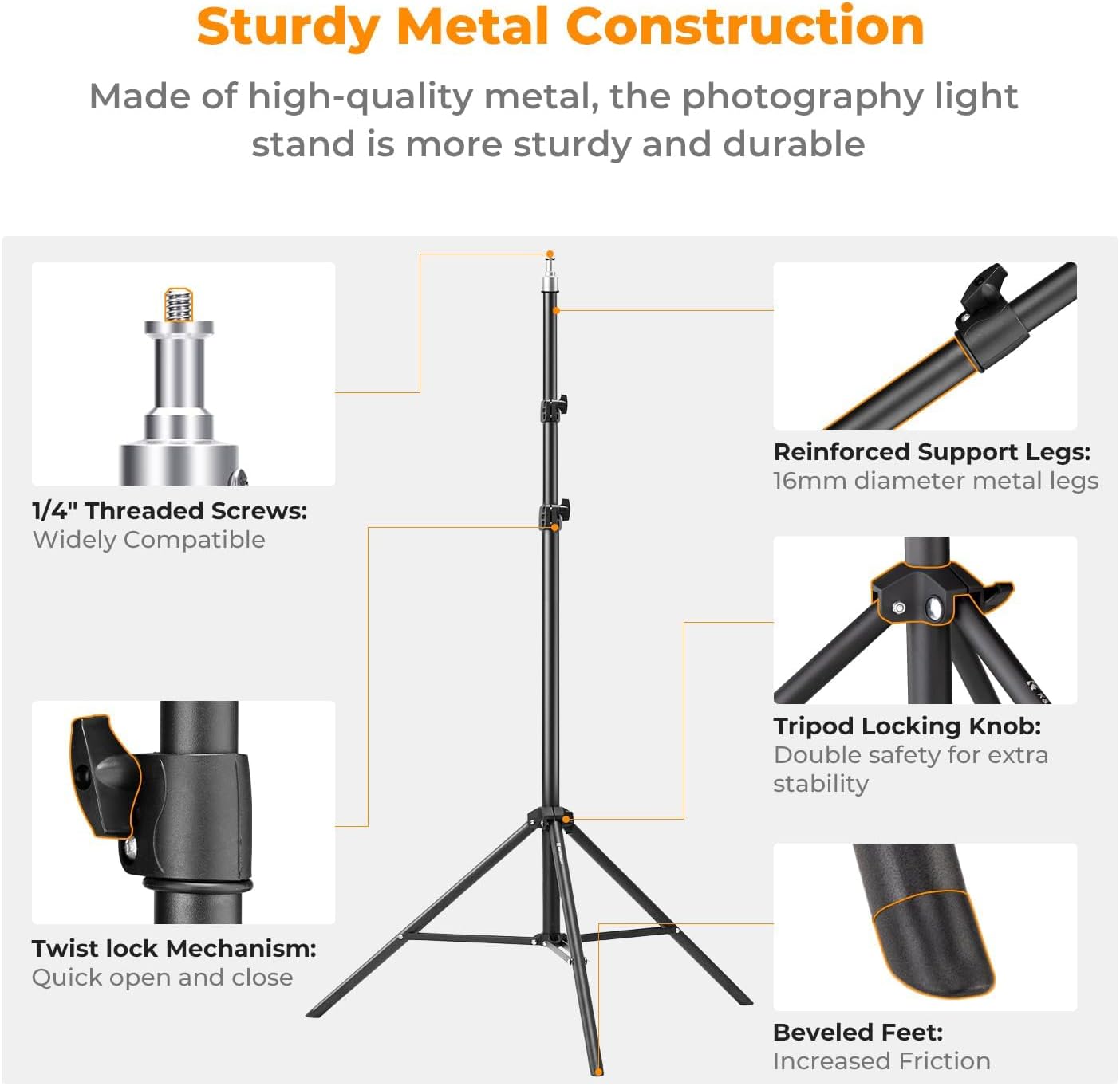
Image: Close-up of the 1/4-inch screw adapter, showing compatibility with softboxes, COB lights, flat panel lights, and fill lights.
5. Maintenance
To ensure the longevity and optimal performance of your light stand, follow these maintenance guidelines:
- Cleaning: Wipe the stand with a soft, dry cloth after each use to remove dust and dirt. For stubborn grime, use a slightly damp cloth and then dry thoroughly. Avoid abrasive cleaners or solvents.
- Lubrication: Periodically apply a small amount of silicone-based lubricant to the moving parts, such as the telescoping sections and locking mechanisms, to ensure smooth operation.
- Storage: When not in use, fold the stand to its compact size and store it in the provided storage bag. Keep it in a dry, cool place away from direct sunlight and extreme temperatures.
- Inspection: Regularly inspect all screws, bolts, and locking mechanisms for tightness. Tighten any loose components to prevent accidental collapse or damage.
6. Troubleshooting
If you encounter any issues with your light stand, refer to the following troubleshooting tips:
| Problem | Possible Cause | Solution |
|---|---|---|
| Stand is wobbly or unstable. | Legs not fully extended or locked; locking knobs not tightened; uneven surface; overloaded. | Ensure legs are fully extended and locked. Tighten all locking knobs. Place on a flat, stable surface. Reduce load if exceeding 5kg. |
| Telescoping sections are difficult to extend or retract. | Dirt or debris in the mechanism; lack of lubrication; locking buckles too tight. | Clean sections and apply silicone lubricant. Loosen locking buckles before adjusting. |
| Equipment does not attach securely to the 1/4-inch screw. | Incorrect thread size; screw damaged. | Verify your equipment has a 1/4-inch thread. Inspect the screw for damage. |
7. Specifications
| Feature | Detail |
|---|---|
| Brand | K&F CONCEPT |
| Model Number | KF34.041U |
| Material | Metal |
| Maximum Height | 200 cm (6.5 ft) |
| Minimum Height | 80 cm (2.6 ft) |
| Folded Size | 70 cm (27.5 inches) |
| Weight Limit | 5 kg (11.02 lbs) |
| Item Weight | 100 Grams (0.22 lbs) |
| Tripod Head Type | Universal Mount (1/4" screw) |
| Compatible Devices | Camera, Smartphone, Flash, Strobe, Major Photography Accessories |
| Water Resistance Level | Not Water Resistant |
8. Warranty and Support
K&F CONCEPT provides a 2-year product warranty for this photography light stand. If you encounter any issues or have questions regarding the product, please do not hesitate to contact K&F CONCEPT customer support. Our team is dedicated to providing a proper solution promptly.
For support, please refer to the contact information provided on the K&F CONCEPT official website or your purchase documentation.