1. Introduction
The UGREEN Revodok Max 2131 is a powerful 13-in-1 Thunderbolt 5 docking station designed to expand your connectivity and enhance productivity. It offers ultra-fast data transfer speeds up to 120Gbps, supports high-resolution dual 8K or triple 4K displays, and provides up to 140W power delivery to your host device. This manual provides detailed instructions for setup, operation, and troubleshooting to ensure optimal performance.

Image: The UGREEN Revodok Max 2131 docking station with included Thunderbolt 5 cables.
2. Product Overview
Familiarize yourself with the various ports and components of your Revodok Max 2131 docking station.
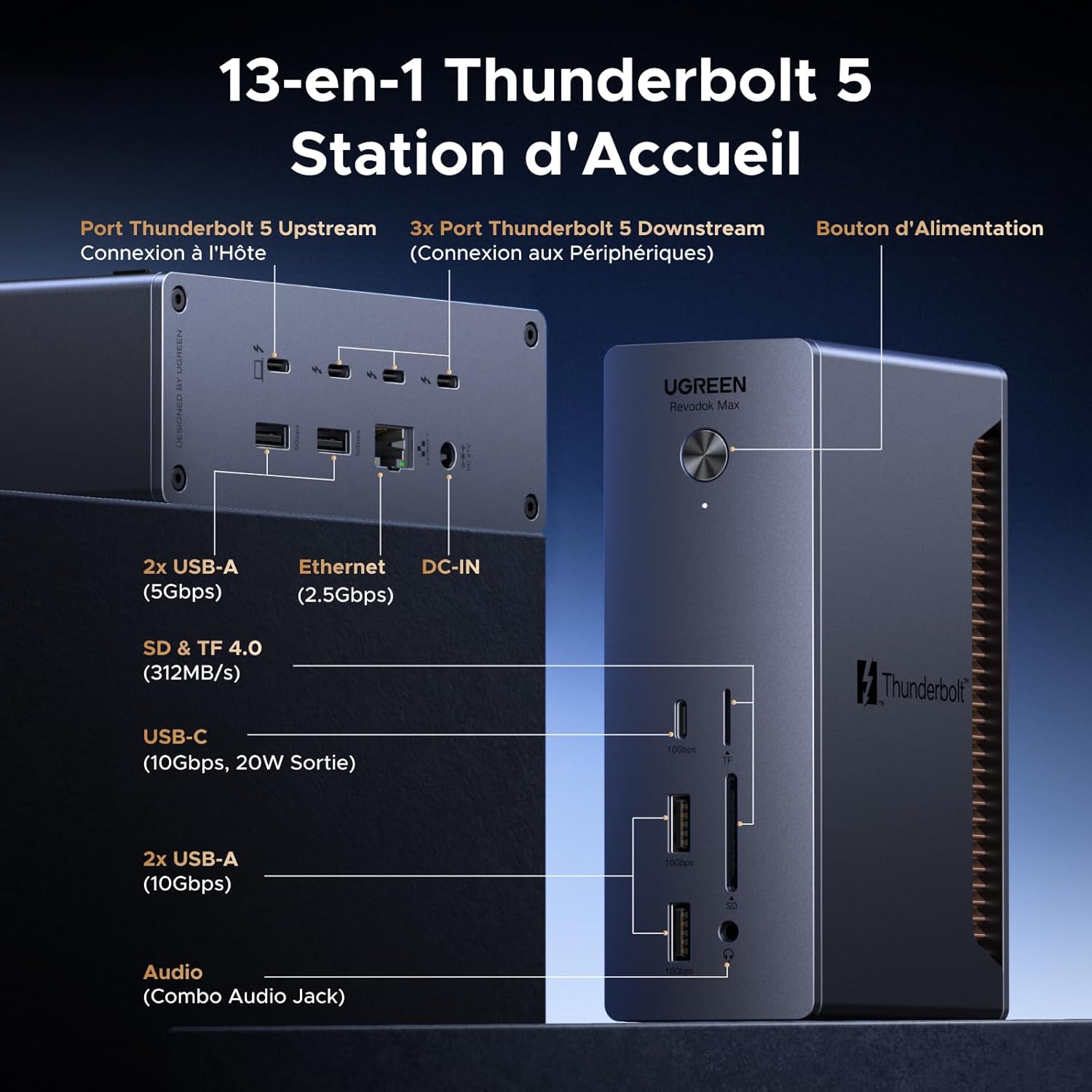
Image: Detailed diagram of the UGREEN Revodok Max 2131 showing all 13 ports and their functions.
Front Ports:
- USB-C (10Gbps, 20W Output): For data transfer and charging mobile devices.
- 2x USB-A (10Gbps): For connecting USB peripherals like keyboards, mice, or external drives.
- SD & TF 4.0 Card Reader (312MB/s): Supports simultaneous reading and writing of SD and TF cards.
- Audio (Combo Audio Jack): For connecting headphones or microphones.
Rear Ports:

Image: View of the rear ports on the UGREEN Revodok Max 2131, including Thunderbolt 5, Ethernet, and DC-IN.
- Thunderbolt 5 Upstream Port (Host Connection, 140W PD): Connects to your computer for data, video, and power delivery.
- 3x Thunderbolt 5 Downstream Ports (Peripheral Connection, 30W/15W PD): For connecting Thunderbolt 5 peripherals, monitors, or daisy-chaining devices. One port supports up to 30W, two others up to 15W.
- 2x USB-A (5Gbps): For connecting additional USB peripherals.
- RJ45 2.5GbE Ethernet Port: Provides a high-speed wired network connection.
- DC-IN: Connects to the included 180W power adapter.
3. Setup Guide
Follow these steps for initial setup of your UGREEN Revodok Max 2131 docking station.
- Unpack Contents: Ensure all items listed in the 'Package Contents' section are present.
- Connect Power: Plug the provided 180W GaN power adapter into the DC-IN port on the back of the docking station, then plug the adapter into a wall outlet. The power indicator light on the dock will turn green.
- Connect to Host Device: Use the included 0.8m Thunderbolt 5 cable to connect the Thunderbolt 5 Upstream port on the docking station to a Thunderbolt 5, Thunderbolt 4, or USB4 port on your laptop or desktop computer. The power indicator light will turn blue when connected to a host.
- Connect Peripherals: Connect your monitors, external drives, keyboard, mouse, and other peripherals to the appropriate ports on the docking station.
- Configure Display (if applicable): Your operating system should automatically detect connected displays. Adjust display settings (resolution, arrangement) as needed in your system's display preferences.

Image: An example of a clean and organized desk setup achieved by consolidating connections through the docking station.
4. Operating Instructions
Display Configuration:
The Revodok Max 2131 supports various display configurations depending on your host device's capabilities.
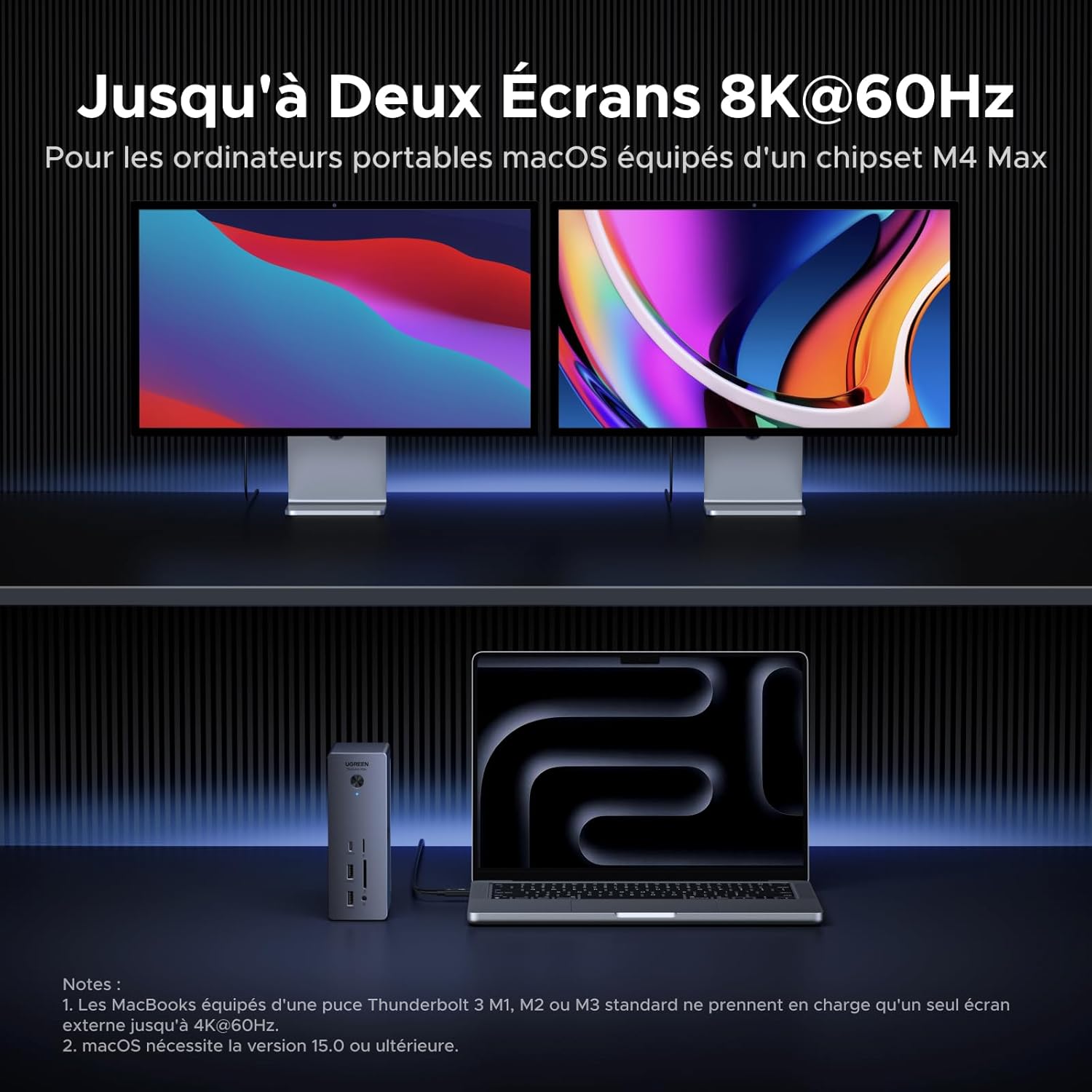
Image: A MacBook Pro connected to the UGREEN dock, driving two external 8K monitors.
- macOS (M1/M2/M3 Pro/Max, M4 Base/Pro/Max, and Intel Thunderbolt 3/4): Supports dual extended displays. Actual resolution and refresh rate depend on your computer, monitor, and video cable.
- Windows PC (Thunderbolt 5/4/USB4): Supports dual extended displays.
- Windows PC (Thunderbolt 5): Supports triple extended displays via three Thunderbolt 5 downstream ports.
- Note: For Mac M1/M2/M3 Base chip and Intel Thunderbolt 3, and Windows PC with Full-Function USB-C (DP Alt Mode), this docking station supports only one external monitor.

Image: Visual representation of various display configurations supported for Windows and macOS systems.
Power Delivery and Charging:
The docking station provides robust charging capabilities:
- Host Charging: The Thunderbolt 5 Upstream port delivers up to 140W max to your connected laptop, utilizing Smart Power for dynamic power distribution. Ensure your laptop supports PD 3.1 protocol for 140W charging.
- Peripheral Charging: One Thunderbolt 5 Downstream port supports up to 30W max, and the other two support 15W max. The front USB-C 10Gbps port supports up to 20W max.

Image: Illustration of a laptop charging rapidly via the 140W Thunderbolt 5 upstream port.
Data Transfer:
Experience high-speed data transfer across all connected devices.
- Thunderbolt 5 Ports: Up to 120Gbps for ultra-fast data transfer, ideal for large files and professional workflows.
- USB Ports: USB-A and USB-C ports offer 5Gbps and 10Gbps speeds for various peripherals.
- SD/TF 4.0: Up to 312MB/s for quick media transfers.

Image: Comparison of data transfer speeds for SD/TF 4.0 versus older standards.
5. Compatibility
The UGREEN Revodok Max 2131 is compatible with a range of operating systems and devices. Please review the compatibility details below.

Image: A chart illustrating compatible laptops and operating systems for the docking station.
Compatible Systems:
- Windows 11 (23H2) and above
- macOS 15.0 (Sonoma) and above
Compatible Devices:
- Laptops and desktops with Thunderbolt 5, Thunderbolt 4, or USB4 ports.
- Macs with M1/M2/M3 Pro/Max, M4 Base/Pro/Max chips.
Partially Incompatible / Not Recommended:
- Tablets and Phones.
- Windows computers with Thunderbolt 3.
- MacBook Pro 15'' 2018 (Intel) / 16'' 2019 / 13'' M2 2022.
- MacBook Air 13'' 2020 (Intel).
- Mac Mini 2018 / M2 2023.
- Dell Latitude 7740, ThinkPad X1 Book, Blade 18'' Laptop, MateBook X Pro, ZenBook Flips, Elitebook 840 G6, etc.

Image: Guide to checking if your laptop's USB-C port supports full functionality (Data, Power Delivery, DisplayPort).
6. Troubleshooting
This section addresses common issues and provides solutions.
Common Questions & Answers:
- Q: What is the minimum macOS and Windows version required to use the Revodok Max 2131?
A: It requires macOS 15 (Sonoma) and Windows 11 (23H2) and above. - Q: Is the Revodok Max 2131 backward compatible with a Thunderbolt 4 or Thunderbolt 3 PC?
A: The Revodok Max 2131 functions on Mac Thunderbolt 4 and Windows Thunderbolt 4 PCs. However, it is not compatible with Windows Thunderbolt 3 PCs. - Q: Does the Revodok Max 2131 work with Apple Silicon Macs?
A: Yes, the Revodok Max 2131 is an ideal companion for Apple Silicon Macs. Base M1/M2/M3 Macs and Intel Thunderbolt 3 only support one external display via Thunderbolt connection. Users of Pro, Max, M4 Base, and Ultra Macs can connect two external displays to the Revodok Max 2131. Triple displays are not supported by a docking station or hub on Mac Thunderbolt 5 via a single Thunderbolt 5 connection. - Q: Is it normal for a pop-up window to appear on my MacBook asking for authorization to connect the docking station?
A: This security feature is for Apple Silicon MacBooks running macOS Ventura or later. When first using Thunderbolt, select "Allow" to enable the docking station to be recognized for charging, data transfer, and video streaming. - Q: How do I know if my computer supports multiple displays?
A: The data below is for reference only. Please check with your computer manufacturer for confirmation.- macOS (M1/M3 Base/Intel Thunderbolt 3): 1x external screen
- macOS (M4 Base, M1/M2/M3 Pro, M1/M2/M3/M4 Max, M1/M2 Ultra): 2x external screens
- Windows (TBT4): 2x external screens
- Windows (TBT5): 3x external screens
- Q: How do I connect monitors to the Revodok Max 2131?
A: If your monitor is Thunderbolt or USB-C type, it can connect directly to the available Thunderbolt 5 ports on the Revodok Max 2131. If you wish to connect an HDMI or DisplayPort monitor, you can purchase a USB-C to HDMI or USB-C to DisplayPort adapter and connect it to the available Thunderbolt ports. - Q: Why does the external monitor have a color difference after connecting to the Revodok Max 213?
A: This Revodok Max 213 supports HDR for better image quality. If your monitor does not support HDR, color differences may appear. You can manually disable the HDR function on your laptop. - Q: Why does my laptop lag or freeze when I connect a 4K@60Hz monitor and activate HDR via Thunderbolt 5?
A: Due to the limited memory of the laptop's graphics card, a delay may occur when high-quality graphics consume too much memory. Please disable HDR to free up memory. - Q: Can I use the Revodok Max 2131 with a Mac mini or iMac since they have their own power supplies?
A: Yes, the Revodok Max 2131 is an excellent option for Mac mini and iMac users to extend their connectivity. When connected to a Mac mini or iMac, the Revodok Max 2131 does not power the computer. - Q: Does the Revodok Max 2131 use dynamic charging or does it have a complete coherent charge?
A: The product dynamically allocates power, offering a maximum of 140W for a laptop with a single connection. The host device's power is automatically adjusted based on the charge of other interfaces. - Q: Does my Revodok Max 2131 get hot during operation, is this normal?
A: At full load, the surface temperature of the Revodok Max 2131 can reach approximately 50°C, which is normal.
Important Notes:
- The dock is not compatible with Windows Thunderbolt 3 laptops. Laptops with full-function USB-C ports can only connect one external display. Apple Silicon MacBooks with M1/M2/M3 Base chips and Intel MacBooks do not support dual external displays. MacBooks with M1/M2/M3 Pro or Max chips and all M4 models support dual external displays.
- The front USB-C ports support charging and data transfer, but do not support video output.
- Only Windows Thunderbolt 5 laptops support connecting three external monitors to this docking station via three Thunderbolt 5 downstream ports.
- Always use the Thunderbolt 5 cable supplied with the docking station. Using non-certified or incompatible cables may lead to compatibility issues.
- When plugging in the DC power, the docking station's indicator light turns green. When the host is connected to the TB5 upstream port, it lights up blue and functions normally.
- Dual 5K monitors must be Thunderbolt 4 monitors or Apple Studio Displays; LG UltraFine 5K monitors are not supported. For 6K, use monitors and GPUs that support DSC (Display Stream Compression) on both the laptop and the monitor for 6K and 8K resolutions.
- Higher refresh rates (above 60Hz) may require DSC (Display Stream Compression) support for monitors and GPUs, and bit depth may vary. For more FAQs on using the docking station, please consult the user manual on the product page.
7. Specifications
| Feature | Detail |
|---|---|
| Brand | UGREEN |
| Model Number | 45790EU |
| Color | Grey |
| Total Ports | 13 |
| Thunderbolt 5 Ports | 4 (1 Upstream, 3 Downstream) |
| USB Ports | 2x USB-A 10Gbps, 2x USB-A 5Gbps, 1x USB-C 10Gbps |
| Ethernet Port | 1x RJ45 2.5GbE |
| Card Reader | SD/TF 4.0 (312MB/s) |
| Audio Port | 3.5mm Combo Audio Jack |
| Data Transfer Rate | Up to 120Gbps (Thunderbolt 5) |
| Power Delivery (Host) | Up to 140W (Thunderbolt 5 Upstream) |
| Power Adapter | 180W GaN |
| Supported Operating Systems | Windows 11 (23H2)+, macOS 15.0+ |
| Material | Plastic |
8. Package Contents
The following items are included in the UGREEN Revodok Max 2131 package:
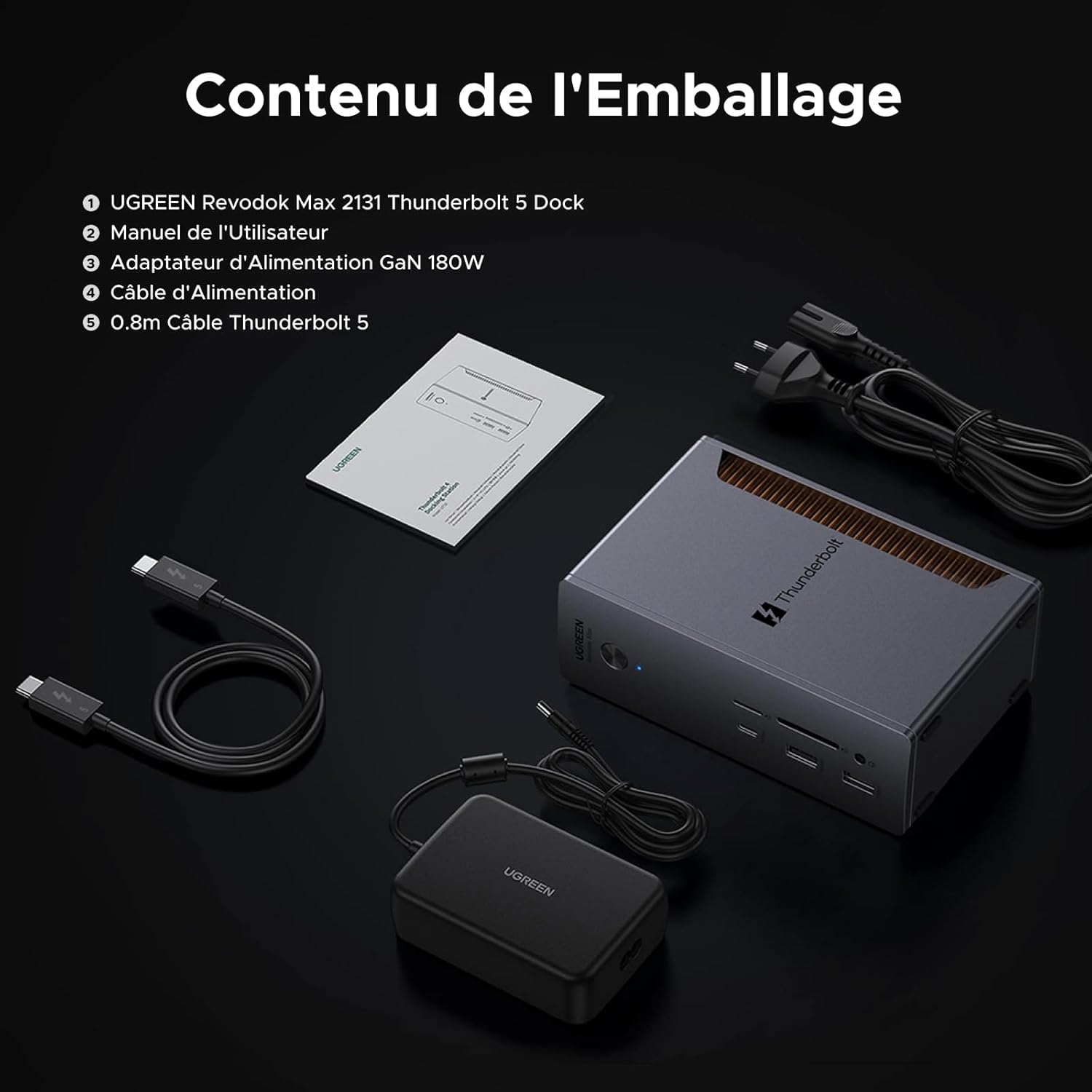
Image: All items included in the UGREEN Revodok Max 2131 retail box.
- UGREEN Revodok Max 2131 Thunderbolt 5 Dock
- User Manual (this document)
- 180W GaN Power Adapter
- Power Cable
- 0.8m Thunderbolt 5 Cable
9. Maintenance
To ensure the longevity and optimal performance of your docking station, follow these maintenance guidelines:
- Cleaning: Use a soft, dry cloth to clean the exterior of the device. Avoid using liquid cleaners or aerosols.
- Ventilation: Ensure the ventilation grilles are not obstructed to allow for proper heat dissipation.
- Storage: Store the device in a cool, dry place away from direct sunlight and extreme temperatures.
- Cable Management: Keep cables organized to prevent strain on ports and accidental disconnections.

Image: The UGREEN Revodok Max 2131 can be positioned horizontally or vertically using its rubber feet for optimal desk space and airflow.
10. Warranty and Support
The UGREEN Revodok Max 2131 comes with a 24-month warranty from UGREEN. For warranty claims or technical support, please contact UGREEN customer service through their official website or the platform where you purchased the product. Please have your product model number (45790EU) and proof of purchase ready when contacting support.
For the latest drivers, firmware updates, and additional support resources, please visit the official UGREEN support page for this product.


