
1. Introduction
The GLOBAL-PTT G6 POC Walkie Talkie Two-Way Radios Set provides extensive communication capabilities, enabling connectivity over long distances, up to 5000 miles nationwide. Featuring 4G LTE connectivity, these radios ensure clear and dependable communication, suitable for various environments such as outdoor activities, construction sites, or any scenario where conventional radios might face limitations. This set includes two radios, facilitating seamless communication between users. Designed for durability and user-friendliness, the GLOBAL-PTT G6 POC Walkie Talkies are an essential tool for reliable long-distance communication, whether for exploring remote areas or coordinating tasks on a job site.
2. Product Features
- Long-Range Communication: Seamless connectivity up to 5000 miles with 4G LTE technology.
- Rugged Design: Durable construction ensures reliable performance in demanding environments.
- Group Communication: Easily connect with multiple users for efficient team coordination.
- Clear Audio Quality: Advanced audio technology delivers crisp and clear voice transmission.
- Compact and Portable: Lightweight and compact design for easy carrying and operation.
3. What's in the Box
Upon unboxing your GLOBAL-PTT G6 Walkie Talkie set, you will find the following items:
- 2 x GLOBAL-PTT G6 Walkie Talkies
- 2 x Earpieces with Microphones
- 2 x USB-C Charging Cables
- 2 x Power Bricks (Wall Adapters)
- 2 x Wrist Straps
- 2 x Belt Clips (with screws for attachment)
- 2 x Foam Earpiece Covers
- 1 x Operation Manual

Image: Contents of the GLOBAL-PTT G6 Walkie Talkie package.
4. Device Layout
Familiarize yourself with the key components and controls of your GLOBAL-PTT G6 Walkie Talkie:
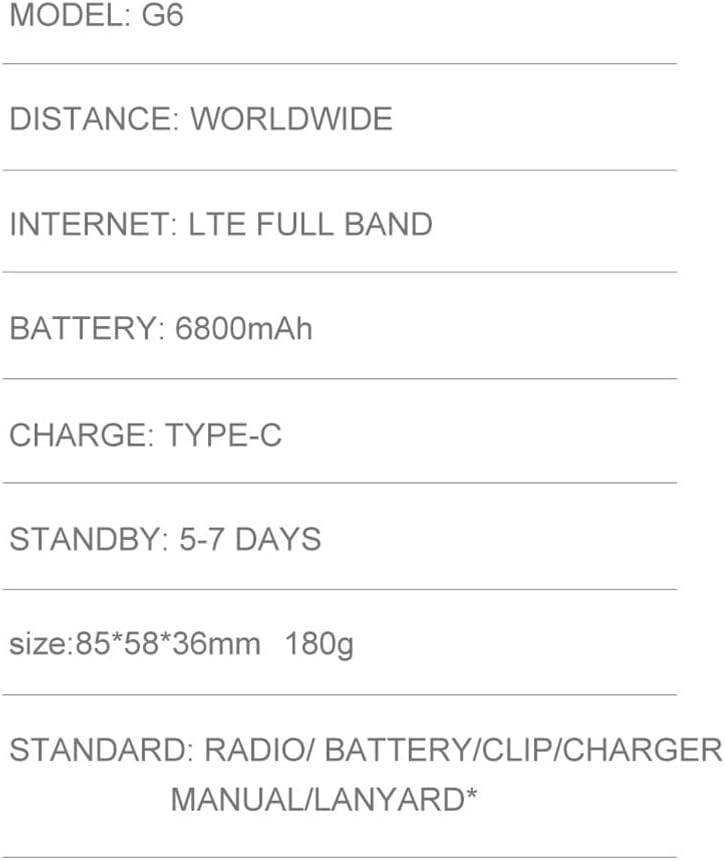
Image: Key Description of the GLOBAL-PTT G6 Walkie Talkie.
- Antenna: For signal transmission and reception.
- Switch/Volume Knob: Rotate to power on/off and adjust volume.
- Screen: Displays status, menu, and group information.
- USB Port: For charging the device.
- PTT (Push-to-Talk) Button: Press and hold to transmit voice.
- Menu Button: Accesses the device menu.
- Power Button: Turns the device on or off.
- Speaker: For audio output.
- SIM Slot: Insert your SIM card for 4G LTE connectivity.
5. Setup and Initial Use
5.1. Charging the Device
Before first use, fully charge your walkie talkie. Connect the USB-C charging cable to the device's USB port and the power brick, then plug it into a wall outlet. The charging indicator on the screen will show the charging status.

Image: Charging the GLOBAL-PTT G6 Walkie Talkie.
5.2. Inserting the SIM Card
The GLOBAL-PTT G6 requires a SIM card for 4G LTE functionality. Locate the SIM slot on the side of the device, open the protective cover, and carefully insert your SIM card as indicated. Ensure the cover is securely closed to maintain water resistance.
5.3. Powering On/Off
To power on the device, rotate the volume knob clockwise until the screen lights up. To power off, rotate the volume knob counter-clockwise until the screen turns off.
5.4. Setting Up Groups for Communication
The G6 walkie talkies allow for group communication. To set up or join a group:
- On one walkie talkie, press the MENU button.
- Navigate to Group Menu and select Create New Group. The device will display a unique code (e.g., a QR code or numerical code).
- On the second walkie talkie, press the MENU button.
- Navigate to Group Menu and select Join New Group.
- Enter the code displayed on the first walkie talkie.
- Once the code is entered, both devices will be connected to the same group and ready for communication.
Video: Instructions on how to quickly add and join groups on the walkie talkies.
6. Operating Instructions
6.1. Basic Communication
To transmit your voice, press and hold the PTT button on the side of the walkie talkie. Speak clearly into the microphone. Release the PTT button to listen for a response. The device will indicate when it is transmitting (e.g., a red light) and receiving (e.g., a green light).
Video: Overview of the GLOBAL-PTT G6 POC Walkie Talkies, demonstrating basic functions and features.
6.2. Adjusting Volume
Rotate the volume knob at the top of the device to increase or decrease the listening volume.
6.3. Using Earpieces
For private communication or in noisy environments, connect the provided earpiece to the USB port on the side of the walkie talkie. Ensure it is securely plugged in.
7. Maintenance
- Cleaning: Use a soft, damp cloth to clean the exterior of the walkie talkie. Avoid using harsh chemicals or abrasive cleaners.
- Storage: Store the device in a cool, dry place away from direct sunlight and extreme temperatures when not in use.
- Battery Care: To prolong battery life, avoid fully discharging the battery frequently. Charge the device regularly, even if not in active use.
- Port Covers: Always ensure the USB and SIM slot covers are securely closed to protect against dust and water.
8. Troubleshooting
- No Power: Ensure the battery is charged. Check the power connection if charging.
- No Signal/Connectivity: Verify that the SIM card is correctly inserted and active. Check for 4G LTE network availability in your area.
- Cannot Communicate with Group: Ensure both devices are powered on and correctly joined to the same group. Check the signal strength.
- Poor Audio Quality: Check the volume settings. Ensure the earpiece (if used) is properly connected. Speak clearly into the microphone and ensure no obstructions.
- Device Unresponsive: Try restarting the device by powering it off and then on again. If the issue persists, contact customer support.
9. Specifications
| Feature | Specification |
|---|---|
| Model Number | G6 |
| Connectivity | 4G LTE (PoC - Push-to-Talk over Cellular) |
| Talking Range Maximum | Up to 5000 Miles (Nationwide) |
| Battery Capacity | 6800mAh (Lithium Ion) |
| Charging Port | Type-C USB |
| Standby Time | 5-7 Days |
| Item Weight | 10.2 ounces (290 Grams) |
| Dimensions | 85 x 58 x 36 mm |
| Water Resistance Level | Water Repellent |
| Number of Channels | 1 (for group communication) |
Image: Key specifications of the GLOBAL-PTT G6 Walkie Talkie.
10. Warranty Information
The GLOBAL-PTT G6 POC Walkie Talkies come with a 1-year manufacturer's warranty from the date of purchase. This warranty covers defects in materials and workmanship under normal use. Please retain your proof of purchase for warranty claims. The warranty does not cover damage caused by misuse, accidents, unauthorized modifications, or normal wear and tear.
11. Support
For further assistance, technical support, or warranty inquiries, please contact GLOBAL-PTT customer service. Refer to the contact information provided in your product packaging or visit the official GLOBAL-PTT website.
Online Resources:
- Visit the GLOBAL-PTT Store on Amazon for product updates and additional information.


